宝塔 Nginx 实现日志记录 Cloudflare 下访客真实IP
网站套 Cloudflare 后,Nginx日志记录的都 Cloudflare IP,要记录访客真实IP,可以按下面方法:
1. 自动化脚本生成如下配置文件
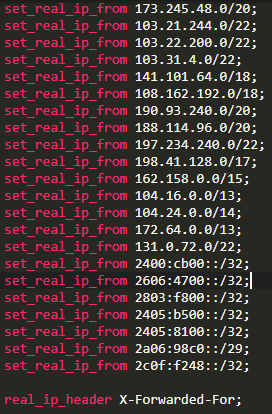
因为 Cloudflare 的IP段会定期更新,所以建个任务计划定期更新这个配置
宝塔面板 任务计划 添加 Shell脚本任务,脚本内容如下:
#!/usr/bin/env bash
# 功能: 生成 cloudflare 代理IP列表,用户配置nginx获取客户端真实IP地址

cf_ipv4="https://www.cloudflare.com/ips-v4"
cf_ipv6="https://www.cloudflare.com/ips-v6"
mod_cffile="/www/server/nginx/conf/cloudflare.conf"

get_cfipinfo() {
    # 生成nginx配置记录格式: set_real_ip_from 103.21.244.0/22;
    curl $cf_ipv4 2>/dev/null | grep -v '#' | grep -v '^$' | sed 's/^/set_real_ip_from /g;s/$/;/g'
    curl $cf_ipv6 2>/dev/null | grep -v '#' | grep -v '^$' | sed 's/^/set_real_ip_from /g;s/$/;/g'

    echo
    # echo "real_ip_header CF-Connecting-IP;"
    echo "real_ip_header X-Forwarded-For;"
    echo
}

get_cfipinfo  | tee $mod_cffile

nginx -t && systemctl reload nginx
添加完后 立即执行生成文件
2. 在 http 段 加载脚本生成的配置文件:
include cloudflare.conf;
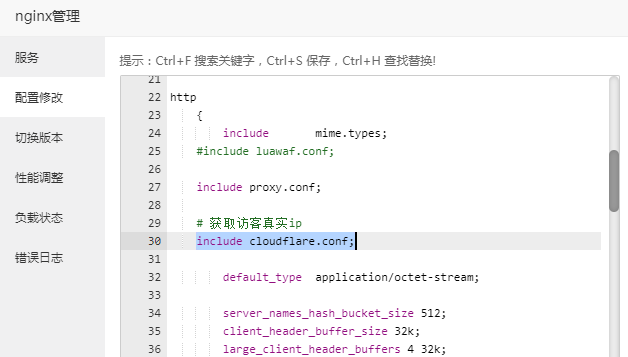
然后 重载 Nginx 配置。
参考:
https://blog.csdn.net/dragonballs/article/details/126345175
https://www.bnxb.com/php/27592.html

 浙公网安备 33010602011771号