
第九周
1、显示统计占用系统内存最多的进程,并排序。
使用top命令查看,输入M可以按照内存从大到小排序
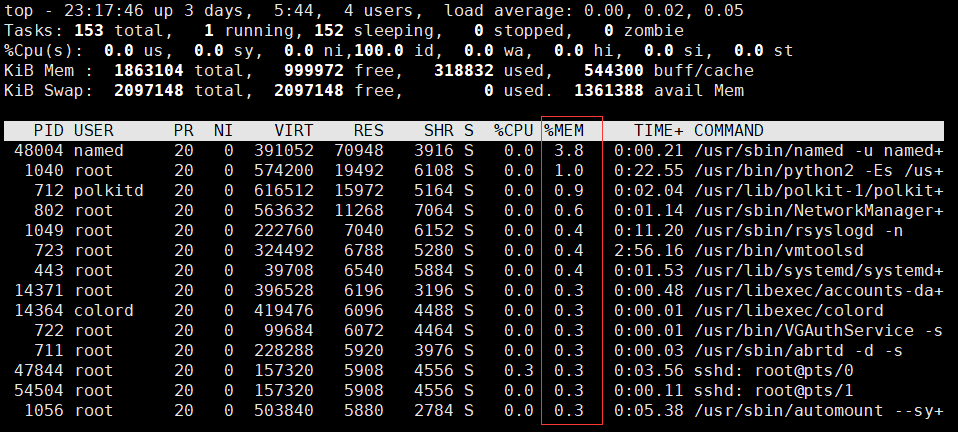
使用ps aux排序
# 下面仅显示了使用内存最多的前五个进程
[root@centos7 ~]# ps aux | sort -nr -k4 | head -5
named     48004  0.0  3.8 391052 70948 ?        Ssl  09:53   0:00 /usr/sbin/named -u named -c /etc/named.conf
root       1040  0.0  1.0 574200 19492 ?        Ssl  Jun10   0:22 /usr/bin/python2 -Es /usr/sbin/tuned -l -P
polkitd     712  0.0  0.8 616512 15972 ?        Ssl  Jun10   0:02 /usr/lib/polkit-1/polkitd --no-debug
root        802  0.0  0.6 563632 11268 ?        Ssl  Jun10   0:01 /usr/sbin/NetworkManager --no-daemon
root        723  0.0  0.3 324492  6788 ?        Ssl  Jun10   2:56 /usr/bin/vmtoolsd
2、编写脚本,使用for和while分别实现192.168.0.0/24网段内,地址是否能够ping通,若ping通则输出"success!",若ping不通则输出"fail!"
# for循环实现
[root@centos7 scripts]# cat for_ping.sh
#!/bin/bash
NET=192.168.0.
for((i=1;i<255;i++));
do
   {
        ping -c 1 -W1 $NET$i &> 1 && echo $NET$i is success! || echo "$NET$i is fail!"
   } &
done
wait

# while循环实现
[root@centos7 scripts]# cat while_ping.sh
#!/bin/bash
NET=192.168.0.
HOSTID=1
while [ $HOSTID -lt 100 ];do
{
    ping -c 1 -W 1 $NET$HOSTID &> /dev/null && echo $NET$HOSTID is success! || echo $NET$HOSTID is fail!
} &
    let HOSTID++

done
wait
3、每周的工作日1:30,将/etc备份至/backup目录中,保存的文件名称格式 为“etcbak-yyyy-mm-dd-HH.tar.xz”,其中日期是前一天的时间
[root@centos7 scripts]# crontab -l
30 1 * * 1-5 /usr/bin/tar Jcvf /backup/etcbak-`date -d '1 days ago' +%F-%H`.tar.xz /etc &> /dev/null
4、工作日时间,每10分钟执行一次磁盘空间检查,一旦发现任何分区利用率高 于80%,就发送邮件报警
# 把要执行的命令写到脚本中,添加执行权限
[root@centos7 scripts]# cat df.sh
#!/bin/bash

df | awk -F ' +|%' '/\/dev\/sd/{print $1,$5}' | while read DISK USE;do
    if [ $USE -gt 80 ];then
        echo $DISK is nearly full! | mail -s "Disk space warning" root
    fi
done

# 设置crontab计划任务,工作日时间每十分钟执行一次
[root@centos7 scripts]# crontab -l
*/10 * * * 1-5 /bin/bash /scripts/df.sh

 浙公网安备 33010602011771号