
SAPUI5 Walkthrough Step 31: Routing and Navigation
Step 31: Routing and Navigation
路由和导航
修改 webapp/manifest.json 文件,增加如下信息(即定义路由 overview 和 detail,其中overview指向target:overview (对应视图为Overview ))
{
    "_version": "1.7.0",
......
    "sap.ui5": {
......
        "resources": {
            "css": [{
                "uri": "css/style.css"
            }]
        },
        "routing": {
            "config": {
                "routerClass": "sap.m.routing.Router",
                "viewType": "XML",
                "viewPath": "sap.ui.demo.walkthrough.view",
                "controlId": "app",
                "controlAggregation": "pages"
            },
            "routes": [{
                "pattern": "",
                "name": "overview",
                "target": "overview"
            }, {
                "pattern": "detail",
                "name": "detail",
                "target": "detail"
            }],
            "targets": {
                "overview": {
                    "viewId": "overview",
                    "viewName": "Overview"
                },
                "detail": {
                    "viewId": "detail",
                    "viewName": "Detail"
                }
            }
        }
    }
}
修改 webapp/Component.js 文件, 增加路由的初始化
this.getRouter().initialize();
sap.ui.define([
    "sap/ui/core/UIComponent",
    "sap/ui/Device",
    "sap/ui/demo/walkthrough/model/models",
    "sap/ui/model/json/JSONModel",
    "./controller/HelloDialog"
], function(UIComponent, Device, models, JSONModel, HelloDialog) {
    "use strict";
    return UIComponent.extend("sap.ui.demo.walkthrough.Component", {
        metadata: {
            manifest: "json"
        },

        init: function() {
            // call the base component's init function
            UIComponent.prototype.init.apply(this, arguments);
            // set the device model
            this.setModel(models.createDeviceModel(), "device");
            // 给Component组件 设置模型jsonModel
            var oJsonData = { recipient: { name: "World" } };
            var oJSONModel = new JSONModel(oJsonData);
            this.setModel(oJSONModel, "jsonModel");
            //
            this._helloDialog = new HelloDialog(this.getRootControl());
            this.getRouter().initialize();
        },

......
    });
});
增加 webapp/view/Overview.view.xml 文件
<mvc:View controllerName="sap.ui.demo.walkthrough.controller.App" xmlns="sap.m" xmlns:mvc="sap.ui.core.mvc">
    <Page title="{i18n>homePageTitle}" >
        <headerContent>
            <Button icon="sap-icon://hello-world" press=".onOpenDialog"/>
        </headerContent>
        <content>
            <mvc:XMLView viewName="sap.ui.demo.walkthrough.view.HelloPanel"/>
            <mvc:XMLView viewName="sap.ui.demo.walkthrough.view.InvoiceList"/>
        </content>
    </Page>
</mvc:View>
修改 webapp/view/App.view.xml 文件, 其中的App id和 manifest.json 中controlId必须一致
<mvc:View controllerName="sap.ui.demo.walkthrough.controller.App" xmlns:html="http://www.w3.org/1999/xhtml" xmlns:mvc="sap.ui.core.mvc"
    displayBlock="true" xmlns="sap.m">
    <Shell>
        <App class="myAppDemoWT" id="app"/>
    </Shell>
</mvc:View>
增加 webapp/view/Detail.view.xml 文件,,并在Page上显示 【返回】 按钮和设置处理事件 onNavButtonPress
<mvc:View xmlns="sap.m" xmlns:mvc="sap.ui.core.mvc" controllerName="sap.ui.demo.walkthrough.controller.Detail">
    <Page title="Walkthrough - Details"
        showNavButton="true" navButtonPress="onNavButtonPress">
        <ObjectHeader title="Invoice"/>
    </Page>
</mvc:View>
增加 webapp/controller/Detail.js 文件,在 onNavButtonPress 中,转到路由“overview”。
sap.ui.define([
    "sap/ui/core/mvc/Controller"
], function(Controller) {
    "use strict";
    return Controller.extend("sap.ui.demo.walkthrough.controller.Detail", {
        onNavButtonPress: function(oEvent) {
            var oRouter = this.getOwnerComponent().getRouter();
            oRouter.navTo("overview");
        }
    });
});
修改 webapp/view/InvoiceList.view.xml 文件, 更改属性为“导航”(点击后触发 onPress 事件)
<mvc:View xmlns="sap.m" xmlns:mvc="sap.ui.core.mvc" controllerName="sap.ui.demo.walkthrough.controller.InvoiceList">
    <List id="invoiceList" headerText="{i18n>invoiceListTitle}" class="sapUiResponsiveMargin" width="auto"
        items="{
            path : 'invoice>/Invoices',
            sorter : {
                path : 'ShipperName',
                group : true
            }
        }">
      <headerToolbar>
         <Toolbar>
            <Title text="{i18n>invoiceListTitle}"/>
            <ToolbarSpacer/>
            <SearchField width="50%" search=".onFilterInvoices"/>
         </Toolbar>
      </headerToolbar>
        <items>
            <ObjectListItem title="{invoice>Quantity} x {invoice>ProductName}"
                number="{parts: [ {path: 'invoice>ExTendedPrice'}, {path: 'view>/currency'} ], type: 'sap.ui.model.type.Currency', formatOptions: { showMeasure: false } }"
                numberUnit="{view>/currency}" numberState="{= ${invoice>ExtendedPrice} > 10 ? 'Error' : 'Success' }"
                type="Navigation" press="onPress">
                <firstStatus>
                    <ObjectStatus text="{ path: 'invoice>Status', formatter: '.formatter.statusText'}"/>
                </firstStatus>
            </ObjectListItem>
        </items>
    </List>
</mvc:View>
修改 webapp/controller/InvoiceList.controller.js 文件, 增加 onPress方法,用来触发路由 “detail”
sap.ui.define([
    "sap/ui/core/mvc/Controller",
    "sap/ui/model/json/JSONModel",
    "../model/formatter",
    "sap/ui/model/Filter",
    "sap/ui/model/FilterOperator"
], function(Controller, JSONModel, formatter, Filter, FilterOperator) {
    "use strict";

    return Controller.extend("sap.ui.demo.walkthrough.controller.InvoiceList", {
        formatter: formatter,

        onInit: function() {
            var oViewModel = new JSONModel({
                currency: "EUR"
            });
            this.getView().setModel(oViewModel, "view");
        },
        onFilterInvoices: function(oEvent) {
            var aFilter = [];
            var sQuery = oEvent.getParameter("query");
            if (sQuery) {
                aFilter.push(new Filter("ProductName", FilterOperator.Contains, sQuery));
            }
            var oList = this.byId("invoiceList");
            var oBinding = oList.getBinding("items");
            oBinding.filter(aFilter);
        },
        onPress: function(oEvent) {
            var oRouter = this.getOwnerComponent().getRouter();
            oRouter.navTo("detail");
        }
    });
});
执行,每行后面多出一个>图标
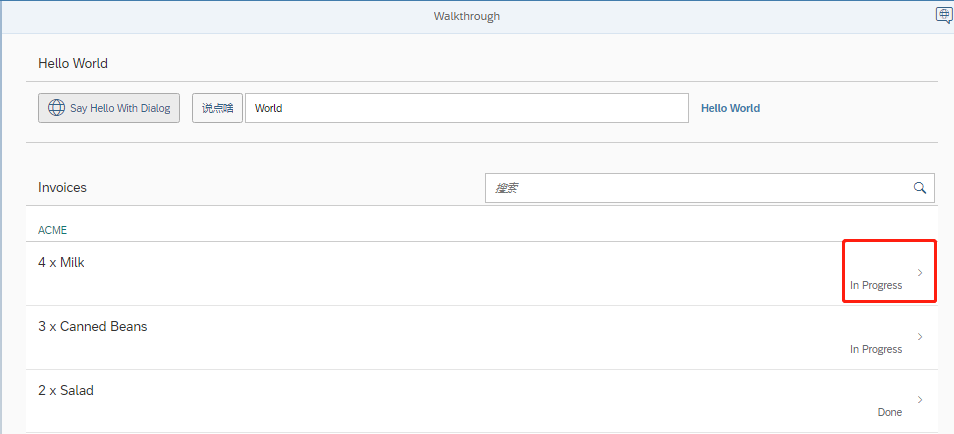
点击行后跳到Detail页面, 点击左上方的【<】后返回主页面


 浙公网安备 33010602011771号