
SAPUI5 Walkthrough Step 16: Dialogs and Fragments
https://sapui5.hana.ondemand.com/#/topic/4da72985139b4b83b5f1c1e0c0d2ed5a
对话框和Fragments
fragment是一种特殊的视图,他没有自己的控制器(即controller.js文件),因此fragment只能依赖于其他视图。
通常,fragment都用于弹出窗口的开发。
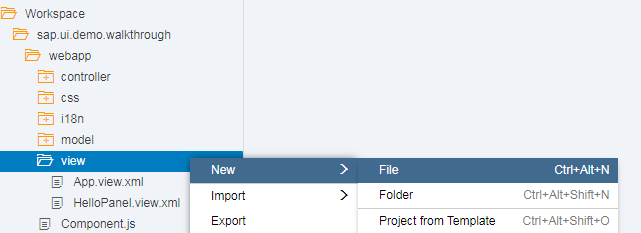
新建文件 webapp/view/HelloDialog.fragment.xml, 选中view目录, 右键 New->File, 输入File Name: HelloDialog.fragment.xml
添加title属性(标题)为 Hello
<core:FragmentDefinition
    xmlns="sap.m"
    xmlns:core="sap.ui.core">
    <Dialog
        id="helloDialog"
        title="Hello">
    </Dialog>
</core:FragmentDefinition>
修改webapp/view/HelloPanel.view.xml文件,增加helloDialogButton按钮
<mvc:View xmlns:core="sap.ui.core" xmlns:mvc="sap.ui.core.mvc" xmlns="sap.m" controllerName="sap.ui.demo.walkthrough.controller.HelloPanel"
    xmlns:html="http://www.w3.org/1999/xhtml">
    <Panel headerText="{i18n>helloPanelTitle}" class="sapUiResponsiveMargin" width="auto">
        <content>
          <Button
             id="helloDialogButton"
             text="{i18n>openDialogButtonText}"
             press=".onOpenDialog"
             class="sapUiSmallMarginEnd"/>
            <Button text="{i18n>showHelloButtonText}" press=".onShowHello" class="myCustomButton"/>
            <Input value="{jsonModel>/recipient/name}" valueLiveUpdate="true" width="50%"/>
            <FormattedText htmlText="Hello {jsonModel>/recipient/name}" class="sapUiSmallMargin sapThemeHighlight-asColor myCustomText"/>
        </content>
    </Panel>
</mvc:View>
修改 webapp/i18n/i18n.properties文件, 增加openDialogButtonText对应的文本
openDialogButtonText=Say Hello With Dialog
修改webapp/controller/HelloPanel.controller.js文件, 增加fragment的显示
sap.ui.define([
    "sap/ui/core/mvc/Controller",
    "sap/m/MessageToast"
], function(Controller, MessageToast) {
    "use strict";

    return Controller.extend("sap.ui.demo.walkthrough.controller.HelloPanel", {
        onShowHello: function() {
            var oBundle = this.getView().getModel("i18n").getResourceBundle();
            var sRecipient = this.getView().getModel("jsonModel").getProperty("/recipient/name");
            var sMsg = oBundle.getText("helloMsg", [sRecipient]);
            MessageToast.show(sMsg);
        },
        onOpenDialog: function() {
            if (!this.oDialog) {
                this.oDialog = sap.ui.xmlfragment(
                    this.getView().getId(),//视图ID
                    "sap.ui.demo.walkthrough.view.HelloDialog",//fragemtn文件的路径
                    this  //this表示控制器为当前controller.js
                ); //定义fragment对话框
                this.getView().addDependent(this.oDialog); //添加和视图的依赖
            }
            this.oDialog.open(); //打开对话框
        }
    });
});
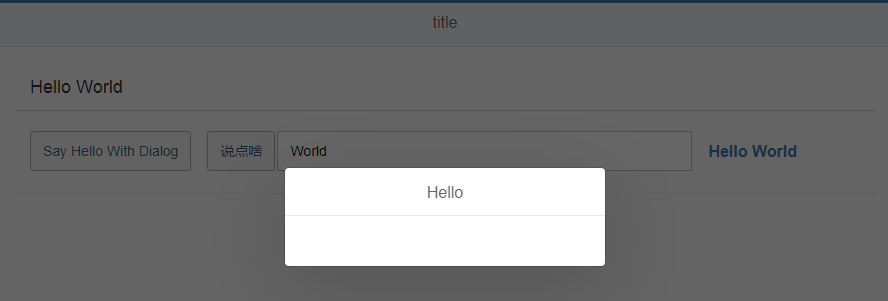
执行

 浙公网安备 33010602011771号