
SAPUI5 Walkthrough Step 14: Custom CSS and Theme Colors
https://sapui5.hana.ondemand.com/#/topic/723f4b2334e344c08269159797f6f796
自定义CSS
由于我用的项目是由WEBIDE创建的,已经有style.css文件,因此直接修改webapp/css/style.css文件
html[dir="ltr"] .myAppDemoWT .myCustomButton.sapMBtn {
   margin-right: 0.125rem
}

html[dir="rtl"] .myAppDemoWT .myCustomButton.sapMBtn {
   margin-left: 0.125rem
}

.myAppDemoWT .myCustomText {
   display: inline-block;
   font-weight: bold;
}
检查webapp/manifest.json文件,查看resources属性
...
        "models": {
            "i18n": {
                "type": "sap.ui.model.resource.ResourceModel",
                "settings": {
                    "bundleName": "sap.ui.demo.walkthrough.i18n.i18n"
                }
            }
        },
        "resources": {
            "css": [{
                "uri": "css/style.css"
            }]
        }
修改webapp/view/App.view.xml文件, 把css类的引用改成我们自己定义的。调整Text组件为FormattedText
<mvc:View controllerName="sap.ui.demo.walkthrough.controller.App" xmlns:html="http://www.w3.org/1999/xhtml" xmlns:mvc="sap.ui.core.mvc"
    displayBlock="true" xmlns="sap.m">
    <Shell>
        <App class="myAppDemoWT">
            <pages>
                <Page title="{i18n>title}">
                    <content>
                        <Panel headerText="{i18n>helloPanelTitle}"
                            class="sapUiResponsiveMargin" width="auto">
                            <content>
                                <Button text="{i18n>showHelloButtonText}" press=".onShowHello"
                                    class="myCustomButton"/>
                                <Input value="{jsonModel>/recipient/name}" valueLiveUpdate="true" width="50%"/>
                                <FormattedText
                                    htmlText="Hello {jsonModel>/recipient/name}"
                                    class="sapUiSmallMargin sapThemeHighlight-asColor myCustomText"/>
                            </content>
                        </Panel>
                    </content>
                </Page>
            </pages>
        </App>
    </Shell>
</mvc:View>
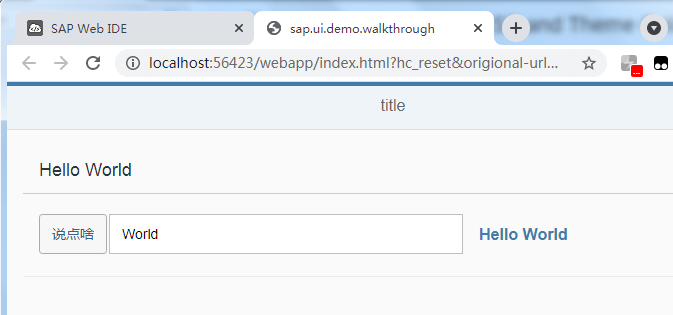
执行

 浙公网安备 33010602011771号