
[转]基于DynamicExpresso的自定义表达式计算
基于DynamicExpresso的自定义表达式计算
项目来由
公司某部门要根据原始数据,进行复杂运算。得到一些指标。因为用excel计算需要使用人的excel技能非常高,而且很繁琐。所以需要It帮忙做一个这样的算法库,可以直接调用。但后来因为公司采购了MES,Mes中包含该功能,所以项目终止了。但花了1周研究的东西,还是不希望就这样流产了。特放到博客园上,希望各位大牛能有闲的时候,能帮忙一起优化。如果能把 DynamicExpresso 这玩意儿也自己写了,还是相当有意义的。代码我会放到 gitee上 。大家有需要的尽管拿去用。目前已经实现的内容是,单数据源已经实现了自定义计算的功能。下面会做详细介绍。先看看 DynamicExpresso 能干什么
DynamicExpresso GitHub项目地址
文档里面写的很清楚了。我只阐述我用过的内容,他的运行规则是这样的: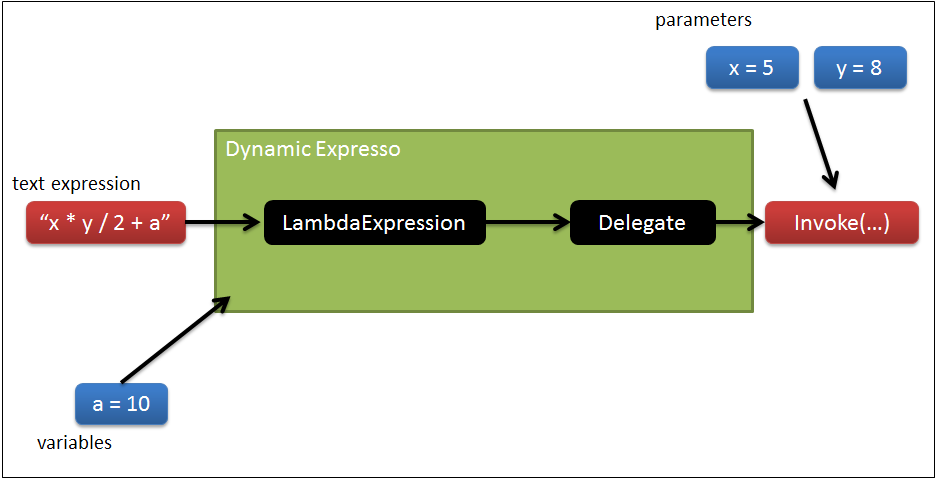
以下是具体的应用实例
- 表达式运算:
var interpreter = new Interpreter(); var result = interpreter.Eval("8 / 2 + 2");- 自定义方法:
Func<double, double, double> pow = (x, y) => Math.Pow(x, y); var target = new Interpreter().SetFunction("pow", pow); Assert.AreEqual(9.0, target.Eval("pow(3, 2)"));- 搜索数据,并运算
class Customer{ public string Name { get; set; } public int Age { get; set; } public char Gender { get; set; }}[Test]public void Linq_Where(){ var customers = new List<Customer> { new Customer() { Name = "David", Age = 31, Gender = 'M' }, new Customer() { Name = "Mary", Age = 29, Gender = 'F' }, new Customer() { Name = "Jack", Age = 2, Gender = 'M' }, new Customer() { Name = "Marta", Age = 1, Gender = 'F' }, new Customer() { Name = "Moses", Age = 120, Gender = 'M' }, }; string whereExpression = "customer.Age > 18 && customer.Gender == 'F'"; var interpreter = new Interpreter(); Func<Customer, bool> dynamicWhere = interpreter.ParseAsDelegate<Func<Customer, bool>>(whereExpression, "customer"); Assert.AreEqual(1, customers.Where(dynamicWhere).Count());}以上实例很具备代表性了。
再看看我们需要干什么
以实际需求为例
最终的表达式是这样的:
result = 1 - (a - b) / (a1 - b1) a,a1 需要通过条件查询得到。 b,b1 分别为两个点的斜率。a的查询条件可能是这样的,下面定义为在项目中定义为Conditianal ,在方法中定义为 filter
Score == like(u_arg_2,"Score") && Power == u_arg_0 # u_arg_2 为用户输入的参数。 # u_arg_0 为用户输入的参数。 # like 是一个内置函数,需要自己实现。比如,用户输入 12.4 那么需要找到在数据源中,Score字段跟 12.4最接近的数。 # 实则上述表达式 只是一个过滤条件,实际上需要根据过滤条件得到指定的变量值。b 和 a 类似,这里就不多做介绍了。
表达式计算的结构设计和实现思路
-
用户输入参数。
-
根据表达式,获取需要的数据,再赋值给相应的变量。
-
重复步骤2,直到表达式需要的所有参数都被赋值。
-
计算表达式。
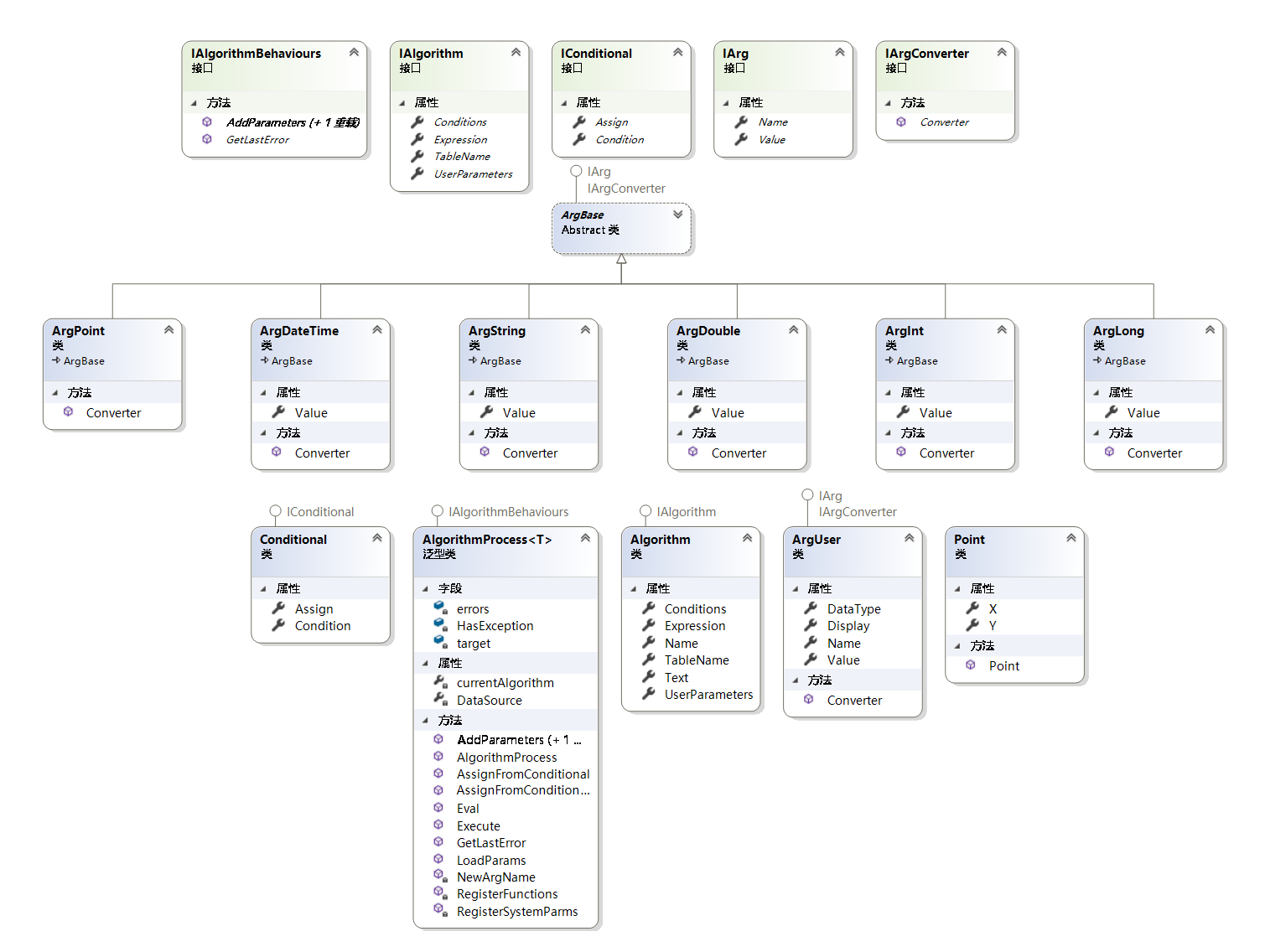
定义了如下类结构
| 接口名称 | 作用 |
|---|---|
| IArg | 所有参数的基类接口 |
| IArgConverter | 参数的类型转换行为 |
| IConditional | 查询条件接口 |
| IAlgorithm | 算法接口 |
| IAlgorithmBehaviours | 算法行为接口 |
| IArg | 所有参数的基类接口 |
实则 IAlgorithmBehaviours 抽象的并不规范。有兴趣的朋友希望能一起改进这个项目。可以联系我邮箱 1102043058@qq.com.
整个算法结构我用json格式定义。前端提交到接口,接口解析数据,并反序列化给 算法处理程序。计算结果即可。
算法结构:
{ "TableName": "tablename", "DataFilter": "HoleID == u_arg_13 && ( Temperature == u_arg_0 || Temperature == u_arg_1 ) && TestType = u_arg_14", "UserParameters": [ { "name": "u_arg_14", "display": "批次", "datatype":"double", "value": 1 }, { "name": "u_arg_13", "display": "孔位", "datatype":"double", "value": 1 }, { "name": "u_arg_0", "display": "温度1", "datatype":"double", "value": 25 }, { "name": "u_arg_1", "display": "温度2", "datatype":"double", "value": 85 }, { "name": "u_arg_2", "display": "功率", "datatype":"double", "value": 80 }, { "name": "u_arg_9", "display": "第一个点", "datatype":"point", "value": "(1.3454533,1.0822343)" }, { "name": "u_arg_10", "display": "第二个点", "datatype":"point", "value": "(1.3454533,1.0822343)" }, { "name": "u_arg_11", "display": "第三个点", "datatype":"point", "value": "(1.3454533,1.0822343)" }, { "name": "u_arg_12", "display": "第四个点", "datatype":"point", "value": "(1.3454533,1.0822343)" } ], "Conditions": [ { "assigns": [ "u_arg_3 = current", "u_arg_4 = MDPCurrent" ], "condition": "Power == like(u_arg_2,\"Power\",\" Temperature == u_arg_0\") && Temperature == u_arg_0" }, { "assigns": [ "u_arg_5 = current" ], "condition": "MPDCurrent == u_arg_4 && Temperature == u_arg_2" } ], "Expression": "1 - (u_arg_3 - ith1(u_arg_9,u_arg_10)) / (u_arg_5 - ith1(u_arg_11,u_arg_12))"} ith1,like 为自定义方法。
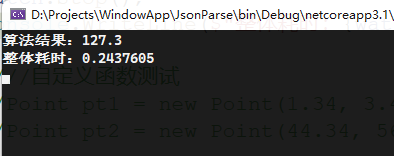
实际调用情况是这样的。
调用代码
Stopwatch watch = new Stopwatch(); watch.Start(); List<IArg> inputs = new List<IArg>(); inputs.Add(new ArgUser() { Name = "arg0", Display = "温度1", Value = "25", DataType = "double" }); inputs.Add(new ArgUser() { Name = "arg1", Display = "温度2", Value = "85", DataType = "double" }); inputs.Add(new ArgUser() { Name = "arg2", Display = "功率", Value = "17.3", DataType = "double" }); List<IConditional> querys = new List<IConditional>(); Conditional conditional = new Conditional() { Assign = new List<string>() { "arg3 = Current", "arg4 = MPDCurrent" }, Condition = "d.Power == like(arg2,\"d.Power\",\"d.Temperature = arg0\") && d.Temperature == arg0" }; querys.Add(conditional); Algorithm algorithm = new Algorithm() { UserParameters = inputs, Conditions = null, Expression = "arg1 + arg2 + arg0", Name = "测试算法" }; AlgorithmProcess<Data> process = new AlgorithmProcess<Data>(datas, algorithm); Console.WriteLine($"算法结果:{process.Execute()}"); watch.Stop(); Console.WriteLine($"整体耗时:{watch.Elapsed.TotalSeconds}");datas是List数据。
项目地址:自定义表达式计算
如果本篇博客对你有帮助,请帮忙推荐一下,谢谢!
---------------------
作者:莫问哥哥
来源:CNBLOGS
原文:https://www.cnblogs.com/LearningC/p/16007884.html
版权声明:本文为作者原创文章,转载请附上博文链接!
内容解析By:CSDN,CNBLOG博客文章一键转载插件

 浙公网安备 33010602011771号