

Git的使用
简单使用
git init 初始化
git add fileName
git commit -m "XXXX"
git rm README.md 从版本库中删除该文件
git status 查看仓库当前状态
git diff 查看difference
log信息
git log
git log --pretty=oneline
git reflog 查看命令记录
回退
git reset --hard HEAD^ # 当前版本HEAD,上一个版本HEAD,上上个版本HEAD^
git reset --hard 130f10a # 或HEAD~100
git reset HEAD file 把暂存区的修改撤销掉(unstage)
git checkout --file (可以从暂存区恢复过来,回到最近一次git commit或git add时的状态)
创建SSH Key
ssh-keygen -t rsa -C "youremail@example.com"
测试是否成功
ssh -T git@github.com
全局的配置
git config --global user.name "yanchunlan"
git config --global user.email "907740329@qq.com"
添加一个远程仓库 (通过ssh方式)
git remote add origin git@github.com:yanchunlan/xxx.git
git remote remove origin
git push -u origin master // 将本地的master分支推送到远程的master分支中
git push -u origin dev // 本地切换到dev分支然后将本地的dev分支推送到远程
git clone git@github.com:xxx/xxxs.git 克隆仓库
分支相关
git branch 查看分支
git branch name 创建分支
git checkout name 切换分支
git checkout -b name 创建+切换分支
git merge name 合并name分支到当前分支
git merge --no-ff -m "merge with no-ff" dev 普通方式合并分支
git branch -d name 删除分支(合并之后才能删除,不然就只能强行删除 -d变成-D)
git log --graph --pretty=oneline --abbrev-commit 查看分支情况
stash
git stash 存储现场
git stash apply 恢复现场
git stash drop 删除现场
git stash pop 恢复+删除现场
git stash list 查看存储的现场信息
使用场景:
- 修复bug时,我们会通过创建新的bug分支进行修复,然后合并,最后删除;
- 开发一个新feature,最好新建一个分支;
- 当手头工作没有完成时,先把工作现场git stash一下,然后去修复bug,修复后,再git stash pop,回到工作现场。
远程仓库
git remote 查看远程库信息
git remote -v 显示远程库更详细的信息
git push origin dev (master) 推送分支
git push origin branch-name 本地推送分支到远程
git push origin :refs/tags/** 删除远程标签
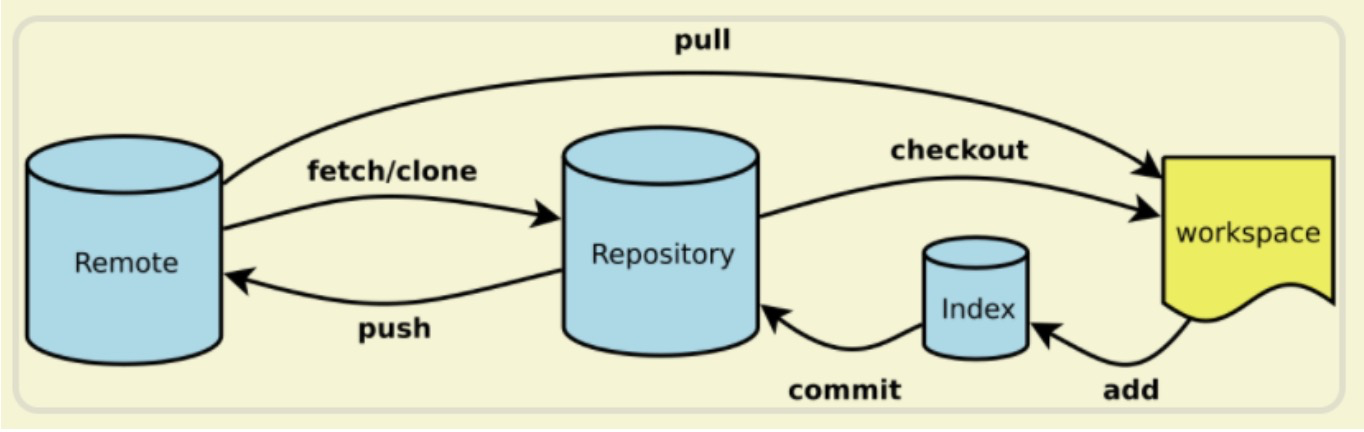
git pull 本地的和远程的合并
git checkout -b dev origin/dev
git checkout -b branch-name origin/branch-name
git branch --set-upstream branch-name origin/branch-name 本地分支和远程分支建立连接
标签
git tag *** 打标签,比如 git tag v1.0
git tag *** (-s -a ** -m ** ) XXX 打标签到 (-s PGP签名 -a 标签名 -m标签说明 XXX 为commmitID)
比如:git tag -a v0.1 -m "version 0.1 released" 3628164
git tag 显示标签
git show *** 查看标签
git tag -d ** 删除标签
git tag push origin ** 推送标签到远程
git tag push origin --tags 推送全部到远程
自定义
git config --global color.ui true //显示颜色,会让命令输出看起来更醒目
Android 的忽略文件定义
.gradle
/local.properties
/.idea/workspace.xml
/.idea/libraries
.DS_Store
/build
/captures
*.iml

 浙公网安备 33010602011771号