

Android之Handler
Handler的整体流程
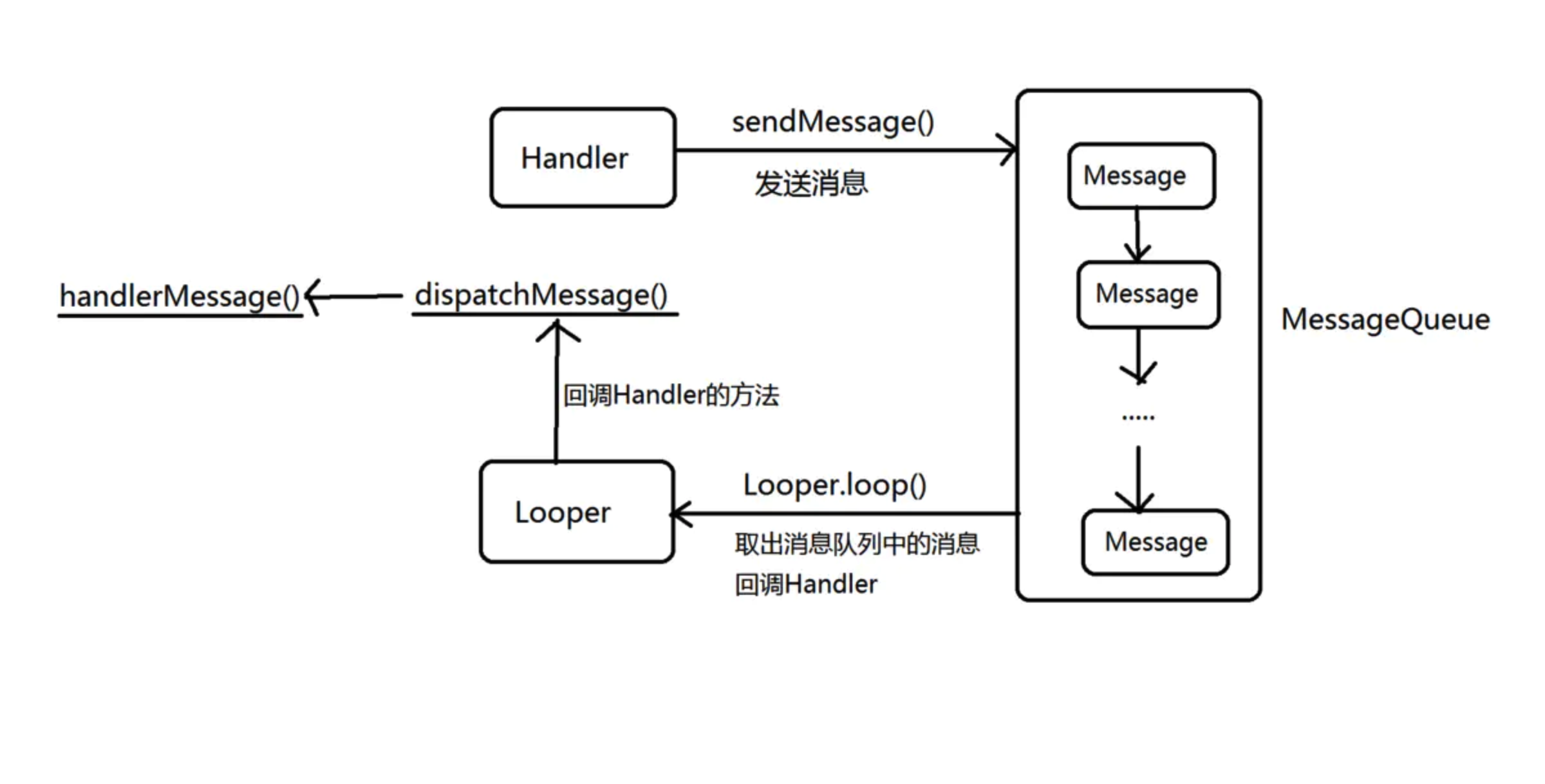
- Handler发送消息消息是通过 MessageQueue 中的 enqueueMessage()方法加入消息队列中的,并 且它在放入中就进行好排序,链表头的延迟时间小,尾部延迟时间最大
- Looper.loop()通过 MessageQueue 中的 next()去取消息。
- MessageQueue 中的 next()如果当前链表头部消息是延迟消息,则根据延迟时间进行消息队列会 阻塞,不返回给 Looper message,直到时间到了,返回给 message
- 如果在阻塞中有新的消息插入到链表头部则唤醒线程,MessageQueue 的nativeWake()唤醒
- 将新消息交给回调给 handler 中的 handleMessage 后,继续调用 MessageQueue 的 next()方法,如果刚刚的延迟消息还是时间未到,则计算时间 继续阻塞。
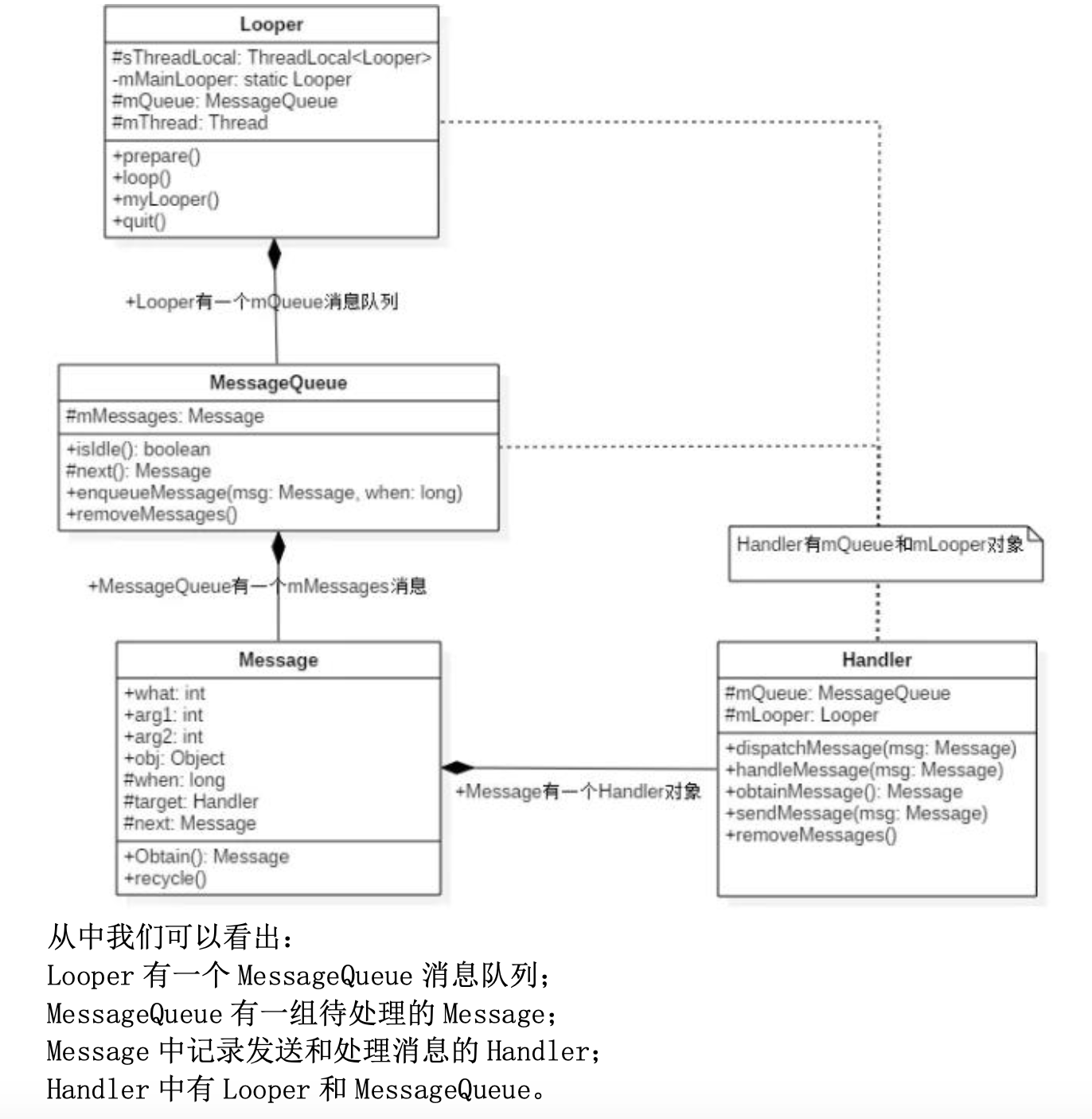
消息的模型
- Message:需要传递的消息,可以传递数据;
- MessageQueue:消息队列,但是它的内部实现并不是用的队列,实际上是通过 一个单链表的数据结构来维护消息列表,因为单链表在插入和删除上比较有优 势。主要功能向消息池投递消息(MessageQueue.enqueueMessage)和取走消息池 的消息(MessageQueue.next);
- Handler:消息辅助类,主要功能向消息池发送各种消息事件 (Handler.sendMessage)和处理相应消息事件(Handler.handleMessage);
- Looper:不断循环执行(Looper.loop),从 MessageQueue 中读取消息,按分发机 制将消息分发给目标处理者。
运行流程
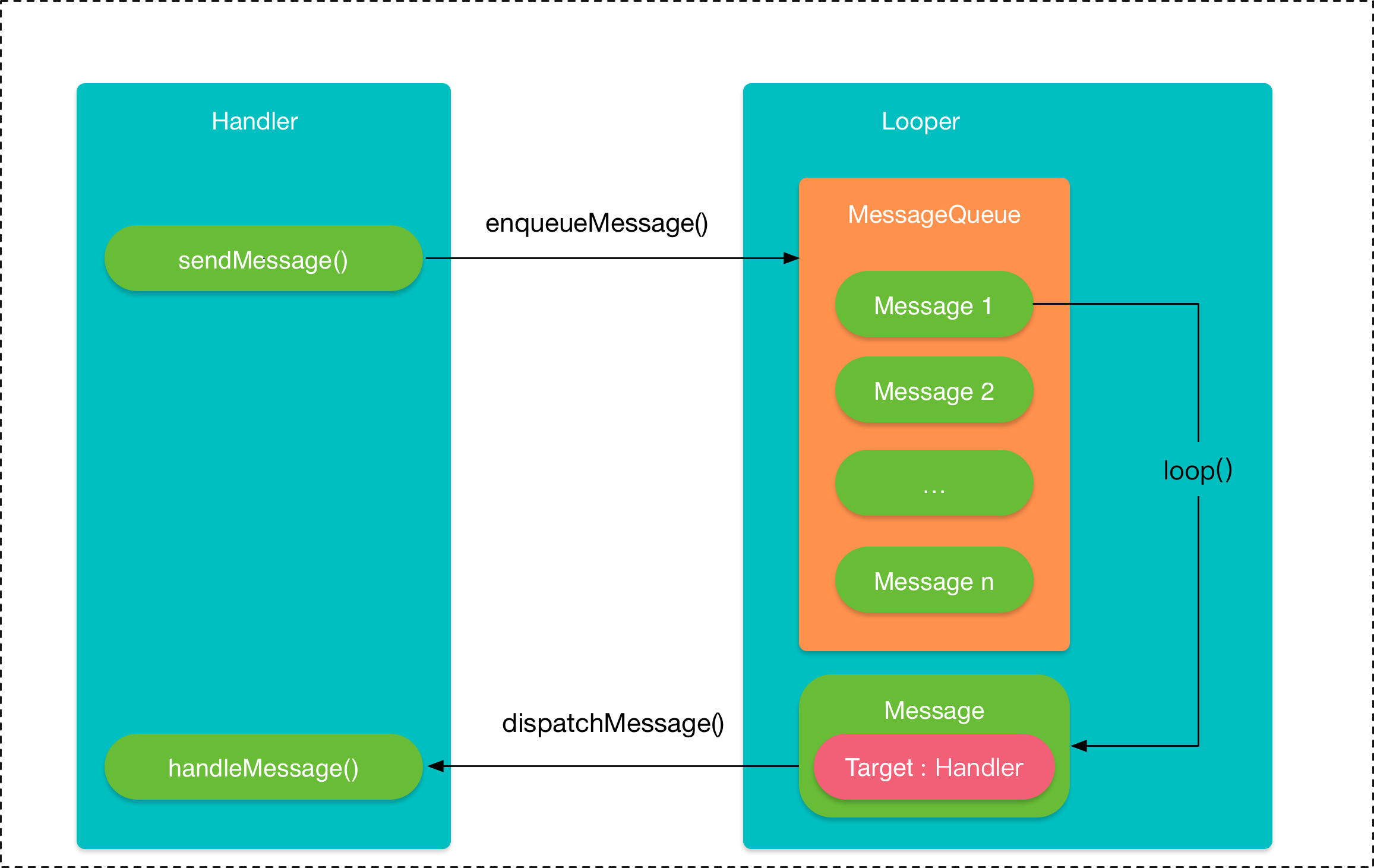
在子线程执行完耗时操作,当 Handler 发送消息时,将会 调用 MessageQueue.enqueueMessage,向消息队列中添加消息。当通过 Looper.loop 开启循环后,会不断地从线程池中读取消息,即调用 MessageQueue.next,然后 调用目标 Handler(即发送该消息的 Handler)的 dispatchMessage 方法传递消息, 然后返回到 Handler 所在线程,目标 Handler 收到消息,调用 handleMessage 方 法,接收消息,处理消息。
消息的运行流程图如下:
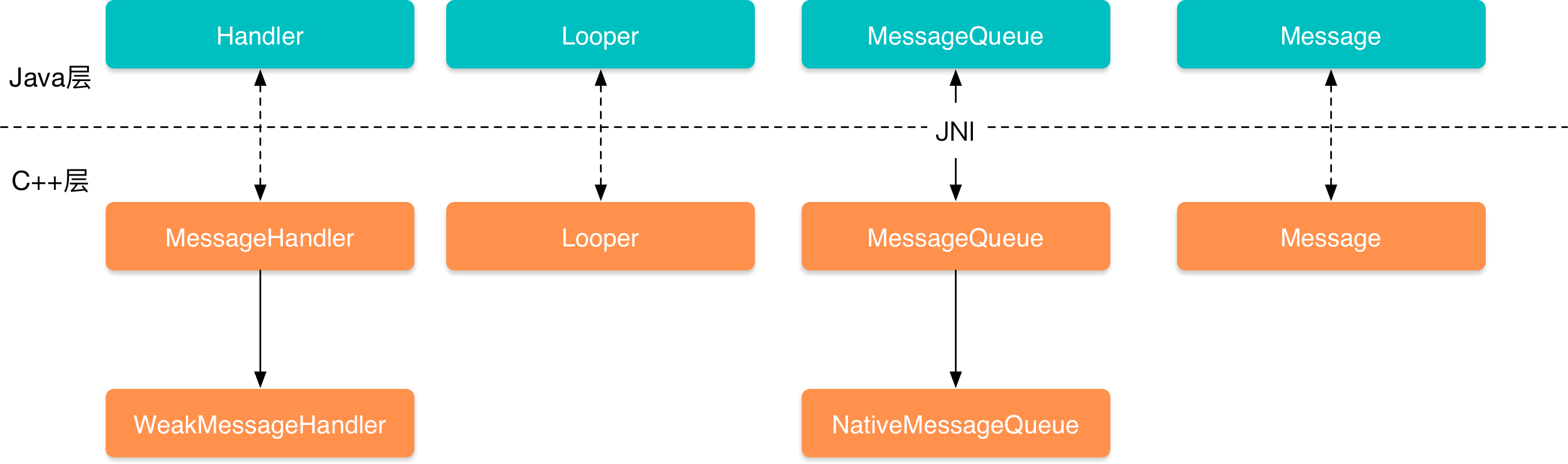
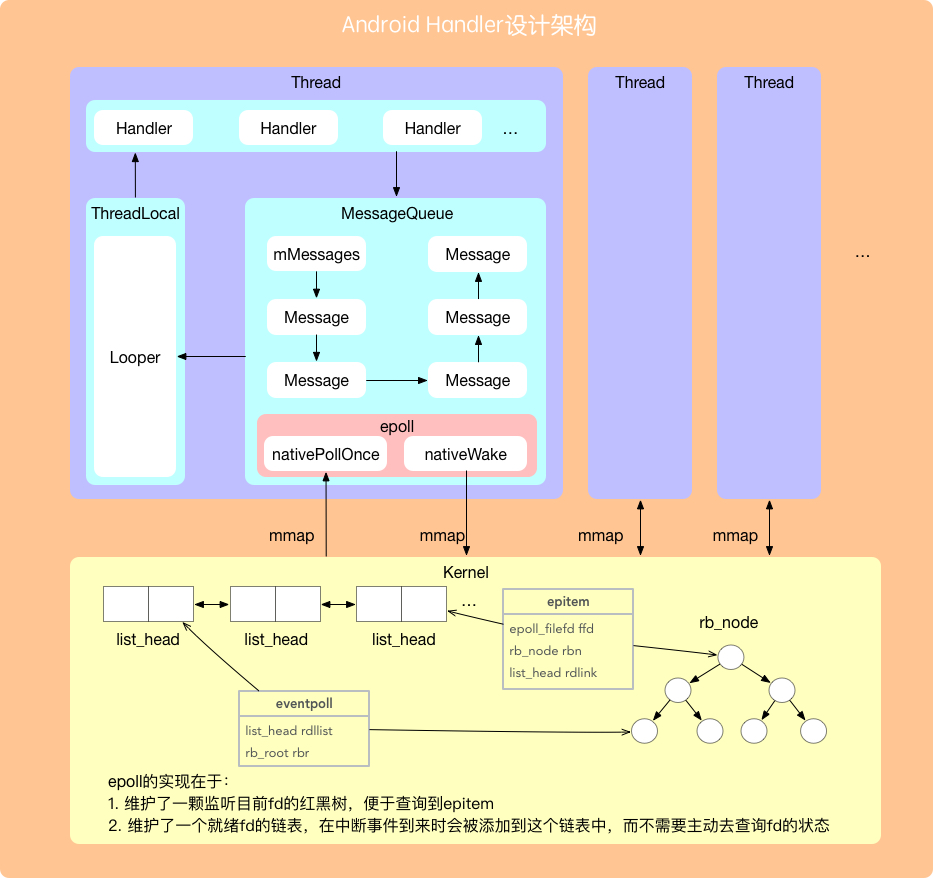
整体的框架架构图
1 Handler发送消息
1.1 Handler在主线程发送消息
不论是sendMessage、sendEmptyMessage还是sendMessageDelayed最终都会调用enqueueMessage方法
  private boolean enqueueMessage(@NonNull MessageQueue queue, @NonNull Message msg,
            long uptimeMillis) {
        //消息绑定Handler对象
        msg.target = this;
        msg.workSourceUid = ThreadLocalWorkSource.getUid();
        //消息是否异步,true标识异步
        if (mAsynchronous) {
            msg.setAsynchronous(true);
        }
        //执行消息队列的入队方法,uptimeMillis表示消息的发送时间
        return queue.enqueueMessage(msg, uptimeMillis);
    }
1.2 Handler在子线程发送消息
在子线程创建Handler时,需在调用Looper.prepare()和Looper.loop()。
Looper.java
  准备异步消息发送
  public static void prepare() {
        prepare(true);
    }

    private static void prepare(boolean quitAllowed) {
        if (sThreadLocal.get() != null) {
            throw new RuntimeException("Only one Looper may be created per thread");
        }
        //sThreadLocal 是JDK中为解决多线程程序的并发问题提供了一种新的思路。使用这个工具类可以很简洁地编写出优美的多线程程序。这里存放的是Looper对象
        sThreadLocal.set(new Looper(quitAllowed));
    }
  //创建looper的时候,也会创建当前线程的消息队列和标记当前线程线程
  private Looper(boolean quitAllowed) {
        mQueue = new MessageQueue(quitAllowed);
        mThread = Thread.currentThread();
    }
2 Looper取消息
    public static void loop() {
       //拿当前线程的looper对象
        final Looper me = myLooper();
        if (me == null) {
            throw new RuntimeException("No Looper; Looper.prepare() wasn't called on this thread.");
        }
        //确保Looper.loop()调用时,保证消息队列中的消息需要执行完成
        if (me.mInLoop) {
            Slog.w(TAG, "Loop again would have the queued messages be executed"
                    + " before this one completed.");
        }

        me.mInLoop = true;
        final MessageQueue queue = me.mQueue;

        // 核实当前线程的身份
        Binder.clearCallingIdentity();
        final long ident = Binder.clearCallingIdentity();
        ...
        for (;;) {
            //开始取消息
            Message msg = queue.next(); // might block
            if (msg == null) {
                //无消息的时候会退出
                return;
            }
            final Observer observer = sObserver;
            ...//省略部分
            //消息发送的开始时间
            final long dispatchStart = needStartTime ? SystemClock.uptimeMillis() : 0;
            final long dispatchEnd;
            Object token = null;
            if (observer != null) {
                token = observer.messageDispatchStarting();
            }
            long origWorkSource = ThreadLocalWorkSource.setUid(msg.workSourceUid);
            try {
                //分发给Handler去处理该消息
                msg.target.dispatchMessage(msg);
                if (observer != null) {
                    observer.messageDispatched(token, msg);
                }
                dispatchEnd = needEndTime ? SystemClock.uptimeMillis() : 0;
            } catch (Exception exception) {
                if (observer != null) {
                    observer.dispatchingThrewException(token, msg, exception);
                }
                throw exception;
            } finally {
                //线程工作的恢复
                ThreadLocalWorkSource.restore(origWorkSource);
            }
            ...
            final long newIdent = Binder.clearCallingIdentity();
            if (ident != newIdent) {
            //再次校验当前线程的身份
            }
            //释放消息
            msg.recycleUnchecked();
        }
    }
3 MessageQueue的next取消息
      //取消息
      for (;;) {
            if (nextPollTimeoutMillis != 0) {
                Binder.flushPendingCommands();
            }
            //仅唤醒一次
            nativePollOnce(ptr, nextPollTimeoutMillis);

            synchronized (this) {
                // 当前时间
                final long now = SystemClock.uptimeMillis();
                Message prevMsg = null;
                //mMessages 表示当前等待处理的消息
                Message msg = mMessages;
                if (msg != null && msg.target == null) {
                    // 寻找下一条异步消息
                    do {
                        prevMsg = msg;
                        msg = msg.next;
                    } while (msg != null && !msg.isAsynchronous());
                }
                if (msg != null) {
                    if (now < msg.when) {
                        // 下一条消息未准备好,这等待,此时会进入到 Binder.flushPendingCommands()这里
                        nextPollTimeoutMillis = (int) Math.min(msg.when - now, Integer.MAX_VALUE);
                    } else {
                        //当前不是阻塞状态
                        mBlocked = false;
                        if (prevMsg != null) {
                            prevMsg.next = msg.next;
                        } else {
                            mMessages = msg.next;
                        }
                        msg.next = null;
                        msg.markInUse();
                        return msg;
                    }
                } else {
                    //没有更多消息 不需要循环
                    nextPollTimeoutMillis = -1;
                }
                // 空闲的IdleHandler数量
                if (pendingIdleHandlerCount < 0
                        && (mMessages == null || now < mMessages.when)) {
                    pendingIdleHandlerCount = mIdleHandlers.size();
                }
                if (pendingIdleHandlerCount <= 0) {
                    // 没有空闲的处理程序,循环等待更多
                    mBlocked = true;
                    continue;
                }

                if (mPendingIdleHandlers == null) {
                    mPendingIdleHandlers = new IdleHandler[Math.max(pendingIdleHandlerCount, 4)];
                }
                mPendingIdleHandlers = mIdleHandlers.toArray(mPendingIdleHandlers);
            }

            // 运行空闲的处理程序,仅限在第一次迭代时会到达这里.
            for (int i = 0; i < pendingIdleHandlerCount; i++) {
                final IdleHandler idler = mPendingIdleHandlers[i];
                mPendingIdleHandlers[i] = null; // release the reference to the handler

                boolean keep = false;
                try {
                    keep = idler.queueIdle();
                } catch (Throwable t) {
                    Log.wtf(TAG, "IdleHandler threw exception", t);
                }

                if (!keep) {
                    synchronized (this) {
                        mIdleHandlers.remove(idler);
                    }
                }
            }
            pendingIdleHandlerCount = 0;
            //不影响下次下次消息的获取,保持的调用Binder.flushPendingCommands()一致。
            nextPollTimeoutMillis = 0;
        }
HandlerThread的使用
        HandlerThread handlerThread = new HandlerThread("xxx");
        handlerThread.start();//Looper.prepare();不用我们再次调用
        //拿到新创建的线程的looper来创建Handler
        Looper looper = handlerThread.getLooper();
        Handler handler2 = new Handler(looper);
        handler2.sendMessage(Message);
小纸片
- 记住ThreadLocal是用来区分Handler
- 主线程MessageQueue的next()不仅你会使用,系统的异步刷新UI也会使用

 浙公网安备 33010602011771号