
Linux环境配置
镜像源替换
1、备份原始镜像源
sudo cp /etc/apt/sources.list /etc/apt/sources.list.bak
2、编辑替换为新的镜像源
- 阿里云镜像站: https://developer.aliyun.com/mirror/
- 清华大学开源软件镜像站 (TUNA): https://mirrors.tuna.tsinghua.edu.cn/
- 中国科学技术大学 (USTC) 开源软件镜像: http://mirrors.ustc.edu.cn/
- 网易开源镜像站: https://mirrors.163.com/
- 华为云镜像站: https://mirrors.huaweicloud.com/
以Ubuntu 22.04 为例
清华源替换
deb https://mirrors.tuna.tsinghua.edu.cn/ubuntu/ jammy main restricted universe multiverse
deb https://mirrors.tuna.tsinghua.edu.cn/ubuntu/ jammy-updates main restricted universe multiverse
deb https://mirrors.tuna.tsinghua.edu.cn/ubuntu/ jammy-backports main restricted universe multiverse
deb https://mirrors.tuna.tsinghua.edu.cn/ubuntu/ jammy-security main restricted universe multiverse
# 源码镜像(按需取消注释)
# deb-src https://mirrors.tuna.tsinghua.edu.cn/ubuntu/ jammy main restricted universe multiverse
阿里源替换
deb http://mirrors.aliyun.com/ubuntu/ jammy main restricted universe multiverse
deb http://mirrors.aliyun.com/ubuntu/ jammy-security main restricted universe multiverse
deb http://mirrors.aliyun.com/ubuntu/ jammy-updates main restricted universe multiverse
deb http://mirrors.aliyun.com/ubuntu/ jammy-backports main restricted universe multiverse
# 源码镜像(按需取消注释)
# deb-src http://mirrors.aliyun.com/ubuntu/ jammy main restricted universe multiverse
将Ubuntu shell环境修改为bash
执行dpkg-reconfigure dash,将Yes切换成No
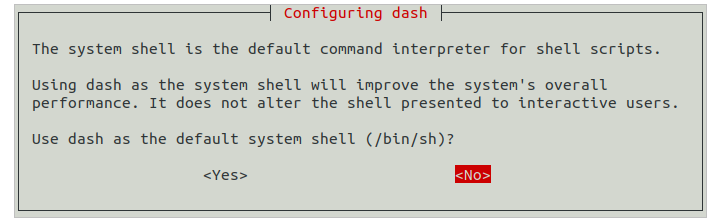
执行ls -l /bin/sh查看结果
apt-get相关依赖下载
更新了镜像源之后,需要更新apt
apt-get update
下载git-lfs
apt-get install git-lfs
代码下载的相关操作
https://gitcode.com/openharmony/docs/blob/master/zh-cn/device-dev/get-code/sourcecode-acquire.md
安装repo
下载repo
curl https://gitee.com/oschina/repo/raw/fork_flow/repo-py3 -o repo
或者使用清华源下载
curl https://mirrors.tuna.tsinghua.edu.cn/git/git-repo -o repo
将下载的repo文件复制到~/bin目录下
修改权限,并使环境变量重新生效
source ~/.bashrc
如果使用repo进行init的时候出现以下的日志,
Downloading Repo source from https://gerrit.googlesource.com/git-repo
fatal: Cannot get https://gerrit.googlesource.com/git-repo/clone.bundle
fatal: error [Errno 101] Network is unreachable
fatal: double check your --repo-rev setting.
fatal: cloning the git-repo repository failed, will remove '.repo/repo'
需要在repo命令后指定镜像源
repo init -u 某某/manifest.git -b master -m 某.xml --repo-url=https://aosp.tuna.tsinghua.edu.cn/tools/repo --repo-branch=stable --mirror
接着更新repo,和拉取代码
repo sync -c
repo forall -c 'git lfs pull'
参考链接:
https://www.cnblogs.com/wucaiyun1/p/12656355.html

 浙公网安备 33010602011771号