
EL表达式
1. 什么是EL表达式
EL(Express Lanuage)表达式可以嵌入在jsp页面内部,减少jsp脚本的编写,EL 出现的目的是要替代jsp页面中输出脚本<%= 数据 %>的编写。
2. EL表达式的格式和作用
EL表达式的格式:
${EL表达式内容}
EL表达式的作用:
- 从域对象中查找指定的数据。
- EL内置对象的使用
- 执行运算符
3. EL表达式的基本使用(从域中取出数据)
3.1 直接使用jsp从域中取数据(用于对比)
<%--
添加数据
 --%>
<%
    pageContext.setAttribute("pageKey","pageValue");
    request.setAttribute("requestKey","requestValue");
    session.setAttribute("sessionKey","sessionValue");
    application.setAttribute("applicationKey","applicationValue");
%>
<%--
取出数据
 --%>
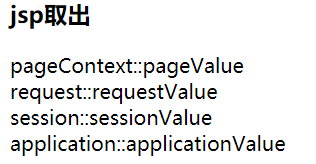
pageContext::<%= pageContext.getAttribute("pageKey")%><br>
request::<%= request.getAttribute("requestKey")%><br>
session::<%= session.getAttribute("sessionKey")%><br>
application::<%= application.getAttribute("applicationKey")%><br>
3.2 使用EL表达式取出域中数据
<h3>EL取出</h3>
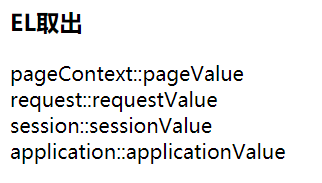
pageContext::${pageScope.pageKey}<br>
request::${requestScope.requestKey}<br>
session::${sessionScope.sessionKey}<br>
application::${applicationScope.applicationKey}<br>
Note:
- EL表达式取出数据时,如果数据不存在则直接不显示,而使用jsp的方式会显示Null
- 如果可以直接使用
${key}的方式来取出域对象中的内容,优先从最小范围的域开始查找
3.3 EL表达式取出javabean
public class Address {
    private String country;
    private String city;
    //省略构造函数和getter&&setter方法...
}

public class User {
    private String name;
    private Address address;
    //省略构造函数和getter&&setter方法...
}
jsp文件:
<%-- 添加数据 --%>
<%
    Address address = new Address("China","Hangzhou");
    User user = new User("admin",address);
    pageContext.setAttribute("user",user);
%>

<h3>EL取出javaBean</h3>

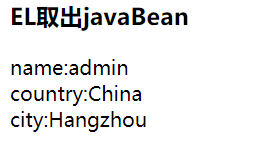
name:${user.name}<br>
country:${user.address.country}<br>
city:${user.address.city}<br>
3.4 EL表达式取出list
<%--
添加数据
 --%>
<%
    ArrayList<String> yiXianChengShi = new ArrayList<>();
    yiXianChengShi.add("beijing");
    yiXianChengShi.add("shanghai");
    yiXianChengShi.add("guangzhou");
    yiXianChengShi.add("shenzhen");
    pageContext.setAttribute("yixianchengshi",yiXianChengShi);
%>

<h3>EL取出list</h3>
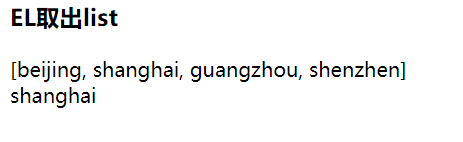
${yixianchengshi}<br>
${yixianchengshi[1]}
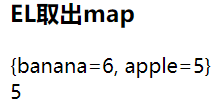
3.4 EL表达式取出map
<%
    Map<String,Integer> map = new HashMap<>();
    map.put("apple",5);
    map.put("banana",6);
    pageContext.setAttribute("map",map);
%>

<h3>EL取出map</h3>
${map}<br>
${map.apple}
4. EL表达式的内置对象pageContext
pageContext : WEB开发中的页面的上下文对象.
作用:可以用来获取JSP中四个域中的数据(pageScope, requestScope, sessionScope, applicationScope)
- 例如,在Servlet中,想获得web应用的名称:
request.getContextPath(); - 那么,在jsp页面上,想获得web应用的名称:
${pageContext.request.contextPath}
<%@ page contentType="text/html;charset=UTF-8" language="java" %>
<html>
<head>
    <title>获取WEB应用项目名称</title>
</head>
<body>
    <h3>获取WEB应用项目名称</h3>
    <%--JSP方式获取--%>
    <%= request.getContextPath()%>
    <%--EL方式获取--%>
    ${pageContext.request.contextPath}
</body>
</html>

5. EL执行运算符
- 算数运算符 + , - , * , / , %
- 逻辑运算符 && , || , !
- 比较运算符 > , < , >= , <= , == , !=
- Null运算符 empty
- 三元运算符
<%@ page import="java.util.ArrayList" %>
<%@ page contentType="text/html;charset=UTF-8" language="java" %>
<html>
<head>
    <title>EL执行运算符</title>
</head>
<body>
    ${3+4} <br>
    ${3-4} <br>
    ${true&&true} <br>
    ${false&& true} <br>
    ${3>4} <br>
    ${3<4 || 5>4} <br>

    <%--向域中存数据, 用于演示 empty--%>
    <%
        String str = null;
        request.setAttribute("str", str);
        request.setAttribute("array", new String[1] );
        request.setAttribute("list", new ArrayList<String>());
    %>
    ${empty str} <br>
    ${empty array} <br>
    ${empty list} <br>

    ${str == null?"数据为空":str} <br>

</body>
</html>


 浙公网安备 33010602011771号