
Python for Data Science - Extreme value analysis using univariate methods
Chapter 5 - Outlier Analysis
Segment 8 - Extreme value analysis using univariate methods
import numpy as np
import pandas as pd

import matplotlib.pyplot as plt
from pylab import rcParams
%matplotlib inline
rcParams['figure.figsize'] = 5,4
address = '~/Data/iris.data.csv'
df = pd.read_csv(filepath_or_buffer=address, header=None, sep=',')

df.columns=['Sepal Length','Sepal Width','Petal Length','Petal Width', 'Species']
X = df.iloc[:,0:4].values
y = df.iloc[:,4].values
df[:5]
| Sepal Length | Sepal Width | Petal Length | Petal Width | Species | |
|---|---|---|---|---|---|
| 0 | 5.1 | 3.5 | 1.4 | 0.2 | setosa |
| 1 | 4.9 | 3.0 | 1.4 | 0.2 | setosa |
| 2 | 4.7 | 3.2 | 1.3 | 0.2 | setosa |
| 3 | 4.6 | 3.1 | 1.5 | 0.2 | setosa |
| 4 | 5.0 | 3.6 | 1.4 | 0.2 | setosa |
Identifying outliers from Tukey boxplots
df.boxplot(return_type='dict')
plt.plot()
[]
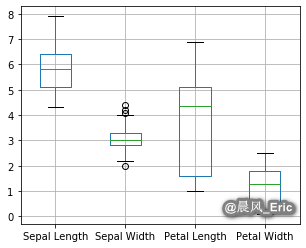
Sepal_Width = X[:,1]
iris_outliers = (Sepal_Width > 4)
df[iris_outliers]
| Sepal Length | Sepal Width | Petal Length | Petal Width | Species | |
|---|---|---|---|---|---|
| 15 | 5.7 | 4.4 | 1.5 | 0.4 | setosa |
| 32 | 5.2 | 4.1 | 1.5 | 0.1 | setosa |
| 33 | 5.5 | 4.2 | 1.4 | 0.2 | setosa |
Sepal_Width = X[:,1]
iris_outliers = (Sepal_Width < 2.05)
df[iris_outliers]
| Sepal Length | Sepal Width | Petal Length | Petal Width | Species | |
|---|---|---|---|---|---|
| 60 | 5.0 | 2.0 | 3.5 | 1.0 | versicolor |
Applying Tukey outlier labeling
pd.options.display.float_format = '{:.1f}'.format
X_df = pd.DataFrame(X)
print(X_df.describe())
0 1 2 3
count 150.0 150.0 150.0 150.0
mean 5.8 3.1 3.8 1.2
std 0.8 0.4 1.8 0.8
min 4.3 2.0 1.0 0.1
25% 5.1 2.8 1.6 0.3
50% 5.8 3.0 4.3 1.3
75% 6.4 3.3 5.1 1.8
max 7.9 4.4 6.9 2.5
相信未来 - 该面对的绝不逃避,该执著的永不怨悔,该舍弃的不再留念,该珍惜的好好把握。

 浙公网安备 33010602011771号