HTML + jQuery随机生成16位API Key
效果图如下:
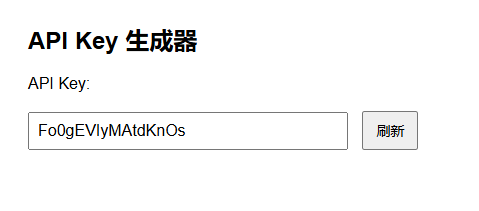
源代码如下:
<!DOCTYPE html>
<html lang="zh-CN">
<head>
    <meta charset="UTF-8">
    <title>API Key 生成器</title>
    <script src="https://code.jquery.com/jquery-3.6.0.min.js"></script>
    <style>
        body {
            font-family: Arial, sans-serif;
            padding: 40px;
        }

        input#apikey {
            width: 300px;
            padding: 8px;
            font-size: 16px;
            margin-right: 10px;
        }

        button#refreshBtn {
            padding: 8px 12px;
            font-size: 14px;
            cursor: pointer;
        }
    </style>
</head>
<body>

<h2>API Key 生成器</h2>

<label for="apikey">API Key:</label><br><br>
<input type="text" id="apikey" readonly>
<button id="refreshBtn">刷新</button>

<script>
    function generateApiKey(length = 16) {
        const chars = 'ABCDEFGHIJKLMNOPQRSTUVWXYZabcdefghijklmnopqrstuvwxyz0123456789';
        let result = '';
        for (let i = 0; i < length; i++) {
            const randomIndex = Math.floor(Math.random() * chars.length);
            result += chars[randomIndex];
        }
        return result;
    }

    function refreshKey() {
        const apiKey = generateApiKey(); // 默认生成16位
        $('#apikey').val(apiKey);
    }

    // 页面加载时自动填充一次
    $(document).ready(function () {
        refreshKey();

        $('#refreshBtn').on('click', function () {
            refreshKey();
        });
    });
</script>

</body>
</html>
本文来自博客园,转载请注明原文链接:https://www.cnblogs.com/keeplearningandsharing/p/18936932

 浙公网安备 33010602011771号