

UOS环境C#/Avalonia将文件剪切到剪切(粘贴)板实现
问题描述:
Avalonia的剪切板IClipboard实现目前(Ver11.3.10)在UOS国产系统下不能成功将文件写入剪切板,在桌面文件夹粘贴时会报错:
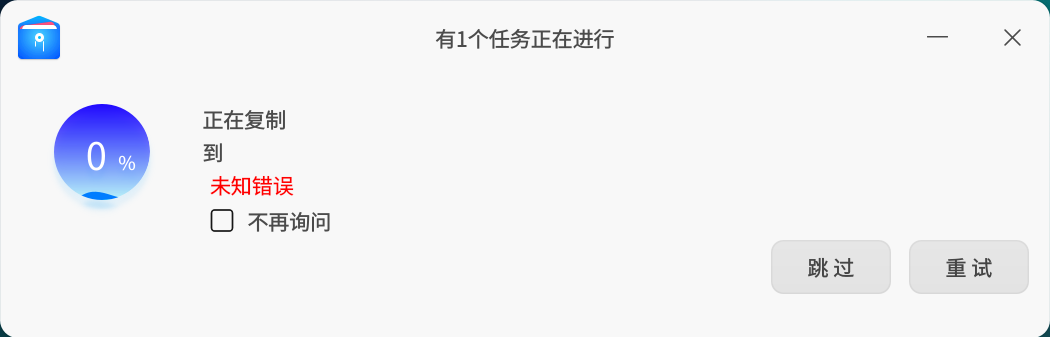
尝试了Avalonia的DataObject旧方法和直接用C#操纵X11,也试了xclip-copyfile命令行,均未能成功,最后曲线救国,采用自编译可执行文件,在软件里调用成功,实现在软件内选择文件复制,然后在桌面文件夹粘贴OK。
以下是需要的代码:


一、实现思路 使用X11库与系统剪切板交互 将文件路径转换为URI格式 设置剪切板数据为x-special/gnome-copied-files格式 二、完整代码 #include <stdio.h> #include <stdlib.h> #include <string.h> #include <X11/Xlib.h> #include <X11/Xatom.h> // 将文件路径转换为文件URI char* file_to_uri(const char* filepath) { // 简单的实现,实际应该进行URL编码 int length = strlen(filepath) + 8; // "file://" + 原路径 + '\0' char* uri = malloc(length); if (uri == NULL) return NULL; snprintf(uri, length, "file://%s", filepath); return uri; } // 设置文件到剪切板 int set_file_to_clipboard(const char* filepath) { Display* display = XOpenDisplay(NULL); if (!display) { fprintf(stderr, "无法打开X显示\n"); return 1; } Window window = XCreateSimpleWindow(display, DefaultRootWindow(display), 0, 0, 1, 1, 0, 0, 0); // 获取剪切板原子 Atom clipboard = XInternAtom(display, "CLIPBOARD", False); Atom targets_atom = XInternAtom(display, "TARGETS", False); Atom text_atom = XInternAtom(display, "TEXT", False); Atom utf8_atom = XInternAtom(display, "UTF8_STRING", False); Atom x_special_atom = XInternAtom(display, "x-special/gnome-copied-files", False); Atom uri_list_atom = XInternAtom(display, "text/uri-list", False); // 转换为URI格式 char* uri = file_to_uri(filepath); if (!uri) { fprintf(stderr, "无法创建URI\n"); XCloseDisplay(display); return 1; } // 创建剪切板数据 // GNOME格式: copy\nfile://path int copy_cmd_len = strlen("copy\n") + strlen(uri) + 1; char* copy_cmd = malloc(copy_cmd_len); if (!copy_cmd) { free(uri); XCloseDisplay(display); return 1; } snprintf(copy_cmd, copy_cmd_len, "copy\n%s", uri); // URI列表格式: file://path char* uri_list = malloc(strlen(uri) + 2); // uri + \n + \0 if (!uri_list) { free(uri); free(copy_cmd); XCloseDisplay(display); return 1; } snprintf(uri_list, strlen(uri) + 2, "%s\n", uri); // 设置剪切板所有权 XSetSelectionOwner(display, clipboard, window, CurrentTime); if (XGetSelectionOwner(display, clipboard) != window) { fprintf(stderr, "无法获取剪切板所有权\n"); free(uri); free(copy_cmd); free(uri_list); XCloseDisplay(display); return 1; } // 等待剪切板请求 XEvent event; while (1) { XNextEvent(display, &event); if (event.type == SelectionRequest) { XSelectionRequestEvent* req = &event.xselectionrequest; XSelectionEvent notify = {0}; notify.type = SelectionNotify; notify.display = req->display; notify.requestor = req->requestor; notify.selection = req->selection; notify.target = req->target; notify.property = req->property; notify.time = req->time; if (req->target == x_special_atom) { // 设置x-special/gnome-copied-files格式 XChangeProperty(req->display, req->requestor, req->property, utf8_atom, 8, PropModeReplace, (unsigned char*)copy_cmd, strlen(copy_cmd)); notify.property = req->property; XSendEvent(req->display, req->requestor, False, 0, (XEvent*)¬ify); } else if (req->target == uri_list_atom) { // 设置text/uri-list格式 XChangeProperty(req->display, req->requestor, req->property, utf8_atom, 8, PropModeReplace, (unsigned char*)uri_list, strlen(uri_list)); notify.property = req->property; XSendEvent(req->display, req->requestor, False, 0, (XEvent*)¬ify); } else if (req->target == targets_atom) { // 返回支持的格式 Atom targets[] = { x_special_atom, uri_list_atom, text_atom, utf8_atom }; XChangeProperty(req->display, req->requestor, req->property, XA_ATOM, 32, PropModeReplace, (unsigned char*)targets, sizeof(targets)/sizeof(targets[0])); notify.property = req->property; XSendEvent(req->display, req->requestor, False, 0, (XEvent*)¬ify); } else if (req->target == text_atom || req->target == utf8_atom) { // 纯文本格式(文件路径) XChangeProperty(req->display, req->requestor, req->property, utf8_atom, 8, PropModeReplace, (unsigned char*)filepath, strlen(filepath)); notify.property = req->property; XSendEvent(req->display, req->requestor, False, 0, (XEvent*)¬ify); } else { // 不支持的目标 notify.property = None; XSendEvent(req->display, req->requestor, False, 0, (XEvent*)¬ify); } } else if (event.type == SelectionClear) { break; } } // 清理 free(uri); free(copy_cmd); free(uri_list); XDestroyWindow(display, window); XCloseDisplay(display); printf("文件 '%s' 已复制到剪切板\n", filepath); printf("现在可以在文件管理器中右键粘贴或使用Ctrl+V粘贴\n"); return 0; } int main(int argc, char* argv[]) { if (argc != 2) { fprintf(stderr, "用法: %s <文件路径>\n", argv[0]); fprintf(stderr, "示例: %s /home/user/example.txt\n", argv[0]); return 1; } // 检查文件是否存在 FILE* file = fopen(argv[1], "r"); if (!file) { fprintf(stderr, "错误: 文件 '%s' 不存在或无法读取\n", argv[1]); return 1; } fclose(file); return set_file_to_clipboard(argv[1]); } 三、编译方法 # 安装必要的开发库 sudo apt-get install libx11-dev # 编译程序 gcc -o set-file-clipboard set-file-clipboard.c -lX11 四、使用方法 # 设置文件到剪切板 ./set-file-clipboard /path/to/your/file.txt
#region UOS(dde-file-manager)剪切文件

public static async Task SetFilesToClipboard(List<string> filePaths)
{
    if (filePaths == null || filePaths.Count == 0)
        return;

    // 每个带空格的文件路径都需要用引号包围
    var arguments = string.Join(" ", filePaths.Select(fp =>
        $"\"{fp.Replace("\"", "\\\"")}\""
    ));

    const string exePath = "set-files-to-clipboard";
    if (!File.Exists(exePath))
        throw new FileNotFoundException($"可执行文件不存在: {exePath}");

    if (!RuntimeInformation.IsOSPlatform(OSPlatform.Windows))
    {
        try
        {
            var mode = File.GetUnixFileMode(exePath);
            if ((mode & UnixFileMode.UserExecute) == 0)
            {
                File.SetUnixFileMode(exePath,
                    mode | UnixFileMode.UserExecute |
                    UnixFileMode.GroupExecute |
                    UnixFileMode.OtherExecute);
                LogHelper.Info($"已为 {exePath} 设置执行权限");
            }
        }
        catch (Exception ex)
        {
            LogHelper.Error($"设置权限失败: {ex.Message}");
        }
    }

    var process = new Process
    {
        StartInfo = new ProcessStartInfo
        {
            FileName = exePath,
            Arguments = arguments,
            UseShellExecute = false,
            RedirectStandardOutput = true,
            RedirectStandardError = true,
            CreateNoWindow = true
        }
    };

    LogHelper.Info($"执行命令: {process.StartInfo.FileName} {arguments}");

    process.Start();
    var output = await process.StandardOutput.ReadToEndAsync();
    var error = await process.StandardError.ReadToEndAsync();
    await process.WaitForExitAsync();

    if (process.ExitCode != 0)
    {
        throw new Exception($"设置剪切板失败: {error}");
    }

    LogHelper.Info(output);
}
#endregion
关键词:复制,剪切,粘贴文件,文件管理器,Avalonia,Clipboard,dde-file-manager,UOS,Linux

 浙公网安备 33010602011771号