


EF Core – 8.0 new features
参考
Docs – What's New in EF Core 8
Support DateOnly and TimeOnly
SQL Server 早在 2008 年就已经支持 date 和 time 类型了。反观 .NET 一直到 6.0 才支持 DateOnly 和 TimeOnly 类型。
而 EF Core 更是直到 2023 年 8.0 版本才支持。
不需要任何配置,直接用就可以了
public class Person
{
    public int Id { get; set; }
    public DateOnly StartDate { get; set; }
    public TimeOnly TimeOfDay { get; set; }
}
SQL
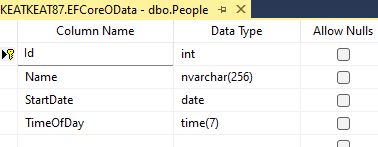
Program.cs
var app = builder.Build();
using var scope = app.Services.CreateScope();
var db = scope.ServiceProvider.GetRequiredService<ApplicationDbContext>();
var person = new Person
{
    Name = "Derrick",
    StartDate = new DateOnly(2023, 1, 1),
    TimeOfDay = new TimeOnly(16, 50)
};
db.People.Add(person);
db.SaveChanges();
var person1 = db.People.FirstOrDefault(e => e.StartDate == new DateOnly(2023, 1, 1));
语句

.NET 6.0 & 7.0 Polyfill
6.0,7.0 如果也想使用 DateOnly 和 TimeOnly 可以使用 Polyfill。Github – ErikEJ / EFCore.SqlServer.DateOnlyTimeOnly
安装

在 Program.cs config SQL Server 时多加一句
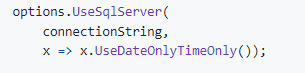
这样就可以了。8.0 后就把这些 remove 掉,就可以了。
OData
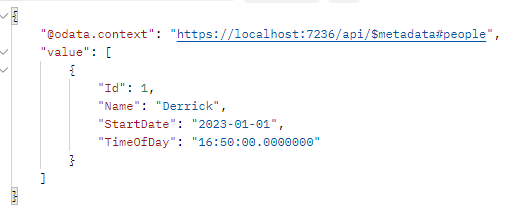
odata v8.0.7 就支持 DateOnly 和 TimeOnly 了。所以一早就可以搭配 EF Core Polyfill 使用了哦
注: query 的 value 不需要 quote 哦

是 eq 2023-01-01 而不是 eq '2023-01-01',不要搞错哦
response
Complex Types
看这篇 EF Core – Owned Entity Types & Complex Types
Primitive Collection Properties
终于支持了😑
public class Product
{
  public int Id { get; set; }
  public string Name { get; set; } = "";
  public List<string> Categories { get; set; } = [];
}
直接写 List<string> 不需要任何 config,EF Core 会自动把它映射成 JSON Column。
create Product and query Product
using var db = new ApplicationDbContext();
db.Products.Add(new()
{
  Name = "iPhone4",
  Categories = ["i-Series", "Apple Products", "2024 Hot Products"]
});
db.SaveChanges();
var products = db.Products.Where(e => e.Categories.Any(category => category.StartsWith("Apple"))).ToList();
效果


不考虑性能问题的话,基本上完成的非常好了。
Supported types
不是只有值类型才支持哦,下面这些都可以
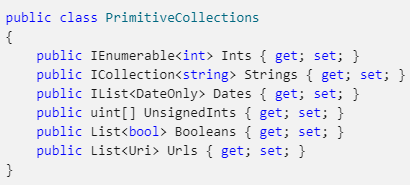
比如 DateOnly,TimeOnly,DateTimeOffset 这些对象也都可以。
另外,Complex Types 或 Owned Entity Types 里也都可以使用。
提醒:enum 映射到数据库是 number 哦。
Config MaxLength and Unicode
默认情况下 column 是 nvarchar(MAX)
如果想优化一点点性能可以设置 MaxLength 和 Unicode
modelBuilder
    .Entity<Product>()
    .Property(e => e.Categories)
    .HasMaxLength(1024)
    .IsUnicode(false);
这样就会变成 varchar(1024)。
要批量设置也行,去 ConfigureConventions
protected override void ConfigureConventions(ModelConfigurationBuilder configurationBuilder)
{
  configurationBuilder
      .Properties<List<string>>()
      .AreUnicode(false)
      .HaveMaxLength(256);
}
Limitation
目前只能映射到同一个 Table 然后是 JSON Column,以后或许可以映射成 one-to-many,这样性能会更好,相关 Github Issue – Add support for collections of primitive types as separate table in relational databases。

 浙公网安备 33010602011771号