
常用类
常用类
字符串相关的类:String
String类:代表字符串类。Java程序中的所有字符串字面值(如"abc")都作为此类的实例实现。
String是一个final类(不能被继承),代表不可变的字符序列。
字符串是常量,用双引号引起来表示。它们的值在创建之后不能更改。
String对象的字符内容是存储在一个字符数组value[]中的。(JDK9之后变为byte[]字节数组)
String类
public final class String
    implements java.io.Serializable, Comparable<String>, CharSequence {
    /** The value is used for character storage. */
    private final char value[];

    /** Cache the hash code for the string */
    private int hash; // Default to 0
String对象的创建
String str = "hello";//字面量

//本质上this.value = new char[0];
String s1 = new String();

//this.value = original.value;
String s2 = new String(String original);

//this.value = Array.copyOf(value,value.length);
String s3 = new String(char[] a);

String s4 = new String(char[] a,int starIndex,int count);
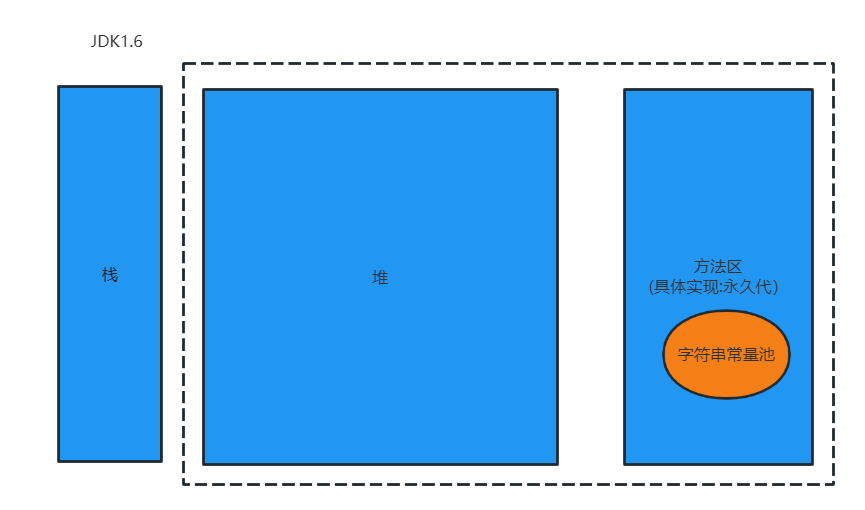
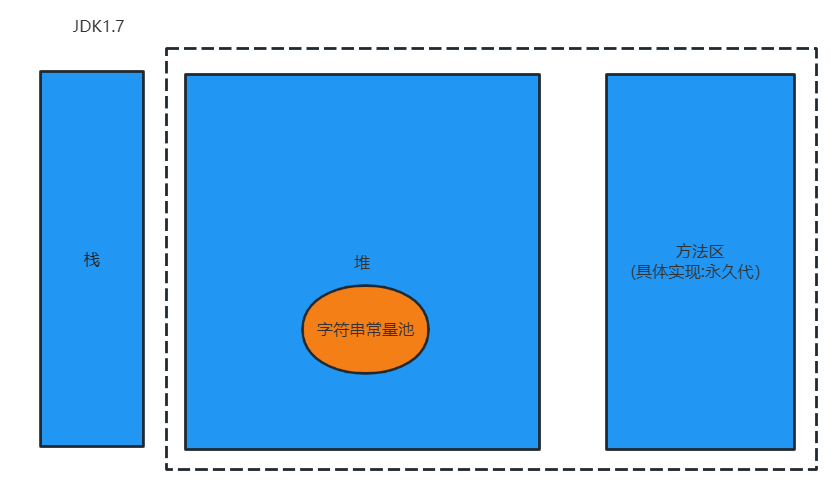
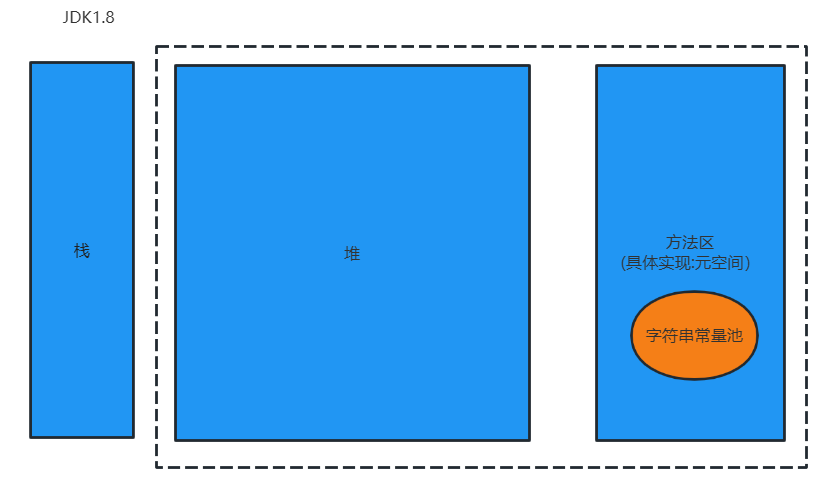
String str1 = "abc";与String str2 = new String("abc");的区别:字符串常量存储在字符串常量池,目的是共享;
字符串非常量对象存储在堆中
/*
    String:字符串,使用一对“”引起来表示
    1.String声明为final的,不可被继承
    2.String实现了Serializable接口:表示字符串是支持序列化的。
            实现了Comparable接口:表示String可以比较大小
    3.String内部定义了final char[] value用于存储字符串数据
    4.代表一个不可变的字符序列。简称:不可变性。
      体现:1.当对字符串重新赋值时,需要重新指定内存区域 赋值,不能使用原有value进行赋值。
           2.当对现有字符串进行连接操作时,也需要重新指定内存区域 赋值,不能使用原有value进行赋值。
           3.当调用String的replace方法修改指定字符或字符串时。也需要重新指定内存区域 赋值。
    5.通过字面量的方式给一个字符串赋值,此时的字符串值声明在字符串常量池中。
    6.字符串常量池中不会存储相同内容的字符串。
     */
    @Test
    public void test1(){
        String s1 = "abc";//字面量的定义方式
        String s2 = "abc";
        System.out.println(s1 == s2);//比较s1和s2的地址值:true
        s1 = "hello";

        System.out.println(s1);//hello
        System.out.println(s2);//abc

        System.out.println("==================");
        String s3 = "abc";
        s3 += "def";
        System.out.println(s3);//abcdef

        System.out.println("==================");
        String s4 = "abc";
        String s5 = s4.replace('a','m');
        System.out.println(s4);//abc
        System.out.println(s5);//mbc
    }
/*
    String的实例化方式:
    方式一:通过字面量定义的方式
    方式二:通过new + 构造器的方式

    面试题:String s = new String("abc");方式创建对象,在内存中创建了几个对象?
        两个:一个是堆空间中new结构,另一个是char[]对应的常量池中的数据”abc“
     */
    @Test
    public void test2(){
        //通过字面量定义的方式:s1和s2的数据havaEE声明在方法区中的字符串常量池中
        String s1 = "javaEE";
        String s2 = "javaEE";
        //通过new + 构造器的方式:此时的s3和s4保存的地址值,是数据在堆空间开辟空间以后对应的地址值
        String s3 = new String("javaEE");
        String s4 = new String("javaEE");

        System.out.println(s1 == s2);//true
        System.out.println(s1 == s3);//false
        System.out.println(s1 == s4);//false
        System.out.println(s3 == s4);//false

        System.out.println("==================");
        Person p1 = new Person("Tom",12);
        Person p2 = new Person("Tom",12);
        System.out.println(p1.name.equals(p2.name));//true
        System.out.println(p1.name == p2.name);//true

        p1.name = "Jerry";
        System.out.println(p2.name);//Tom
    }
/*
    结论:
    1.常量与常量的拼接结果在常量池中。且常量池中不会存在相同内容的常量。
    2.只要其中有一个变量,结果就在堆中。
    3.如果拼接的结果调用intern()方法,返回值就在常量池中
     */
    @Test
    public void test3(){
        String s1 = "javaEE";
        String s2 = "hadoop";

        String s3 = "javaEEhadoop";//字面量
        String s4 = "javaEE"+"hadoop";//两个字面量的连接
        String s5 = s1 + "hadoop";//有其他的变量名参与(相当于new),此时都不是在常量池,在堆空间中去开辟
        String s6 = "javaEE" + s2;
        String s7 = s1 + s2;

        System.out.println(s3 == s4);//true
        System.out.println(s3 == s5);//false
        System.out.println(s3 == s6);//false
        System.out.println(s3 == s7);//false
        System.out.println(s5 == s6);//false
        System.out.println(s5 == s7);//false
        System.out.println(s6 == s7);//false

        String s8 = s5.intern();//返回值得到的s8使用的常量池中已经存在的javaEEhadoop"
        System.out.println(s3 == s8);//true
    }
基本数据类型传递的是值,引用类型传递的地址
三种JVM
-
Sun公司的HotSpot
-
BEA公司的JRockit
-
IBM公司的J9 VM

Heap堆
一个JVM实例只存在一个堆内存,堆内存的大小是可以调节的。类加载器读取了类文件后,需要把类、方法、常变量放到堆内存中,保存所有引用类型的真实信息,以方便执行器执行,堆内存分为三部分:
Young Generation Space新生区    Young
Tenure generation space养老区   Old
Permanent Space永久存储区        Perm可以看作是方法区。虽然JVM规范将方法区(永久存储区)描述为堆的一个逻辑部分,但是它却还有一个别名叫做Non-Heap(非堆),目的就是要和堆分开。
String类及常用的方法
一、
- int length():返回字符串的长度:return value.length
- char charAt(int index):返回某索引处的字符return value[index]
- boolean isEmpty():判断是否是空字符串:return value.length == 0;
- String toLowerCase():使用默认语言环境,将String中的所有字符转换为小写
- String toUpperCase():使用默认语言环境,将String中的所有字符转换为大写
- String trim():返回字符串的副本,忽略前导空白和尾部空白
- boolean equals(Object obj):比较字符串的内容是否相同
- boolean equalsIgnoreCase(String anotherString):与equals方法类似,忽略大小写
- String concat(String str):将指定字符串连接到此字符串的结尾。等价于用'+'
- int compareTo(String anotherString):比较两个字符串的大小
- String substring(int beginIndex):返回一个新的字符串,它是此字符串的从beginIndex开始截取到最后的一个子字符串。
- String substring(int beginIndex,int endIndex):返回一个新字符串,它是此字符串从beginIndex开始截取到endIndex(不包含)的一个子字符串。
junit中的@Test:创建完成一个方法,方法头上加一个@Test 注解,旁边就会出现一个绿色的启动标记 ,点击运行,可以看到没有main方法也是可以启动单元的。
package com.String.demo01;

import org.junit.Test;

import java.util.Locale;

public class StringMethodTest {
    @Test
    public void test2(){
        String s1 = "HelloWorld";
        String s2 = "helloworld";
        System.out.println(s1.equals(s2));//false
        System.out.println(s1.equalsIgnoreCase(s2));//true

        String s3 = "abc";
        String s4 = "def";
        System.out.println(s3.concat(s4));//abcdef

        String s5 = "abc";
        String s6= new String("abd");
        System.out.println(s5.compareTo(s6));//-1负数代表当前对象小,0代表相等,正数代表当前对象大

        String s7 = "沈阳教育学院";
        String s8 = s7.substring(1);//从1到最后
        System.out.println(s8);//阳教育学院

        String s9 = s7.substring(2,5);//包含2,不包含5,左闭右开
        System.out.println(s9);//教育学
    }
    @Test
    public void test1(){
        String s1 = "Helloworld";
        System.out.println(s1.length());//10
        System.out.println(s1.charAt(0));//H
        System.out.println(s1.charAt(9));//d
        System.out.println(s1.isEmpty());//false
        String s2 = s1.toLowerCase();
        System.out.println(s1);//Helloworld
        System.out.println(s2);//helloworld

        String s3 = "   hello  world   ";
        String s4 = s3.trim();//去除首尾空格,中间空格保留
        System.out.println("----"+s3+"----");//----   hello  world   ----
        System.out.println("----"+s4+"----");//----hello  world----
    }

}
二、
- boolean endsWith(String suffix):测试此字符串是否以指定的后缀结束
- boolean startsWith(String prefix):测试此字符串是否以指定的前缀开始
- boolean startsWith(String prefix,int toffset):测试此字符串从指定索引开始的子字符串是否以指定前缀开始
public void test3(){
        String str1 = "helloworld";
        boolean b1 = str1.endsWith("ld");
        System.out.println(b1);//true

        boolean b2 = str1.startsWith("He");
        System.out.println(b2);//false

        boolean b3 = str1.startsWith("ll",2);
        System.out.println(b3);//true
-
boolean contains(CharSequence s):当且仅当此字符串包含指定的char值序列时,返回true
-
int indexOf(String str):返回指定子字符串在此字符串中第一次出现的索引
-
int indexOf(String str,int fromIndex):返回指定子字符串在此字符串中第一次出现处的索引,从指定的索引开始
-
int lastIndexOf(String str):返回指定子字符串在此字符串中最右边出现的处的索引
-
int lastIndexOf(String str,int fromIndex):返回指定子字符串在此字符串中最后一次出现处的索引,从指定的索引开始反向搜索
注:indexOf和lastIndexOf方法如果未找到都是返回-1
public void test4(){
        String str1 = "helloworld";
        String str2 = "wo";
        boolean b1 = str1.contains(str2);//大小写严格要求
        System.out.println(b1);//true
        System.out.println(str1.indexOf("lo"));//3,找不到时候返回-1
        System.out.println(str1.indexOf("lo",5));//-1
        String str3 = "hellorworld";
        System.out.println(str3.lastIndexOf("or"));//7
        System.out.println(str3.lastIndexOf("or",6));//4
    }
**什么情况下,indexOf(str)和lastIndexOf(str)返回值相同?str在 对象中出现0次或1次
三、
- String replace(char oldChar,char newChar):返回一个新的字符串,它是通过用newChar替换此字符串中出现的所有oldChar得到的。
- String replace(CharSequence target,CharSequence replacement):使用指定的字面值替换序列替换此字符串所有匹配字面值目标序列的子字符串
- String replaceAll(String regex,String replacement):使用给定的replacement替换此字符串所有匹配给定的正则表达式的子字符串。
- String replaceFirst(String regex,String replacement):使用给定的replacement替换此字符串匹配给定的正则表达式的第一个字符串。
public void test5(){
        String str1 = "北京欢迎你,我爱北京";
        System.out.println(str1.replace("北","南"));//南京欢迎你,我爱南京

        System.out.println(str1.replace("北京","上海"));//上海欢迎你,我爱上海

        String str2 = "12hello34world5java7891mysql1456";//把字符串中的数字替换成逗号,如果开头结尾有,去掉
        String str3 = str2.replaceAll("\\d+",",").replaceAll("^,|,$","");//hello,world,java,mysql
        System.out.println(str3);
        String str4 = str2.replaceFirst("\\d+",",");
        System.out.println(str4);//,hello34world5java7891mysql1456
    }
- boolean matches(String regex):告知此字符串是否匹配给定的正则表达式
public void test6(){
        String str1 = "123456";
        boolean b1 = str1.matches("\\d+");//判断str字符串是否全部由数字组成
        System.out.println(b1);//true

        Stri
            ng str2 = "0571-4534289";
        boolean b2 = str2.matches("0571-\\d{7,8}");//判断是否是杭州的固定电话
        System.out.println(b2);//true
    }
- String[] split(String regex):根据给定正则表达式的匹配拆分此字符串
- String[] split(String regex,int limit):根据匹配给定的正则表达式来拆分此字符串,最多不超过limit个,如果超过了,剩下的全部都放到最后一个元素中。
public void test7(){
    String str1 = "hello|world|java";
    String[] strs = str1.split("\\|");
    for(int i = 0;i< strs.length;i++){
        System.out.println(strs[i]);
        //hello
        //world
        //java
    }
}
复习:String与其他数据类型的转换
/*
String与基本数据类型、包装类之间的转换
String-->基本数据类型、包装类;调用包装类的静态方法:parseXXX(str)
基本数据类型、包装类-->String:调用String重载的valueOf(xxx)方法
 */
@Test
public void tset1(){
    String str1 = "123";
    //int num = (int)str1;错误的
    int num = Integer.parseInt(str1);

    String str2 = String.valueOf(num);//"123"
    String str3 = num + "";
}
/*
String 与char[]之间的转换
String-->char[]:调用String的toCharArray[]方法
char[]-->String:调用String的构造器
 */
@Test
public void test2(){
    String str1 = "abc123";
    char[] charArray = str1.toCharArray();
    for (int i = 0; i < charArray.length; i++) {
        System.out.println(charArray[i]);//依次输出abc123
    }

    char[] arr = new char[]{'h','e','l','l','o'};
    String str2 = new String(arr);
    System.out.println(str2);//hello
}
/*
String与byte[]之间的转换
编码:String-->byte[]:调用String的getBytes()
解码:byte[]-->String:调用String的构造器

编码:字符串-->字节(看得懂-->看不懂)
解码:编码的逆过程,字节-->字符串(看不懂的二进制数据-->看得懂)

说明:解码时,要求解码使用的字符集必须与编码时使用的字符集一致,否则会出现乱码
 */
@Test
public void teat3() throws UnsupportedEncodingException {
    String str1 = "abc123";
    byte[] bytes1 = str1.getBytes();//使用默认的字符集进行转换UTF-8
    System.out.println(Arrays.toString(bytes1));//[97, 98, 99, 49, 50, 51]

    String str2 = "abc123中国";//UTF-8中一个汉字三位
    byte[] bytes2 = str2.getBytes();
    System.out.println(Arrays.toString(bytes2));//[97, 98, 99, 49, 50, 51, -28, -72, -83, -27, -101, -67]
    byte[] gbks = str2.getBytes("gbk");//使用gbk字符集进行编码
    System.out.println(Arrays.toString(gbks));//[97, 98, 99, 49, 50, 51, -42, -48, -71, -6]

    String str3 = new String(bytes1);//使用默认的字符集,进行解码
    System.out.println(str3);//abc123
    String str4 = new String(gbks);
    System.out.println(str4);//abc123�й�,乱码,编码时候用的gbk,解码默认用的UTF-8,编码集和解码集不一致

    String str5 = new String(gbks,"gbk");
    System.out.println(str5);//abc123中国,解码集和编码集一致
}
StringBuffer、StringBuilder
java.lang.StringBuffer代表可变的字符序列,JDK1.0中声明,可以对字符串内容进行增删,此时不会产生新的对象。
很多方法与String相同。
作为参数传递时,方法内部可以改变值。
abstract class AbstractStringBuilder implements Appendable, CharSequence {
    /**
     * The value is used for character storage.
     */
    char[] value;//value没有final声明,vaule可以不断扩容。

    /**
     * The count is the number of characters used.
     */
    int count;//count记录有效字符的个数。
/*
String、StringBuffer、StringBuilder三者的异同?
String:不可变的字符序列;底层使用char[]存储
StringBuffer:可变的字符序列;线程安全的,效率低;底层使用char[]存储
StringBuilder:可变的字符序列;JDK1.5新增,线程不安全的,效率高;底层使用char[]存储

源码分析:
String str = new String();//new char[0];
String str1 = new String("abc");//char[] value = new char[]{'a','b','c'}

StringBuffer sb1 = new StringBuffer();//char value[] = new char[16];底层创建了一个长度是16的数组。
sb1.append('a');//value[0] = 'a';
sb1.append('b');//value[1] = 'b';

StringBuffer sb2 = new StringBuffer("abc");//char[] value = char["abc".length() + 16]

//问题1:System.out.println(sb2.length());//0
//问题2:扩容问题:如果要添加的数据底层数组盛不下了,那就需要扩容底层的数组。
     默认情况下,扩容为原来容量的2倍+2,同时将原有数组中的元素复制到新的数组中。

     指导意义:在开发过程中建议大家使用StringBuffer(int capacity数组容量)或StringBuilder(int capacity)
 */
 @Test
 public void test1(){
     StringBuffer sb1 = new StringBuffer("abc");
     sb1.setCharAt(0,'m');
     System.out.println(sb1);//mbc

     StringBuffer sb2 = new StringBuffer("");
     System.out.println(sb2.length());//0
 }
StringBuffer/StringBuilder类的常用方法
StringBuffer apend(xxx):提供了很多的append()方法,用于进行字符串拼接
StringBuffer delete(int start,int end):删除指定位置的内容
StringBuffer replace(int start,int end,String str):把[start,end)位置替换为str
StringBuffer insert(int offset,xxx):在指定位置插入xxx
StringBuffer reverse():把当前字符序列逆转
当append和insert时,如果原来value数组长度不够,可扩容。
如上这些方法支持方法链操作。
方法链的原理:可以连续调用方法
@Override
    public StringBuilder append(String str) {
        super.append(str);
        return this;
    }
/*
总结:
增:append(xxx)
删:delete(int start,int end)
改:setCharAt(int n,char ch) /replace(int start,int end,String str)
查:charAt(int n)
插:insert(int offset,xxx)
长度:length();
遍历:for+charAt()
 */
@Test
public void test2(){
    StringBuffer s1 = new StringBuffer("abc");
    s1.append(1);
    s1.append('1');
    System.out.println(s1);//abc11
    s1.delete(2,4);
    System.out.println(s1);//ab1
    s1.replace(1,2,"hello");
    System.out.println(s1);//ahello1
    s1.insert(1,"OK");
    System.out.println(s1);//aOKhello1
    s1.reverse();
    System.out.println(s1);//1ollehKOa
}
JDK 8 之前的日期时间API
System静态方法
-
java.lang.System类
System类提供的public static long currentTimeMillis()用来返回当前时间与1970年1月1日0时0分0秒之间以毫秒为单位的时间差。此方法适于计算时间差。
计算世界时间的主要标准有:UTC(Coordinated Universal Time)、GMT(Greenwich Mean Time)、CST(Central Standard Time)
//1.Syetem类中的currentTimeMills()
@Test
public void test1(){
    long time = System.currentTimeMillis();
    //返回当前时间与1970年1月1日0时0分0秒之间以毫秒为单位的时间差,称为时间戳
    System.out.println(time);//1675861710584以ms为单位
}
Date类
-
java.util.Date类
表示特定的瞬间,精确到毫秒
-
构造器:Date():使用无参构造器创建的对象可以获取本地当前时间。
Date(long date)
-
常用方法
getTime():返回自1970年1月1日00:00:00GMT以来此Date对象表示的毫秒数。
toString():把此Date对象转换为以下形式的String:dow mon dd hh:mm:ss zzz yyyy 其中:dow是一周中的某一天(Sun,Mon,Tue,Wed,Thu,Fri,Sat),zzz是时间标准。周 月 日 时:分:秒 时间标准 年
其它很多方法都过时了
/*
java.util.Date类
java.sql.Date类

1.两个构造器的使用
2.两个方法的使用
3.java.sql.Date对应着数据库中的日期类型的变量
  如何实例化
  sql.Date --->util.Date
  如何将java.util.Date对象转换为java.sql.Date对象
 */
@Test
public void test2(){
    //构造器一:Date():创建了一个对应当前时间的Date对象
    Date date1  = new Date();
    System.out.println(date1.toString());//Wed Feb 08 21:21:35 CST 2023
    System.out.println(date1.getTime());//1675862609290

    //构造器二:创建指定毫秒数的Date对象
    Date date2 = new Date(1675862609290L);
    System.out.println(date2);//Wed Feb 08 21:23:29 CST 2023

    //创建java.sql.Date对象
    java.sql.Date date3 = new java.sql.Date(1675862609290L);
    System.out.println(date3);//2023-02-08

    //如何将java.util.Date对象转换为java.sql.Date对象
    //情况一:
    Date date4 = new java.sql.Date(1675862609290L);
    //情况二:
    Date date6 = new Date();
    java.sql.Date date7 = new java.sql.Date(date6.getTime());
}
-
SimpleDateFormat类
-
java.text.SimpleDateFormat类
Date类的API不易于国际化,大部分被废弃了,java.text.SimpleDateFormat类是一个不与语言环境有关的方式来格式化和解析日期的具体类。
它允许进行格式化:日期->文本、解析:文本->日期
格式化:
- SimpleDateFormat():默认的模式和语言环境创建对象
- public SimpleDateFormat(String parrern):该构造方法可以用参数pattern指定的格式创建一个对象,该对象调用;
- public String format(Date date):方法格式化对象date
解析:
public Date parse(String source):从给定字符串的开始解析文本,以生成一个日期。
/*
SimpleDateFormat的使用:SimpleDateFormat对日期Date类的格式化和解析

1.两个操作:
    格式化:日期--->字符串
    解析:格式化的逆过程,字符串--->日期
2.SimpleDateFormat的实例化
 */
@Test
public void testSimpleDateFormat() throws ParseException {
     //实例化SimpleDateFormat:使用默认的构造器
    SimpleDateFormat sdf = new SimpleDateFormat();

    //格式化:日期--->字符串
    Date date = new Date();
    System.out.println(date);//Thu Feb 09 22:47:55 CST 2023
    String format = sdf.format(date);
    System.out.println(format);//23-2-9 下午10:46

    //解析:格式化的逆过程,字符串--->日期
    String str = "23-2-9 下午10:50";
    Date date1 = sdf.parse(str);//抛异常,传入字符串不满足格式
    System.out.println(date1);//Thu Feb 09 22:50:00 CST 2023

    //按照指定的方式格式化和解析;调用带参的构造器
    SimpleDateFormat sdf1 = new SimpleDateFormat("yyyy-MM-dd hh:mm:ss");
    //格式化
    String format1 = sdf1.format(date);
    System.out.println(format1);//2023-02-09 10:57:58
    //解析:要求字符串必须是符合SimpleDateFormat识别的格式(通过构造器参数实现).否则抛异常
    Date date2 = sdf1.parse("2023-02-09 10:57:58");
    System.out.println(date2);//Thu Feb 09 10:57:58 CST 2023

}
/*
练习一:字符串:"2020-09-18"转换为java.sql.Date   */
@Test
public void testExer() throws ParseException {
    String birth = "2020-09-18";
    SimpleDateFormat sdf1 = new SimpleDateFormat("yyyy-MM-dd");
    Date date = sdf1.parse(birth);
    System.out.println(date);//Fri Sep 18 00:00:00 CST 2020
    java.sql.Date date1 = new java.sql.Date(date.getTime());
    System.out.println(date1);//2020-09-18
}
/*
练习二:"三天打鱼两天晒网" 1990-01-01 xxxx-xx-xx是在打鱼还是晒网

举例:2020-09-18?计算总天数:方式一:(date2.getTime() - date1.getTime())/(1000*60*60*24)+1
                 总天数取模5:123打鱼,04晒网
 */
Calendar类
-
java.util.Calendar(日历)类
Calendar是一个抽象基类,主要用于完成日期字段之间相互操作的功能。
获取Calendar实例的方法
- 使用Calendar.getInstance()方法
- 调用它的子类GregorianCalendar的构造器
一个Calendar的实例是系统时间的抽象表示,通过get(int field)方法来取得想要的时间信息。比如YEAR、MONTH、DAY_OF_WEEK、HOUR_OF_DAY、MINUTE、SECOND
public void set(int field,int value)
public void add(int field,int amount)
public final Date getTime()
public final void setTime(Date date)
注意:获取月份时:一月是0,二月是1,以此类推,十二月是11
获取星期时:周日是1,周一是2,,,周六是7
@Test
public void testCalendar(){
    //1.实例化
    Calendar calendar = Calendar.getInstance();

    //2.常用方法
    //get():获取常用的属性值
    int days = calendar.get(Calendar.DAY_OF_MONTH);
    System.out.println(days);//10输出数字是这个月的第几天
    System.out.println(calendar.get(Calendar.DAY_OF_YEAR));//41
    //set():修改属性值
    calendar.set(Calendar.DAY_OF_MONTH,22);
    days = calendar.get(Calendar.DAY_OF_MONTH);
    System.out.println(days);//22set修改之后的数值
    //add()
    calendar.add(Calendar.DAY_OF_MONTH,3);
    days = calendar.get(Calendar.DAY_OF_MONTH);
    System.out.println(days);//25,在原有基础上加上三天,add中的数字为负数,则为减去几天
    //getTime():日历类--- >Date
    Date date = calendar.getTime();
    System.out.println(date);//Sat Feb 25 15:54:02 CST 2023
    //setTime():Date--->日历类
    Date date1 = new Date();
    calendar.setTime(date1);
    days = calendar.get(Calendar.DAY_OF_MONTH);
    System.out.println(days);//10
}
JDK8中新日期时间API
java.time 包含值对象的基础包
java.time.chrono 提供对不同的日历系统的访问
java.time.format格式化和解析时间和日期
java.time.temporal 包括底层框架和扩展特性
java.time.zone包含对时区支持的类
LocalDate、LocalTime、LocalDateTime
Local、LocalTime、LocalDateTime类是其中较重要的几个类,他们的实例是不可变的对象,分别表示使用ISO-8601日历系统的日期、时间、日期和时间。它们提供了简单的本地日期或时间,并不包含当前的时间信息,也不包含与时区相关的信息。
LocalDate代表IOS格式(yyyy-MM-dd)的日期,可以存储生日、纪念日等日期。
LocalTime表示一个时间,而不是日期。
LocalDateTime是用来表示日期和时间的,这是一个最常用的类之一。
注:ISO-8601日历系统就是国际标准化组织制定的现代公民的日期和时间的表示法,也就是公历。
| 方法 | 描述 |
|---|---|
| now()/*now(Zoneld zone) | 静态方法,根据当前时间创建对象/指定时区的对象 |
| of() | 静态方法,根据指定日期、时间创建对象 |
| getDayOfMonth()/getDayOfYear() | 获得月份天数(1-31)/获得年份天数(1-366) |
| getDayOfWeek() | 获得星期几(fanhui一个DayOfWeek枚举值) |
| getMonth() | 获得月份,返回一个Month()枚举值 |
| getMonthValue()/getYear() | 获得月份(1-12)/获得年份 |
| getHour()/getMinute()/getSecond() | 获得当前对象对应的小时、分钟、秒 |
| withDayOfMonth()/withDayOfYear()/ withMonth()/withYear() |
将月份天数、年份天数、月份、年份修改为指定的值并返回新的对象 |
| plusDays()、plusWeeks()、 plusMonths()、plusYears()、plusHours() |
向当前对象添加几天、几周、几个月、几年、几小时 |
| minusMonths()/minusWeeks()/ minusDays()/minusYears()/minusHours() |
从当前对象减去几月、几周、几天、几年、几小时 |
@Test
public void test1(){
    //now获取当前的日期、时间、日期+时间
    LocalDate localdate = LocalDate.now();
    LocalTime localtime = LocalTime.now();
    LocalDateTime localDateTime = LocalDateTime.now();

    System.out.println(localdate);//2023-02-16
    System.out.println(localtime);//18:15:22.229
    System.out.println(localDateTime);//2023-02-16T18:15:22.229

    //of():设置指定的年、月、日、时、分、秒。没有偏移量
    LocalDateTime localDateTime1 = LocalDateTime.of(2020,10,6,13,14,20);
    System.out.println(localDateTime1);//2020-10-06T13:14:20

    //getXX()获取相关属性
    System.out.println(localDateTime.getDayOfMonth());//16输出当月的第几天
    System.out.println(localDateTime.getDayOfWeek());//THURSDAY
    System.out.println(localDateTime.getMonth());//FEBRUARY
    System.out.println(localDateTime.getMonthValue());//2
    System.out.println(localDateTime.getMinute());//23

    //withXXX设置相关属性:体现不可变性
    LocalDateTime localDateTime2 = localDateTime.withDayOfMonth(22);
    System.out.println(localDateTime);//2023-02-16T18:25:34.423原来对象不变
    System.out.println(localDateTime2);//2023-02-22T18:25:34.423返回值改变

    //加
    LocalDateTime localDateTime3 = localDateTime.plusMonths(3);
    System.out.println(localDateTime);//2023-02-16T18:29:58.346
    System.out.println(localDateTime3);//2023-05-16T18:29:58.346

    //减
    LocalDateTime localDateTime4 = localDateTime.minusDays(6);
    System.out.println(localDateTime);//2023-02-16T18:31:11.737
    System.out.println(localDateTime4);//2023-02-10T18:31:11.737
}
Instant
瞬时Instant:时间线上的一个瞬时点。这可能被用来记录应用程序中的事件时间戳。
在处理时间和日期的时候,我们通常会想到年、月、日、时、分、秒。然而,这只是时间的一个模型,是面向人类的。第二种通用模型是面向机器的,或者说是连续的。在此模型中,时间线中的一个点表示为一个很大的数,这有利于计算机处理。在UNIX中,这个数从1970年开始,以秒为单位;同样的,在Java中,也是从1970年开始,以毫秒为单位。
java.time包通过值类型Instant提供机器视图,不提供任何人类意义上的时间单位。Instant表示时间线上的一个点,而不需要任何上下文信息,例如,时区。概念上讲,它只是简单的表示来自1970年1月1日0时0分0秒(UTC)开始的秒数。因为java.time包是基于纳秒计算的,所以Instant的精度可以达到纳秒级。
1秒 = 1000毫秒 = 10^6微妙 = 10^9纳秒
| 方法 | 描述 |
|---|---|
| now() | 静态方法,返回默认UTC时区的Instant类的对象 |
| ofEpochMilli(long epochMilli) | 静态方法,返回在1970-01-01 00:00:00基础上加上指定毫秒数之后的Instant类的对象 |
| atOffset(ZoneOffset offset) | 结合即时的偏移来创建一个OffsetDateTime |
| toEpochMilli() | 返回1970-01-01 00:00:00到当前时间的毫秒数,即为时间戳 |
时间戳是指格林威治时间1970年01月01日00时0分00秒(北京时间1970年01月01日08时00分00秒)起至现在的总秒数。
@Test
public void test2(){
    /*
    Instant 类似于java.util.Date类
     */
    //now():输出为本初子午线中时区的时间,中国为东八区
    Instant instant = Instant.now();
    System.out.println(instant);//2023-02-16T10:50:08.472Z

    //添加时间的偏移量
    OffsetDateTime offsetDateTime = instant.atOffset(ZoneOffset.ofHours(8));
    System.out.println(offsetDateTime);//2023-02-16T18:53:50.165+08:00

    //toEpochMilli():获取自1970年1月1日0时0分0秒(UTC)开始的毫秒数 --->Date类的getTime()
    long milli = instant.toEpochMilli();
    System.out.println(milli);//1676544964457

    //ofEpochMilli():通过给定的毫秒数获取Instant实例
    Instant instant1 = Instant.ofEpochMilli(1676544964457L);
    System.out.println(instant1);//2023-02-16T10:56:04.457Z
}
DateTimeFormatter
java.time.format.DateTimeFormatter类:格式化或解析日期、时间,类似于SimpleDateFormat
该类提供了三种格式化方法:
- 预定义的标准格式。如:ISO_LOCAL_DATE_TIME;ISO_LOCAL_DATE;ISO_LOCAL_TIME
DateTimeFormatter formatter = DateTimeFormatter.ISO_LOCAL_DATE_TIME;
//格式化:日期--->字符串
LocalDateTime localDateTime = LocalDateTime.now();
String str1 = formatter.format(localDateTime);
System.out.println(localDateTime);//2023-02-16T19:14:34.902
System.out.println(str1);//2023-02-16T19:14:34.902
//解析:字符串--->日期
TemporalAccessor parse = formatter.parse("2023-02-16T19:14:34.902");
System.out.println(parse);//{},ISO resolved to 2023-02-16T19:14:34.902
- 本地化的相关格式。如:ofLocalizedDateTime(FormatStyle.LONG)FormatStyle.MEDIUM/FormatStyle.SHORT
DateTimeFormatter formatter1 = DateTimeFormatter.ofLocalizedDateTime(FormatStyle.SHORT);
//格式化
LocalDateTime localDateTime = LocalDateTime.now();
String str2 = formatter1.format(localDateTime);
System.out.println(str2);//23-2-16 下午7:22

DateTimeFormatter formatter2 = DateTimeFormatter.ofLocalizedDateTime(FormatStyle.LONG);
//格式化
String str3 = formatter2.format(localDateTime);
System.out.println(str3);//2023年2月16日 下午07时23分31秒

DateTimeFormatter formatter3= DateTimeFormatter.ofLocalizedDate(FormatStyle.FULL);
//格式化
String str4 = formatter3.format(LocalDate.now());
System.out.println(str4);//2023年2月16日 星期四
- 自定义的格式。如:ofPattern("yyyy-MM-dd hh:mm:ss E")
| 方法 | 描述 |
|---|---|
| ofPattern(String pattern) | 静态方法,返回一个指定字符串格式的DateTimeFormater |
| format(TemporalAccessor t) | 格式化一个日期、时间,返回字符串 |
| parse(CharSequence text) | 将指定格式的字符串解析为一个日期、时间 |
DateTimeFormatter formatter4 = DateTimeFormatter.ofPattern("yyyy-MM-dd hh:mm:ss");
//格式化
String str5 = formatter4.format(LocalDateTime.now());
System.out.println(str5);//2023-02-16 07:31:34
//解析
TemporalAccessor parse1 = formatter4.parse("2023-02-16 07:31:34");
System.out.println(parse1);//{NanoOfSecond=0, MilliOfSecond=0, MinuteOfHour=31, HourOfAmPm=7, SecondOfMinute=34, MicroOfSecond=0},ISO resolved to 2023-02-16
其他类
ZoneId:该类中包含了所有的时区信息,一个时区的ID,如Europe/Paris
ZonedDateTime:一个在ISO-8601日历系统时区的日期时间,如2007-12-03T10:15:30+01:00Europe/Paris。
其中每个时区都对应着ID,地区ID都为“{区域}、{城市}”的格式,例如:Asia/Shanghai等
Clock:使用时区提供对当前即时、日期和时间的访问的时钟。
持续时间:Duration,用于计算两个‘时间’间隔
日期间隔:Period,用于计算两个‘日期’间隔
TemporalAdjuster:时间校正器。有时我们可能需要获取例如:将日期调整到“下一个工作日”等操作
TemporalAdjusters:该类通过静态方法( firstDayOfXxx()/lastDayOfXxx()/nextXxx())提供了大量常用TemporalAdjuster的实现。
Java比较器
在Java中经常会涉及到对象数组的排序问题,那么设就涉及到对象之间的比较问题。
Java实现对象排序的方式有两种:
自然排序:java.lang.Comparable
定制排序:java.util.Comparator
Comparable接口
Comparable接口强行对实现它的每个类的对象进行整体排序。这种排序被称为类的自然排序。
实现Comparable的类必须实现compareTo(Object obj)方法,两个对象即通过compareTo(Object obj)方法的返回值来比较大小。如果当前对象this大于形参对象obj,则返回正整数,如果当前对象this小于形参对象obj,则返回负整数,如果当前对象this等于形参对象obj,则返回零。
实现Comparable接口的对象列表(和数组)可以通过Collections.sort或Arrays.sort进行自动排序。实现此接口的对象可以用作有序映射中的键或有序集合中的元素,无需指定比较器。
对于类C的每一个e1和e2来说,当且仅当e1.compareTo(e2) == 0与e1.equals(e2)具有相同的boolean值时2,类C的自然排序才叫做与equals一致。建议(虽然不是必须的)最好使自然排序与equals一致。
/*
说明:Java中的对象正常情况下只能进行比较:== 或 != 。不能使用 > 或 < 的
但是在开发场景中,我们需要对多个对象进行排序,言外之意,就需要比较对象的大小。
如何实现?使用两个接口中的任何一个:Comparable 或 Comparator
 */
/*
1.像String、包装类等实现了Comparable接口,重写了compareTo()方法,给出了比较两个对象大小的方式
2.像String、包装类重写compareTo方法以后,进行了从小到大的排列
3.重写compareTo()的规则:如果当前对象this大于形参对象obj,则返回正整数,
                      如果当前对象this小于形参对象obj,则返回负整数,
                      如果当前对象this等于形参对象obj,则返回零
 */
@Test
public void test1(){
    String[] arr = new String[]{"AA","CC","KK","MM","GG","JJ","DD"};
    Arrays.sort(arr);
    System.out.println(Arrays.toString(arr));//[AA, CC, DD, GG, JJ, KK, MM]
}
public class Goods implements Comparable{
    private String name;
    private double price;

    public Goods() {
    }

    public Goods(String name, double price) {
        this.name = name;
        this.price = price;
    }

    public String getName() {
        return name;
    }

    public void setName(String name) {
        this.name = name;
    }

    public double getPrice() {
        return price;
    }

    public void setPrice(double price) {
        this.price = price;
    }

    @Override
    public String toString() {
        return "goods{" +
                "name='" + name + '\'' +
                ", price=" + price +
                '}';
    }

    //指明比较大小的方式:按照价格从低到高排序
    @Override
    public int compareTo(Object o) {
        if(o instanceof Goods){
            Goods goods = (Goods)o;
            //方式一:
            if(this.price > goods.price){
                return 1;
            }else if(this.price < goods.price){
                return -1;
            }else{
                return 0;
            }
            //方式二:
            //return Double.compare(this.price,goods.price);
        }
        throw new RuntimeException("传入的数据类型不一致!");
    }
/*
对于自定义类来说,如果需要排序,我们可以让自定义类来实现Comparable接口,重写compareTo(obj)方法,在compareTo(obj)方法中指明排如何排序
 */
@Test
public void test2(){
    Goods[] arr = new Goods[4];
    arr[0] = new Goods("lenovoMouse",34);
    arr[1] = new Goods("dellMouse",43);
    arr[2] = new Goods("xiaomiMouse",12);
    arr[3] = new Goods("huaweiMouse",65);

    /*
    Arrays.sort(arr);
    System.out.println(Arrays.toString(arr));
    //
    出现异常java.lang.ClassCastException: com.common.demo02.Goods cannot be cast to java.lang.Comparable
     */
    //重写compareTo方法后
    Arrays.sort(arr);
    System.out.println(Arrays.toString(arr));//[goods{name='xiaomiMouse', price=12.0}, goods{name='lenovoMouse', price=34.0}, goods{name='dellMouse', price=43.0}, goods{name='huaweiMouse', price=65.0}]
}
Comparator接口
当元素的类型没有实现java.lang.Comparable接口而又不方便修改代码,或者实现了java.lang.Comparable接口的排序规则不适合当前的操作,那么可以考虑使用Comparator的对象来排序,强行对多个对象进行整体排序的比较。
重写compare(Object o1,Object o2)方法,比较o1和o2的大小;如果方法返回正整数,则表示o1大于o2;如果返回0,表示相等;返回负整数,表示o1小于o2。
可以将Comparator传递给sort方法(如Collection.sort或Arrays.sort),从而允许在排序顺序上实现精确控制。
还可以使用Comparator来控制某些数据结构(如有序set或有序映射)的顺序,或者为那些没有自然顺序的对象collection提供排序。
@Test
public void test3(){
    String[] arr = new String[]{"AA","CC","KK","MM","GG","JJ","DD"};
    Arrays.sort(arr,new Comparator(){
        //按照字符串从大到小的顺序排列
        @Override
        public int compare(Object o1, Object o2) {
            if(o1 instanceof String && o2 instanceof String){
                String s1 = (String)o1;
                String s2 = (String)o2;
                return -s1.compareTo(s2);
            }
            throw new RuntimeException("输入的类型不一致");
        }
    });
    System.out.println(Arrays.toString(arr));//[MM, KK, JJ, GG, DD, CC, AA]
}
@Test
public void test4(){
    Goods[] arr = new Goods[5];
    arr[0] = new Goods("lenovoMouse",34);
    arr[1] = new Goods("dellMouse",43);
    arr[2] = new Goods("xiaomiMouse",12);
    arr[3] = new Goods("huaweiMouse",65);
    arr[4] = new Goods("huaweiMouse",85);

    Arrays.sort(arr, new Comparator() {
        //指明比较大小的方式:按照名称从低到高,再按照价格从高到低排序
        @Override
        public int compare(Object o1, Object o2) {
            if(o1 instanceof Goods && o2 instanceof Goods){
                Goods g1 = (Goods) o1;
                Goods g2 = (Goods) o2;
                if(g1.getName().equals(g2.getName())){
                    return -Double.compare(g1.getPrice(),g2.getPrice());
                }else{
                    return g1.getName().compareTo(g2.getName());
                }
            }
            throw new RuntimeException("输入的类型不一致");
        }
    });
    System.out.println(Arrays.toString(arr));//[goods{name='dellMouse', price=43.0}, goods{name='huaweiMouse', price=85.0}, goods{name='huaweiMouse', price=65.0}, goods{name='lenovoMouse', price=34.0}, goods{name='xiaomiMouse', price=12.0}]
}
System类
System类代表系统,系统级的有很多属性和控制方法都放置在该类的内部。该类位于java.lang包。
由于该类的构造器是private的,所以无法创建该类的对象,也就是无法实例化该类。其内部的成员变量和成员方法都是static的,所以也可以很方便的进行调用。
成员变量:System类内部包含in、out和err三个成员变量,分别代表标准输入流(键盘输入),标准输出流(显示器)和标准错误输出流(显示器)。
成员方法
1.native long currentTimeMillis():该方法的作用是返回当前的计算机时间,时间的表达格式为当前计算机时间和GMT时间(格林威治时间)1970年1月1号0时0分0秒所差的毫秒数。
2.void exit(int status):该方法的作用是退出程序。其中status的值为0代表正常退出,非零代表异常退出。使用该方法可以在图形界面编程中实现程序的退出功能等。
3.void gc():该方法的作用是请求系统进行垃圾回收。至于系统是否立刻回收,则取决于系统中垃圾回收算法的实现以及系统执行情况。
4.String getProperty(String key):该方法的作用是获得系统中属性名为key的属性对应的值。系统中常见的属性名以及属性的作用如下表所示:
| 属性名 | 属性说明 |
|---|---|
| java.version | java运行时环境版本 |
| java.home | java安装目录 |
| os.name | 操作系统的名称 |
| os.version | 操作系统的版本 |
| user.name | 用户的账户名称 |
| user.home | 用户的主目录 |
| user.dir | 用户的当前工作目录 |
Math类
java.lang.Math提供了一系列静态方法用于科学计算。其方法的参数和返回值类型一般为double型。
abs 绝对值
acos,asin,stan,cos,sin,tan 三角函数
sqrt 平方根
pow(double a,double b) a的b次幂
log 自然对数
exp e为底指数
max(double a,double b)
min(double a,double b)
random() 返回0.0到1.0的随机数
long round(double a) double型数据a转换为long型(四舍五入)
toDegress(double angrad) 弧度->角度
toRadians(double angdeg) 角度->弧度
BigInteger与BigDecimal
Integer类作为int的包装类,能存储的最大整型值为231-1,Long类也是有限的,最大为263-1。如果要表示再大的整数,不管是基本数据类型还是它们的包装类都无能为力,更不用说进行运算了。
java.math包的BigInteger可以表示不可变的任意精度的整数。BigInteger提供所有Java的基本整数操作符的对应物,并提供java.lang.Math的所有相关方法。另外,BigInteger还提供以下运算:模运算、GCD计算、质数测试、素数生成、位操作以及一些其他操作。
构造器:BigInteger(String val):根据字符串构建BigInteger对象
常用方法:
public BigInteger abs():返回此BigInteger的绝对值的BigInteger。
BigInteger add(BigInteger val):返回其值为(this + val)的BigInteger。
BigInteger subtract(BigInteger val):返回其值为(this - val)的BigInteger。
BigInteger multiply(BigInteger val):返回其值为(this * val)的BigInteger。
BigInteger divide(BigInteger val):返回其值为(this / val)的BigInteger。整数相除只保留整数部分。
BigInteger remainder(BigInteger val):返回其值为(this % val)的BigInteger。
BigInteger[] divideAndRemainder(BigInteger val):返回包含(this / val)后跟(this % val)的两个BigInteger的数组。
BigInteger pow(int exponent):返回其值为(thisexponent)的BigInteger。
一般的Float类和Double类可以用来做科学计算或工程计算,但在商业计算中,要求数字精度比较高,故用到java.math.BigDecimal类。
BigDecimal类支持不可变的、任意精度的有符号十进制定点数。
构造器:public BigDecimal(double val)
public BigDecimal(String val)
常用方法:
public BigDecimal add(BigDecimal augend)
public BigDecimal subtract(BigDecimal subtrahend)
public BigDecimal multiply(BigDecimal multiplicand)
public BigDecimal divide(BigDecimal divisor,int scale,int roundingMode)

 浙公网安备 33010602011771号