
一次windbg调试记录
最近工厂的一台跑了几年的上位机程序出了bug,具体是设备不动作了,但原先写这程序的早跑路了,问题只好留给我们后来的人了,不得不说接盘真的是无限痛苦的开始。
工厂要生产,也不允许用vs调试什么的,正好知道有windbg这么个东西,用windbg来解决这个问题的话就相当于开了辆特斯拉去参加马拉松啊,正好等到情况再次发生时,创建了转储文件。工厂电脑是Winn7 64位,上位机程序是32位,把dump文件放我win10电脑上用 64位打开
64位打开
,先 ".loadby sos clr" 报错:

因为对windbg了解不多,又尝试用32位的windbg打开,又报错:

没办法了,只能谷歌一下,然后发现,可能是由64位应用程序(例如默认是任务管理器)创建32位进程的转储文件引起的
https://stackoverflow.com/questions/16422577/sos-does-not-support-the-current-target-architecture
然后就在虚拟机win7系统上安装了32位的windbg,尝试调试还是不行,就在我绝望之际,在上面网站评论区发现了,好像有个解决方案
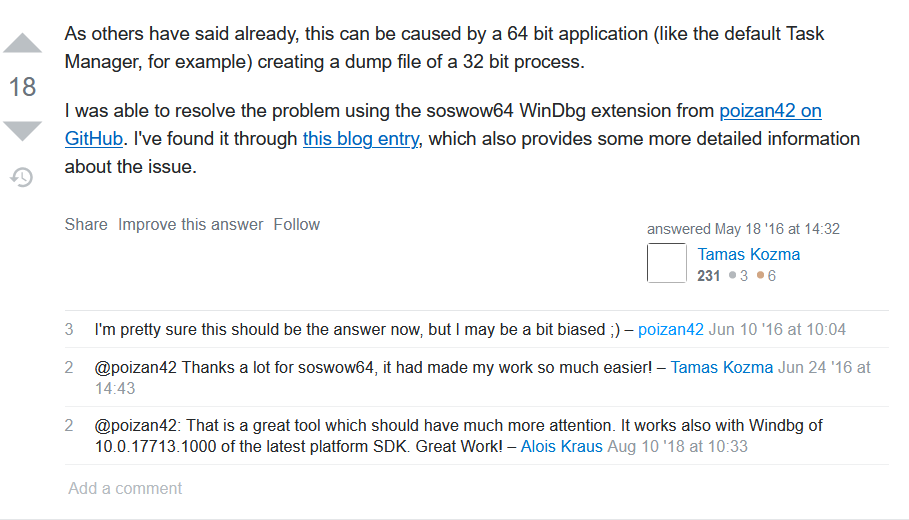
在下面链接下载soswow64.zip的文件,按照他的教程把,dll放到windbg的安装目录下的WinXP文件夹里,我的地址仅做参考 C:\Program Files (x86)\Windows Kits\10\Debuggers\x86\winxp
https://github.com/poizan42/soswow64/releases
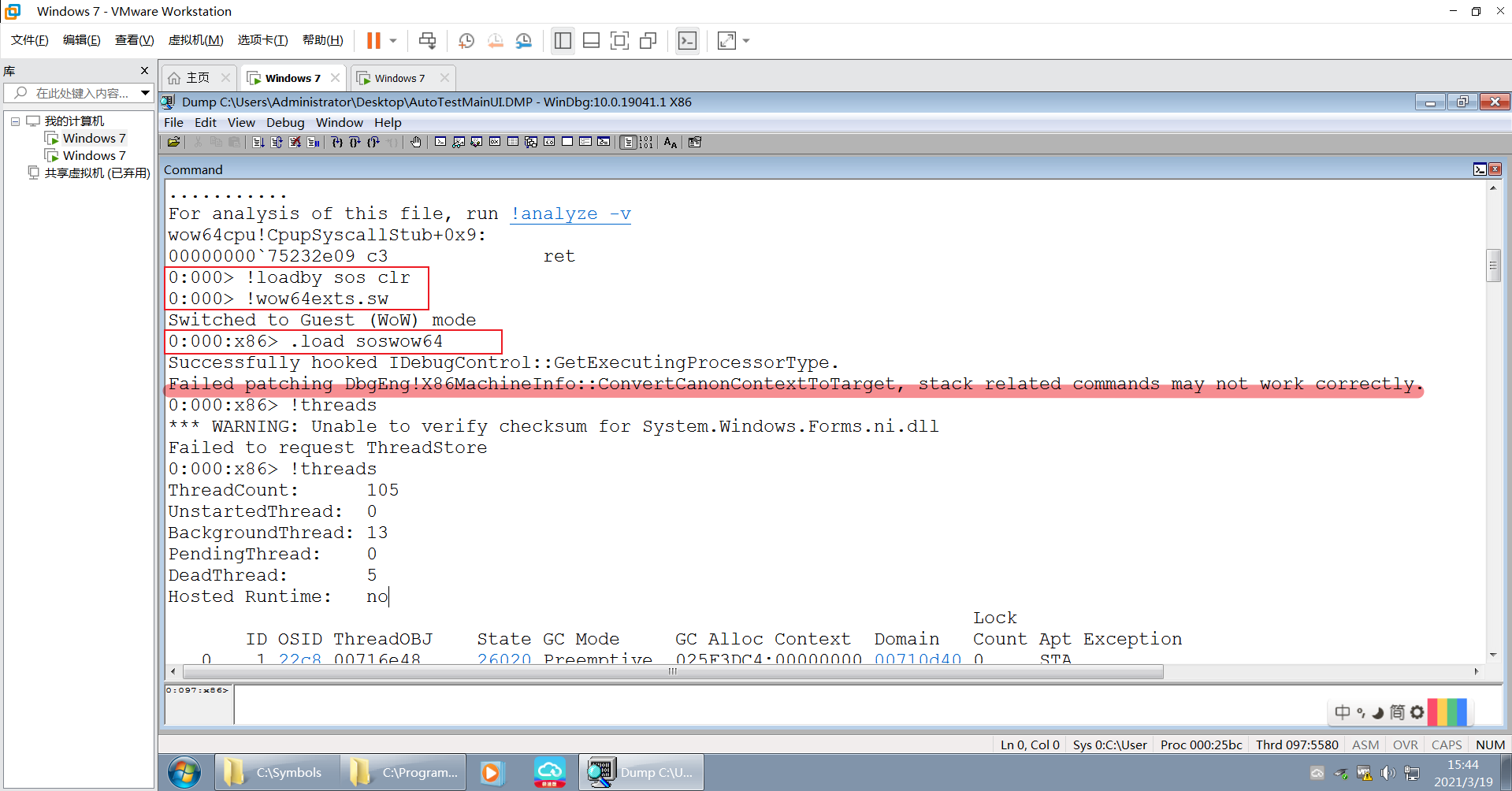
按照教程执行下面目命令
0:000> .load soswow64
Successfully hooked IDebugControl::GetExecutingProcessorType.
Successfully patched DbgEng!X86MachineInfo::ConvertCanonContextToTarget.

Example:

0:000> .loadby sos clr
0:000> !wow64exts.sw
Switched to 32bit mode
0:000:x86> !threads
SOS does not support the current target architecture.
0:000:x86> .load soswow64
Successfully hooked IDebugControl::GetExecutingProcessorType.
Successfully patched DbgEng!X86MachineInfo::ConvertCanonContextToTarget.
0:000:x86> !threads
ThreadCount:      16
UnstartedThread:  0
BackgroundThread: 4
PendingThread:    0
DeadThread:       11
Hosted Runtime:   no
我的执行之后有一个fail,但不影响调试
最后配合代码和堆栈信息,发现是执行到了东芝手臂的move函数,然后Threadsleep,查看线程的睡眠时间,发现是0,好吧这里就不太懂了,至少定位到了问题所在,后续还得看看东芝手臂的东西了
0:097:x86> !clrstack
OS Thread Id: 0x5580 (97)
Child SP       IP Call Site
0bffe00c 0000002b [HelperMethodFrame: 0bffe00c] System.Threading.Thread.SleepInternal(Int32)
0bffe098 6f6167a0 *** WARNING: Unable to verify checksum for mscorlib.ni.dll
System.Threading.Thread.Sleep(Int32)
0bffe0a0 050e7a4f TsRemoteLib.TsRemoteS.Move(MoveType, Double, Double, Double, Double, Double, TsRemoteLib.ConfigS, Double, Double, Double)
0bffe1fc 050e72e2 TsRemoteLib.TsRemoteS.Move(Double, Double, Double, Double, Double, TsRemoteLib.ConfigS)
0bffe234 050e7217 TsRemoteLib.TsRemoteS.Move(TsRemoteLib.TsPointS)
0bffe250 050e546d TestResuorceMamager.RobotTHL.MovePoint(TsRemoteLib.TsPointS, Boolean)
0bffe408 048ad578 TestResuorceMamager.RobotTHLServer.MovePrecisionLoader(TestResuorceMamager.Carrier_Index, Double, Double, Double)
0bffe5a8 048ac4aa TestResuorceMamager.RobotTHLServer.PutDutToPrecisionLoader(System.String)
0bffe6a8 049e5b37 TestResuorceMamager.RobotTHLServer.WorkLoop()
0bffe778 6f58ab43 System.Threading.ThreadHelper.ThreadStart_Context(System.Object)
0bffe784 6f59da07 System.Threading.ExecutionContext.RunInternal(System.Threading.ExecutionContext, System.Threading.ContextCallback, System.Object, Boolean)
0bffe7f0 6f59d956 System.Threading.ExecutionContext.Run(System.Threading.ExecutionContext, System.Threading.ContextCallback, System.Object, Boolean)
0bffe804 6f59d921 System.Threading.ExecutionContext.Run(System.Threading.ExecutionContext, System.Threading.ContextCallback, System.Object)
0bffe81c 6f58aacc System.Threading.ThreadHelper.ThreadStart()
0bffe970 73592552 [GCFrame: 0bffe970]
0bffeb54 73592552 [DebuggerU2MCatchHandlerFrame: 0bffeb54]

 浙公网安备 33010602011771号