
bs实战-汽车之家新闻
上一个新浪微博的例子比较简单,现在我们来看一个汽车之家的例子
还和之前一样,我们需要先导包然后定义url和请求头
import requests
from bs4 import BeautifulSoup

#定义url和请求头
url = 'https://www.autohome.com.cn/news/'
headers = {
        "User-Agent":"Mozilla/5.0 (Windows NT 10.0; Win64; x64) AppleWebKit/537.36 (KHTML, like Gecko) Chrome/91.0.4472.106 Safari/537.36"}
我们来看一下汽车之家新闻页的信息
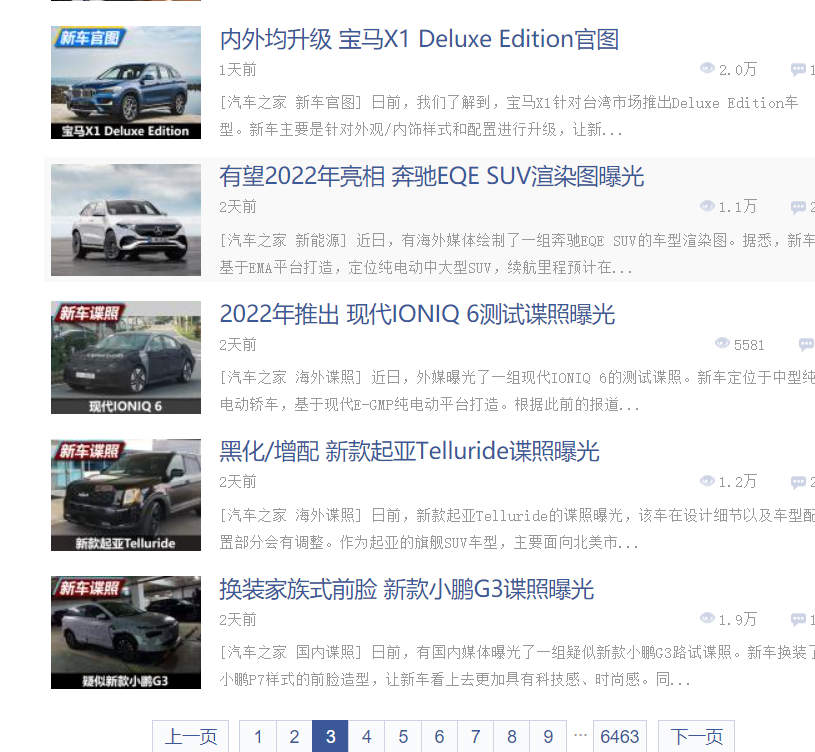
这有很多页,那么我们想爬取很多页的信息该怎么办呢
这需要我们观察一下url的规律,然后我们来定义一个url
#定义url
urls = []
for i in range(1,5):
    url = 'https://www.autohome.com.cn/news/{}/#liststart'.format(i)
    #使用format函数抓取前五页
    urls.append(url)
print(urls)
这里使用循环控制访问前五页的数据
接下来到提取数据的环节
#遍历url,提取数据
for url in urls:
    response = requests.get(url,headers=headers)
    content = response.content.decode('utf8')
    print(content)
    break
你会发现这段代码运行会报错

那么我们就要去网页里看一下meta标签charset属性
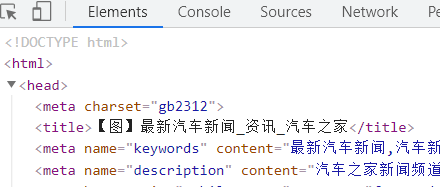
这里我们发现charset是gb2312
所以我们这段代码需要修改一下
#遍历url,提取数据
for url in urls:
    response = requests.get(url,headers=headers)
    content = response.content.decode('gb2312')
    print(content)
    break
接下来实例化BeautifulSoup对象
soup = BeautifulSoup(content,'lxml')
观察网页结构后,我们可以提取一下我们用到的信息
divs = soup.find_all('div',class_="article-wrapper")
    #print(divs)
    for div in divs:
        titles = list(div.find_all('h3'))
        times = list(div.find_all('span',class_="fn-left"))
        profiles = list(div.find_all('p'))
之后我们需要把信息存储起来,要用一个字典把一组的信息放在一起,然后还要用一个列表,每循环一次追加到列表里
这部分完整代码:
#遍历url,提取数据
news = []
for url in urls:
    response = requests.get(url,headers=headers)
    content = response.content.decode('gb2312')
#    print(content)
#    break
    #实例化BeautifulSoup对象
    soup = BeautifulSoup(content,'lxml')
    divs = soup.find_all('div',class_="article-wrapper")
    #print(divs)
    for div in divs:
        titles = list(div.find_all('h3'))
        times = list(div.find_all('span',class_="fn-left"))
        profiles = list(div.find_all('p'))
#        print(titles,times,profiles)
#        print(len(titles),len(times),len(profiles))
#        break
        for title,time,profile in zip(titles,times,profiles):
            title = title.string
            time = time.string
            profile = profile.string
           # print(title,time,profile)
            car_news = {
                      "title":title,
                      "time":time,
                      "profile":profile
                     }
            news.append(car_news)
print(news)
需要注意格式问题,要对齐
今天的分享结束啦,有问题欢迎留言哦~

 浙公网安备 33010602011771号