.Net通过NCO连接SAP总结
环境:VS2010,NCO3.0,SAP ECC6.0 EHP7
说明:NCO区分32位和64位,依系统不同安装不同的版本(安装时无特殊注意点);
WINFORM开发:
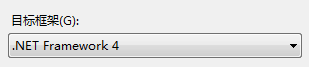
目标框架应设置为.Net Framework 4(项目->属性->应用程序)
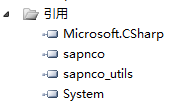
添加引用:sapnco,sapnco_utils
项目中添加app.config;程序代码中需添加
using SAP.Middleware.Connector;
using System.Configuration;
App.config内容如下:
<?xml version="1.0" encoding="utf-8" ?>
<configuration>
  <configSections>
    <sectionGroup name="SAP.Middleware.Connector">
      <sectionGroup name="ClientSettings">
        <section name="DestinationConfiguration" type="SAP.Middleware.Connector.RfcDestinationConfiguration,sapnco"/>
      </sectionGroup>
    </sectionGroup>
  </configSections>

  <SAP.Middleware.Connector>
    <ClientSettings>
      <DestinationConfiguration>
        <destinations>
          <add NAME= "EP1" USER="USER" PASSWD = "PAS" CLIENT="CLIENT"
               LANG="ZH" ASHOST="IP" SYSNR="00"
               MAX_POOL_SIZE="10" IDLE_TIMEOUT="10"/>
        </destinations>
      </DestinationConfiguration>
    </ClientSettings>
  </SAP.Middleware.Connector>
  <startup>
    <supportedRuntime version="v4.0" sku=".NETFramework,Version=v4.0"/>
  </startup>
</configuration>
在SAP中通过SE37开发RFC函数;ZQRDETAIL为自定义结构
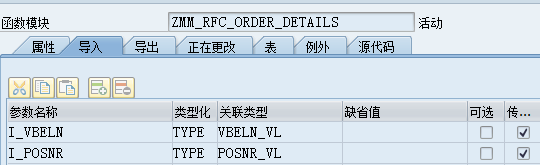
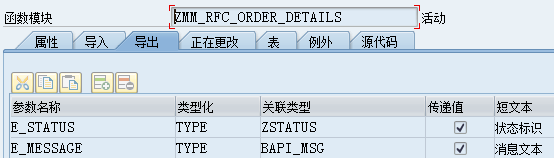
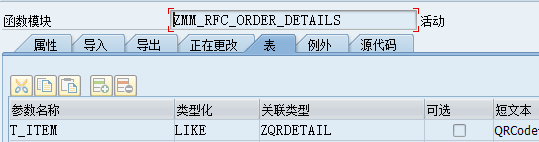
.Net调用RFC函数传递参数过程中,导入参数与表所使用的方式不同,使用导入导出参考代码如下:
        public DataTable GetSapData(string Vbeln, string Posnr)
        {
            DataTable Dtable = new DataTable();
            try
            {
                RfcDestination rfcDestination = RfcDestinationManager.GetDestination("EP1");
                RfcRepository rfcRepository = rfcDestination.Repository;
                IRfcFunction myfun = rfcRepository.CreateFunction("ZMM_RFC_ORDER_DETAILS");

                IRfcStructure import = null;


                import = rfcRepository.GetStructureMetadata("ZQRDETAIL").CreateStructure();

                myfun.SetValue("I_VBELN", Vbeln);
                myfun.SetValue("I_POSNR",Posnr);
                myfun.Invoke(rfcDestination);
                sta = myfun.GetString("E_STATUS");
                msg = myfun.GetString("E_MESSAGE");
                if (sta == "S")
                {
                    IRfcTable tables = myfun.GetTable("T_ITEM");
                    Dtable = ConverToDoNetTable(tables);
                }
                else
                {
                    MessageBox.Show( msg);
                }
            }
            catch (Exception ex)
            {
                MessageBox.Show(ex.Message);
            }
            return Dtable;
        }
private DataTable ConverToDoNetTable(IRfcTable RFCTable)
        {
            DataTable dtTable = new DataTable();
            //Create table
            for (int item = 0; item < RFCTable.ElementCount; item++)
            {
                RfcElementMetadata metadata = RFCTable.GetElementMetadata(item);
                dtTable.Columns.Add(metadata.Name);
            }

            foreach (IRfcStructure row in RFCTable)
            {
                DataRow dr = dtTable.NewRow();
                for (int item = 0; item < RFCTable.ElementCount; item++)
                {
                    RfcElementMetadata metadata = RFCTable.GetElementMetadata(item);
                    if (metadata.DataType == RfcDataType.BCD)
                    {
                        dr[item] = row.GetDouble(metadata.Name);
                    }
                    else
                    {
                        dr[item] = row.GetString(metadata.Name);
                    }
                }
                dtTable.Rows.Add(dr);
            }
            return dtTable;
        }
如果导入导出中均未设置参数,参数全部通过表传入SAP,如下参考:
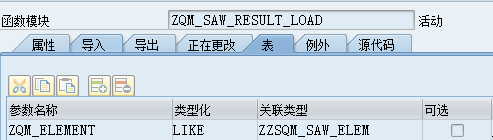
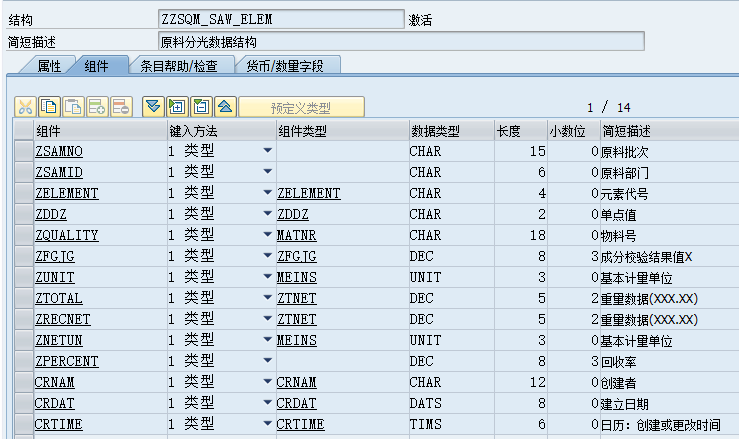
获取参数部分代码如下:
       private string ConvertToSap(int X, RfcDestination dest)
        {
            RfcRepository SapRfcRepository = dest.Repository;
            // Create and invhuoke function module
            IRfcFunction myfun = SapRfcRepository.CreateFunction("ZQM_SAW_RESULT_LOAD");
            // Set some input values for the structure.
            IRfcStructure import = null;
            IRfcTable tables = myfun.GetTable("ZQM_ELEMENT");

            for (int C = 0; C <= dgvShow.ColumnCount - 8; C++)
            {
                import = SapRfcRepository.GetStructureMetadata("ZZSQM_SAW_ELEM").CreateStructure();

                string zsamno = dgvShow.Rows[X].Cells["Name"].Value.ToString().Trim();

                import.SetValue("ZSAMNO", zsamno);

                import.SetValue("ZNETUN", "KG");

                tables.Insert(import);
            }
            myfun.Invoke(dest);
        }
其他代码参考:
using System;
using System.Collections.Generic;
using System.Linq;
using System.Text;
using System.Data;
using System.Data.SqlClient;
using SAP.Middleware.Connector;
using System.Configuration;
using System.IO;

namespace ImpHrReadSap
{
    class Program
    {
        private static DataTable ConverToDoNetTable(IRfcTable RFCTable)
        {
            DataTable dtTable = new DataTable();
            //Create table
            for (int item = 0; item < RFCTable.ElementCount; item++)
            {
                RfcElementMetadata metadata = RFCTable.GetElementMetadata(item);
                dtTable.Columns.Add(metadata.Name);
            }

            foreach (IRfcStructure row in RFCTable)
            {
                DataRow dr = dtTable.NewRow();
                for (int item = 0; item < RFCTable.ElementCount; item++)
                {
                    RfcElementMetadata metadata = RFCTable.GetElementMetadata(item);
                    if (metadata.DataType == RfcDataType.BCD)
                    {
                        dr[item] = row.GetDouble(metadata.Name);
                    }
                    else
                    {
                        dr[item] = row.GetString(metadata.Name);
                    }
                }
                dtTable.Rows.Add(dr);
            }
            return dtTable;
        }

        static void Main(string[] args)
        {
            int F = 0;
            //Path
            string FilePath = "D:\\SAPLOG\\";
            string Log = "HRLog.txt";
            string dt = DateTime.Now.ToString("yyyyMMdd");
            string SqlConString = ConfigurationManager.ConnectionStrings["SapYcSqlConnectiongString"].ConnectionString.ToString();
            SqlConnection conn = new SqlConnection(SqlConString);
            SqlCommand com = new SqlCommand("DelTIAB", conn);
            try
            {
                conn.Open();
                SqlTransaction trans = conn.BeginTransaction();
                com.CommandType = CommandType.StoredProcedure;
                com.Transaction = trans;
                com.Parameters.Add("@RET", SqlDbType.Int);
                com.Parameters["@RET"].Direction = ParameterDirection.ReturnValue;
                com.ExecuteNonQuery();
                F = (int)com.Parameters["@RET"].Value;
                RfcDestination rfcDestination = RfcDestinationManager.GetDestination("EP1");
                RfcRepository rfcRepository = rfcDestination.Repository;
                IRfcFunction myfun = rfcRepository.CreateFunction("Z_HR_PA_001");
                myfun.SetValue("I_BEGDA", dt);
                myfun.SetValue("I_ENDDA", dt);
                myfun.Invoke(rfcDestination);
                IRfcTable Mtables = myfun.GetTable("RESULT_OUT");
                DataTable Master = ConverToDoNetTable(Mtables);
                using (SqlBulkCopy SqlBc = new SqlBulkCopy(conn, SqlBulkCopyOptions.Default, trans))
                {
                    try
                    {
                        SqlBc.DestinationTableName = "SAPTEMPHR";
                        SqlBc.WriteToServer(Master);
                        com.CommandText = "SelTempHrToTIAB";
                        com.ExecuteNonQuery();
                        trans.Commit();
                    }
                    catch (Exception ex)
                    {
                        trans.Rollback();
                        FileStream FS = new FileStream(FilePath + Log, System.IO.FileMode.OpenOrCreate);
                        StreamWriter WR = new StreamWriter(FS);
                        WR.Write(ex.Message);
                        WR.Flush();
                        WR.Close();
                        FS.Close();
                    }
                }
            }
            catch (Exception ex)
            {
                FileStream FS = new FileStream(FilePath + Log, System.IO.FileMode.OpenOrCreate);
                StreamWriter WR = new StreamWriter(FS);
                WR.Write(ex.Message);
                WR.Flush();
                WR.Close();
                FS.Close();
            }
        }
    }
}

 浙公网安备 33010602011771号