
thinkphp视图
一、模板渲染
1、模板渲染
控制器 和模板,它们名字是对应的。
通过fetch方法,访问控制器时,就可以渲染模板
想使用fetch方法,要先use引入view
namespace app\controller;
use app\BaseController;
use think\facade\View;

class Index extends BaseController
{
    public function index()
    {
        return View::fetch();

    }
这里如果我们没有视图文件,会 报错:模板文件不存在
第一步:创建一个跟控制器平级的目录。目录名:view
第二部 :在view目录里创建index目录
第三步:在index目录下,创建index.html文件
2、注入View
thinkphp6使用view可能会冲突,我们就需要用注入的方式。
namespace app\controller;
use app\BaseController;
//use think\facade\View;
use think\View;

class Index extends BaseController
{
    public function index(View $view)
    {
        return $view->fetch();

    }
}
3、调用模板
namespace app\controller;
use app\BaseController;
use think\facade\View;

class Index extends BaseController
{
    public function index()
    {
     //调用对应名称模板
     return View::fetch();
//调用本控制器task模板
     return View::fetch('task');

    //调用user控制器里的index模板
        return View::fetch('user/index');
   //调用admin项目里的member类的index模板
    return View::fetch('admin@member/index');

    }
}
二、模板赋值
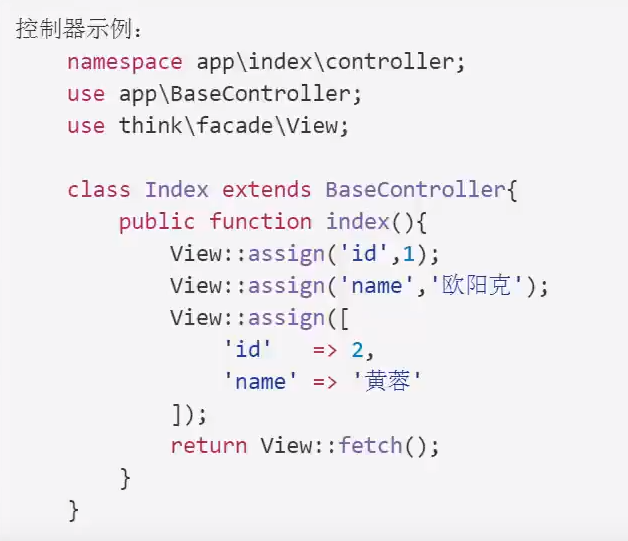
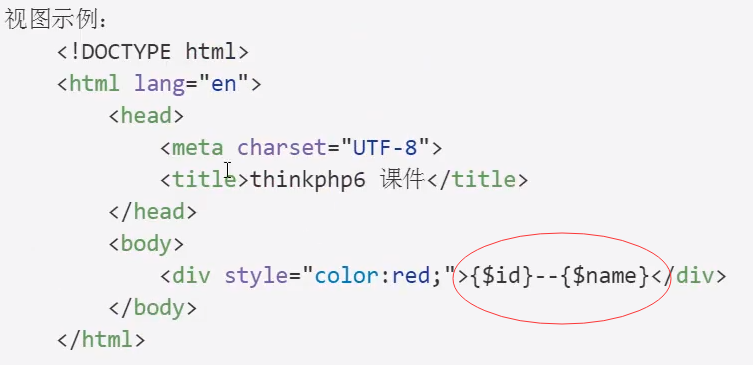
使用assign方法进行模板变量赋值

 浙公网安备 33010602011771号