

CentOS 安装 Redis
下载Redis
进入官网找到下载地址:https://redis.io/download
![[外链图片转存失败,源站可能有防盗链机制,建议将图片保存下来直接上传(img-ukfj6YlK-1637890569444)(Linux上安装Redis.assets/image-20210603231336807.png)]](https://img-blog.csdnimg.cn/4f079ce2ed1e4c16b4adfb5874fb46d7.png?x-oss-process=image/watermark,type_ZHJvaWRzYW5zZmFsbGJhY2s,shadow_50,text_Q1NETiBA5Yed56We6YGQ5oOz,size_20,color_FFFFFF,t_70,g_se,x_16)
右键 Download按钮,选择复制链接
进入到Xshell控制台
[root@centos ~]# cd /usr/local
[root@centos local]# mkdir redis
[root@centos local]# cd redis/
[root@centos local]# wget https://download.redis.io/releases/redis-6.2.4.tar.gz
wget 复制的链接
等待下载完成
解压
[root@centos redis]# tar -zxvf redis-6.2.4.tar.gz
[root@centos redis]# ls
输入ls可以看到安装好的目录
编译
[root@localhost redis-6.2.4]# make
![[外链图片转存失败,源站可能有防盗链机制,建议将图片保存下来直接上传(img-6tT0H6b4-1637890569447)(Linux上安装Redis.assets/image-20210603232202867.png)]](https://img-blog.csdnimg.cn/6a89cdb44a6e40cb928b458a52da3661.png)
安装
[root@centos redis-6.2.4]# make PREFIX=/usr/local/redis install

启动Redis
后台进程方式启动
[root@centos redis]# ./bin/redis-server &
查看Redis是否正在运行
[root@centos redis]# ps -ef | grep redis
编译报错解决
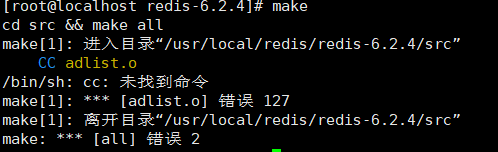
[root@centos redis]# yum -y install gcc-c++
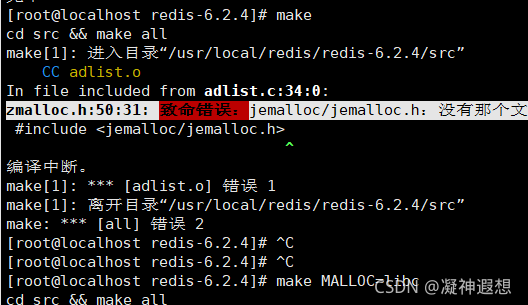
[root@centos redis]# make MALLOC=libc
了解更多可扫码关注公众号


 浙公网安备 33010602011771号