


element组件--基础表格el-table

参考: https://element.eleme.cn/#/zh-CN/component/table
<   template >
   <   el-table
     :data="tableData"
     style="width: 100%">
     <   el-table-column
       prop="date"
       label="日期"
       width="180">

     <   el-table-column
       prop="name"
       label="姓名"
       width="180">

  <   span style="color: #ff0000;" data-mce-style="color: #ff0000;">   <   el-table-column
       prop="address"
       label="地址">


 <   script >
   export default {
     data() {
       return {
         tableData: [{
           date: '2016-05-02',
           name: '王小虎',
           address: '上海市普陀区金沙江路 1518 弄'
         }, {
           date: '2016-05-04',
           name: '王小虎',
           address: '上海市普陀区金沙江路 1517 弄'
         }, {
           date: '2016-05-01',
           name: '王小虎',
           address: '上海市普陀区金沙江路 1519 弄'
         }, {
           date: '2016-05-03',
           name: '王小虎',
           address: '上海市普陀区金沙江路 1516 弄'
         }]
       }
     }
   }
加一个操作列且里面带跳转标签
<el-table-column label="访问链接" width="400" show-overflow-tooltip>
<template>
<a :href="aa">编辑</a> <a :href="aa">删除</a>
</template>
</el-table-column>
加一个获取当前列的值的方法
<el-table-column
prop="id"
label="操作"
>
<template slot-scope="scope">
<a href="JavaScript:;" @click="infoList_detial(scope.row.id)">编辑</a>
</template >
</el-table-column>
注意: scope.row.id 是获取接口的数据的每个对象 ,所以没在页面上展示的列 也可以拿到的
后记:
太长鼠标移动出现气泡效果可以加属性 :show-overflow-tooltip
<el-table-column prop="iterations_name" label="迭代名称" :show-overflow-tooltip='true'>
修改表头的样式 用scss语法
<template>
 <a-table class="conRight" style="width:46%;padding:20px;" bordered :data-source="b_one_dataSource" :columns="b_one_columns" :pagination="false">
      </a-table>
</template>


<style lang="scss">
.conRight .ant-table-thead {
  ::v-deep & > tr > th {
    background: rgb(245, 236, 213);
  }}
</style>
列的字符过多 实现换行展示的方法
<template>
  <el-table :data="tableData" style="width: 100%">
    <el-table-column
      prop="iterations_name"
      width="150px"
      label="迭代名称"
      :show-overflow-tooltip="true"
      class-name="cell-wrap-text"
    ></el-table-column>
    <!-- 其他列 -->
  </el-table>
</template>

<script>
export default {
  data() {
    return {
      tableData: [
        // ...你的表格数据
      ],
    };
  },
};
</script>

<style scoped>
/* 自定义 CSS 类来允许文本换行 */
.cell-wrap-text .cell {
  white-space: normal !important;
  word-break: break-all;
}
</style>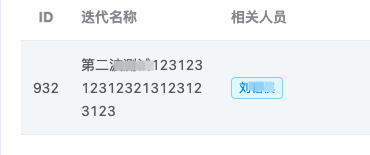

 浙公网安备 33010602011771号