
生成微博授权url
-
创建apps/oauth模块进行oauth认证
'''2.1 在apps文件夹下新建应用: oauth'''
cd syl/apps
pyhton ../manage.py startapp oauth
'''2.2 添加子路由: oauth/urls.py'''
from django.urls import path
from . import views
urlpatterns = [
]
'''2.3 在syl/settings.py中添加应用'''
INSTALLED_APPS = [
'oauth.apps.OauthConfig',
]
'''2.4 在syl/urls.py主路由中添加'''
urlpatterns = [
path('oauth/', include('oauth.urls')),
]
-
添加子路由:oauth/urls.py
urlpatterns = [
    path('weibo/', views.WeiboUrl.as_view())        # /oauth/weibo/
]
-
syl/settings.py中配微博地址
-
视图函数: oauth/views/py
from rest_framework.permissions import AllowAny
from rest_framework.response import Response
from rest_framework.views import APIView
from urllib.parse import urlencode
# 生成前端跳转到微博扫码页面的url
class WeiboUrl(APIView):
'''
生成微博的登录页面路由地址
https://api.weibo.com/oauth/oauth2/authorize # 微博oauth认证地址
client_id = 1890720403& # 注册开发者id
response_type = code&
redirect_uri = http://127.0.0.1:8888/oauth/callback/ #获取code后将code回 调给后段地址
'''
#自定义权限类
permission_classes = (AllowAny,)
def post(self, request):
url = 'https://api.weibo.com/oauth2/authorize?' # 微博授权的url地址
data = {
'client_id': '1890720403', # WEIBO_APP_KEY
'response_type': 'code',
'redirect_uri': 'http://127.0.0.1:8888/oauth/callback/'
# Vue的回调,微博后台授权的回调地址
}
weibo_url = url + urlencode(data)
# https://api.weibo.com/oauth2/authorize? client_id=4152203033&response_type=code&redirect_uri=http://127.0.0.1:8000/api/we ibo_back/
# return Response({'weibo_url': weibo_url})
return Response({'code': '0', 'msg': '成功', 'data': {'url': weibo_url}})
-
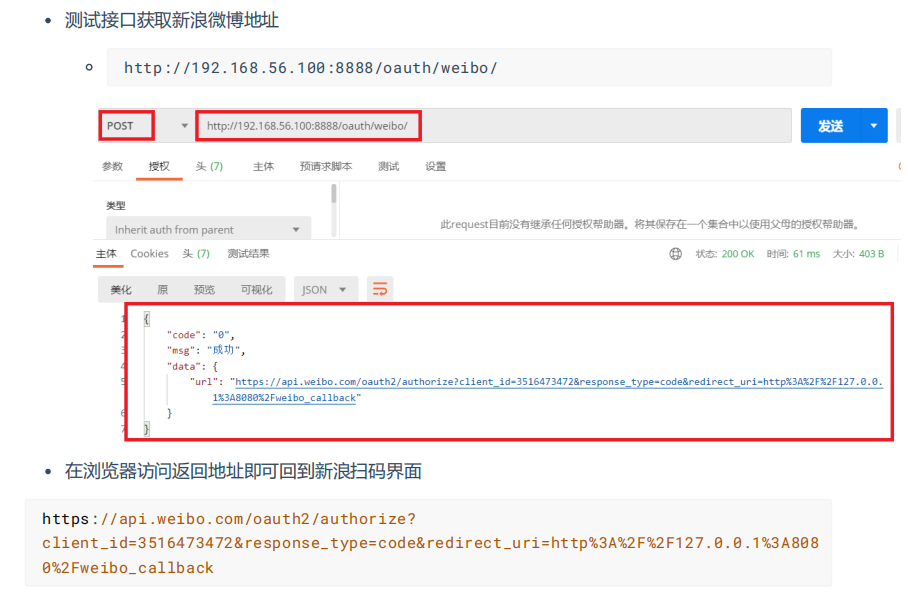
测试生成微博售前URL接口
# 测试接口获取新浪微博地址

 浙公网安备 33010602011771号