


[Linux]通过ssh远程登录另一台电脑,无须每次都输入密码的办法,通过copy-id
思路:
#step1:生成秘钥 生成以后我这里保存在 /root/.ssh/id_rsa 记住这个位置
ssh-keygen #敲3次回车
#将秘钥发送到另一台linux服务器 此过程会输入免密登录的linux用户密码
ssh-copy-id <username>@10.1.71.51

#执行ssh命令进行登录
ssh <username>@10.1.71.51
具体操作:
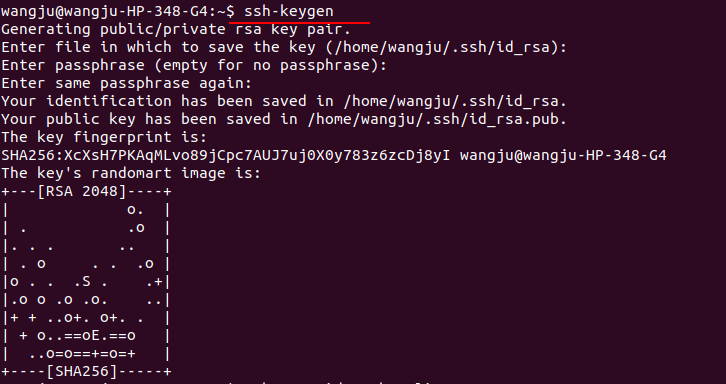
step1:生成密钥
ssh-keygen
step2:将秘钥发送到另一台linux服务器,
系统询问是否继续连接时,输入yes
然后输入root用户的密码
(ssh <username>@10.1.71.51)你使用的是哪个username,就输入哪个username的登录密码)
wangju@wangju-HP-348-G4:~$ ssh-copy-id root@10.2.1.92
The authenticity of host '10.2.1.92 (10.2.1.92)' can't be established.
ECDSA key fingerprint is SHA256:Ar7EcI1o7lTpJNX7dD3FgDKyV7180t2iAGjXrjBlBGU.
Are you sure you want to continue connecting (yes/no)? yes
/usr/bin/ssh-copy-id: INFO: attempting to log in with the new key(s), to filter out any that are already installed
/usr/bin/ssh-copy-id: INFO: 1 key(s) remain to be installed -- if you are prompted now it is to install the new keys
root@10.2.1.92's password:

Number of key(s) added: 1

Now try logging into the machine, with:   "ssh 'root@10.2.1.92'"
and check to make sure that only the key(s) you wanted were added.
step3:验证配置结果:
再次执行 ssh root@10.2.1.92,不需要再输入密码,即可连接成功
wangju@wangju-HP-348-G4:~$ ssh root@10.2.1.92
Last login: Fri Jan  3 15:59:31 2020 from 10.1.71.32
[root@67 ~]# logout
Connection to 10.2.1.92 closed.

 浙公网安备 33010602011771号