

Android学习——fragement
1、fragement与html中的iframe框架很相似,在同一个页面中显示不同的内容,平常使用的手机qq下面一般有四个可切换的按键,每个按键对应不同的页面,而它们所对应的页面便是由fragement编写。fragement的使用是为了让界面更加灵活。
2、fragement拥有生命周期,依托activity的生命周期存在
3、在activity中使用fragement时,必须加上name和id,一是为了后台使用更加方便,二是不加的话程序无法运行,会出现闪退的情况
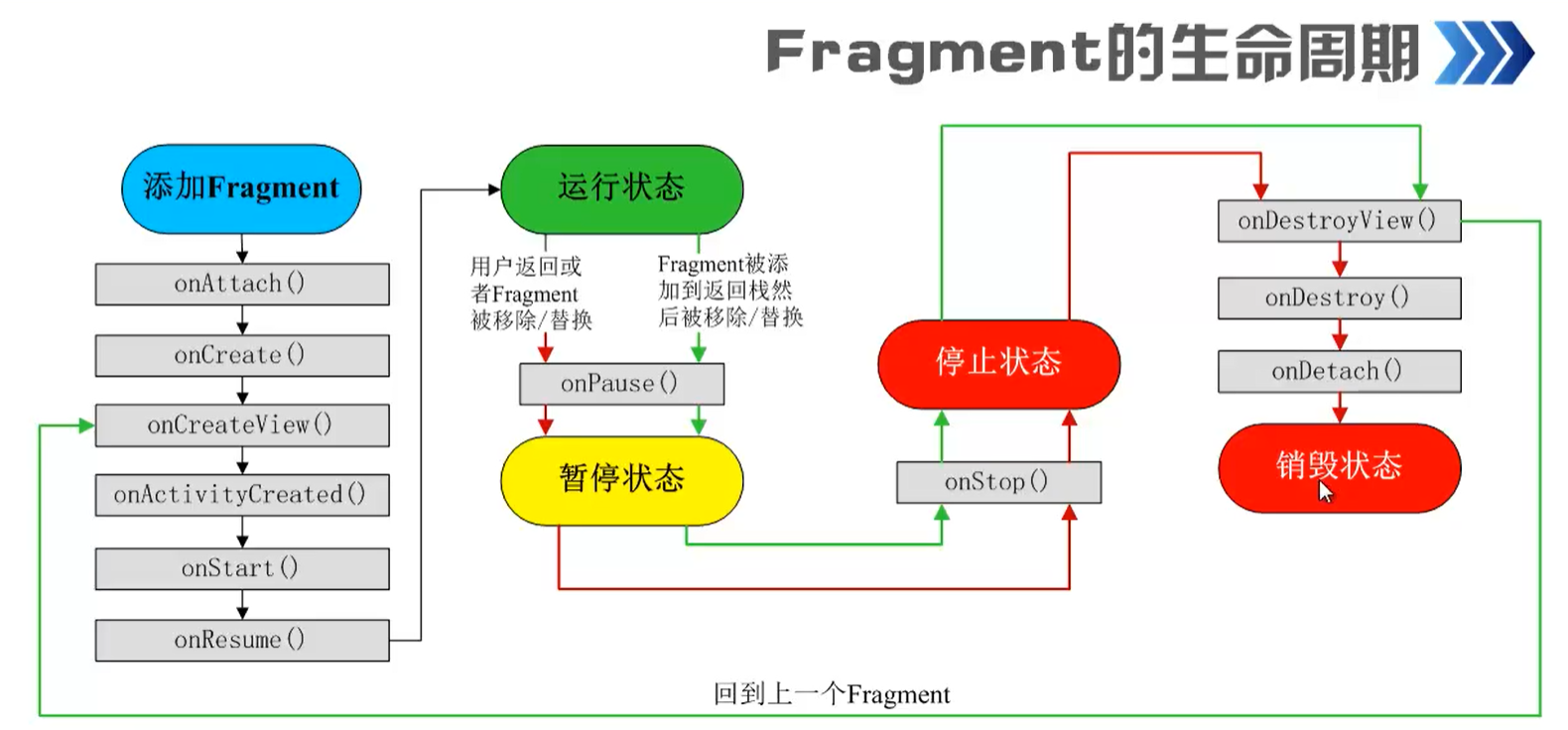
下面是写的一个练习,点击按键之后,屏幕上的字体会改变
package com.example.fragement;

import android.os.Bundle;

import androidx.fragment.app.Fragment;

import android.view.LayoutInflater;
import android.view.View;
import android.view.ViewGroup;
import android.widget.Button;
import android.widget.TextView;

public class BlankFragment1 extends Fragment {

    private View root;
    @Override
    public void onCreate(Bundle savedInstanceState) {
        super.onCreate(savedInstanceState);

    }

    @Override
    public View onCreateView(LayoutInflater inflater, ViewGroup container,
                             Bundle savedInstanceState) {

        if(root == null){
            root = inflater.inflate(R.layout.fragment_blank1, container, false);
        }
        //解析text
        TextView textview = root.findViewById(R.id.textview);
        //初始化button,相应点击事件
        Button btn = root.findViewById(R.id.btn);
        btn.setOnClickListener(new View.OnClickListener() {
            @Override
            public void onClick(View view) {
                textview.setText("是的,我很好");
            }
        });
        return root;
    }
}
<?xml version="1.0" encoding="utf-8"?>
<LinearLayout xmlns:android="http://schemas.android.com/apk/res/android"
    xmlns:tools="http://schemas.android.com/tools"
    android:layout_width="match_parent"
    android:layout_height="match_parent"
    android:orientation="vertical"
    tools:context=".BlankFragment1">

    <!-- TODO: Update blank fragment layout -->
    <TextView
        android:layout_width="match_parent"
        android:layout_height="40dp"
        android:id="@+id/textview"
        android:text="@string/hello_blank_fragment" />

    <Button
        android:layout_width="match_parent"
        android:layout_height="40dp"
        android:text="你好"
        android:layout_alignBottom="@id/textview"
        android:background="@color/purple_200"
        android:id="@+id/btn"/>


</LinearLayout>
<?xml version="1.0" encoding="utf-8"?>
<LinearLayout xmlns:android="http://schemas.android.com/apk/res/android"
    xmlns:app="http://schemas.android.com/apk/res-auto"
    xmlns:tools="http://schemas.android.com/tools"
    android:layout_width="match_parent"
    android:layout_height="match_parent"
    android:orientation="vertical"
    tools:context=".MainActivity">

    <fragment
        android:name="com.example.fragement.BlankFragment1"
        android:layout_width="match_parent"
        android:layout_height="match_parent"
        android:id="@+id/fragement1"/>
</LinearLayout>

 浙公网安备 33010602011771号