

Unity中在纹理上绘制图形
Unity中在纹理上绘制图形
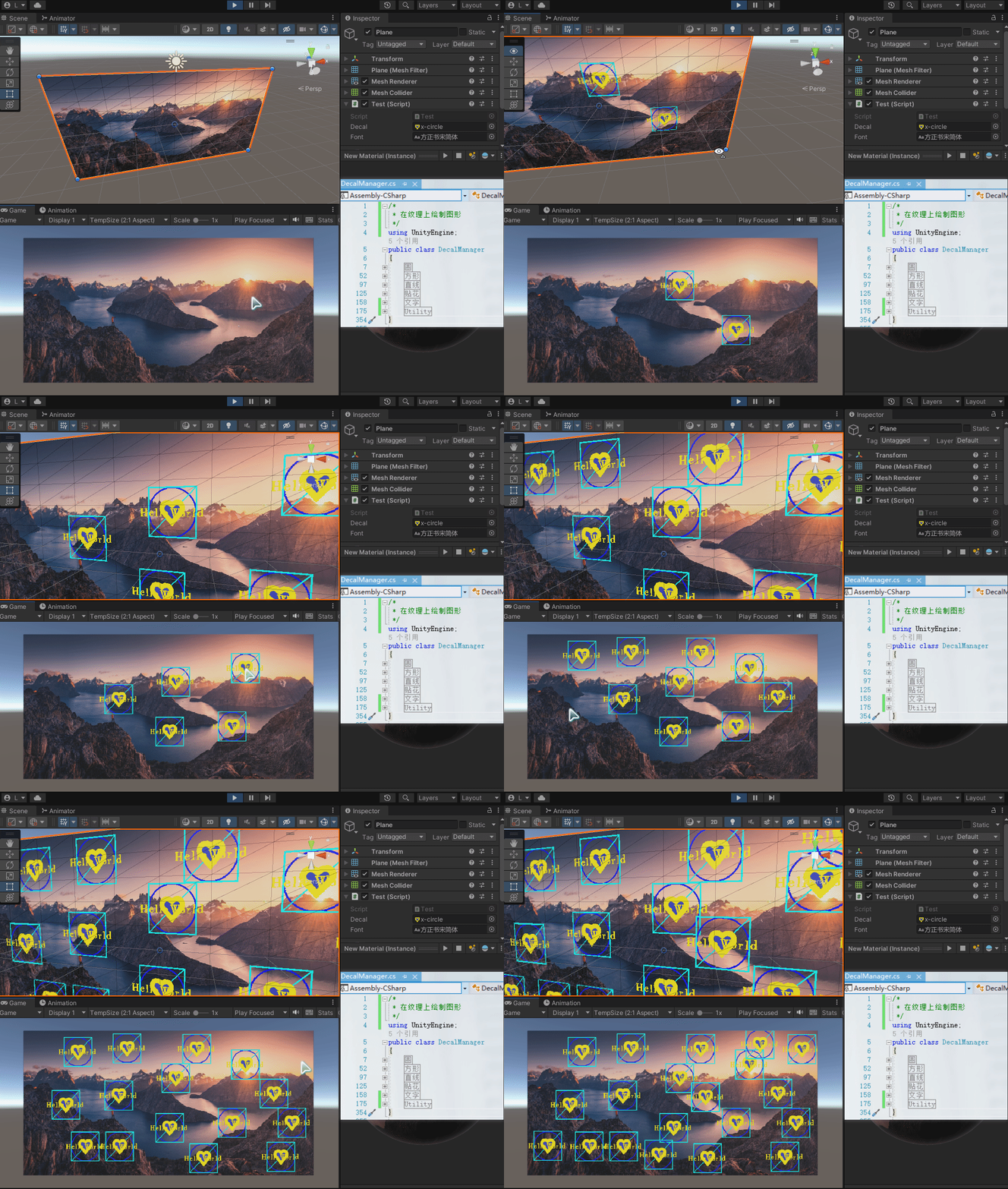
支持绘制图形:
- 圆形(实心-空心)
- 方形(实心-空心)
- 直线/虚线
- 纹理(贴花)
- 文字
使用如下:
创建3D Plane 并添加 Test.cs脚本
using UnityEngine;

public class Test : MonoBehaviour
{
    public Texture2D decal;
    public Font font;
    Texture2D wallTexture;
    // 定义一个图片副本
    Texture2D DrawTexture;
    RaycastHit hit;
    private void Start()
    {
        // 获取墙贴图
        wallTexture = GetComponent<MeshRenderer>().material.mainTexture as Texture2D;
        // 备份一个墙的图片
        DrawTexture = Instantiate(wallTexture) as Texture2D;
        // 将备份赋值回去,做为修改对象
        GetComponent<MeshRenderer>().material.mainTexture = DrawTexture;
    }
    private void Update()
    {
        if (Input.GetMouseButtonDown(0))
        {
            Ray ray = Camera.main.ScreenPointToRay(Input.mousePosition);
            if (Physics.Raycast(ray, out hit))
            {
                if (hit.collider.name == "Plane")
                {
                    Vector2 hitPos = hit.textureCoord;
                    Vector2Int pos = new Vector2Int((int)(hitPos.x * DrawTexture.width), (int)(hitPos.y * DrawTexture.height));
                    // 绘制填充圆
                    //DecalManager.DrawCircleFill(DrawTexture, pos, 50, Color.red);
                    // 绘制圆环
                    DecalManager.DrawCircle(DrawTexture, pos, 50, 3, Color.blue);
                    // 绘制填充矩形
                    //DecalManager.DrawRectangleFill(DrawTexture, pos + Vector2Int.one * -50, pos + Vector2Int.one * 50, Color.cyan);
                    // 绘制矩形
                    DecalManager.DrawRectangle(DrawTexture, pos + Vector2Int.one * -50, pos + Vector2Int.one * 50, 3, Color.cyan);
                    // 绘制直线
                    DecalManager.DrawLine(DrawTexture, pos + Vector2Int.one * -50, pos + Vector2Int.one * 50, 3, Color.cyan);
                    // 绘制纹理(贴花)
                    DecalManager.DrawTex(DrawTexture, decal, pos);
                    // 绘制文字
                    DecalManager.DrawText(DrawTexture, pos, "HelloWorld", font, Color.yellow);
                }
            }
        }
    }
}
绘图插件代码:
/*
 * 在纹理上绘制图形
 */
using UnityEngine;
public class DecalManager
{
    #region 圆
    /// <summary>
    /// 在纹理上绘制一个实行圆
    /// </summary>
    /// <param name="texture">要绘制的纹理</param>
    /// <param name="Center">圆点纹理像素坐标</param>
    /// <param name="r">圆像素半径</param>
    /// <param name="color">颜色</param>
    public static void DrawCircleFill(Texture2D texture, Vector2Int Center, int r, Color color)
    {
        for (int x = Center.x - r; x <= Center.x + r; x++)
        {
            for (int y = Center.y - r; y <= Center.y + r; y++)
            {
                if (InCircle(x, y, Center, r))
                {
                    texture.SetPixel(x, y, color);
                }
            }
        }
        texture.Apply();
    }
    /// <summary>
    /// 在纹理上绘制一个圆不带填充
    /// </summary>
    /// <param name="texture">要绘制的纹理</param>
    /// <param name="Center">圆点纹理像素坐标</param>
    /// <param name="r">圆半径纹理像素</param>
    /// <param name="border">线宽度</param>
    /// <param name="color">绘制颜色</param>
    public static void DrawCircle(Texture2D texture, Vector2Int Center, int r, int border, Color color)
    {
        for (int x = Center.x - r; x <= Center.x + r; x++)
        {
            for (int y = Center.y - r; y <= Center.y + r; y++)
            {
                if (InCircle(x, y, Center, r) && !InCircle(x, y, Center, r - border))
                {
                    texture.SetPixel(x, y, color);
                }
            }
        }
        texture.Apply();
    }
    #endregion
    #region 方形
    /// <summary>
    /// 在纹理上绘制一个实心方形
    /// </summary>
    /// <param name="texture">要绘制的纹理</param>
    /// <param name="ld">方形左下角坐标纹理坐标</param>
    /// <param name="ru">方形方向右上角纹理坐标</param>
    /// <param name="color">填充颜色</param>
    public static void DrawRectangleFill(Texture2D texture, Vector2Int ld, Vector2Int ru, Color color)
    {
        for (int x = ld.x; x <= ru.x; x++)
        {
            for (int y = ld.y; y <= ru.y; y++)
            {
                if (InRectangle(x, y, ld, ru))
                {
                    texture.SetPixel(x, y, color);
                }
            }
        }
        texture.Apply();
    }
    /// <summary>
    /// 在纹理上绘制一个没有填充的方形
    /// </summary>
    /// <param name="texture">要绘制的纹理</param>
    /// <param name="ld">左下角纹理坐标</param>
    /// <param name="ru">右上角纹理坐标</param>
    /// <param name="border">方形边界宽度</param>
    /// <param name="color">绘制的颜色</param>
    public static void DrawRectangle(Texture2D texture, Vector2Int ld, Vector2Int ru, int border, Color color)
    {
        for (int x = ld.x; x <= ru.x; x++)
        {
            for (int y = ld.y; y <= ru.y; y++)
            {
                if (InRectangle(x, y, ld, ru) && !InRectangle(x, y, ld + Vector2Int.one * border, ru - Vector2Int.one * border))
                {
                    texture.SetPixel(x, y, color);
                }
            }
        }
        texture.Apply();
    }
    #endregion
    #region 线
    /// <summary>
    /// 在纹理上绘制一条直线
    /// </summary>
    /// <param name="texture">要被绘制的纹理</param>
    /// <param name="start">起点纹理坐标</param>
    /// <param name="end">终点纹理坐标</param>
    /// <param name="border">线宽度</param>
    /// <param name="color">绘制的颜色</param>
    public static void DrawLine(Texture2D texture, Vector2Int start, Vector2Int end, int border, Color color)
    {
        Vector2Int vector = Vector2Int.zero;
        border /= 2;
        for (int x = start.x; x <= end.x; x++)
        {
            for (int y = start.y; y <= end.y; y++)
            {
                vector.x = x;
                vector.y = y;
                if (InLine(vector, start, end, border))
                {
                    texture.SetPixel(x, y, color);
                }
            }
        }
        texture.Apply();
    }
    /// <summary>
    /// 在纹理上绘制一条虚线
    /// </summary>
    /// <param name="texture">纹理画布</param>
    /// <param name="start">起点</param>
    /// <param name="end">终点</param>
    /// <param name="radius">线宽度</param>
    /// <param name="color">线颜色</param>
    /// <param name="gap">线间距</param>
    public static void DrawDottedLine(Texture2D texture, Vector2Int start, Vector2Int end, int radius, Color color, int gap = 2)
    {
        Vector2 center = start;
        while (center != end)
        {
            center = Vector2.MoveTowards(center, end, radius * 2 + gap);
            for (int x = (int)(center.x - radius); x <= center.x + radius; x++)
            {
                for (int y = (int)(center.y - radius); y <= center.y + radius; y++)
                {
                    if (InCircle(x, y, new Vector2Int((int)center.x, (int)center.y), radius))
                    {
                        texture.SetPixel(x, y, color);
                    }
                }
            }
        }
        texture.Apply();
    }
    #endregion
    #region 贴花
    /// <summary>
    /// 在纹理上填充一个纹理
    /// </summary>
    /// <param name="texture">要处理的纹理</param>
    /// <param name="source">贴花纹理</param>
    /// <param name="Center">贴花位置</param>
    public static void DrawTex(Texture2D texture, Texture2D source, Vector2Int Center)
    {
        for (int i = 0; i < source.width; i++)
        {
            for (int j = 0; j < source.height; j++)
            {
                // 得到texture对应source应该出现的每个像素点
                int x = Center.x - source.width / 2 + i;
                int y = Center.y - source.height / 2 + j;

                // 获取texture每个像素点的颜色
                Color texColor = texture.GetPixel(x, y);
                // 获取source的对应每个像素点的颜色
                Color sourceColor = source.GetPixel(i, j);
                // 融合
                if (sourceColor.a > 0.1f)
                {
                    //Color r = texColor * sourceColor;
                    texture.SetPixel(x, y, sourceColor);
                }
            }
        }
        //将修改融合的图片应用
        texture.Apply();
    }
    #endregion
    #region 文字
    /// <summary>
    /// 在纹理上绘制文字
    /// </summary>
    /// <param name="texture">要被处理的纹理</param>
    /// <param name="Center">绘制的起点(文字将从左->右,上->下方渲染)</param>
    /// <param name="text">要绘制的文字</param>
    /// <param name="font">文字使用的字体(动态字体)</param>
    /// <param name="color">文字使用的颜色</param>
    /// <param name="fontSize">文字尺寸</param>
    /// <param name="style">文字使用的样式</param>
    public static void DrawText(Texture2D texture, Vector2Int Center, string text, Font font, Color color, int fontSize = 24, FontStyle style = FontStyle.Normal)
    {
        Texture2D source = TextToTexture(font, fontSize, style, text, color, new Color(0, 0, 0, 0));
        DrawTex(texture, source, Center);
    }
    #endregion
    #region Utility
    /// <summary>
    /// 纹理像素点是否在纹理坐标系指定圆内
    /// </summary>
    /// <param name="pixelCoordinate">像素坐标</param>
    /// <param name="circleCenter">像素圆中心</param>
    /// <param name="r">像素圆半径</param>
    /// <returns></returns>
    private static bool InCircle(int x, int y, Vector2Int circleCenter, int r)
    {
        return Mathf.Pow(x - circleCenter.x, 2) + Mathf.Pow(y - circleCenter.y, 2) < Mathf.Pow(r, 2);
    }
    /// <summary>
    /// 纹理像素是否在纹理方形内
    /// </summary>
    /// <param name="x">x坐标</param>
    /// <param name="y">y坐标</param>
    /// <param name="ld">左下角坐标</param>
    /// <param name="ru">右上角左边</param>
    /// <returns></returns>
    private static bool InRectangle(int x, int y, Vector2Int ld, Vector2Int ru)
    {
        if (x >= ld.x && x <= ru.x && y >= ld.y && y <= ru.y)
        {
            return true;
        }
        else
        {
            return false;
        }
    }
    private static bool InLine(Vector2Int target, Vector2Int start, Vector2Int end, int border)
    {
        float length = Vector2.Distance(target, start);
        var angle = Vector2.Angle(target - start, end - start) * Mathf.Deg2Rad;
        float value = Mathf.Abs(Mathf.Sin(angle) * length);
        if (value < border)
        {
            return true;
        }
        else
        {
            return false;
        }
    }
    /// <summary>
    /// 将文本转纹理
    /// </summary>
    /// <param name="font">文本使用的字体</param>
    /// <param name="fontSize">文本大小</param>
    /// <param name="fontStyle">文本样式</param>
    /// <param name="text">要绘制的纹理</param>
    /// <param name="textColor">纹理颜色</param>
    /// <returns></returns>
    private static Texture2D TextToTexture(Font font, int fontSize, FontStyle fontStyle, string text, Color textColor, Color bgColor)
    {
        // 字体贴图不可读,需要创建一个新的可读的
        font.RequestCharactersInTexture(text, fontSize, fontStyle);
        var fontTexture = (Texture2D)font.material.mainTexture;
        var readableFontTexture = new Texture2D(fontTexture.width, fontTexture.height, fontTexture.format, fontTexture.mipmapCount, true);
        Graphics.CopyTexture(fontTexture, readableFontTexture);

        // 文字信息
        int spaceGap = 10;            // 空格
        int widthGap = 1;             // 字间间隔偏移量
        int heightGap = 1;            // 行间间隔偏移量

        int texWidth = 0;
        int texHeight = 0;
        int widthTemp = 0;
        int heightTemp = 0;
        int lineCount = 1;          // 行数量
        CharacterInfo ci;
        foreach (var @char in text)
        {
            var b = font.GetCharacterInfo(@char, out ci, fontSize, fontStyle);
            //print(@char + ":" + b + ":" + ci.glyphWidth + ":" + ci.glyphHeight);
            heightTemp = heightTemp > ci.glyphHeight ? heightTemp : ci.glyphHeight;
            if (@char == ' ')
            {
                widthTemp += spaceGap;
            }
            else if (@char == '\n')
            {
                // 换行
                texWidth = texWidth > widthTemp ? texWidth : widthTemp;
                texHeight += heightTemp + heightGap;
                widthTemp = 0;
                heightTemp = 0;
                lineCount++;
            }
            else
            {
                widthTemp += ci.glyphWidth + widthGap;
            }
        }
        texWidth = texWidth > widthTemp ? texWidth : widthTemp;
        texHeight = texHeight > heightTemp ? texHeight + heightTemp : heightTemp;
        // 创建返回的Texture
        var textTexture = new Texture2D(texWidth, texHeight, TextureFormat.ARGB32, true);
        // 背景颜色
        Color[] bgColors = new Color[texWidth * texHeight];
        for (int i = 0; i < bgColors.Length; i++)
        {
            bgColors[i] = bgColor;
        }
        textTexture.SetPixels(bgColors);
        // 调整偏移量
        heightTemp = texHeight / lineCount;
        int drawOffsetX = 0;
        int drawOffsetY = texHeight - heightTemp;

        // // 逐个字符绘制
        foreach (var @char in text.ToCharArray())
        {
            var b = font.GetCharacterInfo(@char, out CharacterInfo info, fontSize, fontStyle);

            if (@char == ' ')
            {
                drawOffsetX += spaceGap;
                continue;
            }

            if (@char == '\n')
            {
                // 换行
                drawOffsetX = 0;
                drawOffsetY -= heightTemp;
                continue;
            }

            int charWidth, charHeight;// 字符宽高
            Color[] charColor;// 字符颜色,数组内颜色的顺序为从左至右,从下至上

            if (info.uvTopLeft.x < info.uvBottomRight.x)// 处理被垂直翻转的字符
            {
                charWidth = info.glyphWidth;
                charHeight = info.glyphHeight;

                charColor = readableFontTexture.GetPixels((int)(readableFontTexture.width * info.uvTopLeft.x), (int)(readableFontTexture.height * info.uvTopLeft.y), charWidth, charHeight);

                for (int j = 0; j < charHeight; j++)
                {
                    for (int i = 0; i < charWidth; i++)
                    {
                        if (charColor[j * charWidth + i].a != 0)
                        {
                            // 从上往下画,把字符颠倒过来
                            textTexture.SetPixel(drawOffsetX + i, drawOffsetY + charHeight - j, textColor);
                        }
                    }
                }
            }
            else// 处理被顺时针旋转90度的字符
            {
                charWidth = info.glyphHeight;
                charHeight = info.glyphWidth;

                charColor = readableFontTexture.GetPixels((int)(readableFontTexture.width * info.uvBottomRight.x), (int)(readableFontTexture.height * info.uvBottomRight.y), charWidth, charHeight);

                for (int j = 0; j < charHeight; j++)
                {
                    for (int i = 0; i < charWidth; i++)
                    {
                        if (charColor[j * charWidth + i].a != 0)
                        {
                            // 旋转
                            textTexture.SetPixel(drawOffsetX + charHeight - j, drawOffsetY + i, textColor);
                        }
                    }
                }
            }
            // 更新偏移
            drawOffsetX += charWidth + widthGap;
        }
        textTexture.Apply();
        return textTexture;
    }
    #endregion
}
运行效果:
希望可以帮各位伙伴,若有Bug请评论,谢谢

 浙公网安备 33010602011771号