在企业级应用开发中,文档的自动化生成与处理是一项极为常见的需求。无论是生成电子证书、合同文件,还是报告单,开发人员常常需要应对 Word 模板的动态填充、格式转换以及安全防护等一系列复杂挑战。本文将基于 Java 技术栈(同时会穿插提及 C++ 与 Go 等语言在类似场景中的设计思路作为对比),深入剖析如何利用 Spring Boot 框架,结合 FreeMarker 模板引擎,从零构建一条龙服务:从 Word 模板生成、二维码植入、水印添加,再到 PDF 转换与电子签章。
本文不仅会提供完整的解决方案,还会分享在实战过程中遇到的“坑”,帮助你少走弯路。
一、项目概览与核心思路
在开始编码之前,我们先梳理一下整个流程的核心脉络。通常,这类文档处理管线可以拆解为以下五个核心步骤:
- 模板准备:制作符合规范的 Word 模板(.docx),这是整个流程的地基。
- 内容渲染:使用 FreeMarker 将业务数据动态注入到模板中。
- 元素增强:在生成的文档中动态添加二维码、水印等视觉元素。
- 格式转换:将 Word 文档转换为 PDF 格式,以确保跨平台显示的稳定性。
- 安全防护:对 PDF 文件进行加密、数字签名或添加可见签章。
整个过程涉及多个第三方库的协同工作,如 Apache POI、FreeMarker、OpenPDF 等。为了便于读者理解,本文将以 Gitee 上的一个开源项目(word2pdf)为例进行深度拆解。你可以先克隆源码到本地,结合本文阅读,效果更佳。
源码地址:https://gitee.com/kissstrong/word2pdf.git
⚠️ 特别提醒:在开始之前,请务必确认你的开发环境已正确配置。本文的示例代码基于 Java 11 与 Spring Boot 2.7.x,但核心逻辑对于 JavaScript(TypeScript)或 Python 开发者同样具有极高的参考价值。
二、Word 模板制作规范:细节决定成败
很多初学者在完成代码开发后,发现生成的 PDF 文件格式错乱,甚至出现乱码,90% 的问题都出在模板制作环节。一个合格的模板必须遵循以下原则:
1. 字体选择与嵌入
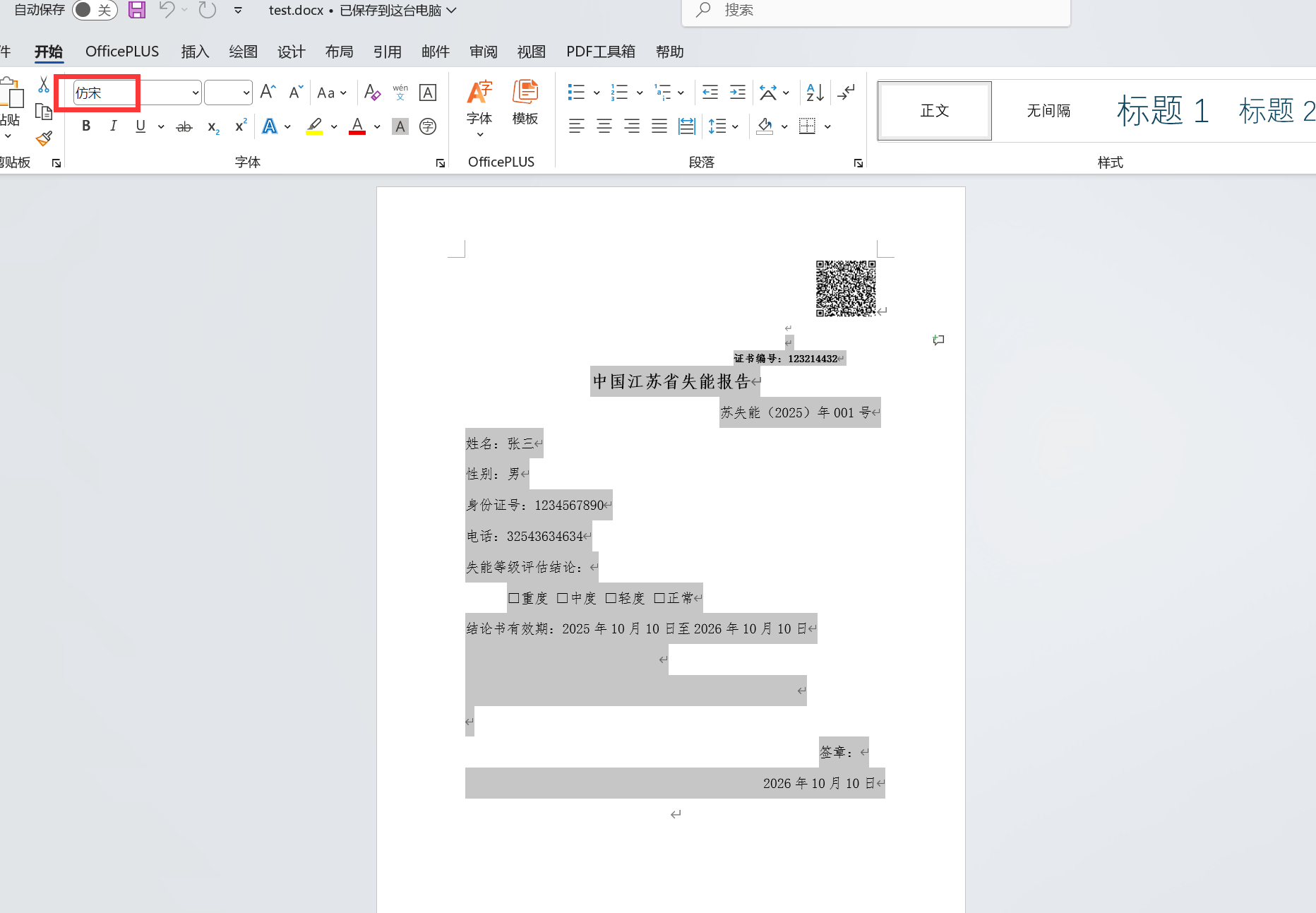
为了简化后续转换流程,并避免因 Linux 服务器缺少 Windows 字体而导致的乱码问题,我们统一使用“仿宋”字体。在制作模板时,请确保所有文本样式均设置为仿宋。
模板的整体样式如下图所示,其中图片的嵌入方式至关重要:
2. 图片的环绕方式
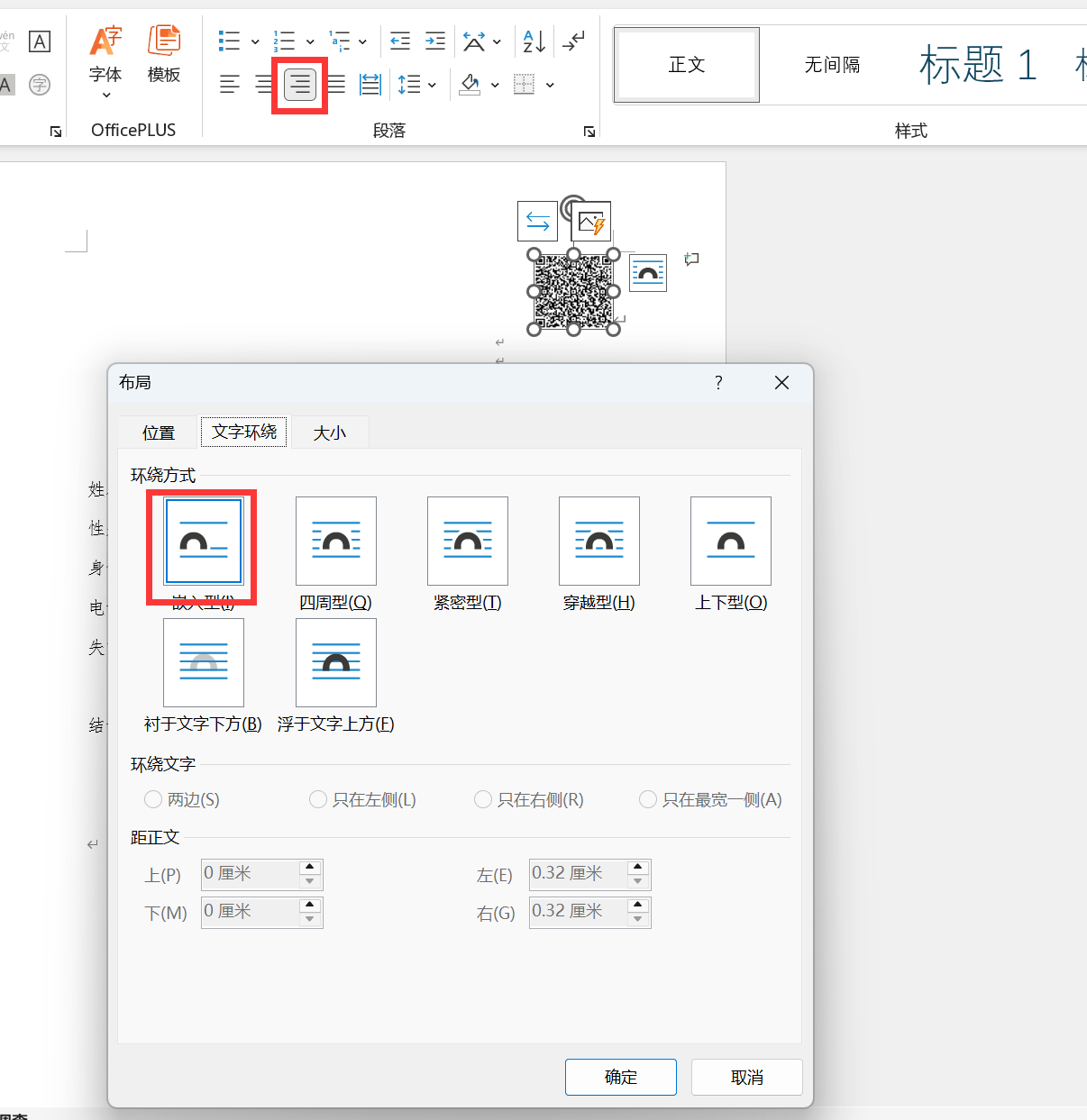
模板中如果包含 Logo 或签名图片,请务必将其布局方式设置为 “嵌入型”,并且对齐方式选择 “靠右”。如果使用“浮于文字上方”或“四周型环绕”,在转换 PDF 时极易发生位置偏移,导致排版错乱。
✅ 实践建议:在 Word 中制作模板后,建议先手动执行一次“另存为 PDF”,检查排版是否正常。如果手动转换都存在问题,那么代码转换必然也会出错。
三、Word 转 PDF:攻克乱码与字体映射
在 Spring Boot 中实现 Word 转 PDF,最常用的方案是基于 LibreOffice 或 OpenOffice 的无头模式(Headless Mode)进行转换。首先,我们需要在 pom.xml 中引入相关依赖:
            org.docx4j
            docx4j-core
            8.3.9


            org.docx4j
            docx4j-export-fo
            8.3.9


            org.docx4j
            docx4j-JAXB-Internal
            8.3.9


            ch.qos.logback
            logback-classic
            1.2.13
编写一个简单的测试用例,尝试将我们准备好的 .docx 文件转换为 PDF:
package com.cyz;
import org.docx4j.Docx4J;
import org.docx4j.openpackaging.packages.WordprocessingMLPackage;
import java.io.File;
import java.io.FileOutputStream;
public class Word2Pdf {
    /**
     * 使用 docx4j 将 .docx 文件转换为 .pdf
     *
     * @param inputDocxPath 输入 .docx 文件路径
     * @param outputPdfPath 输出 .pdf 文件路径
     */
    public static void convert(String inputDocxPath, String outputPdfPath) throws Exception {
        WordprocessingMLPackage wordMLPackage = WordprocessingMLPackage.load(new File(inputDocxPath));
        try (FileOutputStream outputStream = new FileOutputStream(outputPdfPath)) {
            // 4. 转换为 PDF
            Docx4J.toPDF(wordMLPackage, outputStream);
        }
        System.out.println("✅ Word 转 PDF 成功: " + outputPdfPath);
    }
    public static void main(String[] args) throws Exception {
        String docxPath="D:\\develop\\codes\\javacode\\wordtopdf\\src\\main\\resources\\word\\test.docx";
        String outPdfPath="D:\\develop\\codes\\javacode\\wordtopdf\\src\\main\\resources\\pdf\\test.pdf";
        convert(docxPath,outPdfPath);
    }
}
运行测试后,你大概率会遇到下图所示的情况:PDF 中的中文全部变成了“豆腐块”或乱码。

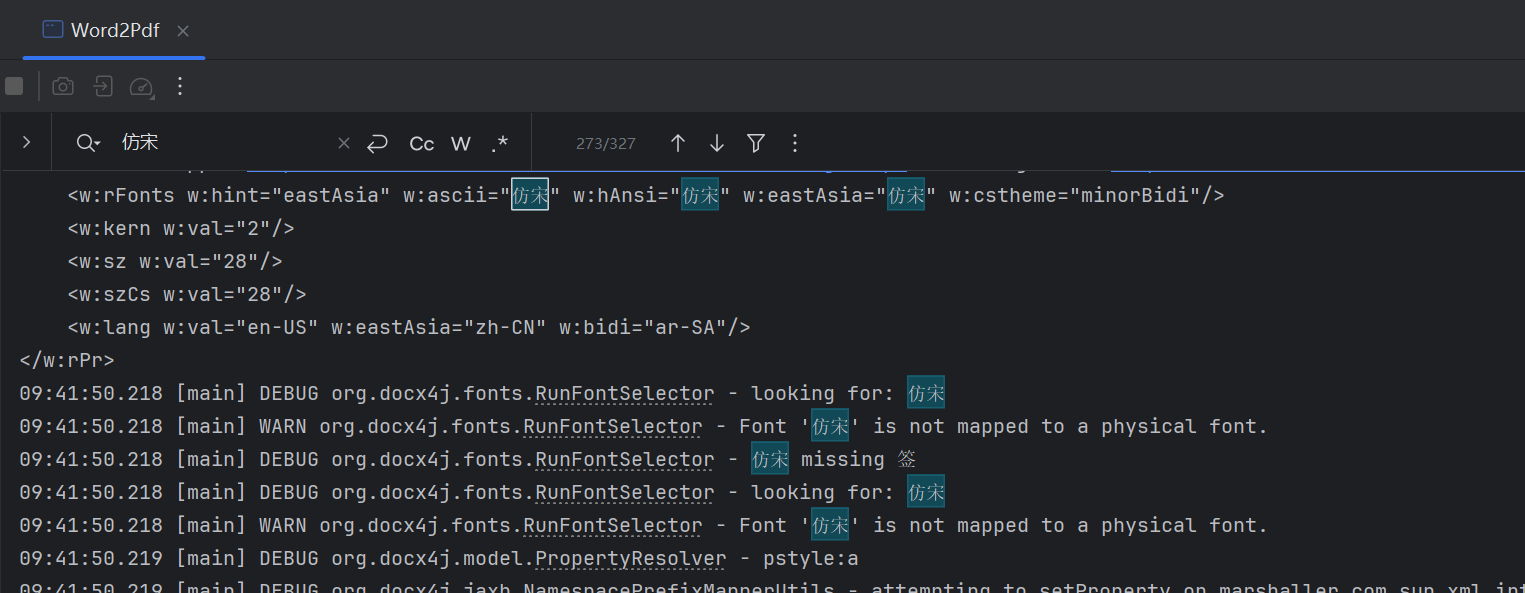
查看控制台日志,你会发现关键错误提示:“字体 ‘仿宋’ 不存在”。
1. 字体调试与映射策略
这是 Linux 服务器环境下的通病。由于系统未安装对应的中文字体,转换引擎无法识别。解决方案不是去服务器安装字体(这往往涉及版权与运维成本),而是建立字体映射表。
首先,我们需要查看当前操作系统(或容器内)自带哪些字体:
    public static void convert(String inputDocxPath, String outputPdfPath) throws Exception {
        // 1. 使用新的 API 加载文档
        WordprocessingMLPackage wordMLPackage = WordprocessingMLPackage.load(new File(inputDocxPath));
        //必须写,不然看不到系统字体
        Mapper fontMapper = new IdentityPlusMapper();
        // 注册系统字体
        Map physicalFonts = PhysicalFonts.getPhysicalFonts();
        System.out.println("物理字体->" + physicalFonts.keySet());
        // 3. 使用 try-with-resources 自动关闭流
//        try (FileOutputStream outputStream = new FileOutputStream(outputPdfPath)) {
//            // 4. 转换为 PDF
//            Docx4J.toPDF(wordMLPackage, outputStream);
//        }
        System.out.println("✅ Word 转 PDF 成功: " + outputPdfPath);
} 
通过上述命令,我们可以列出系统字体库中所有可用字体,并从中寻找合适的替代品。例如,我们找到了 fangsong 相关的字体族。
物理字体->[constantia, source sans pro black, bahnschrift, microsoft phagspa bold, fzyaoti, garamond, consolas italic, youyuan, bodoni mt condensed, javanese text, nirmala text semilight, microsoft yi baiti, nirmala text bold, old english text mt, microsoft jhenghei ui, open sans, candara bold, verdana bold italic, sans serif collection, stsong, raleway, cooper black, simsun, palace script mt, papyrus, microsoft yahei ui light, bodoni mt condensed bold italic, stliti, arvo bold italic, lucida handwriting italic, magneto bold, gadugi, vivaldi italic, felix titling, franklin gothic heavy, trebuchet ms, fredericka the great, matura mt script capitals, bookshelf symbol 7, dubai medium, lucida bright demibold, bodoni mt italic, nirmala ui semilight, dosis regular, malgun gothic semilight, tw cen mt bold italic, shadows into light, calisto mt, script mt bold, fzcuheisongs-b-gb, bookman old style bold italic, bodoni mt bold, open sans italic, franklin gothic demi cond, lucida bright italic, dejavu sans mono, century schoolbook italic, perpetua bold, yu gothic bold, franklin gothic book italic, julius sans one, constantia bold, parchment, ms ui gothic, gill sans mt bold italic, roboto italic, yu gothic medium, perpetua titling mt light, mingliu-extb, microsoft tai le, consolas bold italic, dengxian regular, fzshuti, stxihei, barrio regular, eras demi itc, perpetua titling mt bold, eras light itc, rockwell, comfortaa regular, dubai light, franklin gothic medium italic, iqyht regular, bubblegum sans regular, goudy stout, simsun-extg, stfangsong, noto serif sc, pmingliu-extb, times new roman, informal roman, simsun-extb, kunstler script, lisu, tw cen mt italic, franklin gothic demi italic, roboto bold, brush script mt italic, ink free, calibri bold, comic sans ms bold, lucida fax italic, elephant, perpetua bold italic, bodoni mt poster compressed, gill sans mt ext condensed bold, lucida sans demibold roman, maiandra gd, imprint mt shadow, candara light italic, ubuntu mono, dubai bold, lucida sans typewriter bold oblique, simhei, source sans pro black italic, franklin gothic heavy italic, microsoft yahei ui bold, calibri bold italic, showcard gothic, book antiqua bold italic, century gothic italic, zilla slab, droid serif, footlight mt light, century gothic bold, segoe ui black, stxinwei, bell mt italic, rockwell extra bold, roboto bold italic, cambria, onyx, arvo-italic, arial, webdings, tw cen mt bold, segoe ui bold, ms gothic, bodoni mt bold italic, baskerville old face, century gothic bold italic, roboto slab regular, nsimsun, droid serif bold, comic sans ms bold italic, forte, candara light, consolas bold, gill sans mt condensed, leelawadee ui bold, verdana bold, eras medium itc, palatino linotype, eras bold itc, franklin gothic book, dejavu sans mono bold, bodoni mt condensed italic, calisto mt italic, book antiqua bold, microsoft new tai lue, vast shadow regular, rockwell italic, pristina, french script mt, trebuchet ms italic, century schoolbook bold, microsoft himalaya, microsoft jhenghei ui light, segoe script, bell mt bold, arial narrow bold italic, gill sans mt, kristen itc, bradley hand itc, calibri, calibri light, century, segoe ui emoji, yu gothic ui bold, wingdings, nirmala ui, source sans pro light, century schoolbook bold italic, cabin sketch bold, segoe ui historic, kaiti, garamond bold, copperplate gothic light, dengxian bold, high tower text, courier new bold, lucida sans typewriter bold, verdana italic, courier new bold italic, yu gothic ui regular, stxingkai, lucida fax demibold italic, viner hand itc, mistral, tahoma bold, sitka text, mingliu_hkscs-extb, mingliu_mscs-extb, cambria math, arial italic, berlin sans fb demi bold, cambria bold italic, ebrima, colonna mt, segoe ui black italic, lucida fax regular, constantia italic, microsoft jhenghei bold, microsoft yahei ui, berlin sans fb bold, rage italic, georgia italic, ravie, bodoni mt, yu gothic ui semibold, berlin sans fb, franklin gothic medium, verdana, corbel light italic, ms reference sans serif, corbel, georgia bold, numberonly bold, times new roman bold italic, freestyle script, marlett, segoe ui semibold, lucida sans italic, myanmar text, roboto condensed, tw cen mt, monoton, gloucester mt extra condensed, niagara solid, microsoft yahei, franklin gothic demi, leelawadee ui, nanum pen, palatino linotype italic, din next lt pro bold, palatino linotype bold, iqyht medium, stcaiyun, open sans bold italic, calisto mt bold italic, tw cen mt condensed bold, sitka text italic, nirmala text, fangsong, ms outlook, segoe ui semibold italic, rockwell bold, yu gothic ui light, nirmala ui bold, source sans pro italic, roboto slab bold, microsoft jhenghei, palatino linotype bold italic, garamond italic, book antiqua italic, castellar, myanmar text bold, sylfaen, californian fb, malgun gothic bold, georgia bold italic, comic sans ms italic, droid serif bold italic, times new roman italic, bookman old style, corbel light, symbol, century gothic, arvo, corbel italic, segoe print, britannic bold, segoe ui light, cambria italic, segoe ui semilight italic, trebuchet ms bold, lucida sans regular, rockwell condensed bold, lucida bright, roboto condensed bold italic, agency fb bold, poiret one, lobster, malgun gothic, niagara engraved, segoe ui semilight, edwardian script itc, book antiqua, candara italic, open sans bold, cambria bold, segoe ui light italic, californian fb italic, stkaiti, mongolian baiti, segoe mdl2 assets, bodoni mt black, curlz mt, source sans pro regular, stzhongsong, ms reference specialty, engravers mt, wide latin, dejavu sans mono bold oblique, perpetua, ebrima bold, gill sans ultra bold, modern no. 20, bookman old style italic, yu gothic ui semilight, segoe ui, candara bold italic, barlow condensed regular, source sans pro semibold, copperplate gothic bold, lucida calligraphy italic, tw cen mt condensed extra bold, trebuchet ms bold italic, goudy old style, arial rounded mt bold, courier new italic, agency fb, source sans pro semibold italic, leelawadee ui semilight, calibri italic, delius-regular, noto sans sc, segoe ui symbol, segoe ui italic, arial bold, microsoft phagspa, yu gothic regular, megrim, lucida sans typewriter regular, arial black, century schoolbook, lucida sans typewriter oblique, segoe ui variable, source sans pro bold, ocr a extended, yu gothic light, segoe ui bold italic, gill sans mt italic, pangolin regular, din next lt pro medium, corbel bold, poor richard, goudy old style italic, wingdings 3, indie flower, wingdings 2, comfortaa bold, microsoft jhenghei light, rockwell condensed, corbel bold italic, microsoft sans serif, lucida sans unicode, bell mt, sthupo, arial narrow italic, goudy old style bold, gadugi bold, roboto condensed bold, franklin gothic medium cond, comic sans ms, lucida bright demibold italic, perpetua italic, arial narrow bold, segoe fluent icons, georgia, microsoft yahei light, roboto condensed italic, bodoni mt black italic, ms pgothic, arvo bold, gill sans ultra bold condensed, roboto, calibri light italic, fredoka one, arial bold italic, bookman old style bold, microsoft tai le bold, microsoft yahei bold, arial narrow, consolas, monotype corsiva, centaur, microsoft new tai lue bold, tahoma, bodoni mt condensed bold, droid serif italic, rockwell bold italic, lucida sans demibold italic, mt extra, cabin sketch regular, dejavu sans mono oblique, lucida console, segoe script bold, gill sans mt bold, high tower text italic, vladimir script, din next lt pro regular, courier new, din next lt pro light, zilla slab bold, lucida fax demibold, dengxian light, source sans pro bold italic, raleway bold, dubai regular, microsoft jhenghei ui bold, candara, mv boli, calisto mt bold, tw cen mt condensed, hyzhonghei 197, constantia bold italic, segoe print bold, times new roman bold, californian fb bold]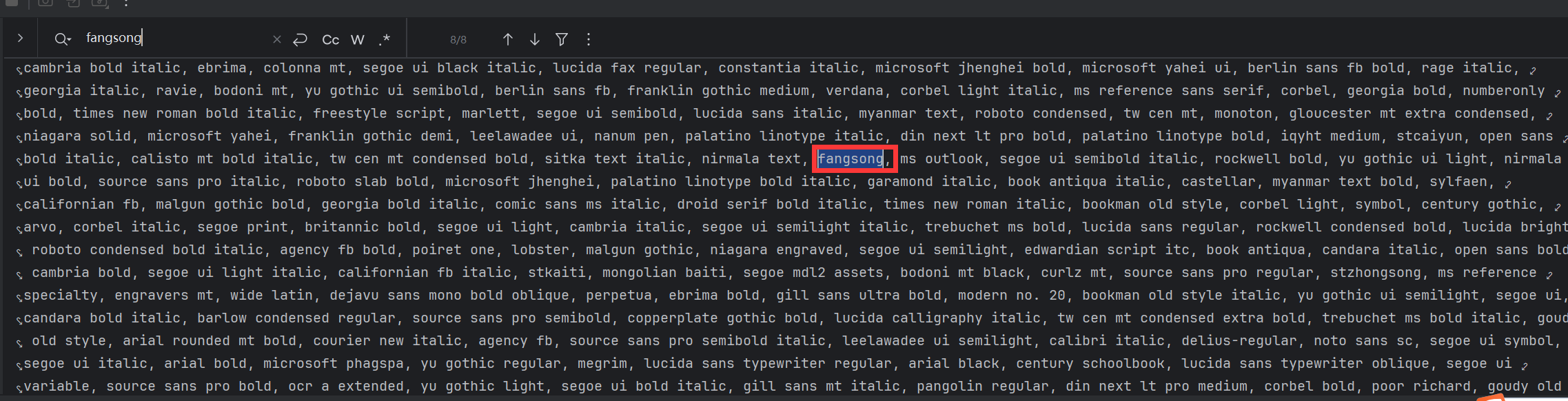
2. 编写自定义字体映射注册器
找到替代字体后,我们需要在代码中将这些字体名称注册到字体替换表中。这类似于在 TypeScript 中做类型映射,或者是在 C++ 中重载操作符,都是为了适配底层 API 的差异。
核心代码如下,通过继承 IRegisteredFont 或使用 FontSettings 类来将“仿宋”映射到系统已有的“FangSong”字体:
    public static void convert(String inputDocxPath, String outputPdfPath) throws Exception {
        // 1. 使用新的 API 加载文档
        WordprocessingMLPackage wordMLPackage = WordprocessingMLPackage.load(new File(inputDocxPath));
        //必须写,不然看不到系统字体
        Mapper fontMapper = new IdentityPlusMapper();
//        // 注册系统字体
//        Map physicalFonts = PhysicalFonts.getPhysicalFonts();
//        System.out.println("物理字体->" + physicalFonts.keySet());
        //映射字体
        fontMapper.put("仿宋", PhysicalFonts.get("FangSong"));
        // 3. 使用 try-with-resources 自动关闭流
        try (FileOutputStream outputStream = new FileOutputStream(outputPdfPath)) {
            // 4. 转换为 PDF
            Docx4J.toPDF(wordMLPackage, outputStream);
        }
        System.out.println("✅ Word 转 PDF 成功: " + outputPdfPath);
    }
3. 验证与调整
再次运行测试,发现大部分文本已经能够正常显示,但仍有细微的排版偏差。这是正常现象,因为不同字体的字宽和行距存在细微差异。
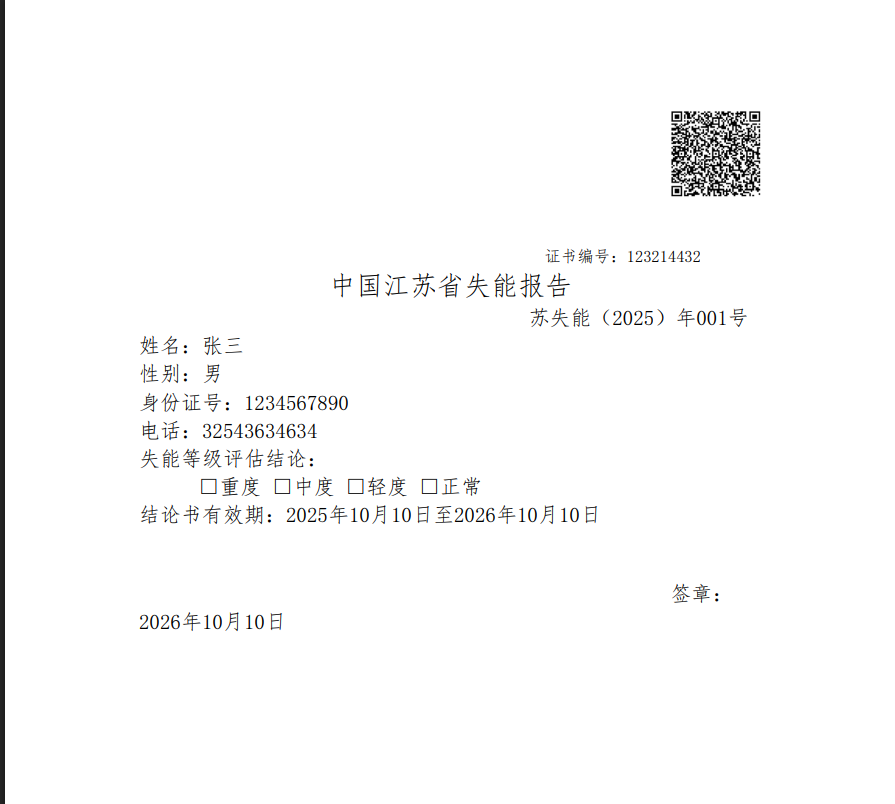
此时,我们可以通过微调 Word 模板中的段落缩进或行距,或者调整代码中的 PDF 转换参数(如 Margins)来使其完美对齐。最终的完整转换工具类代码如下:
package com.cyz;
import org.docx4j.Docx4J;
import org.docx4j.fonts.IdentityPlusMapper;
import org.docx4j.fonts.Mapper;
import org.docx4j.fonts.PhysicalFont;
import org.docx4j.fonts.PhysicalFonts;
import org.docx4j.openpackaging.packages.WordprocessingMLPackage;
import java.io.File;
import java.io.FileOutputStream;
import java.util.Map;
public class Word2Pdf {
    /**
     * 使用 docx4j 将 .docx 文件转换为 .pdf
     *
     * @param inputDocxPath 输入 .docx 文件路径
     * @param outputPdfPath 输出 .pdf 文件路径
     */
    public static void convert(String inputDocxPath, String outputPdfPath) throws Exception {
        // 1. 使用新的 API 加载文档
        WordprocessingMLPackage wordMLPackage = WordprocessingMLPackage.load(new File(inputDocxPath));
        //必须写,不然看不到系统字体
        Mapper fontMapper = new IdentityPlusMapper();
//        // 注册系统字体
//        Map physicalFonts = PhysicalFonts.getPhysicalFonts();
//        System.out.println("物理字体->" + physicalFonts.keySet());
        //映射字体
        fontMapper.put("仿宋", PhysicalFonts.get("FangSong"));
        // 3. 使用 try-with-resources 自动关闭流
        try (FileOutputStream outputStream = new FileOutputStream(outputPdfPath)) {
            // 4. 转换为 PDF
            Docx4J.toPDF(wordMLPackage, outputStream);
        }
        System.out.println("✅ Word 转 PDF 成功: " + outputPdfPath);
    }
    public static void main(String[] args) throws Exception {
        String docxPath="D:\\develop\\codes\\javacode\\wordtopdf\\src\\main\\resources\\word\\test.docx";
        String outPdfPath="D:\\develop\\codes\\javacode\\wordtopdf\\src\\main\\resources\\pdf\\test.pdf";
        convert(docxPath,outPdfPath);
    }
} 技术延伸:如果你在 Go 语言中处理类似问题,通常使用 unioffice 库;而在 C++ 环境中,则更多依赖于 COM 组件调用 Word API。虽然语言不同,但“字体映射”这一核心思想是通用的。四、动态内容增强:二维码与水印的生成
在证件或合同类文档中,二维码通常用于防伪验证,水印则用于版权声明。这两者都可以通过 Java 代码动态生成并叠加到文档中。
1. 生成二维码并插入
我们使用 Google 的 zxing 库来生成二维码图片。首先引入依赖:
            com.google.zxing
            core
            3.3.0


            com.google.zxing
            javase
            3.3.0
接着,编写一个工具类,将指定的 URL 或文本内容生成二维码,并写入到 Word 文档的指定位置。这里的关键技术点在于:必须通过操作 XWPFRun 对象来添加图片,以保持与模板中图片相同的“嵌入型”布局。
package com.cyz;
import com.google.zxing.BarcodeFormat;
import com.google.zxing.EncodeHintType;
import com.google.zxing.client.j2se.MatrixToImageWriter;
import com.google.zxing.common.BitMatrix;
import com.google.zxing.qrcode.QRCodeWriter;
import com.google.zxing.qrcode.decoder.ErrorCorrectionLevel;
import java.io.File;
import java.io.FileOutputStream;
import java.util.Date;
import java.util.HashMap;
import java.util.Map;
public class QRCodeServiceUtils {
    /**
     * 生成二维码字节数组
     *
     * @param content 二维码内容
     * @param width   宽度
     * @param height  高度
     * @return 二维码图片字节数组
     */
    public static File generateQRCode(String content, int width, int height,String outDirPath) {
        try {
            Map hints = new HashMap<>();
            hints.put(EncodeHintType.ERROR_CORRECTION, ErrorCorrectionLevel.H);
            hints.put(EncodeHintType.MARGIN, 1);
            hints.put(EncodeHintType.CHARACTER_SET, "UTF-8");
            QRCodeWriter qrCodeWriter = new QRCodeWriter();
            BitMatrix bitMatrix = qrCodeWriter.encode(content, BarcodeFormat.QR_CODE, width, height, hints);
            String fileName = outDirPath+File.separator+new Date().getTime()+".png";
            FileOutputStream outputStream = new FileOutputStream(fileName);
            MatrixToImageWriter.writeToStream(bitMatrix, "PNG", outputStream);
            return new File(fileName);
        } catch (Exception e) {
            System.out.println("生成二维码失败");
            throw new RuntimeException("生成二维码失败", e);
        }
    }
    public static void main(String[] args) {
        String content="www.baidu.com";
        int width=200;
        int height=200;
        String outDirPath="D:\\develop\\codes\\javacode\\wordtopdf\\src\\main\\resources\\png\\";
        generateQRCode(content,width,height,outDirPath);
    }
}
执行测试,可以看到生成的文档中已经成功嵌入了二维码,效果如下:

2. 水印添加的两种方案
- 方案一(Word 层):在 Word 模板中通过 FreeMarker 变量控制页眉文字,实现文字水印。
- 方案二(PDF 层):在转换为 PDF 后,使用 PDFBox 或 iText 在页面中添加图形水印(更适合复杂 Logo 水印)。
推荐使用方案二,因为 PDF 层的水印不影响 Word 模板的编辑,且渲染效果更稳定。
五、FreeMarker 模板引擎的高级玩法
FreeMarker 是 Java 生态中最强大的模板引擎之一。相比于 JavaScript 中的 Handlebars,它在处理 XML 文档结构时具有天然的优势。
1. 将 Word 模板转换为 XML
首先,用 WPS 或 Microsoft Word 将我们做好的 .docx 文件另存为 Word 2003 XML 文档(*.xml)格式。
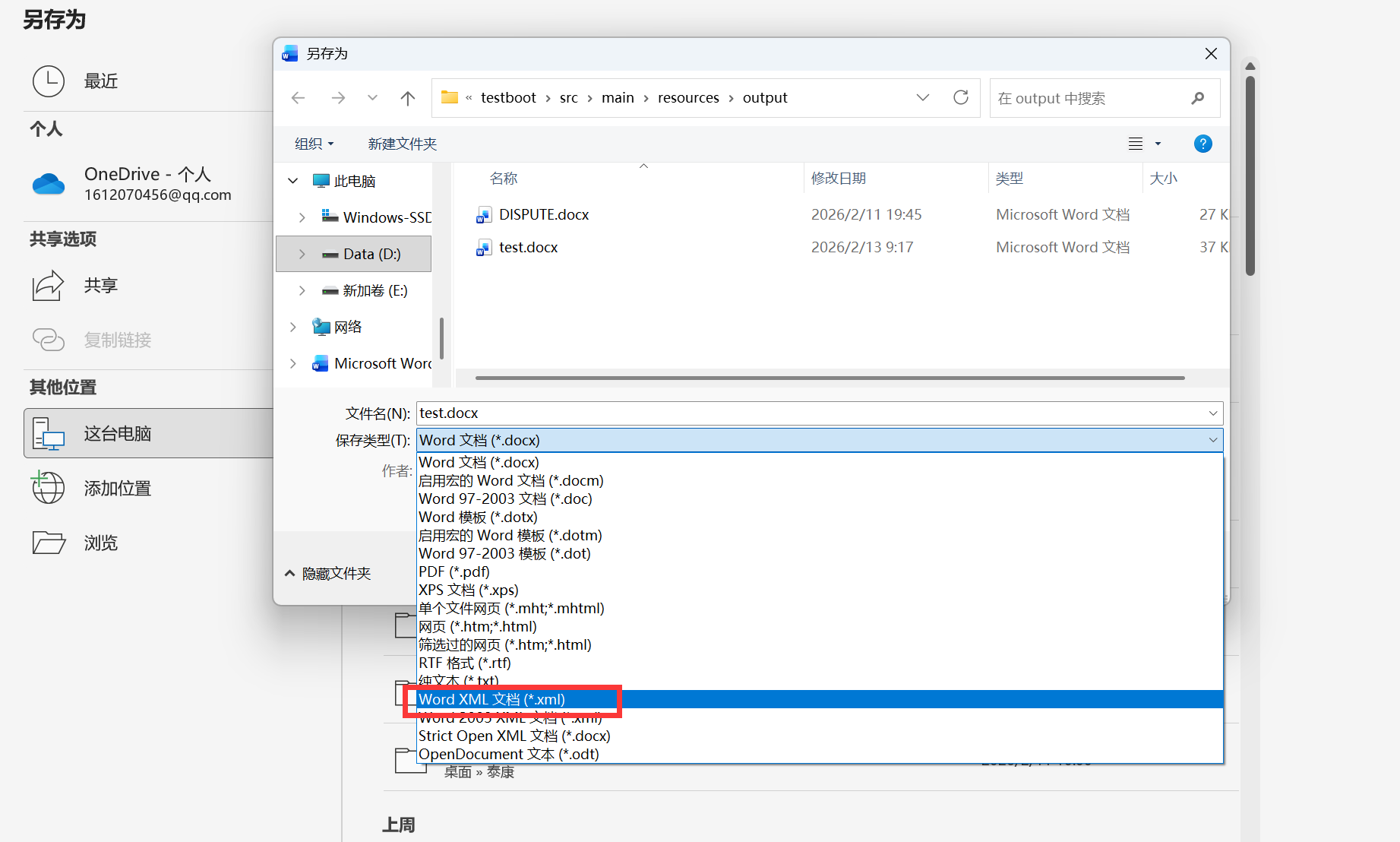
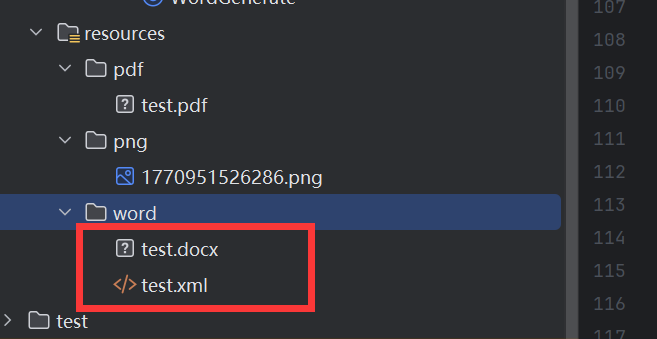
将生成的 .docx 和 .xml 文件同时放在项目的 resources/templates 目录下。
2. XML 结构分析与变量替换
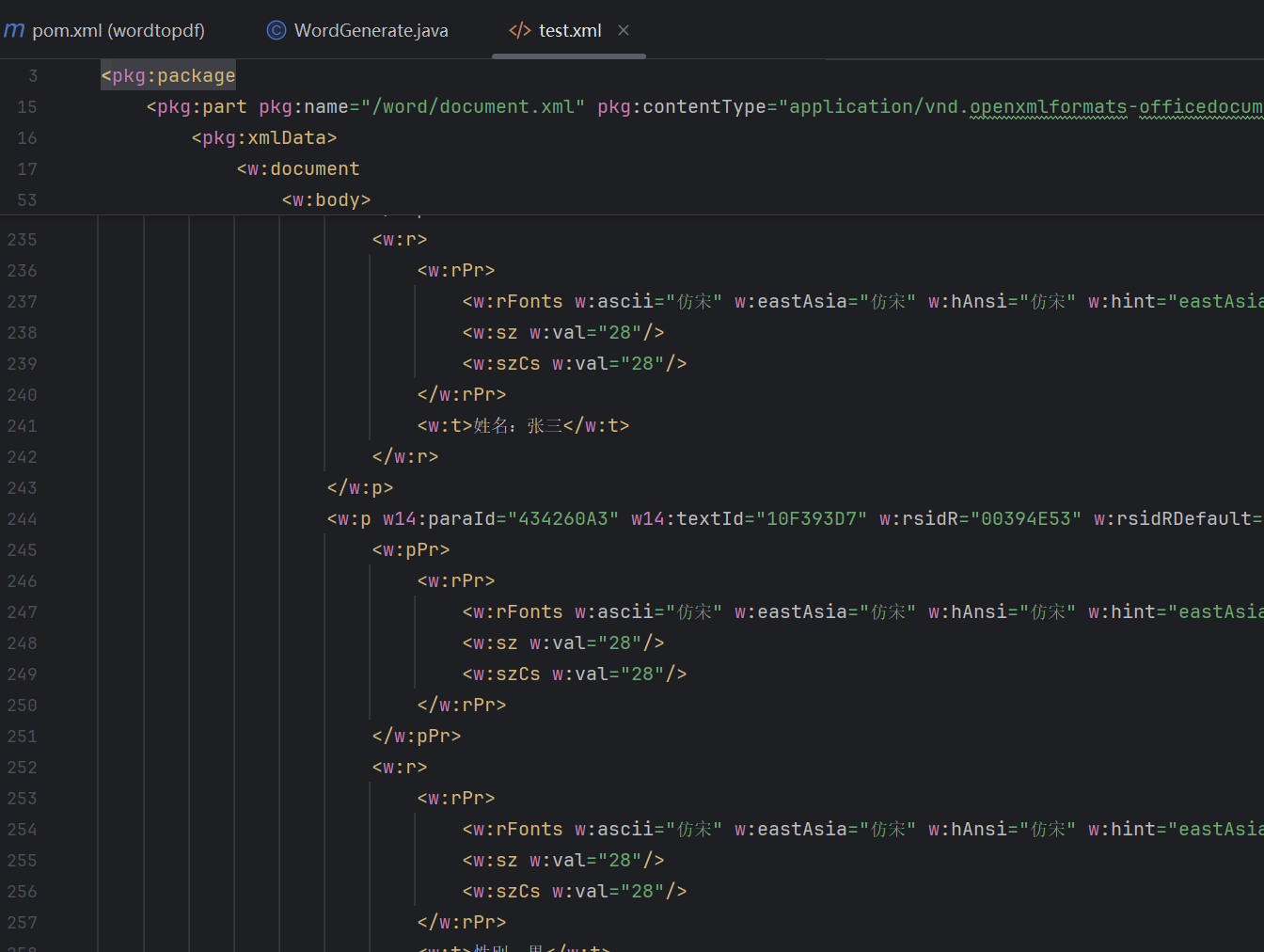
打开 XML 文件,你会发现内容极其冗余。我们使用在线 XML 格式化工具(如 tool.ip138.com/xml)进行美化,以便提取核心内容。
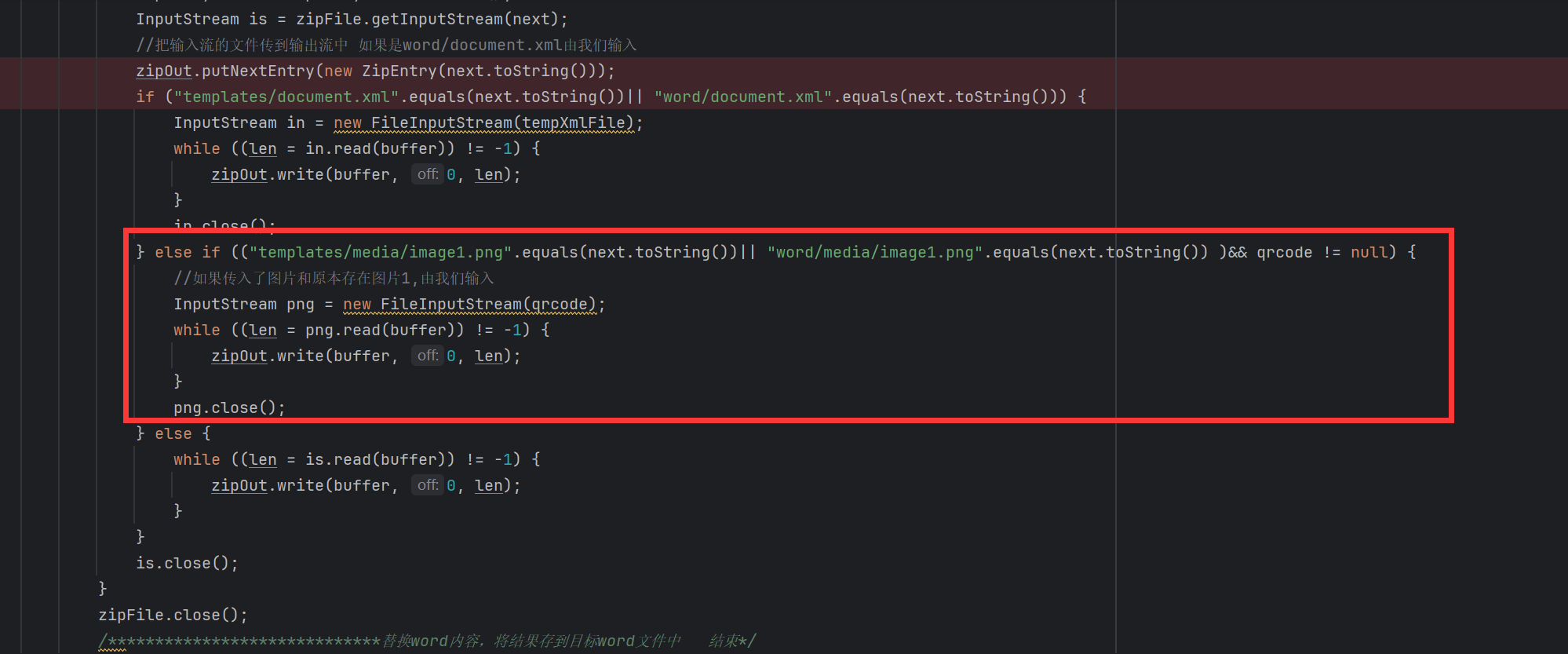
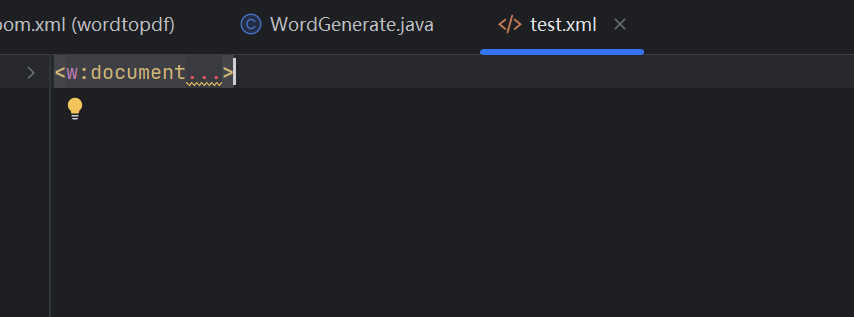
由于我们只需要替换 w:document 标签内部的内容,因此可以将其余的命名空间定义等头部信息全部删除,只保留纯内容部分。
3. 定义业务变量
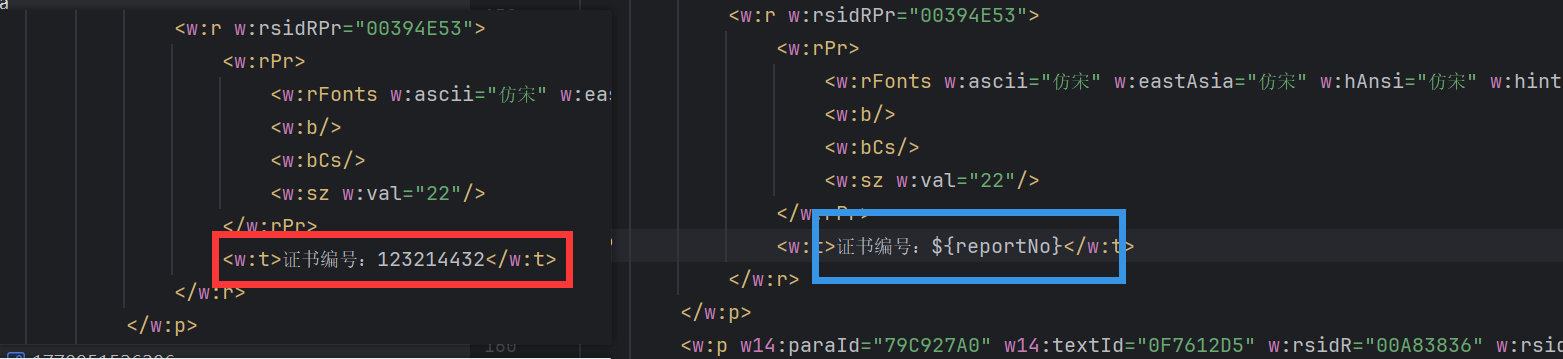
在 XML 中,找到需要动态替换的文本(如“证书编号”),将其替换为 FreeMarker 语法中的变量占位符 ${certNo}。
4. 处理复选框等特殊符号
对于 Word 中的复选框控件,我们需要使用 Wingdings 2 字体。其中,勾选状态对应的字符编码是 R(或特定的 Unicode 码点),未勾选状态对应另一个码点。
勾选状态代码片段如下:
未勾选状态代码片段如下:
为了根据变量动态显示勾选状态,我们需要在 XML 中嵌入 FreeMarker 的 if 判断语句。例如,变量 u_0 为 true 时显示勾选,否则显示未勾选:
<#if (u_0) == true>


<#else>
按照此逻辑,替换 XML 中所有需要动态控制的复选框区域,如下图所示:
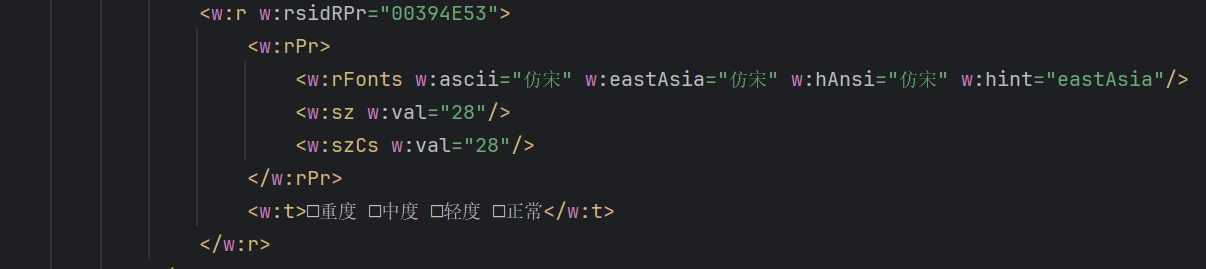
最终,一个包含完整逻辑判断的 XML 片段如下所示,这展示了 FreeMarker 在处理复杂逻辑时的强大能力:
                <#if (L_4) == true>


                <#else>


                重度
原始 XML 片段参考:
六、PDF 签章与最终发布
文档生成 PDF 后,最后一步通常是加盖电子签章。这可以通过 iText 库实现,核心流程是:加载现有 PDF → 创建透明图层 → 在指定坐标绘制印章图片 → 保存新 PDF。
关于签章的详细实现,由于篇幅限制,这里不再展开,但核心 API 调用逻辑与二维码插入非常相似,都是“坐标 + 图片”的渲染模式。
[AFFILIATE_SLOT_1]
七、踩坑总结与性能优化建议
回顾整个流程,以下几个关键点值得你特别关注:
- 模板是根本:任何排版问题,优先检查模板,而非代码。
- 字体映射表:提前在服务器上执行字体枚举命令,建立完整的映射字典,避免运行时才暴露问题。
- 图片布局:所有插入的图片(包括动态生成的二维码)必须设置为“嵌入型”,否则位置会漂移。
- 性能考量:Word 转 PDF 属于 CPU 密集型操作,建议使用线程池异步处理,避免阻塞 Spring Boot 的主线程(类似 Go 中的 goroutine 调度思路)。
此外,对于高并发的场景,建议将转换后的 PDF 文件缓存至 Redis 或对象存储(如 MinIO),避免重复转换带来的性能开销。
[AFFILIATE_SLOT_2]
总结
本文从实战角度出发,详细拆解了基于 Spring Boot 的 Word 模板处理全链路。从模板的规范化制作,到字体的映射调试,再到 FreeMarker 的 XML 深度操作,每一步都包含了开发者容易忽视的细节。掌握这套方案,你不仅能应对证书生成需求,更能将其灵活扩展至合同管理、电子发票等更广泛的业务场景中。希望本文能为你的技术栈添砖加瓦。


 浙公网安备 33010602011771号