视觉语言模型(VLM)正以前所未有的速度迭代。Qwen3-VL 系列作为其中的佼佼者,凭借其强大的长上下文理解能力和创新的架构设计,为多模态 AI 树立了新标杆。本文将深入剖析其核心架构、训练流程与评测表现,为你提供一份全景技术指南。
模型家族概览:从稠密到MoE的灵活部署
Qwen3-VL 提供了丰富的模型选择,以满足不同场景下的延迟与质量需求。其家族成员包括稠密型(Dense)的 2B/4B/8B/32B 以及混合专家型(MoE)的 30B-A3B/235B-A22B。旗舰版 Qwen3-VL-235B-A22B 总参数量高达 2350 亿,但每个 Token 仅激活 220 亿参数,在保持高性能的同时兼顾了推理效率。
这一系列模型均基于强大的 Qwen3 Backbone 构建,原生支持高达 256K Token 的交错上下文,并能扩展至 1M,使其能够稳健处理长文档、图像序列乃至小时级视频。无论是需要快速响应的边缘部署,还是追求极致性能的云端任务,开发者都能找到合适的变体。
架构创新一:增强的交错MRoPE位置编码
位置编码是 Transformer 模型理解序列顺序的关键。Qwen3-VL 引入了 增强的交错 MRoPE(Multimodal Rotary Position Embedding),这是对前代技术的一次重要革新。
在传统的 MRoPE(如 Qwen2.5-VL)中,时间(t)、高度(h)和宽度(w)的维度被划分为独立的子空间,这会导致频谱不平衡:时间维度仅在高频带表示,难以建模长距离时序;空间维度仅在低频带表示,局部精细位置区分能力不足。
Qwen3-VL 的解决方案是将 t、h、w 分量在嵌入维度上交错分布,确保每个时空轴都能在高低频带上得到均匀表示。这一设计显著改善了长距离视频位置建模能力,同时保留了对图像局部细节的敏锐感知。
理解 RoPE 的高低频:低频旋转慢,擅长区分远距离位置(如长序列);高频旋转快,对位置变化敏感,擅长区分近距离细节(如局部纹理)。交错 MRoPE 让模型“长短兼顾”。
传统MRoPE (Qwen2-VL):
维度: [t,t,t,t, h,h,h,h, w,w,w,w]  (分组排列)
└─低频─┘ └─中频─┘ └─高频─┘
问题: t只在低频,w只在高频 → 谱不平衡
Qwen3-VL Interleaved MRoPE:
维度: [t,h,w,t, h,w,t,h, w,t,h,w]  (交错排列)
└── 每个轴均匀分布所有频段 ──┘
架构创新二:视觉编码器与DeepStack融合
在视觉感知层面,Qwen3-VL 采用了 SigLIP-2 架构,并默认使用 SigLIP2-SO-400M 变体(小规模模型如 2B/4B 则采用 300M 的 Large 版本)。该编码器支持动态输入分辨率,并利用 2D-RoPE 和可学习的绝对位置嵌入来适应不同尺寸的输入图像。
更关键的是 DeepStack 视觉-语言融合机制。不同于以往仅从视觉编码器最后一层提取特征,DeepStack 从 ViT 的多个中间层提取视觉特征,并通过轻量级残差连接注入到 LLM 的前几层。这种跨层融合方式保留了从低级(如边缘、纹理)到高级(如语义、物体关系)的丰富视觉信息。
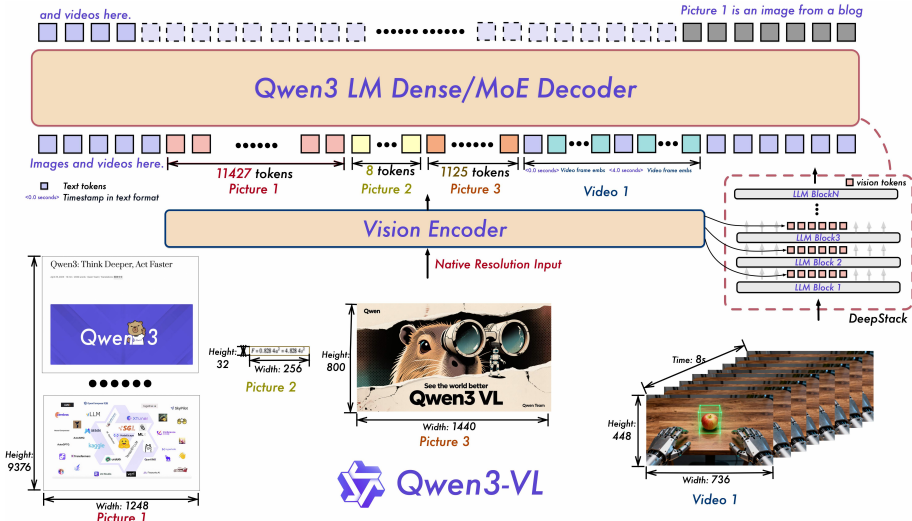
该机制的核心优势在于:
- 增强细粒度理解:在 InfoVQA 上提升 2.3 分,DocVQA 上提升 1.6 分。
- 零额外开销:通过残差连接注入,不增加序列长度。
- 更优的对齐:强化了视觉与语言模态间的信息交互。
视觉编码器层1 ──→ Merger ──┐
视觉编码器层2 ──→ Merger ──┼→ 分别注入LLM的对应层
视觉编码器层3 ──→ Merger ──┘
架构创新三:显式视频时间戳
对于视频理解,时间建模至关重要。Qwen2.5-VL 采用时间同步的 MRoPE,但存在两个局限:一是将位置 ID 直接绑定绝对时间,在处理长视频时会产生稀疏且过大的 ID;二是对训练数据的帧率采样要求极高。
Qwen3-VL 创新性地采用基于文本的时间戳。每个视频片段都附带格式化的文本字符串(例如,<3.0秒>),并在训练时使用秒和 HMS 格式生成时间戳。这种方法不仅解决了长视频时序建模的难题,还降低了训练数据的构建成本,使模型能更有效地学习和解释多样化的时间码。
| Qwen2.5-VL | Qwen3-VL | |
|---|---|---|
| 方案 | T-RoPE (绝对时间位置编码) | 文本时间戳 (Text-based Timestamp) |
| 实现方式 | 通过MRoPE位置编码直接嵌入绝对时间信息 | 用格式化文本字符串如 作为token输入 |
| 状态 | ❌ 被弃用 | ✅ 当前qwen3 vl采用 |
训练策略:从预训练到后训练的精妙设计
Qwen3-VL 的训练流程分为预训练和后训练两大阶段,每个阶段都经过精心设计。
预训练阶段分为四个子阶段,逐步构建模型能力:
- S0(初始对齐):仅训练 MLP 融合层,实现视觉-语言基础对齐。
- S1(多模态预训练):全参数训练,序列长度 8K。
- S2(长上下文预训练):将序列长度扩展至 32K。
- S3(超长上下文适应):支持 256K Token 上下文窗口。
Stage 0: 视觉-语言对齐 (Vision-Language Alignment)
├── 仅训练MLP merger
├── 视觉编码器和LLM冻结
├── 67B tokens, 8K序列长度
└── 数据: 高质量图像-标题对、OCR数据
Stage 1: 多模态预训练 (Multimodal Pre-Training)
├── 全参数训练
├── ~1T tokens, 8K序列长度
├── 混合VL数据 + 纯文本数据
└── 新增: 交错图文、视觉定位、STEM、视频
Stage 2: 长上下文预训练 (Long-Context)
├── ~1T tokens, 32K序列长度
├── 增加纯文本比例(长文本理解)
└── 大量视频和agent数据
Stage 3: 超长上下文适应 (Ultra-Long-Context)
├── 100B tokens, 262K序列长度
└── 专注: 长视频、长文档理解后训练阶段同样包含三个步骤:首先是基于长链式思维(CoT)数据的有监督微调(SFT),提升模型推理能力;其次是从更强教师模型进行知识蒸馏;最后通过强化学习(RL)使模型与人类偏好对齐。此外,训练损失从 per-sample 转向 平方根归一化的 per-token 损失,更好地平衡了文本与多模态数据的贡献。
| 数据类型 | 关键改进 |
|---|---|
| 图像标题 | 用Qwen2.5-VL-32B重新生成高质量描述,语义去重 |
| 交错图文 | 支持长达256K tokens的书籍级文档 |
| OCR | 扩展至39种语言 (Qwen2.5-VL仅10种) |
| 文档解析 | QwenVL-HTML/Markdown双格式,支持复杂布局 |
| grounding | 归一化坐标[0,1000],支持2D/3D定位、计数 |
| 空间理解 | 关系推理、 affordance、动作规划 |
| 代码 | UI→HTML/CSS、图像→SVG、视觉编程 |
| 视频 | 时间戳交错描述、时空定位、长度自适应采样 |
| STEM | 6000万K-12/大学题目,1200万长CoT推理 |
| Agent | GUI感知+决策、函数调用、搜索能力 |
评测表现与未来展望
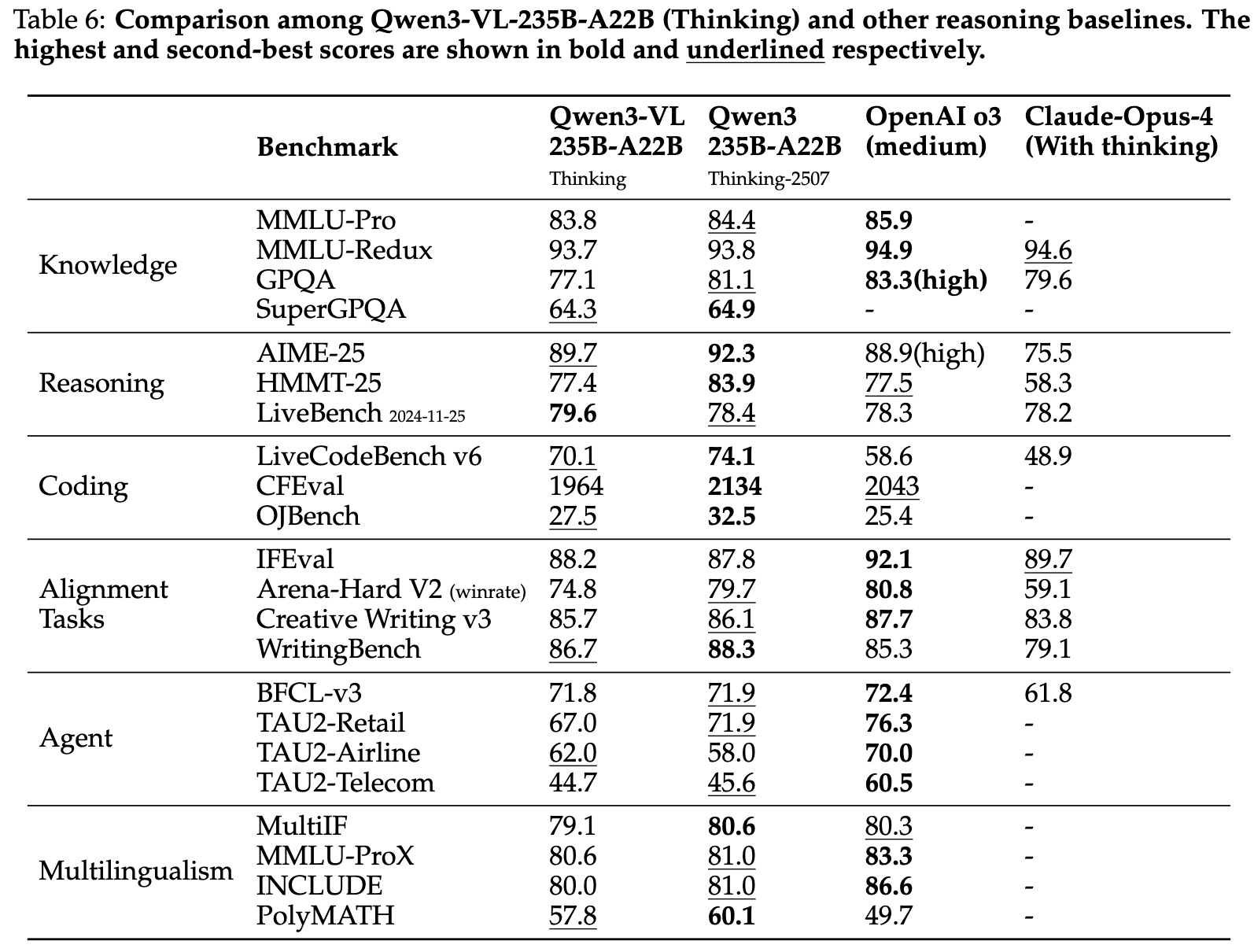
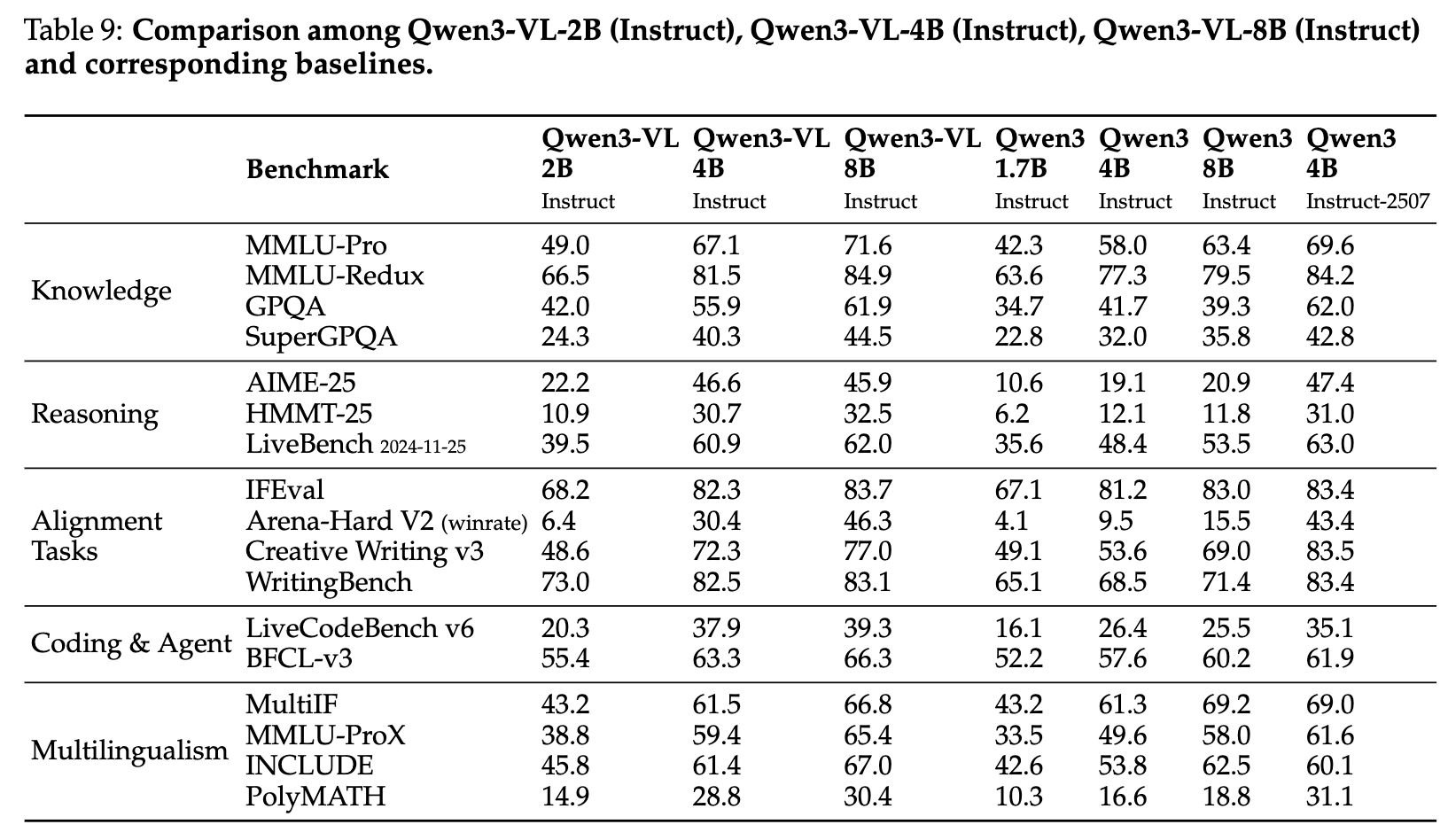
Qwen3-VL 在多项基准测试中展现出顶尖实力。在一般视觉问答(如 MMBench)、多模态推理(如 MMMU、MathVista)、文档理解(OCR)、2D/3D 定位以及视频理解(VideoMME)等任务上,均取得了与 Gemini-2.5-Pro 等闭源模型相抗衡的成绩。
尤其值得一提的是,得益于交错 MRoPE、文本时间戳等创新,小参数模型 Qwen3-VL-8B 的性能已可与显著更大的 Qwen2.5-VL-72B 相媲美,展现了架构创新的巨大潜力。
未来,Qwen3-VL 的研究方向将聚焦于交互式感知、工具增强推理和实时多模态控制。这意味着模型不仅将“看懂”世界,更能“操作”世界,为智能体(Agent)应用打开更广阔的想象空间。
| 特性 | 说明 |
|---|---|
| 每个Merger的结构 | 仍然是 2层MLP(与Qwen2.5-VL相同) |
| Merger数量 | 3个(对应选取的3个ViT层) |
| 输出到哪里 | 分别加到LLM的第1/2/3层的hidden states(通过残差连接) |
结语:Qwen3-VL 的技术启示
Qwen3-VL 通过交错 MRoPE、DeepStack 跨层融合和文本时间戳三大架构创新,有效解决了长视频建模、多尺度视觉特征融合和时序定位等核心难题。其精细化的训练策略也为多模态模型训练树立了新范式。对于开发者而言,Qwen3-VL 不仅是一个高性能模型,更是一个值得深入研究的架构范本。
[AFFILIATE_SLOT_2]Your role is that of a research assistant specializing in visual information. Answer questions about images by looking at them closely and then using research tools. Please follow this structured thinking process and show your work.
Start an iterative loop for each question:
- **First, look closely:** Begin with a detailed description of the image, paying attention to the user’s question. List what you can tell just by looking, and what you’ll need to look up.
- **Next, find information:** Use a tool to research the things you need to find out.
- **Then, review the findings:** Carefully analyze what the tool tells you and decide on your next action.
Continue this loop until your research is complete.
To finish, bring everything together in a clear, synthesized answer that fully responds to the user’s question.
#Tools
You may call one or more functions to assist with the user query.
You are provided with function signatures within <tools></tools> XML tags:
<tools>
{ "type":"function", "function": {"name": "image_zoom_in_tool", "description": "Zoom in on a specific region of an image by cropping it based on a bounding box (bbox) and an optional object label", "arguments": {"type": "object", "properties": {"bbox_2d": {"type": "array", "items": {"type": "number"}, "minItems": 4, "maxItems": 4, "description": "The bounding box of the region to zoom in, as [x1, y1, x2, y2], where (x1, y1) is the top-left corner and (x2, y2) is the bottom-right corner"}, "label": {"type": "string", "description": "The name or label of the object in the specified bounding box"}, "img_idx": {"type": "number", "description": "The index of the zoomed-in image (starting from 0)"}}, "required": ["bbox_2d", "label", "img_idx"]}}}
</tools>
For each function call, return a JSON object with function name and arguments within <tool_call></tool_call> XML tags:
<tool_call>
{"name": <function-name>, "arguments": <args-json-object>}
</tool_call>
<image>
{question}Your role is that of a research assistant specializing in visual information. Answer questions about images by looking at them closely and then using research tools. Please follow this structured thinking process and show your work.
Start an iterative loop for each question:
- **First, look closely:** Begin with a detailed description of the image, paying attention to the user’s question. List what you can tell just by looking, and what you’ll need to look up.
- **Next, find information:** Use a tool to research the things you need to find out.
- **Then, review the findings:** Carefully analyze what the tool tells you and decide on your next action.
Continue this loop until your research is complete.
To finish, bring everything together in a clear, synthesized answer that fully responds to the user’s question.
#Tools
You may call one or more functions to assist with the user query.
You are provided with function signatures within <tools></tools> XML tags:
<tools>
{ "type":"function", "function": {"name": "image_zoom_in_tool", "description": "Zoom in on a specific region of an image by cropping it based on a bounding box (bbox) and an optional object label", "arguments": {"type": "object", "properties": {"bbox_2d": {"type": "array", "items": {"type": "number"}, "minItems": 4, "maxItems": 4, "description": "The bounding box of the region to zoom in, as [x1, y1, x2, y2], where (x1, y1) is the top-left corner and (x2, y2) is the bottom-right corner"}, "label": {"type": "string", "description": "The name or label of the object in the specified bounding box"}, "img_idx": {"type": "number", "description": "The index of the zoomed-in image (starting from 0)"}}, "required": ["bbox_2d", "label", "img_idx"]}}}
</tools>
For each function call, return a JSON object with function name and arguments within <tool_call></tool_call> XML tags:
<tool_call>
{"name": <function-name>, "arguments": <args-json-object>}
</tool_call>
<image>
{question}
{options}<3.0 seconds>


 浙公网安备 33010602011771号