在Web开发中,理解HTTP响应中的报头(Header)和正文(Body)是构建高效、可靠应用的基础。本文将带你从基础概念出发,通过表单、Ajax和Socket三种方式,逐步深入掌握响应数据的结构与构造技巧。无论你使用TypeScript、Java、Go还是Python,这些知识都将帮助你更好地调试和优化网络请求。
认识响应报头(Header)
响应报头的格式与请求报头基本一致,它们都以键值对的形式传递元数据。常见的响应报头包括 Content-Type 和 Content-Length,这些属性的含义与请求中的相同。
Content-Type 是响应中最关键的报头之一,它告诉浏览器正文的格式。常见的取值有:
- text/html:正文数据格式为HTML
- text/css:正文数据格式为CSS
- application/javascript:正文数据格式为JavaScript
- application/json:正文数据格式为JSON
如果你需要更详细的MIME类型列表,可以参考Mozilla开发者文档。例如,在Java或Go后端中,设置正确的Content-Type能确保前端正确解析响应。
响应正文(Body)的格式与实例
响应的正文格式完全取决于 Content-Type。下面通过几个抓包实例来直观理解不同格式的响应正文:
1️⃣ text/html 格式:
Server: nginx/1.17.3
Date: Thu, 10 Jun 2021 07:25:09 GMT
Content-Type: text/html; charset=utf-8
Last-Modified: Thu, 13 May 2021 09:01:26 GMT
Connection: keep-alive
ETag: W/"609ceae6-3206"
Content-Length: 12806
2️⃣ text/css 格式:
HTTP/1.1 200 OK
Server: nginx/1.17.3
Date: Thu, 10 Jun 2021 07:25:09 GMT
Content-Type: text/css
Last-Modified: Thu, 13 May 2021 09:01:26 GMT
Connection: keep-alive
ETag: W/"609ceae6-3cfbe"
Content-Length: 249790
@font-face{font-family:element-icons;src:url(../../static/fonts/element-icons.53
......
3️⃣ application/javascript 格式:
HTTP/1.1 200 OK
Server: nginx/1.17.3
Date: Thu, 10 Jun 2021 07:25:09 GMT
Content-Type: application/javascript; charset=utf-8
Last-Modified: Thu, 13 May 2021 09:01:26 GMT
Connection: keep-alive
ETag: W/"609ceae6-427d4"
Content-Length: 272340
(window["webpackJsonp"]=window["webpackJsonp"]||[]).push([["app"],{0:function(t,
......
4️⃣ application/json 格式:
HTTP/1.1 200
Server: nginx/1.17.3
Date: Thu, 10 Jun 2021 07:25:10 GMT
Content-Type: application/json;charset=UTF-8
Connection: keep-alive
X-Content-Type-Options: nosniff
X-XSS-Protection: 1; mode=block
Cache-Control: no-cache, no-store, max-age=0, must-revalidate
Pragma: no-cache
Expires: 0
vary: accept-encoding
Content-Length: 12268
{"msg":"操作成功","code":200,"permissions":[] }
⚠️ 注意:在调试时,务必检查Content-Type是否匹配实际数据格式,否则浏览器可能无法正确渲染或解析。
使用Form表单构造HTTP请求
Form(表单)是HTML中常用的标签,支持GET和POST两种方法。它通过 action 属性指定URL,method 属性指定请求方法。
✅ 示例:发送GET请求
页面效果如下:

在输入框中填写数据后:

点击“提交”,浏览器会构造并发送HTTP请求:
GET http://abcdef.com/myPath?userId=100&classId=200 HTTP/1.1
Host: abcdef.com
Proxy-Connection: keep-alive
Upgrade-Insecure-Requests: 1
User-Agent: Mozilla/5.0 (Windows NT 10.0; Win64; x64) AppleWebKit/537.36 (KHTML,
Accept: text/html,application/xhtml+xml,application/xml;q=0.9,image/avif,image/w
Accept-Encoding: gzip, deflate
Accept-Language: zh-CN,zh;q=0.9,en;q=0.8
对应关系图解:
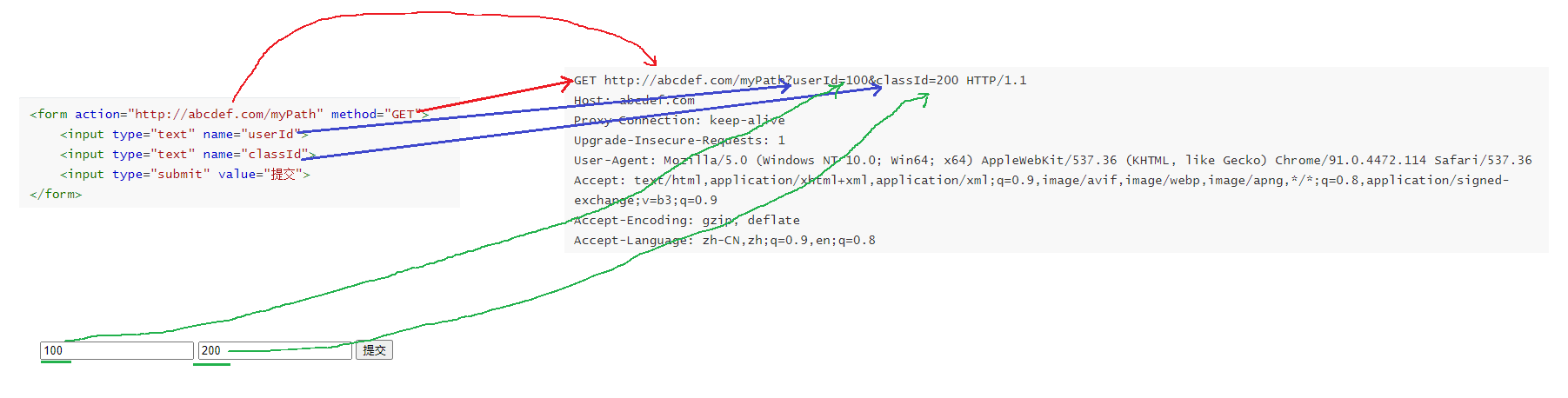
关键对应:
- form的action → 请求URL
- form的method → 请求方法
- input的name → querystring的key
- input的内容 → querystring的value
当method改为POST时:
页面效果不变:

构造的POST请求:
POST http://abcdef.com/myPath HTTP/1.1
Host: abcdef.com
Proxy-Connection: keep-alive
Content-Length: 22
Cache-Control: max-age=0
Upgrade-Insecure-Requests: 1
Origin: null
Content-Type: application/x-www-form-urlencoded
User-Agent: Mozilla/5.0 (Windows NT 10.0; Win64; x64) AppleWebKit/537.36 (KHTML,
Accept: text/html,application/xhtml+xml,application/xml;q=0.9,image/avif,image/w
Accept-Encoding: gzip, deflate
Accept-Language: zh-CN,zh;q=0.9,en;q=0.8
userId=100&classId=200
主要区别:数据从URL的querystring移动到了请求的body中。此外,Form还支持文件上传。
⚡ 使用Ajax构造HTTP请求
Ajax(Asynchronous JavaScript And XML)允许在不刷新页面的情况下发送HTTP请求,功能更强大。在JavaScript中,常用jQuery或原生API实现。
✅ 发送GET请求(使用jQuery):
<script src="https://code.jquery.com/jquery-3.6.3.min.js"></script>
<script>
$.ajax({
type: 'get',
url: 'https://www.sogou.com?studentName=zhangsan',
// 此处 success 就声明了⼀个回调函数, 就会在服务器响应返回到浏览器的时候触发该回调
// 正是此处的 回调 体现了 "异步"
success: function(data) {
// data 则是响应的正⽂部分.
console.log("当服务器返回的响应到达浏览器之后, 浏览器触发该回调, 通知到咱们
}
});
console.log("浏览器⽴即往下执⾏后续代码");
</script>
⚠️ 注意:Ajax默认受同源策略限制,跨域请求会报错:

如果服务器允许跨域(如设置CORS头),则可以正常访问。
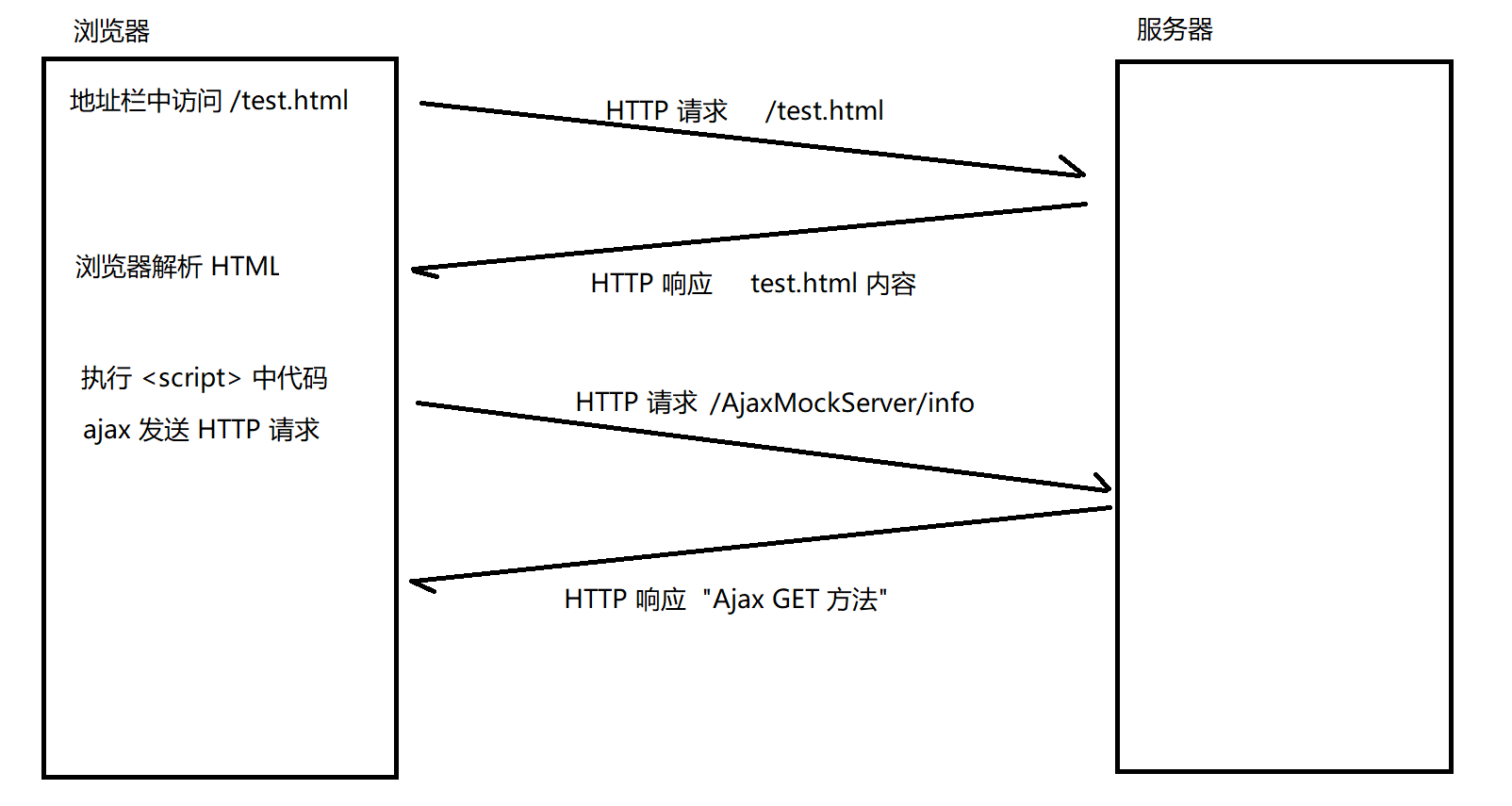
浏览器与服务器的交互流程(引入Ajax后):
✅ 发送POST请求:
1️⃣ 发送 application/x-www-form-urlencoded 数据:
<script src="https://code.jquery.com/jquery-3.6.3.min.js"></script>
<script>
$.ajax({
type: 'post',
url: 'https://www.sogou.com',
contentType: 'application/x-www-form-urlencoded',
data: 'studentName=zhangsan',
success: function(data) {
// data 则是响应的正⽂部分.
console.log("当服务器返回的响应到达浏览器之后, 浏览器触发该回调, 通知到咱们
}
});
console.log("浏览器⽴即往下执⾏后续代码");
</script>
2️⃣ 发送 application/json 数据:
<script src="https://code.jquery.com/jquery-3.6.3.min.js"></script>
<script>
$.ajax({
type: 'post',
url: 'https://www.sogou.com',
contentType: 'application/json',
data: '{ name: "zhangsan" }',
success: function(data) {
// data 则是响应的正⽂部分.
console.log("当服务器返回的响应到达浏览器之后, 浏览器触发该回调, 通知到咱们
}
});
console.log("浏览器⽴即往下执⾏后续代码");
</script>
在TypeScript或JavaScript项目中,推荐使用fetch API或axios库,它们提供了更简洁的接口。
使用Java Socket构造HTTP请求
实际上,发送HTTP请求的本质就是按照协议格式向TCP Socket中写入字符串。接收响应则是从Socket中读取并解析字符串。
✅ 示例:基于Socket的HTTP客户端(Java)
public class HttpClient {
private Socket socket;
private String ip;
private int port;
public HttpClient(String ip, int port) throws IOException {
this.ip = ip;
this.port = port;
socket = new Socket(ip, port);
}
public String get(String url) throws IOException {
StringBuilder request = new StringBuilder();
// 构造⾸⾏
request.append("GET " + url + " HTTP/1.1\n");
// 构造 header
request.append("Host: " + ip + ":" + port + "\n");
// 构造 空⾏
request.append("\n");
// 发送数据
OutputStream outputStream = socket.getOutputStream();
outputStream.write(request.toString().getBytes());
// 读取响应数据
InputStream inputStream = socket.getInputStream();
byte[] buffer = new byte[1024 * 1024];
int n = inputStream.read(buffer);
return new String(buffer, 0, n, "utf-8");
}
public String post(String url, String body) throws IOException {
StringBuilder request = new StringBuilder();
// 构造⾸⾏
request.append("POST " + url + " HTTP/1.1\n");
// 构造 header
request.append("Host: " + ip + ":" + port + "\n");
request.append("Content-Length: " + body.getBytes().length + "\n");
request.append("Content-Type: text/plain\n");
// 构造 空⾏
request.append("\n");
// 构造 body
request.append(body);
// 发送数据
OutputStream outputStream = socket.getOutputStream();
outputStream.write(request.toString().getBytes());
// 读取响应数据
InputStream inputStream = socket.getInputStream();
byte[] buffer = new byte[1024 * 1024];
int n = inputStream.read(buffer);
return new String(buffer, 0, n, "utf-8");
}
public static void main(String[] args) throws IOException {
HttpClient httpClient = new HttpClient("42.192.83.143", 8080);
String getResp = httpClient.get("/AjaxMockServer/info");
System.out.println(getResp);
String postResp = httpClient.post("/AjaxMockServer/info", "this is body"
System.out.println(postResp);
}
}
优势:使用Socket构造的HTTP客户端没有跨域限制,可以自由访问任何服务器。例如,在Java或Go中编写爬虫或API测试工具时,这种方法非常实用。
运行结果示例:
HttpClient httpClient = new HttpClient("www.sogou.com", 80);
String resp = httpClient.get("/index.html");
System.out.println(resp);
// 此时可以获取到 搜狗主⻚ 的 html
[AFFILIATE_SLOT_1]
总结与最佳实践
- 响应报头 是理解数据格式的关键,务必关注Content-Type。
- Form表单 适合简单的GET/POST请求,但功能有限。
- Ajax 提供异步能力,但需注意跨域问题。
- Socket编程 让你完全控制HTTP请求,适合高级场景。
无论你使用Python、Java、Go还是TypeScript,掌握这些基础都能让你在处理网络请求时更加得心应手。建议在实际项目中多尝试不同方式,深入理解协议细节。
[AFFILIATE_SLOT_2]


 浙公网安备 33010602011771号