在AI和开源技术飞速发展的今天,GitHub Trending页面就像一座宝藏,每天涌现出无数优秀的项目。对于深度学习和自然语言处理领域的开发者来说,快速掌握这些热门仓库的动态,是保持技术敏感度的关键。本文将从零开始,带你用Rust语言构建一个高性能的GitHub Trending爬虫,将网页数据转化为结构化的JSON,为后续的机器学习或数据分析任务打下坚实基础。
技术栈与项目概览
在开始编码之前,我们先来梳理一下这个爬虫项目所依赖的核心技术栈。它们共同构成了一个高效、稳定的数据采集管道:
- HTTP请求:
reqwest—— Rust生态中最流行的异步HTTP客户端,性能卓越,支持连接池和超时控制。 - HTML解析:
scraper—— 基于selectors库,支持CSS选择器,轻量且高效,非常适合提取结构化数据。 - JSON序列化:
serde+serde_json—— Rust标准的序列化/反序列化库,确保数据结构与JSON完美映射。 - 异步运行时:
tokio—— Rust异步编程的事实标准,让I/O操作非阻塞执行,大幅提升爬取效率。 - 日志:
env_logger+log—— 提供简洁的日志输出,方便调试和监控爬虫运行状态。 - 错误处理:
anyhow—— 简化错误传递,无需手动定义复杂错误类型,让代码更简洁。
这些技术栈的组合,使得爬虫不仅能够快速抓取数据,还能优雅地处理各种异常情况。项目结构如下:
github-trending-crawler/
├── Cargo.toml       # 依赖配置
├── src/
│   └── main.rs      # 核心逻辑
└── trending_repos.json  # 输出结果文件(运行后生成)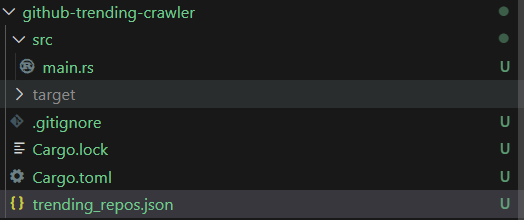
步骤一:项目初始化与依赖配置
1.1 创建项目
首先,使用Cargo创建一个新的二进制项目:
cargo new github-trending-crawler
cd github-trending-crawler
1.2 配置Cargo.toml
打开Cargo.toml文件,添加以下依赖项。请确保版本兼容,可通过crates.io查询最新版本:
[package]
name = "github-trending-crawler"
version = "0.1.0"
edition = "2021"
description = "A crawler to fetch GitHub Trending Rust repositories"
license = "MIT"
[dependencies]
# HTTP 客户端(异步)
reqwest = { version = "0.12", features = ["json", "rustls-tls"] }
# HTML 解析(CSS 选择器)
scraper = "0.18"
# JSON 序列化/反序列化
serde = { version = "1.0", features = ["derive"] }
serde_json = "1.0"
# 异步运行时
tokio = { version = "1.0", features = ["full"] }
# 日志
log = "0.4"
env_logger = "0.10"
# 错误处理(可选,简化错误传递)
anyhow = "1.0"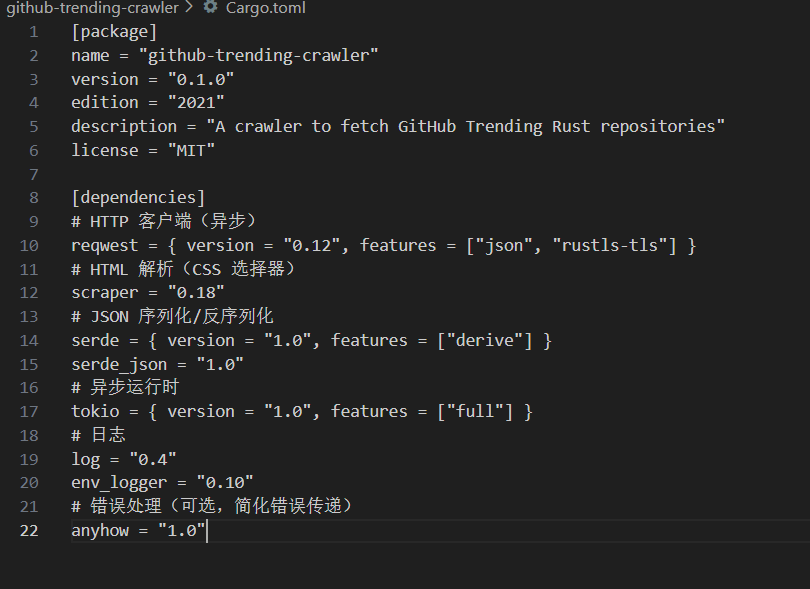
提示:在深度学习项目中,我们经常需要处理大规模数据集。使用Rust构建的爬虫,其内存安全和高并发特性,非常适合作为数据采集的前端工具。
步骤二:核心逻辑实现(src/main.rs)
2.1 导入依赖与初始化日志
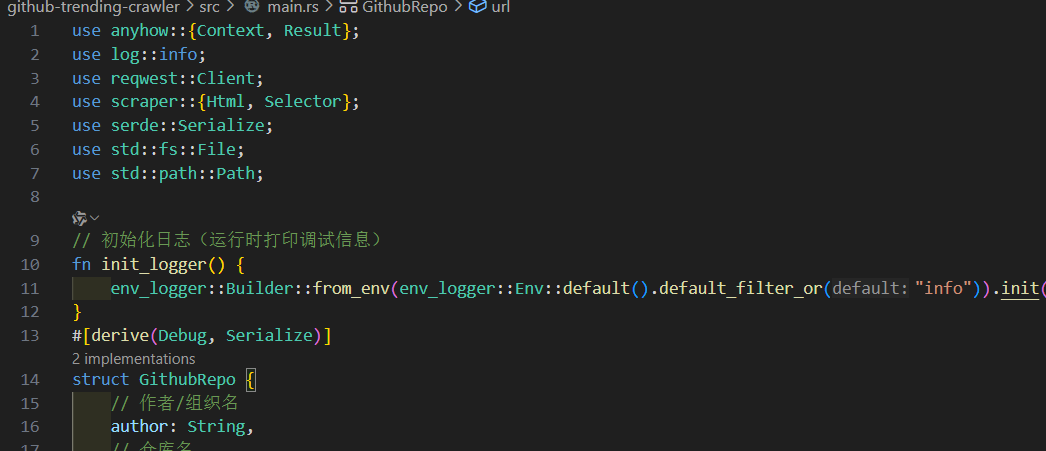
在文件开头导入所有必要的库,并初始化日志系统,方便调试:
use anyhow::{Context, Result};
use log::info;
use reqwest::Client;
use scraper::{Html, Selector};
use serde::Serialize;
use std::fs::File;
use std::path::Path;
// 初始化日志(运行时打印调试信息)
fn init_logger() {
    env_logger::Builder::from_env(env_logger::Env::default().default_filter_or("info")).init();
}
2.2 定义数据结构
创建一个结构体来存储每个仓库的信息,并使用serde::Serialize trait支持JSON序列化。字段与GitHub Trending页面信息一一对应:
#[derive(Debug, Serialize)]
struct GithubRepo {
    // 作者/组织名
    author: String,
    // 仓库名
    name: String,
    // 仓库描述
    description: Option,
    // 星标数
    stars: String,
    // 分支数
    forks: String,
    // 今日新增星标
    today_stars: String,
    // 仓库链接
    url: String,
}
2.3 核心爬虫逻辑
2.3.1 构建HTTP客户端并请求页面
优化点:保持原有的User-Agent伪装和超时设置,确保请求不被GitHub拒绝。同时保留详细的请求错误上下文,便于排查网络问题:
async fn fetch_trending_page(client: &Client) -> Result {
    // GitHub Trending Rust 页面 URL(按今日热门排序)
    let url = "https://github.com/trending/rust?since=daily";
    info!("Fetching page: {}", url);
    // 发送 GET 请求(设置 User-Agent 模拟浏览器,避免被 GitHub 拦截)
    let response = client
        .get(url)
        .header("User-Agent", "Mozilla/5.0 (Windows NT 10.0; Win64; x64) AppleWebKit/537.36 (KHTML, like Gecko) Chrome/120.0.0.0 Safari/537.36")
        .send()
        .await
        .context(format!("Failed to request URL: {}", url))?;
    // 检查响应状态码(200-299 为成功状态)
    if !response.status().is_success() {
        return Err(anyhow::anyhow!(
            "Request failed with status: {}",
            response.status()
        ));
    }
    // 读取响应体(HTML 字符串),并记录页面大小
    let html = response.text().await.context("Failed to read response body")?;
    info!("Successfully fetched page (size: {} bytes)", html.len());
    Ok(html)
}
2.3.2 解析HTML提取仓库信息
解析是爬虫的核心。我们做了以下优化:
- CSS选择器错误处理:使用
map_err直接显示选择器解析错误详情,便于调试。 - 选择器稳定性提升:将描述选择器改为通用
p标签;星标/分支选择器改为基于href后缀(如a[href$='/stargazers']),避免因GitHub样式类名变更导致解析失败。 - 缺失值容错:使用
unwrap_or_else给缺失的星标/分支/今日新增星标设置默认值"0",避免程序panic。 - 代码简化:合并作者名元素提取逻辑,减少重复代码。
fn parse_repos(html: &str) -> Result> {
    info!("Starting to parse repositories...");
    let document = Html::parse_document(html);
    // 定义 CSS 选择器(优化后:基于语义化属性,降低页面样式变更影响)
    // 1. 每个仓库的根节点选择器(GitHub 仓库列表统一用 article.Box-row 包裹)
    let repo_selector = Selector::parse("article.Box-row")
        .map_err(|e| anyhow::anyhow!("Failed to parse repo selector: {}", e))?;
    // 2. 作者 + 仓库名选择器(h2 下的 a 标签,包含仓库路径)
    let author_name_selector = Selector::parse("h2 a")
        .map_err(|e| anyhow::anyhow!("Failed to parse author-name selector: {}", e))?;
    // 3. 仓库描述选择器(通用 p 标签,避免依赖特定类名)
    let desc_selector = Selector::parse("p")
        .map_err(|e| anyhow::anyhow!("Failed to parse description selector: {}", e))?;
    // 4. 星标数选择器(基于 href 后缀 /stargazers,语义化更强)
    let stars_selector = Selector::parse("a[href$='/stargazers']")
        .map_err(|e| anyhow::anyhow!("Failed to parse stars selector: {}", e))?;
    // 5. 分支数选择器(基于 href 后缀 /forks,语义化更强)
    let forks_selector = Selector::parse("a[href$='/forks']")
        .map_err(|e| anyhow::anyhow!("Failed to parse forks selector: {}", e))?;
    // 6. 今日新增星标选择器(基于 data-menu-button-text 属性,稳定性更高)
    let today_stars_selector = Selector::parse("span[data-menu-button-text]")
        .map_err(|e| anyhow::anyhow!("Failed to parse today-stars selector: {}", e))?;
    let mut repos = Vec::new();
    // 遍历每个仓库节点,提取信息
    for repo_node in document.select(&repo_selector) {
        // 1. 提取作者和仓库名(格式:"author/name",从 a 标签文本中解析)
        let author_name_element = repo_node
            .select(&author_name_selector)
            .next()
            .context("Missing author/name element (GitHub page structure may have changed)")?;
        // 清理文本(去除空格和换行符)
        let author_name_text = author_name_element
            .text()
            .collect::()
            .trim()
            .to_string();
        // 分割作者和仓库名(格式必须为 "author/name",否则报错)
        let (author, name) = author_name_text
            .split_once('/')
            .context(format!("Invalid author/name format: '{}' (expected 'author/name')", author_name_text))?;
        let author = author.trim().to_string();
        let name = name.trim().to_string();
        // 2. 提取仓库完整链接(补全 GitHub 域名,a 标签的 href 属性为相对路径)
        let url = author_name_element
            .value()
            .attr("href")
            .context("Missing href attribute for repo link")?
            .to_string();
        let url = format!("https://github.com{}", url); // 拼接完整 URL
        // 3. 提取仓库描述(可选,无描述时为 None,避免强制 unwrap 导致 panic)
        let description = repo_node
            .select(&desc_selector)
            .next()
            .map(|elem| elem.text().collect::().trim().to_string());
        // 4. 提取星标数(缺失时默认值为 "0",容错性优化)
        let stars = repo_node
            .select(&stars_selector)
            .next()
            .map(|elem| elem.text().collect::().trim().to_string())
            .unwrap_or_else(|| "0".to_string());
        // 5. 提取分支数(缺失时默认值为 "0",容错性优化)
        let forks = repo_node
            .select(&forks_selector)
            .next()
            .map(|elem| elem.text().collect::().trim().to_string())
            .unwrap_or_else(|| "0".to_string());
        // 6. 提取今日新增星标(缺失时默认值为 "0",容错性优化)
        let today_stars = repo_node
            .select(&today_stars_selector)
            .next()
            .map(|elem| elem.text().collect::().trim().to_string())
            .unwrap_or_else(|| "0".to_string());
        // 构建仓库对象并添加到列表
        repos.push(GithubRepo {
            author,
            name,
            description,
            stars,
            forks,
            today_stars,
            url,
        });
    }
    info!("Successfully parsed {} repositories", repos.len());
    Ok(repos)
}
2.3.3 保存结果到JSON文件
将解析后的仓库列表序列化为格式化的JSON(pretty模式),便于阅读和后续处理:
fn save_repos_to_json(repos: &[GithubRepo], path: &str) -> Result<()> {
    info!("Saving repositories to JSON file: {}", path);
    // 创建文件(若已存在会覆盖)
    let file = File::create(Path::new(path))
        .context(format!("Failed to create file: {} (check directory permissions)", path))?;
    // 序列化并写入文件(pretty 模式:缩进格式化,可读性强)
    serde_json::to_writer_pretty(file, repos)
        .context("Failed to serialize repos to JSON (invalid data format)")?;
    info!("Successfully saved {} repos to {}", repos.len(), path);
    Ok(())
}
2.4 主函数
使用tokio异步运行时,按“请求页面 → 解析信息 → 保存结果”的流程执行,同时保留详细日志:
#[tokio::main]
async fn main() -> Result<()> {
    // 初始化日志(程序启动时执行)
    init_logger();
    info!("Starting GitHub Trending Rust Crawler...");
    // 创建 HTTP 客户端(设置超时,避免网络问题导致程序卡死)
    let client = Client::builder()
        .connect_timeout(std::time::Duration::from_secs(10)) // 连接超时:10 秒
        .timeout(std::time::Duration::from_secs(15)) // 响应超时:15 秒
        .build()
        .context("Failed to create HTTP client (check network or dependencies)")?;
    // 1. 爬取 GitHub Trending 页面 HTML
    let html = fetch_trending_page(&client).await?;
    // 2. 解析 HTML,提取仓库信息
    let repos = parse_repos(&html)?;
    // 3. 将结果保存到 JSON 文件(项目根目录下的 trending_repos.json)
    save_repos_to_json(&repos, "trending_repos.json")?;
    info!("Crawler finished successfully! Check 'trending_repos.json' for results.");
    Ok(())
}
⚠️ 注意事项:在自然语言处理任务中,爬取的数据可能需要经过清洗和预处理才能用于训练神经网络。建议在保存JSON时,同时记录爬取时间戳,方便后续数据版本管理。
步骤三:运行与验证
3.1 运行爬虫
在项目根目录下执行以下命令:
# 直接运行(默认输出 info 级别日志)
cargo run
# (可选)输出 debug 级别日志(查看更详细的执行过程,便于调试)
RUST_LOG=debug cargo run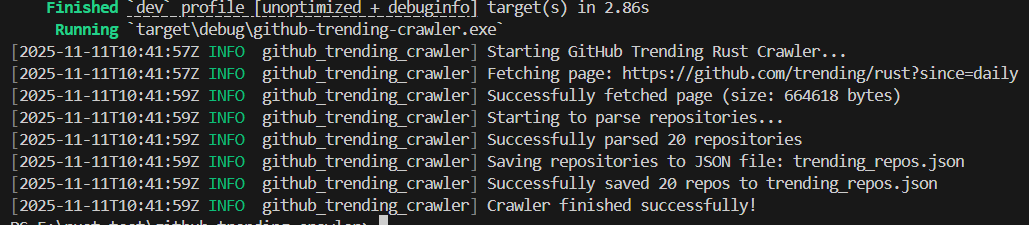
3.2 验证结果
运行成功后,项目根目录会生成trending_repos.json文件。优化后的结果示例(容错性提升,无缺失值):
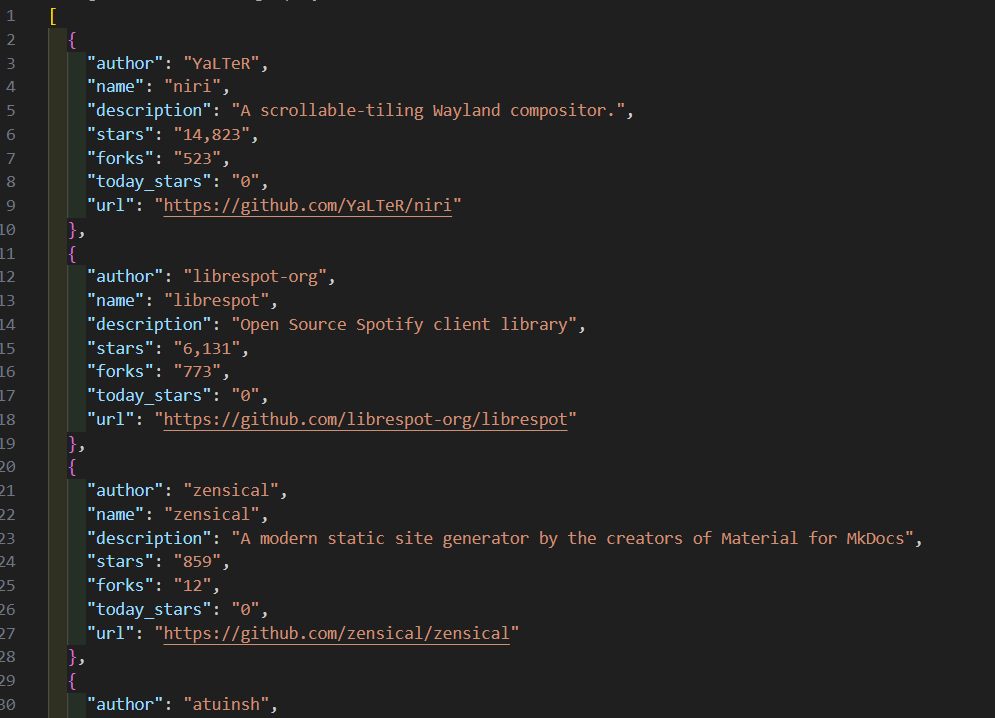
[
  {
    "author": "YaLTeR",
    "name": "niri",
    "description": "A scrollable-tiling Wayland compositor.",
    "stars": "14,823",
    "forks": "523",
    "today_stars": "0",
    "url": "https://github.com/YaLTeR/niri"
  },
  {
    "author": "librespot-org",
    "name": "librespot",
    "description": "Open Source Spotify client library",
    "stars": "6,131",
    "forks": "773",
    "today_stars": "0",
    "url": "https://github.com/librespot-org/librespot"
  },
  {
    "author": "zensical",
    "name": "zensical",
    "description": "A modern static site generator by the creators of Material for MkDocs",
    "stars": "859",
    "forks": "12",
    "today_stars": "0",
    "url": "https://github.com/zensical/zensical"
  },
  {
    "author": "atuinsh",
    "name": "atuin",
    "description": "✨ Magical shell history",
    "stars": "26,951",
    "forks": "730",
    "today_stars": "0",
    "url": "https://github.com/atuinsh/atuin"
  },
  {
    "author": "openai",
    "name": "codex",
    "description": "Lightweight coding agent that runs in your terminal",
    "stars": "50,236",
    "forks": "6,238",
    "today_stars": "0",
    "url": "https://github.com/openai/codex"
  },
  {
    "author": "bevyengine",
    "name": "bevy",
    "description": "A refreshingly simple data-driven game engine built in Rust",
    "stars": "43,023",
    "forks": "4,224",
    "today_stars": "0",
    "url": "https://github.com/bevyengine/bevy"
  },
  {
    "author": "topjohnwu",
    "name": "Magisk",
    "description": "The Magic Mask for Android",
    "stars": "56,884",
    "forks": "15,868",
    "today_stars": "0",
    "url": "https://github.com/topjohnwu/Magisk"
  },
  {
    "author": "uutils",
    "name": "coreutils",
    "description": "Cross-platform Rust rewrite of the GNU coreutils",
    "stars": "22,144",
    "forks": "1,637",
    "today_stars": "0",
    "url": "https://github.com/uutils/coreutils"
  },
  {
    "author": "regolith-labs",
    "name": "ore",
    "description": "It's time to mine.",
    "stars": "741",
    "forks": "262",
    "today_stars": "0",
    "url": "https://github.com/regolith-labs/ore"
  },
  {
    "author": "commonwarexyz",
    "name": "monorepo",
    "description": "Commonware Library Primitives and Examples",
    "stars": "369",
    "forks": "131",
    "today_stars": "0",
    "url": "https://github.com/commonwarexyz/monorepo"
  },
  {
    "author": "rust-lang",
    "name": "rust-analyzer",
    "description": "A Rust compiler front-end for IDEs",
    "stars": "15,670",
    "forks": "1,864",
    "today_stars": "0",
    "url": "https://github.com/rust-lang/rust-analyzer"
  },
  {
    "author": "chroma-core",
    "name": "chroma",
    "description": "Open-source search and retrieval database for AI applications.",
    "stars": "24,344",
    "forks": "1,912",
    "today_stars": "0",
    "url": "https://github.com/chroma-core/chroma"
  },
  {
    "author": "getzola",
    "name": "zola",
    "description": "A fast static site generator in a single binary with everything built-in. https://www.getzola.org",
    "stars": "16,120",
    "forks": "1,094",
    "today_stars": "0",
    "url": "https://github.com/getzola/zola"
  },
  {
    "author": "longbridge",
    "name": "gpui-component",
    "description": "Rust GUI components for building fantastic cross-platform desktop application by using GPUI.",
    "stars": "7,532",
    "forks": "297",
    "today_stars": "0",
    "url": "https://github.com/longbridge/gpui-component"
  },
  {
    "author": "fish-shell",
    "name": "fish-shell",
    "description": "The user-friendly command line shell.",
    "stars": "31,470",
    "forks": "2,159",
    "today_stars": "0",
    "url": "https://github.com/fish-shell/fish-shell"
  },
  {
    "author": "Spotifyd",
    "name": "spotifyd",
    "description": "A spotify daemon",
    "stars": "10,404",
    "forks": "487",
    "today_stars": "0",
    "url": "https://github.com/Spotifyd/spotifyd"
  },
  {
    "author": "tree-sitter",
    "name": "tree-sitter",
    "description": "An incremental parsing system for programming tools",
    "stars": "22,666",
    "forks": "2,198",
    "today_stars": "0",
    "url": "https://github.com/tree-sitter/tree-sitter"
  },
  {
    "author": "UwUDev",
    "name": "ygege",
    "description": "High-performance indexer for YGG Torrent written in Rust",
    "stars": "78",
    "forks": "9",
    "today_stars": "0",
    "url": "https://github.com/UwUDev/ygege"
  },
  {
    "author": "ankitects",
    "name": "anki",
    "description": "Anki is a smart spaced repetition flashcard program",
    "stars": "24,634",
    "forks": "2,583",
    "today_stars": "0",
    "url": "https://github.com/ankitects/anki"
  },
  {
    "author": "get-convex",
    "name": "convex-backend",
    "description": "The open-source reactive database for app developers",
    "stars": "8,066",
    "forks": "452",
    "today_stars": "0",
    "url": "https://github.com/get-convex/convex-backend"
  }
]
✅ 验证要点:检查JSON文件是否包含所有字段,特别是星标数、分支数等数值字段是否正常显示。如果某个仓库的今日新增星标为"0",说明该字段可能被GitHub隐藏,我们的容错机制已生效。
[AFFILIATE_SLOT_1]项目总结与延伸
通过这个实战项目,我们不仅掌握了Rust爬虫的完整开发流程,还学到了如何优雅地处理网页解析中的各种异常情况。从技术选型到代码优化,每一步都体现了Rust在系统编程领域的优势:内存安全、高性能、零成本抽象。
对于从事机器学习和自然语言处理的开发者来说,这个爬虫可以作为数据采集的基础组件。你可以轻松扩展它,例如:
- 添加定时任务,每天自动抓取Trending数据,构建历史趋势分析数据集。
- 将爬取结果存入数据库,支持更复杂的查询和分析。
- 结合神经网络模型,对仓库描述进行情感分析或主题分类。
Rust在AI领域的应用正在快速增长,特别是在需要高性能数据管道的场景中。掌握Rust爬虫技术,将为你的深度学习项目提供坚实的数据基础。
[AFFILIATE_SLOT_2]想了解更多关于Rust语言的知识及应用,可前往华为开放原子旋武开源社区 https://xuanwu.openatom.cn/ ,了解更多资讯~
这个实战项目将使用 Rust 实现一个爬虫,目标是爬取 GitHub Trending 页面的热门 Rust 仓库信息(仓库名、描述、星标数、作者等),并将结果输出为 JSON 文件。本次更新基于优化后的代码,重点提升了错误处理容错性和 CSS 选择器稳定性。
本项目是基于 Rust 开发的 GitHub Trending 热门 Rust 仓库爬虫,通过 实现异步 HTTP 请求、 解析 HTML 页面、 系列库完成 JSON 序列化,搭配 异步运行时和 错误处理库,构建了高效且健壮的爬取流程。相较于初始版本,优化后的代码在 CSS 选择器上采用语义化属性(如基于 后缀、数据属性),降低了 GitHub 页面样式变更带来的维护成本;在错误处理上,通过 明确选择器解析错误、 处理信息缺失场景,大幅提升了程序容错性;同时保留详细日志输出,便于调试和问题定位。项目最终能稳定爬取每日热门 Rust 仓库的作者、名称、描述、星标数等关键信息,并以格式化 JSON 文件存储结果。
reqwestscraperserdetokioanyhowhrefmap_errunwrap_or_else


 浙公网安备 33010602011771号