在物联网和边缘计算日益普及的今天,如何快速构建一个功能完整、界面现代的硬件管理系统,并将其安全地暴露到公网,是许多开发者面临的挑战。本文将带你深入实践,利用AI编程助手和现代Web技术,从环境准备到内网穿透,完整实现一个智能头盔管理系统。无论你是前端开发者还是全栈工程师,这套方法论都能显著提升你的开发效率。
一、项目环境与工具链的精心准备
工欲善其事,必先利其器。一个稳定高效的开发环境是项目成功的基石。对于我们的智能头盔管理系统,你需要准备以下核心工具:
- Node.js (v14.0+):作为后端运行时,它是构建轻量级、高性能Web服务的首选。与传统的Java或Go相比,Node.js在I/O密集型应用上表现优异,且生态丰富。
- Python:虽然不是本项目的主要开发语言,但许多构建工具和AI助手依赖Python环境。确保安装最新稳定版。
- CMake:某些原生模块的编译可能需要它。
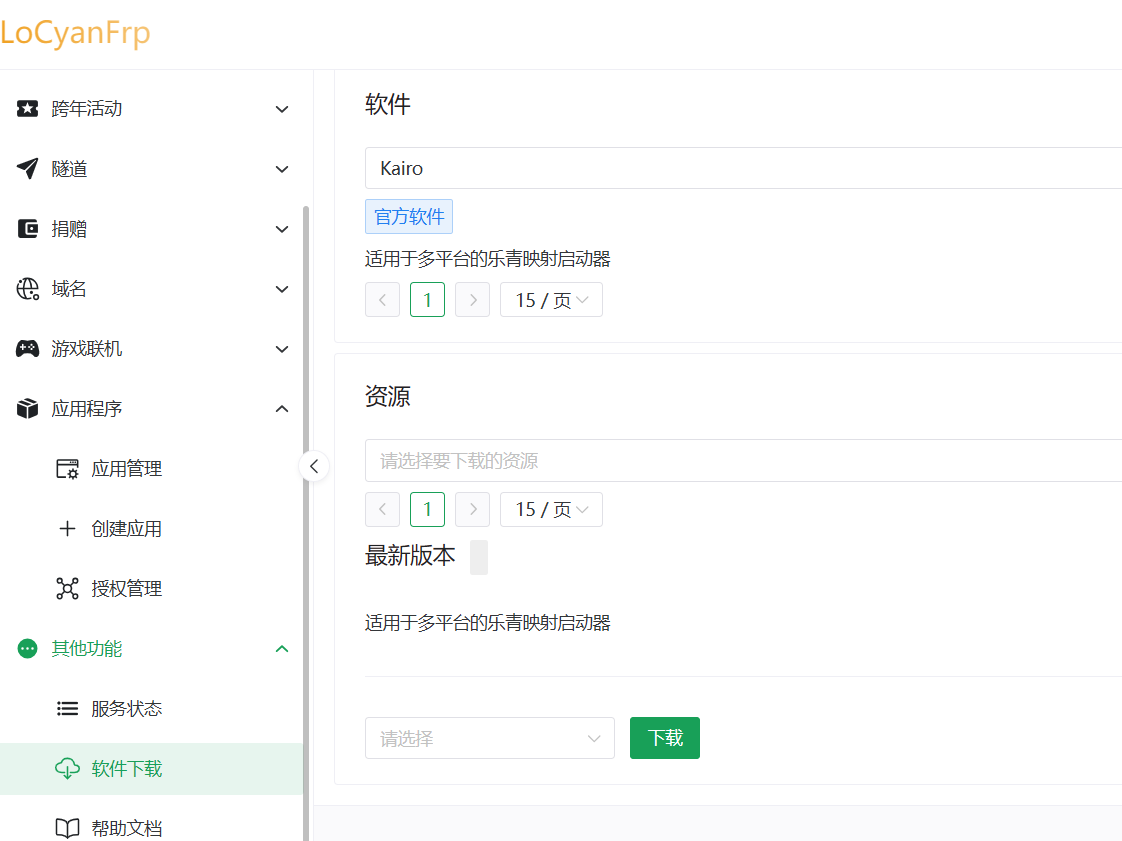
- 内网穿透工具:这是将本地服务公网可访问的关键。我们以“乐青映射”为例,你可以访问其官网下载启动器
kairo或纯净版客户端Frpc。这一步解决了本地开发无法对外提供服务的核心痛点。
安装完成后,建议通过node -v和python --version命令验证安装是否成功。一个配置好的环境能让你在后续的AI辅助开发中畅通无阻。
二、AI辅助下的项目架构与快速启动
现代开发已进入AI协作时代。利用如Gemini、Codex或Cursor等AI编程助手,可以极大加速项目初始化与核心代码编写。我们的策略是:让AI负责重复性框架代码,开发者专注于业务逻辑与架构设计。
首先,向AI清晰地描述需求是关键。以下是一个高效的Prompt示例,适用于大多数AI助手:
“我需要构建一个智能头盔管理系统,采用前后端分离架构。后端使用Node.js,提供清晰、RESTful风格的API。前端不使用任何重型框架(如React/Vue),仅用原生HTML、CSS和JavaScript,且样式与逻辑需分离为独立文件。第一步,请帮我搭建一个WebSocket服务器,实现前端可配置连接,服务器默认逻辑为消息转发。”
AI会根据指令生成标准的项目结构。一个清晰的结构是维护性的保障:
helmet-system/
├── package.json
├── node_modules/
├── backend/
│   └── server.js
└── frontend/
    ├── index.html
    ├── style.css
    └── script.js
接下来,在项目根目录打开终端,执行标准的Node.js项目初始化与依赖安装命令:
npm init -y          # 初始化项目
npm install ws # 安装 WebSocket 库 (唯一的外部依赖)这里,我们使用ws这个轻量且强大的库来创建WebSocket服务器,它比手动实现Socket协议要可靠得多。完成后,启动服务器:
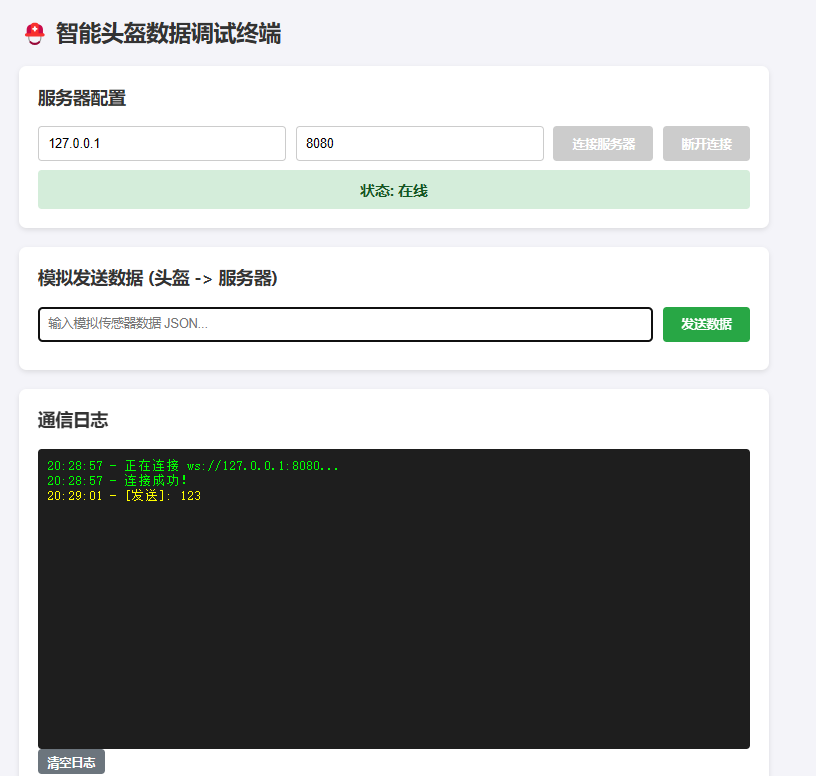
node backend/server.js此时,一个基础的WebSocket服务已在本地运行。你可以通过AI生成的前端页面进行连接测试,初步验证通信是否正常。
 [AFFILIATE_SLOT_1]
三、前端界面的现代化重构与本地部署
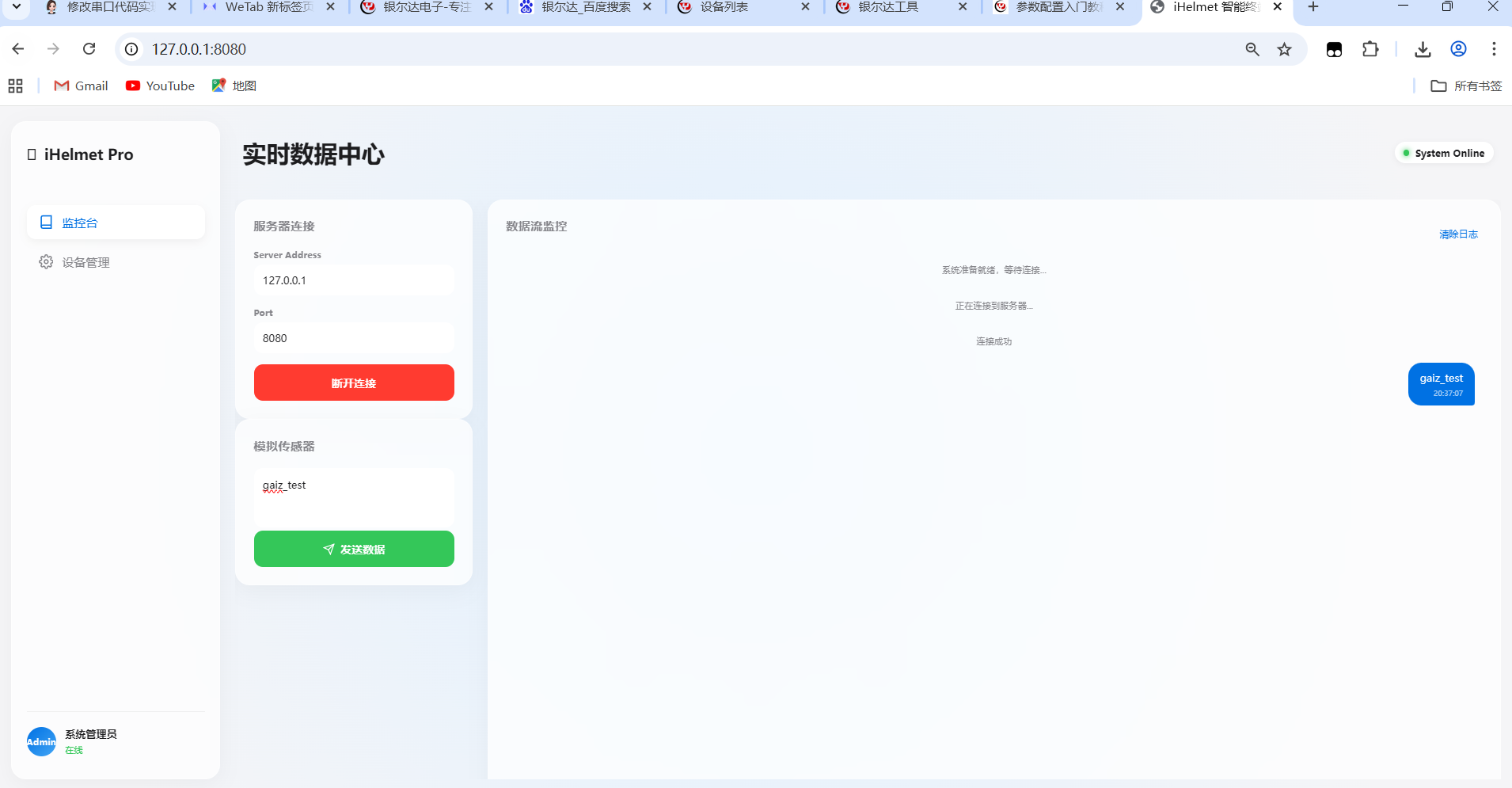
AI生成的初始界面往往比较简陋。为了获得卓越的用户体验,我们需要进行UI重构。再次借助AI,给出更具体的设计指令:
“请完全重构此系统的UI,保持所有功能业务代码不变。设计要求现代化,符合苹果设计语言(Apple Human Interface Guidelines)。系统交互需流畅,动效过渡细腻,布局饱满且信息层次清晰。”
AI会生成一套全新的前端三件套代码。将生成的index.html, style.css, script.js覆盖原文件。此时,前端代码已具备现代单页应用的雏形,但为了能在浏览器中通过本地服务器地址(如127.0.0.1)访问,而非直接打开文件,我们需要一个静态文件服务器。
一个简单的方法是使用Node.js的http模块或express快速搭建,也可以使用live-server这类工具。核心是让前端文件通过HTTP协议提供服务,这是后续与后端API交互和内网穿透的前提。重构后的界面效果将焕然一新:
四、核心代码解析与内网穿透集成
现在,让我们深入看看AI为我们生成的核心代码。首先是项目配置的package.json,它定义了依赖和启动脚本:
{
  "name": "helmet-system",
  "version": "1.0.0",
  "main": "index.js",
  "scripts": {
    "test": "echo \"Error: no test specified\" && exit 1"
  },
  "keywords": [],
  "author": "",
  "license": "ISC",
  "description": "",
  "dependencies": {
    "ws": "^8.19.0"
  }
}后端服务器server.js是项目的核心,它使用ws库创建WebSocket服务器,处理连接、消息接收与广播:
/**
 * backend/server.js
 * 极简版服务器 - 只使用 ws 和原生模块
 * 绝对不包含 document 等前端代码
 */
const http = require('http');
const fs = require('fs');
const path = require('path');
const WebSocket = require('ws');
const PORT = 8080;
// 文件类型映射
const MIME_TYPES = {
    '.html': 'text/html',
    '.css': 'text/css',
    '.js': 'text/javascript',
    '.json': 'application/json'
};
// 1. 创建 HTTP 服务器 (负责让浏览器能看到网页)
const server = http.createServer((req, res) => {
    // 默认访问 index.html
    let filePath = req.url === '/' ? 'index.html' : req.url;
    // 指向 ../frontend 文件夹
    const fullPath = path.join(__dirname, '../frontend', filePath);
    const extname = path.extname(fullPath);
    const contentType = MIME_TYPES[extname] || 'text/plain';
    fs.readFile(fullPath, (err, content) => {
        if (err) {
            if (err.code === 'ENOENT') {
                res.writeHead(404);
                res.end('404 Not Found');
            } else {
                res.writeHead(500);
                res.end(`Server Error: ${err.code}`);
            }
        } else {
            res.writeHead(200, { 'Content-Type': contentType });
            res.end(content, 'utf-8');
        }
    });
});
// 2. 创建 WebSocket 服务器 (负责数据实时转发)
const wss = new WebSocket.Server({ server });
wss.on('connection', (ws, req) => {
    const ip = req.socket.remoteAddress;
    console.log(`[WebSocket] 新连接: ${ip}`);
    ws.on('message', (message) => {
        // 收到消息,直接转发给其他人
        const msgString = message.toString();
        console.log(`[转发数据] ${msgString}`);
        wss.clients.forEach((client) => {
            if (client !== ws && client.readyState === WebSocket.OPEN) {
                client.send(msgString);
            }
        });
    });
});
// 3. 启动
server.listen(PORT, () => {
    console.log(`-----------------------------------`);
    console.log(`服务器已启动!`);
    console.log(`请在浏览器打开: http://127.0.0.1:${PORT}`);
    console.log(`-----------------------------------`);
});
前端代码则负责构建用户界面并建立WebSocket连接。HTML结构清晰:
iHelmet 智能终端
实时数据中心
未连接服务器
服务器连接
模拟传感器
数据流监控
系统准备就绪,等待连接...
<script src="script.js"></script>
CSS样式采用了现代设计理念,包括柔和的阴影、圆角、平滑过渡和灵活的布局:
/* frontend/style.css */
:root {
    --bg-color: #fbfbfd;
    --text-main: #1d1d1f;
    --text-secondary: #86868b;
    --accent-blue: #0071e3;
    --accent-green: #34c759;
    --accent-red: #ff3b30;
    --glass-bg: rgba(255, 255, 255, 0.75);
    --glass-border: rgba(255, 255, 255, 0.4);
    --shadow-soft: 0 8px 30px rgba(0, 0, 0, 0.04);
    --radius-lg: 20px;
    --radius-md: 12px;
}
body {
    margin: 0;
    font-family: -apple-system, BlinkMacSystemFont, "SF Pro Text", "Helvetica Neue", sans-serif;
    background-color: #f5f5f7;
    color: var(--text-main);
    overflow: hidden;
    height: 100vh;
}
/* 动态背景光效 */
.ambient-light {
    position: absolute;
    top: -50%;
    left: -50%;
    width: 200%;
    height: 200%;
    background: radial-gradient(circle at 50% 50%, #e0f0ff 0%, #f5f5f7 40%);
    z-index: -1;
    animation: pulseLight 10s infinite alternate;
}
@keyframes pulseLight {
    0% { transform: scale(1); }
    100% { transform: scale(1.1); }
}
.app-container {
    display: flex;
    height: 100vh;
    padding: 20px;
    box-sizing: border-box;
    gap: 20px;
}
/* --- Sidebar --- */
.sidebar {
    width: 240px;
    background: var(--glass-bg);
    backdrop-filter: blur(20px);
    -webkit-backdrop-filter: blur(20px);
    border-radius: var(--radius-lg);
    border: 1px solid var(--glass-border);
    padding: 30px 20px;
    display: flex;
    flex-direction: column;
    box-shadow: var(--shadow-soft);
}
.brand {
    font-size: 20px;
    font-weight: 700;
    margin-bottom: 40px;
    display: flex;
    align-items: center;
    gap: 10px;
}
.menu {
    list-style: none;
    padding: 0;
    flex: 1;
}
.menu li {
    padding: 12px 16px;
    margin-bottom: 8px;
    border-radius: var(--radius-md);
    color: var(--text-secondary);
    cursor: pointer;
    transition: all 0.3s ease;
    display: flex;
    align-items: center;
    gap: 12px;
    font-weight: 500;
}
.menu li svg { width: 20px; height: 20px; }
.menu li.active, .menu li:hover {
    background: white;
    color: var(--accent-blue);
    box-shadow: 0 4px 12px rgba(0,0,0,0.05);
}
.user-profile {
    display: flex;
    align-items: center;
    gap: 12px;
    padding-top: 20px;
    border-top: 1px solid rgba(0,0,0,0.05);
}
.avatar {
    width: 40px;
    height: 40px;
    background: linear-gradient(135deg, #0071e3, #42a5f5);
    border-radius: 50%;
    color: white;
    display: flex;
    align-items: center;
    justify-content: center;
    font-size: 12px;
    font-weight: bold;
}
.info .name { display: block; font-size: 14px; font-weight: 600; }
.info .role { font-size: 12px; color: var(--accent-green); }
/* --- Dashboard --- */
.dashboard {
    flex: 1;
    display: flex;
    flex-direction: column;
    gap: 20px;
}
.glass-header {
    display: flex;
    justify-content: space-between;
    align-items: center;
    padding: 0 10px;
}
.server-status {
    display: flex;
    align-items: center;
    gap: 8px;
    background: white;
    padding: 6px 12px;
    border-radius: 20px;
    font-size: 13px;
    font-weight: 600;
    box-shadow: 0 2px 8px rgba(0,0,0,0.05);
}
.status-dot { width: 8px; height: 8px; border-radius: 50%; background: #ccc; }
.status-dot.online { background: var(--accent-green); box-shadow: 0 0 8px var(--accent-green); }
.status-dot.offline { background: #ccc; }
.status-dot.error { background: var(--accent-red); }
.content-grid {
    display: grid;
    grid-template-columns: 320px 1fr;
    gap: 20px;
    height: 100%;
    overflow: hidden; /* 防止溢出 */
}
/* --- Cards --- */
.glass-card {
    background: var(--glass-bg);
    backdrop-filter: blur(20px);
    border-radius: var(--radius-lg);
    border: 1px solid var(--glass-border);
    padding: 24px;
    box-shadow: var(--shadow-soft);
    display: flex;
    flex-direction: column;
    transition: transform 0.2s;
}
.col-right .glass-card {
    height: calc(100vh - 120px); /* 确保高度填满 */
}
.card-header h3 {
    margin: 0 0 20px 0;
    font-size: 16px;
    color: var(--text-secondary);
    text-transform: uppercase;
    letter-spacing: 0.5px;
}
.flex-header { display: flex; justify-content: space-between; align-items: center; }
/* --- Inputs & Buttons --- */
.input-group { margin-bottom: 15px; }
.input-group label { display: block; font-size: 12px; color: var(--text-secondary); margin-bottom: 5px; font-weight: 600; }
.ios-input, .ios-textarea {
    width: 100%;
    padding: 12px;
    border: none;
    background: white;
    border-radius: var(--radius-md);
    font-size: 14px;
    color: var(--text-main);
    box-sizing: border-box;
    transition: box-shadow 0.2s;
    font-family: inherit;
}
.ios-textarea { height: 80px; resize: none; }
.ios-input:focus, .ios-textarea:focus {
    outline: none;
    box-shadow: 0 0 0 2px var(--accent-blue);
}
.ios-btn {
    width: 100%;
    padding: 14px;
    border: none;
    border-radius: var(--radius-md);
    font-size: 15px;
    font-weight: 600;
    cursor: pointer;
    transition: all 0.2s;
    display: flex;
    align-items: center;
    justify-content: center;
    gap: 8px;
    color: white;
}
.btn-primary { background: var(--accent-blue); }
.btn-primary:hover { background: #0077ED; transform: scale(1.02); }
.btn-primary:active { transform: scale(0.98); }
.btn-success { background: var(--accent-green); }
.btn-success:disabled { background: #ccc; cursor: not-allowed; opacity: 0.6; }
.text-btn { background: none; border: none; color: var(--accent-blue); cursor: pointer; font-size: 13px; }
/* --- Chat Style Log --- */
.chat-container {
    flex: 1;
    overflow-y: auto;
    padding: 10px;
    display: flex;
    flex-direction: column;
    gap: 12px;
}
.system-msg {
    text-align: center;
    font-size: 12px;
    color: var(--text-secondary);
    margin: 10px 0;
}
.msg-bubble {
    max-width: 80%;
    padding: 10px 16px;
    border-radius: 18px;
    font-size: 14px;
    line-height: 1.4;
    position: relative;
    animation: popIn 0.3s cubic-bezier(0.175, 0.885, 0.32, 1.275);
    word-break: break-all;
}
@keyframes popIn {
    from { opacity: 0; transform: translateY(10px) scale(0.9); }
    to { opacity: 1; transform: translateY(0) scale(1); }
}
.msg-sent {
    align-self: flex-end;
    background: var(--accent-blue);
    color: white;
    border-bottom-right-radius: 4px;
}
.msg-received {
    align-self: flex-start;
    background: white;
    color: var(--text-main);
    border-bottom-left-radius: 4px;
    box-shadow: 0 2px 5px rgba(0,0,0,0.05);
}
.time-stamp {
    font-size: 10px;
    opacity: 0.7;
    margin-top: 4px;
    display: block;
    text-align: right;
}
JavaScript逻辑处理连接管理、消息发送与接收显示,并加入了用户友好的状态提示:
/* frontend/script.js */
let ws = null;
// DOM 元素获取 (保持ID不变,适配新UI)
const inputs = {
    ip: document.getElementById('serverIp'),
    port: document.getElementById('serverPort'),
    msg: document.getElementById('msgInput')
};
const btnConnect = document.getElementById('btnConnect');
const btnSend = document.getElementById('btnSend');
const btnClear = document.getElementById('btnClear'); // 新增清除按钮
const logArea = document.getElementById('logArea');
const statusText = document.getElementById('statusText');
const statusDot = document.getElementById('statusDot');
// 自动填充当前地址
window.onload = () => {
    inputs.ip.value = window.location.hostname;
    inputs.port.value = window.location.port;
};
// --- 事件监听 ---
btnConnect.addEventListener('click', toggleConnection);
btnSend.addEventListener('click', sendMessage);
btnClear.addEventListener('click', () => {
    logArea.innerHTML = '日志已清除';
});
// --- 核心逻辑 ---
function toggleConnection() {
    if (ws) {
        // 如果已连接,则断开
        ws.close();
        return;
    }
    const ip = inputs.ip.value;
    const port = inputs.port.value;
    const url = `ws://${ip}:${port}`;
    logToSystem(`正在连接到服务器...`);
    try {
        ws = new WebSocket(url);
        ws.onopen = () => {
            updateUIState(true);
            logToSystem('连接成功');
        };
        ws.onmessage = (event) => {
            logMessage(event.data, 'received');
        };
        ws.onclose = () => {
            updateUIState(false);
            ws = null;
            logToSystem('服务器连接已断开');
        };
        ws.onerror = () => {
            updateUIState(false);
            statusDot.className = 'status-dot error';
            statusText.innerText = '连接错误';
            logToSystem('连接发生错误,请检查网络');
        };
    } catch (e) {
        logToSystem('URL 格式错误');
    }
}
function sendMessage() {
    if (ws && ws.readyState === WebSocket.OPEN) {
        const msg = inputs.msg.value;
        if (!msg) return;
        ws.send(msg);
        logMessage(msg, 'sent');
    }
}
// --- UI 渲染函数 (这里是改动最大的地方,为了漂亮) ---
function updateUIState(isConnected) {
    if (isConnected) {
        statusText.innerText = 'System Online';
        statusDot.className = 'status-dot online';
        btnConnect.innerHTML = '断开连接';
        btnConnect.style.background = '#ff3b30'; // 红色
        btnSend.disabled = false;
        inputs.ip.disabled = true;
        inputs.port.disabled = true;
    } else {
        statusText.innerText = '未连接服务器';
        statusDot.className = 'status-dot offline';
        btnConnect.innerHTML = '连接系统';
        btnConnect.style.background = ''; // 恢复默认蓝色
        btnSend.disabled = true;
        inputs.ip.disabled = false;
        inputs.port.disabled = false;
    }
}
// 生成聊天气泡风格的消息
function logMessage(text, type) {
    const div = document.createElement('div');
    const time = new Date().toLocaleTimeString([], { hour: '2-digit', minute: '2-digit', second: '2-digit' });
    div.className = `msg-bubble ${type === 'sent' ? 'msg-sent' : 'msg-received'}`;
    div.innerHTML = `
        ${text}
        ${time}
    `;
    logArea.appendChild(div);
    scrollToBottom();
}
// 生成系统提示消息
function logToSystem(text) {
    const div = document.createElement('div');
    div.className = 'system-msg';
    div.innerText = text;
    logArea.appendChild(div);
    scrollToBottom();
}
function scrollToBottom() {
    logArea.scrollTo({
        top: logArea.scrollHeight,
        behavior: 'smooth'
    });
}
至此,一个功能完整、界面美观的本地智能头盔管理系统已经完成。最后一步是实现公网访问。运行之前下载的“乐青映射”客户端,按照其指引配置隧道,将本地的Web服务端口(如8080)映射到一个公网域名和端口。配置成功后,你就能通过公网地址远程访问和管理你的智能头盔系统了。
[AFFILIATE_SLOT_2]五、总结与最佳实践延伸
通过本次实践,我们演示了如何结合AI编程助手与经典Web技术栈,高效完成一个物联网管理系统的原型开发。其核心要点包括:利用清晰的Prompt驱动AI生成框架代码;坚持前后端分离与关注点分离原则;以及使用可靠的内网穿透工具解决网络访问难题。
你可以将此模式扩展到其他物联网设备管理、实时监控看板等场景。对于更复杂的项目,可以考虑引入TypeScript增强代码健壮性,或用Go重写高性能的后端微服务。记住,AI是强大的副驾驶,但系统的架构设计与业务逻辑的核心把握,始终在开发者手中。
恭喜你!现在你不仅拥有一个可运行的智能头盔管理系统,更掌握了一套在现代开发环境中快速启动并交付项目的有效工作流。


 浙公网安备 33010602011771号