图像视图和采样器(Image view and sampler)
目录
图像视图和采样器(Image view and sampler)
放大 / 缩小过滤(Magnification/Minification Filter)
各向异性过滤设备特性(Anisotropy device feature)
在本章中,我们将创建另外两个图形管线采样图像所需的资源。第一个资源是我们在处理交换链图像时已经见过的图像视图,第二个是新资源 —— 它与着色器如何从图像中读取纹理像素(texels)相关。
纹理图像视图(Texture image view)
我们之前已经了解到,无论是交换链图像还是帧缓冲区(framebuffer),图像都是通过图像视图(image views)访问的,而非直接访问。因此,我们也需要为纹理图像创建这样一个图像视图。
添加一个类成员来存储纹理图像的 VkImageView,并创建一个新函数 createTextureImageView 用于创建该视图:
vk::raii::ImageView textureImageView = nullptr;
...
void initVulkan() {
    ...
    createTextureImage();
    createTextureImageView();
    createVertexBuffer();
    ...
}
...
void createTextureImageView() {
}
该函数的代码可以直接基于 createImageViews 编写,只需修改两个地方:format(格式)和 image(关联的图像):
vk::ImageViewCreateInfo viewInfo{ .image = image, .viewType = vk::ImageViewType::e2D, .format = format, .subresourceRange = { vk::ImageAspectFlagBits::eColor, 0, 1, 0, 1 }};我省略了显式的 viewInfo.components 初始化,因为 VK_COMPONENT_SWIZZLE_IDENTITY 的默认值就是 0。调用 vkCreateImageView 完成图像视图的创建:
vk::raii::ImageView( device, viewInfo );由于该逻辑与 createImageViews 有大量重复,建议将其抽象为一个新的 createImageView 函数:
vk::raii::ImageView createImageView(vk::raii::Image& image, vk::Format format) {
    vk::ImageViewCreateInfo viewInfo{ .image = image, .viewType = vk::ImageViewType::e2D,
        .format = format, .subresourceRange = { vk::ImageAspectFlagBits::eColor, 0, 1, 0, 1 } };
    return vk::raii::ImageView( device, viewInfo );
}此时,createTextureImageView 函数可以简化为:
void createTextureImageView() {
    textureImageView = createImageView(textureImage, vk::Format::eR8G8B8A8Srgb);
}同时,createImageViews 函数也可以简化:
void createImageViews() {
    swapChainImageViews.resize(swapChainImages.size());
    for (uint32_t i = 0; i < swapChainImages.size(); i++) {
        swapChainImageViews[i] = createImageView(swapChainImages[i], swapChainImageFormat);
    }
}
采样器(Samplers)
着色器可以直接从图像中读取纹理像素,但当图像用作纹理时,这种方式并不常见。纹理通常通过采样器(samplers)访问,采样器会应用过滤(filtering)和变换(transformations),以计算最终获取的颜色。
这些过滤器有助于解决诸如过采样(oversampling)等问题。假设将一个纹理映射到几何体上,而几何体的片段数(fragments)多于纹理像素数(texels):
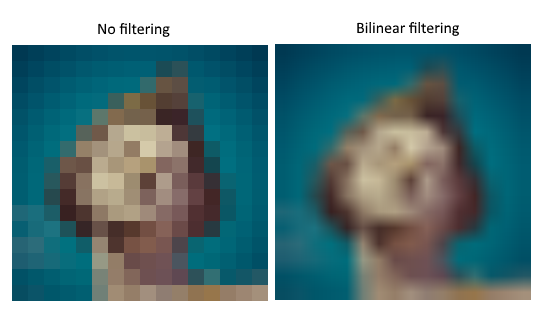
- 如果直接为每个片段的纹理坐标选取最近的纹理像素,会得到如左侧图像所示的效果(无过滤);
- 如果通过线性插值(linear interpolation)合并 4 个最近的纹理像素,则会得到右侧图像所示的更平滑的结果(双线性过滤)。
当然,你的应用程序可能因艺术风格需求更适合左侧效果(例如《我的世界》),但在传统图形应用中,右侧效果更受青睐。采样器对象会在从纹理读取颜色时自动应用这种过滤。
欠采样(undersampling)则是相反的问题,即纹理像素数多于片段数。当以大角度采样高频图案(如棋盘格纹理)时,会产生 artifacts:
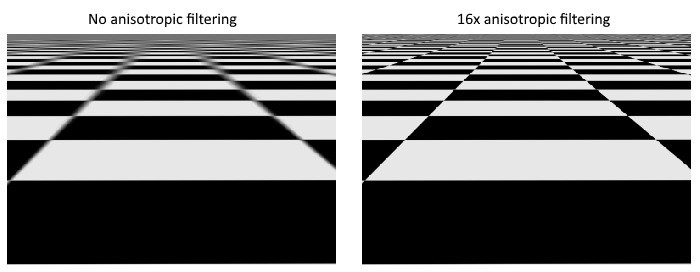
各向异性过滤(anisotropic filtering)也可以由采样器自动应用。
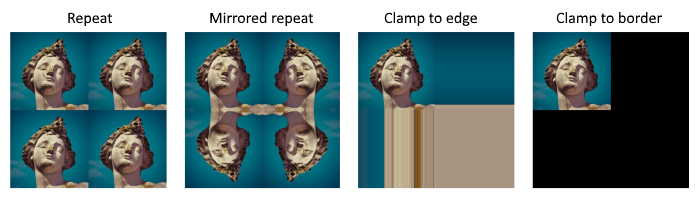
除了过滤,采样器还能处理纹理坐标变换。它通过寻址模式(addressing mode)定义了当尝试读取图像外的纹理像素时的行为,下图展示了几种常见的寻址模式:
现在,我们创建一个 createTextureSampler 函数来设置这样的采样器对象,后续将使用该采样器在着色器中从纹理读取颜色。
void initVulkan() {
    ...
    createTextureImage();
    createTextureImageView();
    createTextureSampler();
    ...
}
...
void createTextureSampler() {
}
采样器通过 VkSamplerCreateInfo 结构体进行配置,该结构体指定了采样器应应用的所有过滤和变换规则。
放大 / 缩小过滤(Magnification/Minification Filter)
vk::SamplerCreateInfo samplerInfo{.magFilter = vk::Filter::eLinear, .minFilter = vk::Filter::eLinear};magFilter:指定纹理被放大(oversampling 场景)时的插值方式;minFilter:指定纹理被缩小(undersampling 场景)时的插值方式;- 可选值:
VK_FILTER_NEAREST:最近邻过滤(选取最近的纹理像素);VK_FILTER_LINEAR:线性过滤(插值合并周围纹理像素)。
寻址模式(Addressing Mode)
vk::SamplerCreateInfo samplerInfo{.magFilter = vk::Filter::eLinear, .minFilter = vk::Filter::eLinear,  .mipmapMode = vk::SamplerMipmapMode::eLinear,
.addressModeU = vk::SamplerAddressMode::eRepeat, .addressModeV = vk::SamplerAddressMode::eRepeat };- 可以通过
addressModeU、addressModeV、addressModeW分别为 U、V、W 轴(纹理空间坐标的约定,对应 X、Y、Z 轴)指定寻址模式; - 可选值及说明:
VK_SAMPLER_ADDRESS_MODE_REPEAT:超出图像尺寸时重复纹理;VK_SAMPLER_ADDRESS_MODE_MIRRORED_REPEAT:超出尺寸时镜像翻转纹理后重复;VK_SAMPLER_ADDRESS_MODE_CLAMP_TO_EDGE:超出尺寸时使用最近边缘的纹理像素颜色;VK_SAMPLER_ADDRESS_MODE_MIRROR_CLAMP_TO_EDGE:超出尺寸时使用对侧边缘的纹理像素颜色;VK_SAMPLER_ADDRESS_MODE_CLAMP_TO_BORDER:超出尺寸时返回一个固定的边界颜色。
在本教程中,我们不会采样图像外的纹理像素,因此寻址模式的选择影响不大。但重复模式(Repeat)是最常用的模式,可用于平铺地板、墙壁等纹理。
各向异性过滤(Anisotropic Filtering)
vk::PhysicalDeviceProperties properties = physicalDevice.getProperties();
vk::SamplerCreateInfo samplerInfo{.magFilter = vk::Filter::eLinear, .minFilter = vk::Filter::eLinear,  .mipmapMode = vk::SamplerMipmapMode::eLinear,
    .addressModeU = vk::SamplerAddressMode::eRepeat, .addressModeV = vk::SamplerAddressMode::eRepeat, .addressModeW = vk::SamplerAddressMode::eRepeat,
.anisotropyEnable = vk::True, .maxAnisotropy = properties.limits.maxSamplerAnisotropy};anisotropyEnable:是否启用各向异性过滤(除非有性能顾虑,否则建议启用);maxAnisotropy:限制计算最终颜色时可采样的纹理像素数量(值越低性能越好,但质量越差);- 需通过物理设备属性获取支持的最大各向异性值:
vk::PhysicalDeviceProperties properties = physicalDevice.getProperties();properties.limits.maxSamplerAnisotropy给出了设备支持的最大各向异性值,直接使用该值可获得最佳质量。
比较操作(Comparison Operation)
samplerInfo.compareEnable = vk::False;
samplerInfo.compareOp = vk::CompareOp::eAlways;- 如果启用比较功能(
compareEnable = VK_TRUE),纹理像素会先与一个参考值比较,比较结果将用于过滤操作; - 主要用于阴影贴图(shadow maps)的百分比接近过滤(percentage-closer filtering),后续章节会详细介绍;
- 本教程中禁用该功能。
边界颜色(Border Color)
samplerInfo.borderColor = vk::BorderColor::eIntOpaqueBlack;- 当使用
VK_SAMPLER_ADDRESS_MODE_CLAMP_TO_BORDER寻址模式时,指定超出图像尺寸采样时返回的颜色; - 支持的颜色包括黑色、白色、透明色(分为浮点型和整型格式),无法指定自定义颜色。
坐标系统(Coordinate System)
samplerInfo.unnormalizedCoordinates = vk::False;VK_TRUE:使用非归一化坐标,纹理像素地址范围为[0, texWidth)和[0, texHeight);VK_FALSE:使用归一化坐标,纹理像素地址范围为[0, 1)(所有轴);- 实际应用中几乎都使用归一化坐标,因为这样可以用完全相同的坐标适配不同分辨率的纹理。
多级渐远纹理(Mipmapping)
samplerInfo.mipmapMode = vk::SamplerMipmapMode::eLinear;
samplerInfo.mipLodBias = 0.0f;
samplerInfo.minLod = 0.0f;
samplerInfo.maxLod = 0.0f;- 这些字段均与多级渐远纹理相关(后续章节会详细介绍),多级渐远纹理是另一种可应用的过滤方式;
- 目前暂不使用多级渐远纹理,保持默认值即可。
创建采样器对象
采样器的功能已完全定义,添加一个类成员存储采样器对象的句柄,并调用 vkCreateSampler 创建采样器:
vk::raii::ImageView textureImageView = nullptr;
vk::raii::Sampler textureSampler = nullptr;
...
void createTextureSampler() {
    vk::PhysicalDeviceProperties properties = physicalDevice.getProperties();
    vk::SamplerCreateInfo samplerInfo{
        .magFilter = vk::Filter::eLinear,
        .minFilter = vk::Filter::eLinear,
        .mipmapMode = vk::SamplerMipmapMode::eLinear,
        .addressModeU = vk::SamplerAddressMode::eRepeat,
        .addressModeV = vk::SamplerAddressMode::eRepeat,
        .addressModeW = vk::SamplerAddressMode::eRepeat,
        .anisotropyEnable = vk::True,
        .maxAnisotropy = properties.limits.maxSamplerAnisotropy,
        .compareEnable = vk::False,
        .compareOp = vk::CompareOp::eAlways,
        .borderColor = vk::BorderColor::eIntOpaqueBlack,
        .unnormalizedCoordinates = vk::False,
        .mipLodBias = 0.0f,
        .minLod = 0.0f,
        .maxLod = 0.0f
    };
    textureSampler = vk::raii::Sampler(device, samplerInfo);
}注意:采样器对象并未引用任何 VkImage。采样器是一个独立的对象,提供了从纹理中提取颜色的接口,可应用于任何 1D、2D 或 3D 图像。这与许多旧版 API 不同,旧版 API 会将纹理图像和过滤规则合并为单个状态。
各向异性过滤设备特性(Anisotropy device feature)
如果现在运行程序,会看到如下验证层错误信息:

这是因为各向异性过滤实际上是一个可选的设备特性,我们需要在 createLogicalDevice 函数中显式请求该特性:
vk::StructureChain featureChain = {
    {.features = {.samplerAnisotropy = true } },            // vk::PhysicalDeviceFeatures2
    {.synchronization2 = true, .dynamicRendering = true },  // vk::PhysicalDeviceVulkan13Features
    {.extendedDynamicState = true }                         // vk::PhysicalDeviceExtendedDynamicStateFeaturesEXT
};
此外,尽管现代显卡几乎都支持该特性,但仍建议在 isDeviceSuitable 函数中检查其可用性:
bool isDeviceSuitable(VkPhysicalDevice device) {
    ...
    vk::PhysicalDeviceFeatures supportedFeatures = device.getPhysicalDeviceFeatures();
    return indices.isComplete() && extensionsSupported && swapChainAdequate && supportedFeatures.samplerAnisotropy;
}
vkGetPhysicalDeviceFeatures 函数会通过 VkPhysicalDeviceFeatures 结构体的布尔值指示设备支持的特性(而非请求的特性)。
如果不想强制要求设备支持各向异性过滤,也可以通过条件判断禁用该功能:
samplerInfo.anisotropyEnable = VK_FALSE;
samplerInfo.maxAnisotropy = 1.0f;
在下一章中,我们将把图像和采样器对象暴露给着色器,以将纹理绘制到正方形上。


 浙公网安备 33010602011771号