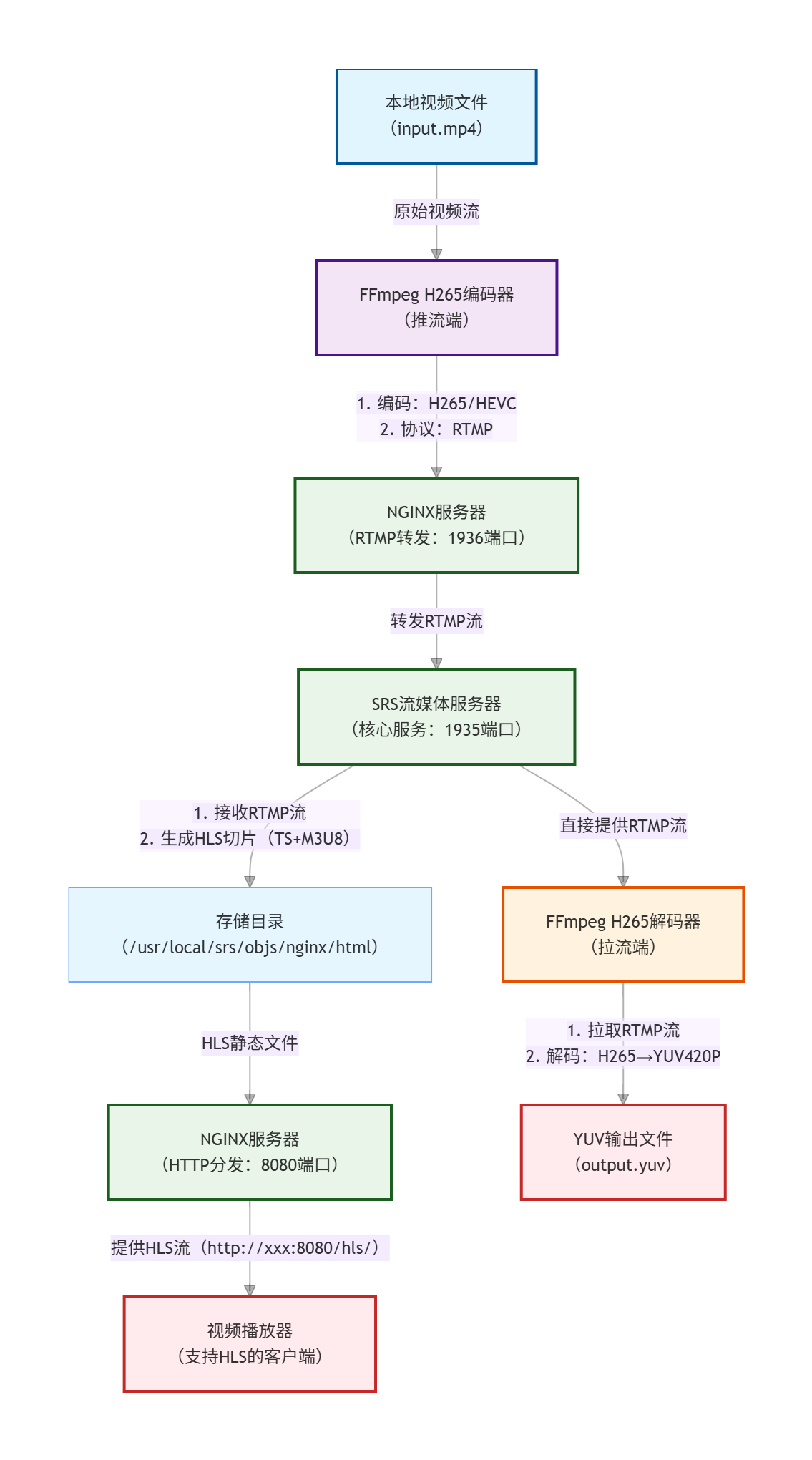
架构图核心说明
组件职责:
- 推流端(FFmpeg):负责将本地视频编码为 H265 格式,通过 RTMP 协议推送到服务器
- NGINX:双角色(RTMP 流转发 + HTTP 静态文件分发),解决 SRS 的 HLS 访问和负载均衡需求
- SRS:核心流媒体服务器,接收 RTMP 流并转码为 HLS 切片,支持低延迟 RTMP 拉流
- 拉流端(FFmpeg):拉取 SRS 的 RTMP 流解码为 YUV 原始数据,或播放器直接访问 NGINX 的 HLS 流播放
关键链路:
- 推流链路(延迟低):视频文件 → FFmpeg 编码 → RTMP → NGINX → SRS
- 拉流链路(双选项):
- 低延迟:SRS → RTMP → FFmpeg 解码 → YUV 文件
- 跨平台播放:SRS → HLS 切片 → NGINX → HTTP → 播放器(支持浏览器 / 移动端)
协议与端口:
- RTMP:1935(SRS)、1936(NGINX 转发)
- HTTP(HLS):8080(NGINX)
- 编码格式:H265/HEVC(推流)、YUV420P(解码输出)
一、SRS+NGINX 流媒体服务器搭建步骤(Ubuntu 18.04)
1. 系统依赖安装
sudo apt update && sudo apt upgrade -y
sudo apt install -y git gcc g++ make cmake libssl-dev libpcre3-dev zlib1g-dev wget
2. SRS 服务器搭建
SRS(Simple Real-Time Server)是轻量级流媒体服务器,支持 RTMP/HLS/WebRTC 等协议。
(1)克隆 SRS 源码
git clone https://gitee.com/ossrs/srs.git
cd srs/trunk
(2)编译 SRS
# 配置编译选项(启用SSL/HLS/FFmpeg)
./configure --prefix=/usr/local/srs --with-ssl --with-hls --with-dvr
make -j$(nproc)  # 多核编译
sudo make install
(3)配置 SRS
编辑主配置文件:
sudo vi /usr/local/srs/conf/srs.conf修改核心配置(开启 RTMP/HLS,设置路径):
listen              1935;        # RTMP默认端口
max_connections     1000;
daemon              on;          # 后台运行
srs_log_tank        file;        # 日志输出到文件
srs_log_file        /usr/local/srs/logs/srs.log;
vhost __defaultVhost__ {
    # HLS配置
    hls {
        enabled         on;
        hls_path        /usr/local/srs/objs/nginx/html;  # HLS文件存储路径
        hls_fragment    10;       # 切片时长(秒)
        hls_window      60;       # 播放列表长度(秒)
    }
    # RTMP配置
    rtmp {
        gop_cache       on;       # 缓存关键帧减少延迟
        queue_length    10;
        min_latency     off;
    }
}
(4)启动 SRS
sudo /usr/local/srs/objs/srs start   # 启动
sudo /usr/local/srs/objs/srs status  # 检查状态
3. NGINX 搭建(带 RTMP 模块)
NGINX 用于反向代理和 HLS 静态文件分发,需编译 RTMP 模块。
(1)下载 NGINX 和 RTMP 模块
cd ~
git clone https://github.com/arut/nginx-rtmp-module.git
wget http://nginx.org/download/nginx-1.20.1.tar.gz  # 稳定版本
tar -zxvf nginx-1.20.1.tar.gz
cd nginx-1.20.1
(2)编译安装 NGINX
# 配置编译选项(添加RTMP模块+SSL)
./configure --prefix=/usr/local/nginx \
            --add-module=../nginx-rtmp-module \
            --with-http_ssl_module \
            --with-pcre \
            --with-zlib
make -j$(nproc)
sudo make install
(3)配置 NGINX
编辑 NGINX 配置文件:
sudo vi /usr/local/nginx/conf/nginx.conf添加 RTMP 模块配置(推流转发到 SRS):
# RTMP模块配置(http块外)
rtmp {
    server {
        listen 1936;  # 避免与SRS的1935端口冲突
        chunk_size 4096;
        # RTMP推流应用
        application live {

 浙公网安备 33010602011771号