
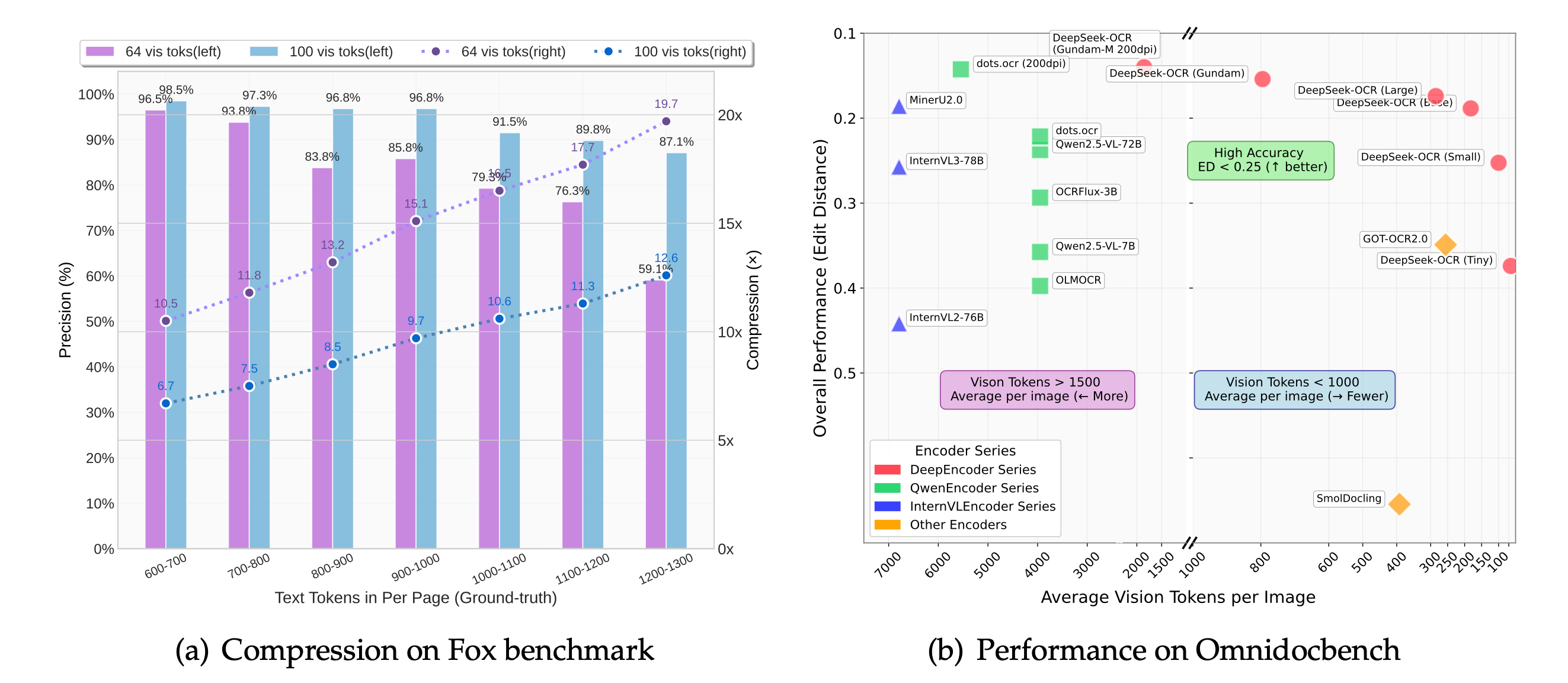
我们提出DeepSeek-OCR作为通过光学二维映射压缩长上下文的可行性初步研究。DeepSeek-OCR包含两个组件:DeepEncoder编码器和采用DeepSeek3B-MoE-A570M的解码器。具体而言,DeepEncoder作为核心引擎,旨在高分辨率输入下保持低激活量,同时实现高压缩比以确保最优且可控的视觉标记数量。实验表明,当文本标记数量不超过视觉标记的10倍时(即压缩比<10倍),模型可实现97%的解码(OCR)精确度;即使在20倍压缩比下,OCR准确率仍保持在约60%。这为历史长上下文压缩和大语言模型记忆遗忘机制等研究领域展现了巨大潜力。此外,DeepSeek-OCR还展现出极高的实用价值:在OmniDocBench基准测试中,仅用100个视觉标记就超越了GOT-OCR2.0(256标记/页)的表现,使用不足800个视觉标记时更优于平均每页6000+标记的MinerU2.0。实际生产中,DeepSeek-OCR单张A100-40G显卡每日可生成20万页以上的LLM/VLM训练数据。代码和模型权重已开源:http://github.com/deepseek-ai/DeepSeek-OCR。
发布
- [2025/10/23] DeepSeek-OCR 现已正式支持上游 vLLM。感谢 vLLM 团队的帮助。
- [2025/10/20] 我们发布了 DeepSeek-OCR,这是一个从以 LLM 为中心的视角研究视觉编码器作用的模型。
内容
安装
我们的运行环境是cuda11.8+torch2.6.0。
- 克隆此仓库并进入DeepSeek-OCR文件夹
git clone https://github.com/deepseek-ai/DeepSeek-OCR.git- Conda
conda create -n deepseek-ocr python=3.12.9 -y
conda activate deepseek-ocr- Packages
- 下载vllm-0.8.5 whl文件
pip install torch==2.6.0 torchvision==0.21.0 torchaudio==2.6.0 --index-url https://download.pytorch.org/whl/cu118
pip install vllm-0.8.5+cu118-cp38-abi3-manylinux1_x86_64.whl
pip install -r requirements.txt
pip install flash-attn==2.7.3 --no-build-isolation
注意: 如果你想在同一个环境中运行 vLLM 和 transformers 的代码,无需担心此类安装错误:vllm 0.8.5+cu118 要求 transformers>=4.51.1
- VLLM:
注意: 在 DeepSeek-OCR-master/DeepSeek-OCR-vllm/config.py 中更改 INPUT_PATH/OUTPUT_PATH 和其他设置
cd DeepSeek-OCR-master/DeepSeek-OCR-vllm- 图片:流式输出
python run_dpsk_ocr_image.py- pdf: 并发处理能力约2500令牌/秒(基于A100-40G架构)
python run_dpsk_ocr_pdf.py- 批量评估基准测试
python run_dpsk_ocr_eval_batch.py[2025/10/23] 上游 vLLM 版本:
uv venv
source .venv/bin/activate
# Until v0.11.1 release, you need to install vLLM from nightly build
uv pip install -U vllm --pre --extra-index-url https://wheels.vllm.ai/nightly
from vllm import LLM, SamplingParams
from vllm.model_executor.models.deepseek_ocr import NGramPerReqLogitsProcessor
from PIL import Image
# Create model instance
llm = LLM(
model="deepseek-ai/DeepSeek-OCR",
enable_prefix_caching=False,
mm_processor_cache_gb=0,
logits_processors=[NGramPerReqLogitsProcessor]
)
# Prepare batched input with your image file
image_1 = Image.open("path/to/your/image_1.png").convert("RGB")
image_2 = Image.open("path/to/your/image_2.png").convert("RGB")
prompt = "<image>\nFree OCR."
model_input = [
{
"prompt": prompt,
"multi_modal_data": {"image": image_1}
},
{
"prompt": prompt,
"multi_modal_data": {"image": image_2}
}
]
sampling_param = SamplingParams(
temperature=0.0,
max_tokens=8192,
# ngram logit processor args
extra_args=dict(
ngram_size=30,
window_size=90,
whitelist_token_ids={128821, 128822}, # whitelist: <td>, </td>
),
skip_special_tokens=False,
)
# Generate output
model_outputs = llm.generate(model_input, sampling_param)
# Print output
for output in model_outputs:
print(output.outputs[0].text)Transformers 推理
- Transformers
from transformers import AutoModel, AutoTokenizer
import torch
import os
os.environ["CUDA_VISIBLE_DEVICES"] = '0'
model_name = 'deepseek-ai/DeepSeek-OCR'
tokenizer = AutoTokenizer.from_pretrained(model_name, trust_remote_code=True)
model = AutoModel.from_pretrained(model_name, _attn_implementation='flash_attention_2', trust_remote_code=True, use_safetensors=True)
model = model.eval().cuda().to(torch.bfloat16)
# prompt = "<image>\nFree OCR. "
  prompt = "<image>\n<|grounding|>Convert the document to markdown. "
    image_file = 'your_image.jpg'
    output_path = 'your/output/dir'
    res = model.infer(tokenizer, prompt=prompt, image_file=image_file, output_path = output_path, base_size = 1024, image_size = 640, crop_mode=True, save_results = True, test_compress = True)
否则你可以
cd DeepSeek-OCR-master/DeepSeek-OCR-hf
python run_dpsk_ocr.py
支持模式
当前开源模型支持以下模式:
- 原生分辨率:
- 微型:512×512(64视觉令牌)✅
- 小型:640×640(100视觉令牌)✅
- 基础:1024×1024(256视觉令牌)✅
- 大型:1280×1280(400视觉令牌)✅
- 动态分辨率
- 高达:n×640×640 + 1×1024×1024 ✅
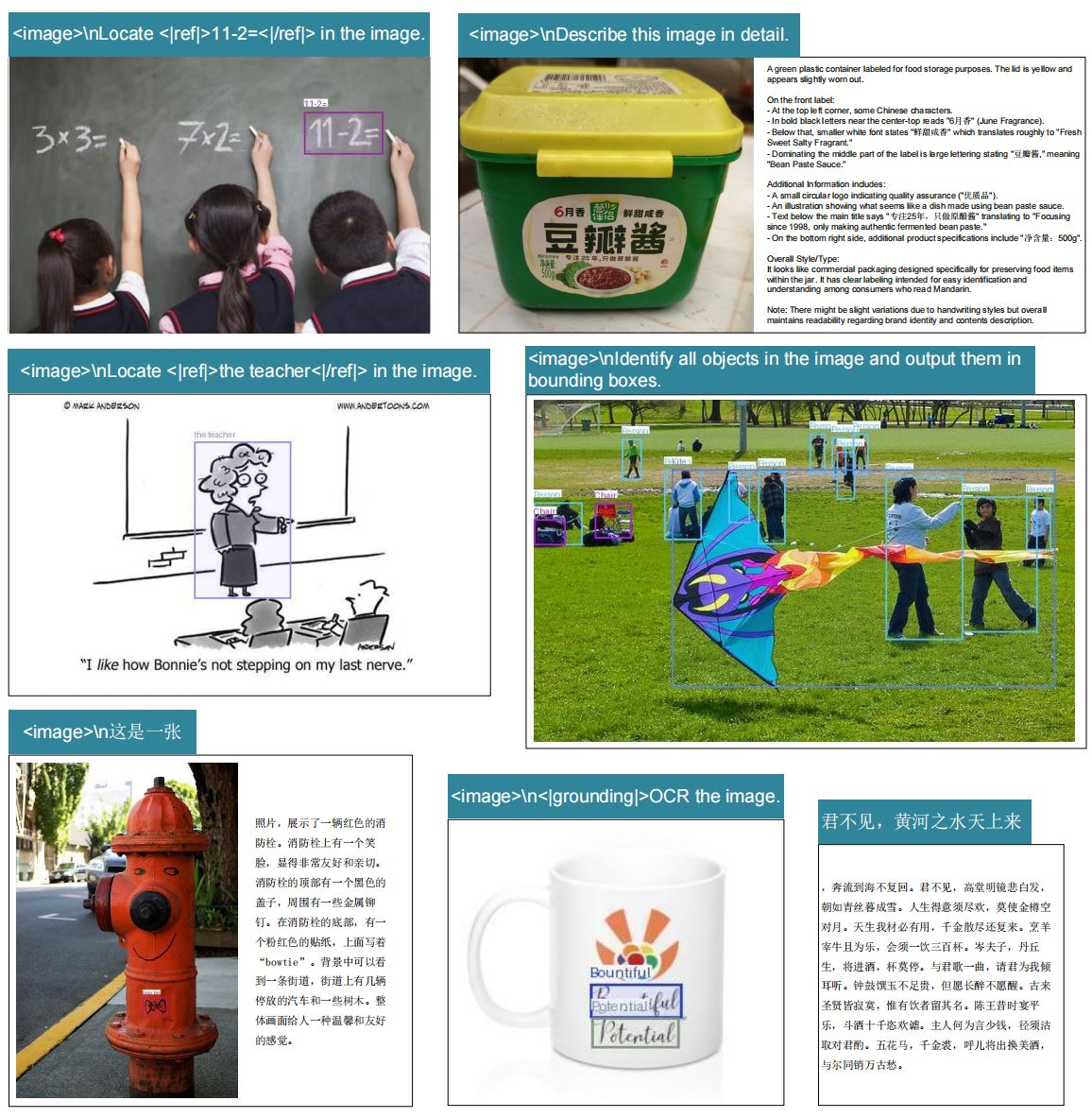
提示词示例
# document: <image>\n<|grounding|>Convert the document to markdown.
  # other image: <image>\n<|grounding|>OCR this image.
    # without layouts: <image>\nFree OCR.
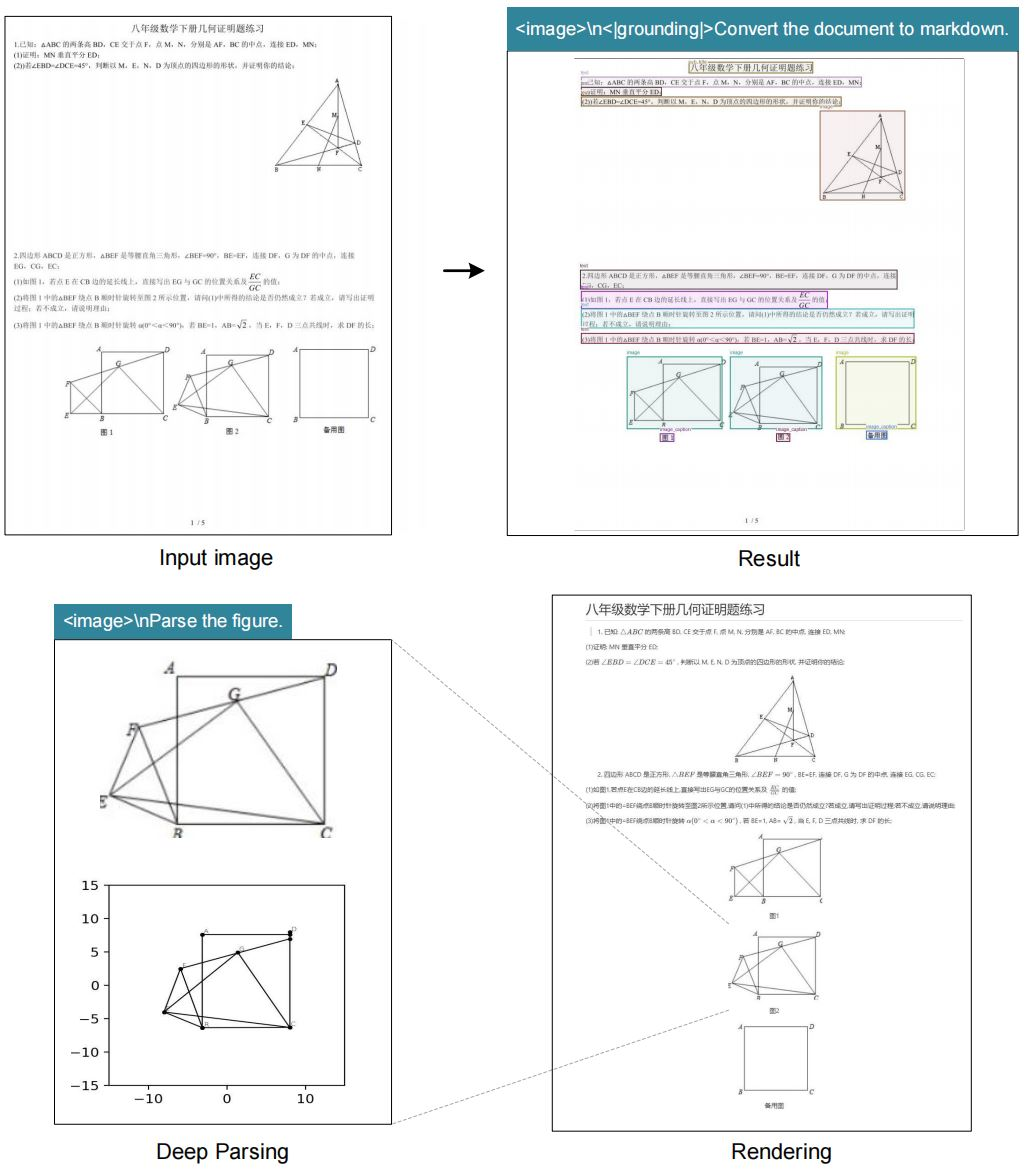
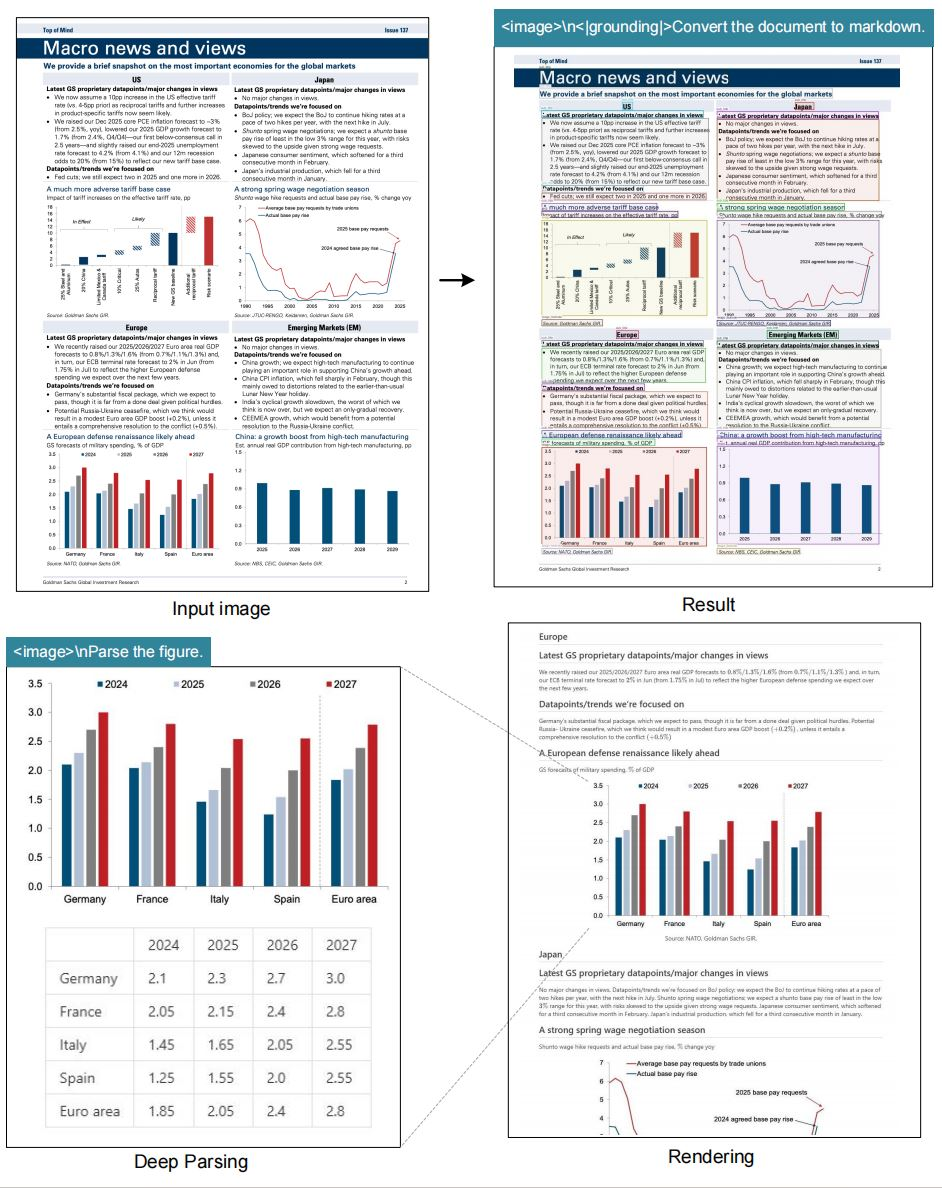
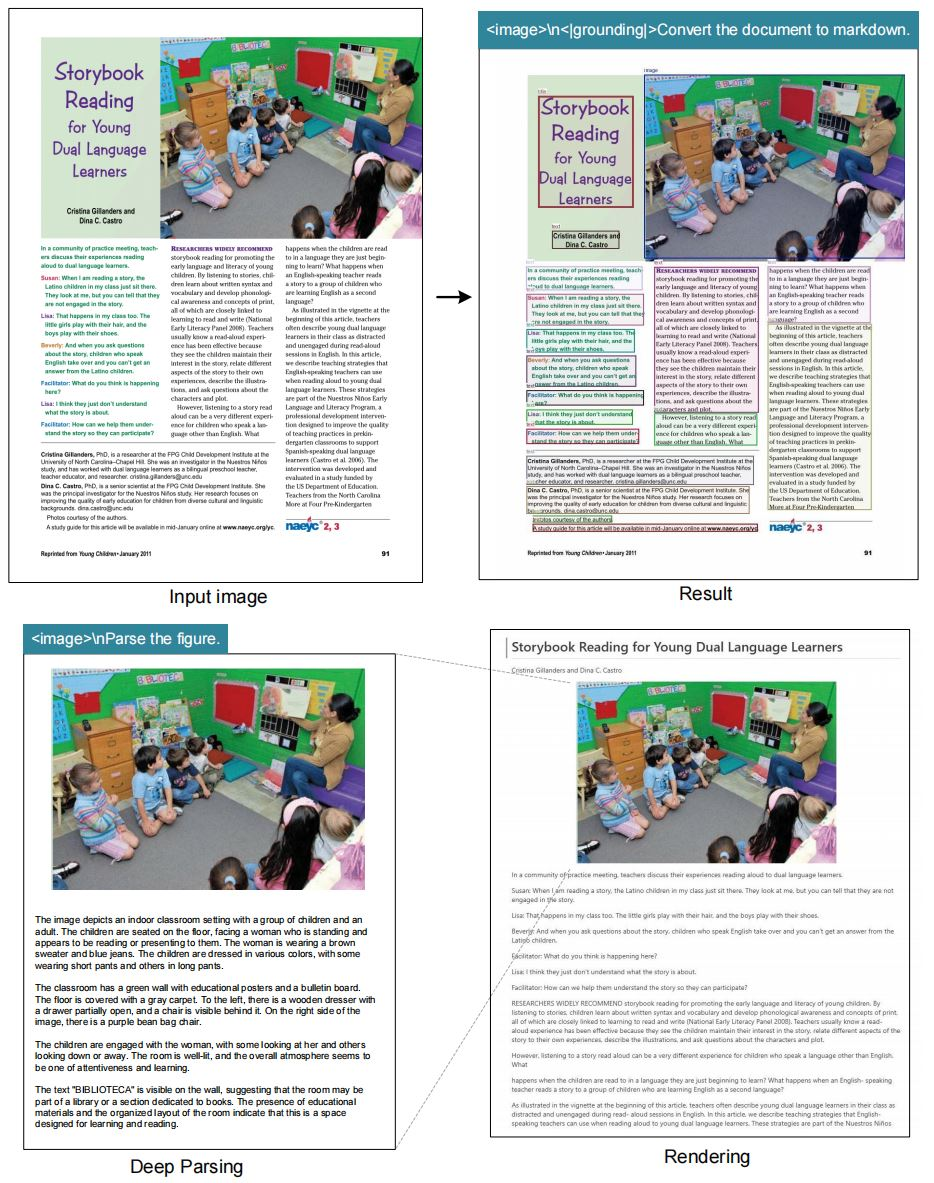
      # figures in document: <image>\nParse the figure.
        # general: <image>\nDescribe this image in detail.
          # rec: <image>\nLocate <|ref|>xxxx<|/ref|> in the image.
            # '先天下之忧而忧'
可视化
 |  |
 |  |
致谢
我们要感谢Vary、GOT-OCR2.0、MinerU、PaddleOCR、OneChart、Slow Perception提供的宝贵模型和创意。
同时感谢以下基准测试集:Fox、OminiDocBench。
Citation
@article{wei2024deepseek-ocr,
  title={DeepSeek-OCR: Contexts Optical Compression},
  author={Wei, Haoran and Sun, Yaofeng and Li, Yukun},
  journal={arXiv preprint arXiv:2510.18234},
  year={2025}
}

 浙公网安备 33010602011771号