

目录
前言
本文基于 Spring AI Alibaba 最新版本(2025 年 11 月,兼容 Spring Boot 3.x / Spring Cloud Alibaba 2023.0.x)
✅ 适合中高级 Java 开发者、AI 应用架构师、云原生工程师阅读
官方文档:https://sca.aliyun.com/en/docs/ai/overview/
随着大模型(LLM)技术的爆发,AI 能力正从“科研玩具”走向“企业级生产力”。然而,Java 生态长期缺乏一套标准化、生产级、云原生友好的 AI 应用开发框架。Spring AI Alibaba 应运而生——它不仅是 Spring AI 的阿里云增强版,更是通义千问(Qwen)、百炼平台与 Spring Cloud Alibaba 深度融合的产物。其目标是:让 Java 开发者像写 REST API 一样轻松集成 AI 能力。
本文将从架构设计、核心组件、源码实现、实战示例四个维度,系统剖析 Spring AI Alibaba 的技术内核。
1. Spring AI Alibaba 架构总览
Spring AI Alibaba 在 Spring AI 基础上,深度集成阿里云通义大模型服务(如 Qwen-Max、Qwen-Plus)和百炼平台,并强化了云原生、可观测性、插件化三大能力。
整体架构分为三层:
┌───────────────────────────────────────────────┐
│            Application Layer                   │
│ (Your Business Code: Chat, RAG, Agent...)     │
└───────────────────────────────────────────────┘
┌───────────────────────────────────────────────┐
│          Spring AI Alibaba Core               │ ← Fluent API + Abstraction
│ ┌─────────────┬─────────────┬─────────────┐ │
│ │ ChatClient  │ VectorStore │ Function    │ │
│ │             │             │ Calling     │ │
│ └─────────────┴─────────────┴─────────────┘ │
└───────────────────────────────────────────────┘
┌───────────────────────────────────────────────┐
│         Model & Service Adapters              │ ← 阿里云适配器
│ ┌───────────────────────┬─────────────────┐ │
│ │ Qwen (via Bailian)    │ OpenAI (兼容)   │ │
│ │ DashScope             │ Ollama          │ │
│ └───────────────────────┴─────────────────┘ │
└───────────────────────────────────────────────┘关键理念:解耦模型实现与业务逻辑,通过统一 API 支持多模型无缝切换。
2. 核心组件详解
2.1 ChatClient:对话模型抽象层
ChatClient 是 Spring AI Alibaba 的核心入口,提供同步/异步/流式三种调用方式,支持结构化输出(POJO 映射)。
关键能力:
- 自动序列化 Prompt 到模型输入
- 支持
@Prompt注解模板 - 输出自动反序列化为 Java 对象(Structured Output)
- 内置 Retry、Observability(Micrometer)
2.2 VectorStore:向量存储与检索
用于 RAG(Retrieval-Augmented Generation)场景,支持:
- 文档分块(Splitter)
- 向量化(Embedding)
- 存储到 Milvus / Redis / FAISS / 阿里云 OpenSearch
- 相似度检索(Top-K)
2.3 Function Calling:工具调用机制
允许 LLM 主动调用外部函数(如查询数据库、调用 API、调用shell),是构建 AI Agent 的基石。
工作流程:
- LLM 识别需调用工具 → 返回
tool_calls - 框架执行对应 Java 方法
- 将结果回传给 LLM 继续生成
3. 新增特性与创新点(Spring AI Alibaba 特有)
| 特性 | 描述 | 价值 |
|---|---|---|
| 通义百炼深度集成 | 一键对接 Qwen 系列模型,支持 Token 流控、计费监控 | 降低企业接入成本 |
| 阿里云向量引擎支持 | 原生支持 OpenSearch 向量检索 | 无需自建 Milvus |
| AI Observability | 自动上报 Prompt/Response 到 ARMS / SLS | 可审计、可追踪 |
| Function Calling 插件化 | 支持动态注册/注销工具函数 | 运行时灵活扩展 |
4. 架构图展示
4.1 Spring AI Alibaba 整体架构
4.2 RAG 工作流程
5. 关键源码剖析(附真实代码)
源码基于 spring-ai-alibaba:1.1.0.0-SNAPSHOT(GitHub: alibaba/spring-cloud-alibaba)
5.1 ChatClient 核心调用逻辑
// org.springframework.ai.autoconfigure.alicloud.QwenChatAutoConfiguration
@Bean
@ConditionalOnMissingBean
public ChatClient chatClient(QwenChatModel chatModel) {
return new AiClientBuilder()
.withChatModel(chatModel)
.withDefaultFunctions(functionCallbackContext.getCallbacks())
.build()
.chatClient();
}
5.2 VectorStore 文档检索实现
// com.alibaba.cloud.ai.dashscope.rag.DashScopeCloudStore
public List<Document> similaritySearch(SearchRequest request) {
  String pipelineId = this.dashScopeApi.getPipelineIdByName(this.options.getIndexName());
  if (pipelineId == null) {
  throw new DashScopeException("Index:" + this.options.getIndexName() + " NotExist");
  } else {
  DashScopeDocumentRetrieverOptions searchOption = this.options.getRetrieverOptions();
  if (searchOption == null) {
  searchOption = new DashScopeDocumentRetrieverOptions();
  }
  searchOption.setRerankTopN(request.getTopK());
  return this.dashScopeApi.retriever(pipelineId, request.getQuery(), searchOption);
  }
  }
5.4 实战示例:基础 ReactAgent 使用
下面我们来看一个完整的 Java 示例,演示如何使用 ReactAgent 构建一个简单的天气助手应用。这个例子不需要任何外部工具,直接利用通义千问回答问题。
POM文件
<dependencies>
  <dependency>
  <groupId>com.alibaba.cloud.ai</groupId>
  <artifactId>spring-ai-alibaba-studio</artifactId>
  </dependency>
  <dependency>
  <groupId>com.alibaba.cloud.ai</groupId>
  <artifactId>spring-ai-alibaba-starter-dashscope</artifactId>
  </dependency>
  <dependency>
  <groupId>com.alibaba.cloud.ai</groupId>
  <artifactId>spring-ai-alibaba-agent-framework</artifactId>
  </dependency>
  <dependency>
  <groupId>org.springframework.ai</groupId>
  <artifactId>spring-ai-starter-mcp-client</artifactId>
  </dependency>
  <dependency>
  <groupId>org.springframework.boot</groupId>
  <artifactId>spring-boot-starter-web</artifactId>
  </dependency>
  <dependency>
  <groupId>org.springframework.boot</groupId>
  <artifactId>spring-boot-starter-test</artifactId>
  <scope>test</scope>
  </dependency>
</dependencies>
核心代码
// sample2/AgentExample.java
public class AgentExample {
public static void main(String[] args) throws Exception {
// 创建模型实例
DashScopeApi dashScopeApi = DashScopeApi.builder()
.apiKey("your-api-key-here")
.build();
ChatModel chatModel = DashScopeChatModel.builder()
.dashScopeApi(dashScopeApi)
.build();
// 创建 Agent
ReactAgent agent = ReactAgent.builder()
.name("weather_agent")
.model(chatModel)
.instruction("You are a helpful weather forecast assistant.")
.build();
// 运行 Agent
AssistantMessage response = agent.call("what is the weather in Hangzhou?");
System.out.println(response.getText());
}
}
application.yml
spring:
application:
name: DeepResearch
ai:
dashscope:
api-key: your-api-key-here
这段代码展示了最基本的 Agent 创建和调用过程,适用于简单的问答场景。
执行结果: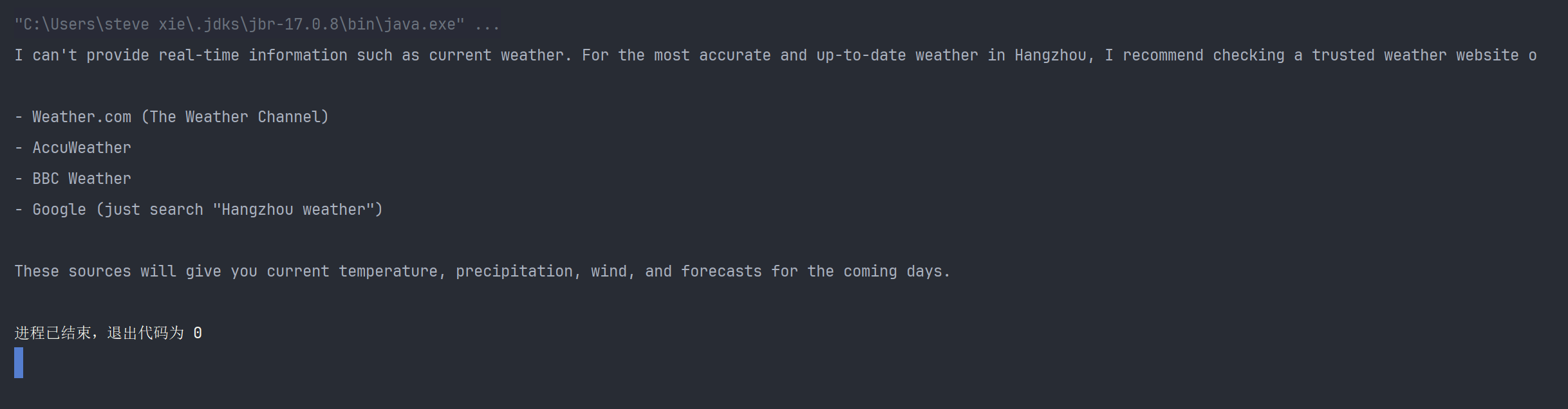
6. 快速上手示例:基于Spring AI Alibaba的深度研究Agent应用
6.1 添加依赖(Maven)
<dependencies>
  <dependency>
  <groupId>com.alibaba.cloud.ai</groupId>
  <artifactId>spring-ai-alibaba-studio</artifactId>
  </dependency>
  <dependency>
  <groupId>com.alibaba.cloud.ai</groupId>
  <artifactId>spring-ai-alibaba-starter-dashscope</artifactId>
  </dependency>
  <dependency>
  <groupId>com.alibaba.cloud.ai</groupId>
  <artifactId>spring-ai-alibaba-agent-framework</artifactId>
  </dependency>
  <dependency>
  <groupId>org.springframework.ai</groupId>
  <artifactId>spring-ai-starter-mcp-client</artifactId>
  </dependency>
  <dependency>
  <groupId>org.springframework.boot</groupId>
  <artifactId>spring-boot-starter-web</artifactId>
  </dependency>
  <dependency>
  <groupId>org.springframework.boot</groupId>
  <artifactId>spring-boot-starter-test</artifactId>
  <scope>test</scope>
  </dependency>
</dependencies>
6.2 配置 application.yml
spring:
application:
name: DeepResearch
ai:
dashscope:
api-key: your-api-key-here
mcp:
client:
enabled: true
toolcallback:
enabled: true
sse:
connections:
jina:
url: "https://mcp.jina.ai"
request-timeout: 60000
server:
port: 8080
6.3 加载Agent实例
- AgentStaticLoader 类
作用:静态Agent加载器,实现 AgentLoader 接口
功能:管理和加载预创建的Agent实例;通过 ToolCallbackProvider 获取MCP工具回调;创建并注册名为 research_agent 的深度研究Agent;提供Agent列表查询和按名称加载功能
@Component
class AgentStaticLoader implements AgentLoader {
private Map<String, BaseAgent> agents = new ConcurrentHashMap<>();
  //	public AgentStaticLoader(){}
  public AgentStaticLoader(ToolCallbackProvider toolCallbackProvider) {
  List<ToolCallback> toolCallbacks = Arrays.asList(toolCallbackProvider.getToolCallbacks());
    System.out.println("Loaded MCP tool callbacks: " + toolCallbacks.size());
    ReactAgent researchAgent = new DeepResearchAgent().getResearchAgent(toolCallbacks);
    GraphRepresentation representation = researchAgent.getAndCompileGraph().stateGraph.getGraph(GraphRepresentation.Type.PLANTUML);
    System.out.println(representation.content());
    this.agents.put("research_agent", researchAgent);
    }
    @Override
    @Nonnull
    public List<String> listAgents() {
      return agents.keySet().stream().toList();
      }
      @Override
      public BaseAgent loadAgent(String name) {
      if (name == null || name.trim().isEmpty()) {
      throw new IllegalArgumentException("Agent name cannot be null or empty");
      }
      BaseAgent agent = agents.get(name);
      if (agent == null) {
      throw new NoSuchElementException("Agent not found: " + name);
      }
      return agent;
      }
}- DeepResearchAgent 类
作用:深度研究Agent的构建器类
功能:创建配置DashScope API和聊天模型;设置复杂的Agent行为,包括多种拦截器(Interceptor)和钩子(Hook);构建包含子Agent的研究Agent,专门用于深入研究和撰写报告;定义研究工作流提示词,指导Agent完成从研究到撰写再到评审的完整流程
public class DeepResearchAgent {
private static final String BASE_AGENT_PROMPT =
"In order to complete the objective that the user asks of you, " +
"you have access to a number of standard tools.";
private String systemPrompt;
private ChatModel chatModel;
// Interceptors
private LargeResultEvictionInterceptor largeResultEvictionInterceptor;
private FilesystemInterceptor filesystemInterceptor;
private TodoListInterceptor todoListInterceptor;
private PatchToolCallsInterceptor patchToolCallsInterceptor;
private ContextEditingInterceptor contextEditingInterceptor;
private ToolRetryInterceptor toolRetryInterceptor;
// Hooks
private SummarizationHook summarizationHook;
private HumanInTheLoopHook humanInTheLoopHook;
private ToolCallLimitHook toolCallLimitHook;
private ShellToolAgentHook shellToolAgent;
//	private ShellTool shellTool = ShellTool.builder().build();
public DeepResearchAgent() {
// Create DashScopeApi instance using the API key from environment variable
DashScopeApi dashScopeApi = DashScopeApi.builder().apiKey("your-api-key-here").build();
// Create DashScope ChatModel instance
this.chatModel = DashScopeChatModel.builder().dashScopeApi(dashScopeApi).build();
this.systemPrompt = researchInstructions + "\n\n" + BASE_AGENT_PROMPT;
// Initialize interceptors
this.largeResultEvictionInterceptor = LargeResultEvictionInterceptor
.builder()
.excludeFilesystemTools()
.toolTokenLimitBeforeEvict(5000)
.build();
this.filesystemInterceptor = FilesystemInterceptor.builder()
.readOnly(false)
.build();
this.todoListInterceptor = TodoListInterceptor.builder().build();
this.patchToolCallsInterceptor = PatchToolCallsInterceptor.builder().build();
this.toolRetryInterceptor = ToolRetryInterceptor.builder()
.maxRetries(1).onFailure(ToolRetryInterceptor.OnFailureBehavior.RETURN_MESSAGE)
.build();
// Initialize hooks
this.summarizationHook = SummarizationHook.builder()
.model(chatModel) // should use another model for summarization
.maxTokensBeforeSummary(120000)
.messagesToKeep(6)
.build();
this.humanInTheLoopHook = HumanInTheLoopHook.builder()
.approvalOn("search_web", "Please approve the search_web tool.")
.build();
this.toolCallLimitHook = ToolCallLimitHook.builder()
.runLimit(25)
.build();
this.shellToolAgent = ShellToolAgentHook.builder().build();
this.contextEditingInterceptor = ContextEditingInterceptor.builder()
.trigger(10000)
.clearAtLeast(6000)
.keep(4)
.excludeTools("write_todos")
.build();
}
private static SubAgentSpec createCritiqueAgent(String subCritiquePrompt) {
return SubAgentSpec.builder()
.name("critique-agent")
.description("Used to critique the final report. Provide information about " +
"how you want the report to be critiqued.")
.systemPrompt(subCritiquePrompt)
.enableLoopingLog(true)
.build();
}
private static SubAgentSpec createResearchAgent(List<ToolCallback> toolsFromMcp, String subResearchPrompt) {
  return SubAgentSpec.builder()
  .name("research-agent")
  .description("Used to research in-depth questions. Only give one topic at a time. " +
  "Break down large topics into components and call multiple research agents " +
  "in parallel for each sub-question.")
  .systemPrompt(subResearchPrompt)
  .tools(toolsFromMcp)
  .enableLoopingLog(true)
  .build();
  }
  public ReactAgent getResearchAgent(List<ToolCallback> toolsFromMcp) {
    // Build the ReactAgent with all interceptors
    return ReactAgent.builder()
    .name("DeepResearchAgent")
    .model(chatModel)
    .tools(toolsFromMcp)
    .systemPrompt(systemPrompt)
    .enableLogging(true)
    .interceptors(todoListInterceptor,
    filesystemInterceptor,
    largeResultEvictionInterceptor,
    patchToolCallsInterceptor,
    //						contextEditingInterceptor,
    toolRetryInterceptor,
    subAgentAsInterceptors(toolsFromMcp))
    .hooks(humanInTheLoopHook, summarizationHook, toolCallLimitHook)
    .saver(new MemorySaver())
    .build();
    }
    private Interceptor subAgentAsInterceptors(List<ToolCallback> toolsFromMcp) {
      SubAgentSpec researchAgent = createResearchAgent(toolsFromMcp, subResearchPrompt);
      SubAgentSpec critiqueAgent = createCritiqueAgent(subCritiquePrompt);
      SubAgentInterceptor.Builder subAgentBuilder = SubAgentInterceptor.builder()
      .defaultModel(chatModel)
      .defaultInterceptors(
      todoListInterceptor,
      filesystemInterceptor,
      //						contextEditingInterceptor,
      patchToolCallsInterceptor,
      largeResultEvictionInterceptor
      )
      .defaultHooks(summarizationHook, toolCallLimitHook)
      .addSubAgent(researchAgent)
      .includeGeneralPurpose(true)
      .addSubAgent(critiqueAgent);
      return subAgentBuilder.build();
      }
      public static class Prompts {
      // Main research instructions
      public static String researchInstructions = "内容略,可下载源码查看";
      // Sub-agent prompt for research
      public static String subResearchPrompt = "提示词内容略,可下载源码查看";
      // Sub-agent prompt for critique
      public static String subCritiquePrompt = "提示词内容略,可下载源码查看";
      }
      }
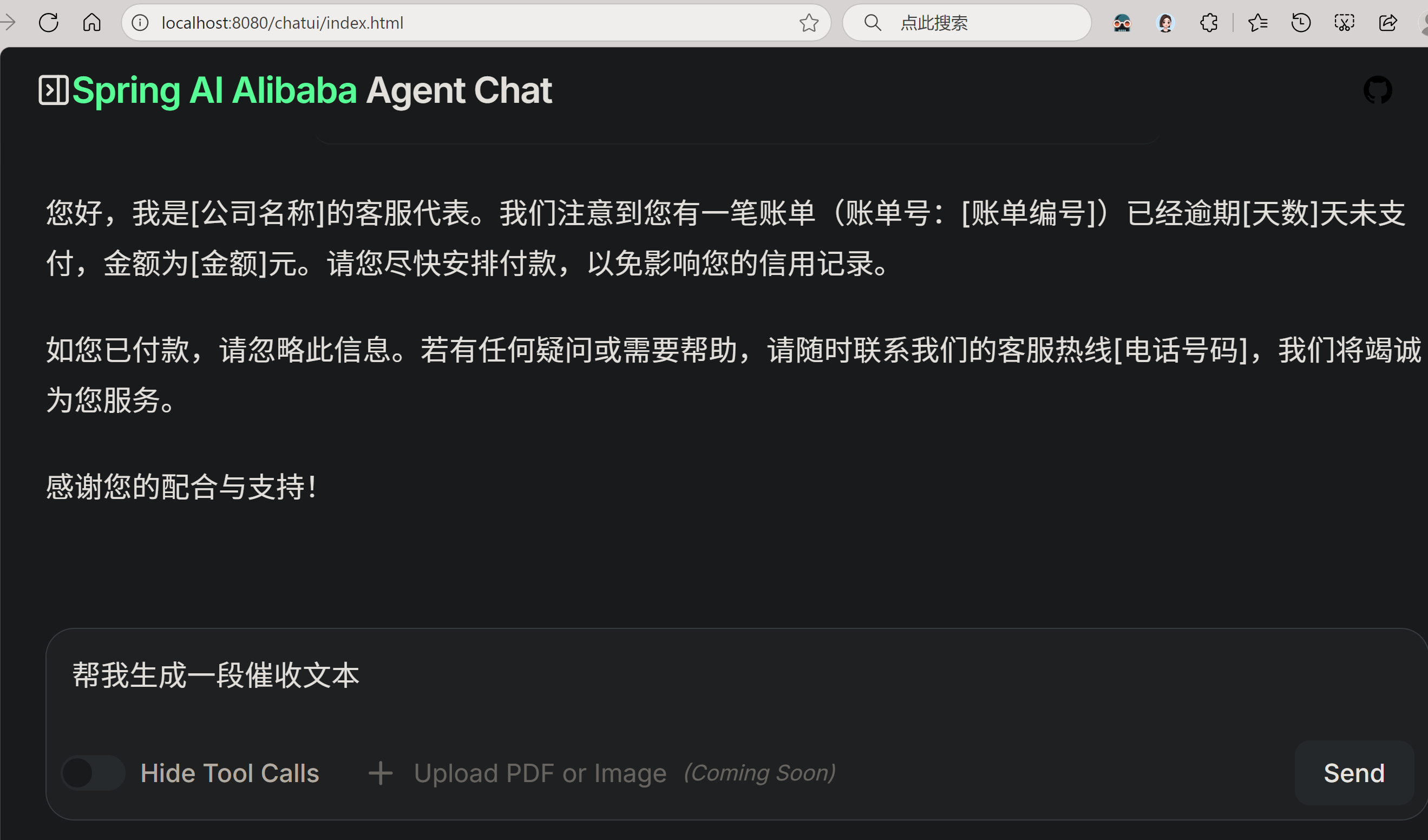
6.4 执行结果
打开:http://localhost:8080/chatui/index.html
7. 模型无关性与扩展机制:无需修改源码即可接入新模型
Spring AI Alibaba 的强大之处不仅在于对阿里云生态的深度集成,更在于其面向接口的插件化架构,使得新增或移除大模型完全无需修改框架源码。
7.1 设计哲学:抽象先行
Spring AI 定义了如 ChatClient、EmbeddingClient 等高层接口,所有模型适配器(包括官方和第三方)均基于这些接口实现。这意味着:
- 业务代码只依赖接口,不绑定具体模型;
- 新模型只需实现接口,即可无缝接入;
- 模型切换成本极低,通常只需更换依赖和配置。
7.2 实战示例:接入新模型
假设 DeepSeek 发布了新的 API,我们可通过以下步骤接入:
7.2.1 实现 ChatClient
@Component
public class DeepSeekChatClient implements ChatClient {
// ... 实现 call() 方法,封装 DeepSeek API 调用
// 转换请求/响应格式,使用 RestTemplate 发送 HTTP
}
7.2.2 配置 API 信息
spring:
ai:
deepseek:
api-url: https://api.deepseek.com/v1/chat/completions
api-key: sk-xxxxxx
7.2.3 业务代码无感使用
public class AiController {
private final ChatClient chatClient; // 自动注入 DeepSeek 实现
public String chat(String msg) {
return chatClient.call(new Prompt(msg)).getContent();
}
}关键优势:若未来切换为 Ollama 或通义千问,只需替换
ChatClient实现,业务代码一行不改。
7.3 旧模型下线
若某模型(如 Meta Llama API)停止服务,应该怎么处理?
- 官方可弃用对应 starter;
- 老项目不受影响(只要不升级依赖);
- 新项目可切换至 Ollama 本地部署版本;
- 因统一接口,迁移成本几乎为零。
7.4 扩展性总结
| 场景 | 解决方案 | 是否需改 Spring AI 源码 |
|---|---|---|
| 新增模型(如 DeepSeek) | 实现 ChatClient + 自定义 starter | ❌ 不需要 |
| 模型下线(如 Meta API 停服) | 移除对应 starter,切换实现 | ❌ 不需要 |
| 多模型共存 | 使用 @Qualifier 或命名 Bean | ❌ 不需要 |
| 统一配置管理 | 通过 application.yml 配置 endpoint/key | ✅ 开箱即用 |
Spring AI 的目标不是"包揽所有模型",而是"让接入任何模型变得简单"。
7.5 实战示例:为 Agent 添加自定义工具回调
除了基本的问答功能外,Agent 还可以通过自定义工具实现更复杂的功能。下面的例子展示了如何为 Agent 添加一个天气查询工具:
- 核心调用流程:
// sample3/WeatherTool.java
// 定义天气查询工具
public class WeatherTool implements BiFunction<String, ToolContext, String> {
  @Override
  public String apply(String city, ToolContext toolContext) {
  return "It's always sunny in " + city + "!";
  }
  }
  // sample3/AgentExample3.java
  public class AgentExample3 {
  public static void main(String[] args) {
  // 初始化 ChatModel
  DashScopeApi dashScopeApi = DashScopeApi.builder()
  .apiKey("your-api-key-here")
  .build();
  ChatModel chatModel = DashScopeChatModel.builder()
  .dashScopeApi(dashScopeApi)
  .build();
  // 关键点:自定义天气工具类
  ToolCallback weatherTool = FunctionToolCallback.builder("get_weather", new WeatherTool())
  .description("Get weather for a given city")
  .inputType(String.class)
  .build();
  // 创建 agent
  ReactAgent agent = ReactAgent.builder()
  .name("weather_agent")
  .model(chatModel)
  .tools(weatherTool)
  .systemPrompt("You are a helpful assistant")
  .saver(new MemorySaver())
  .build();
  // 运行 agent
  AssistantMessage response = null;
  try {
  response = agent.call("what is the weather in San Francisco");
  } catch (GraphRunnerException e) {
  throw new RuntimeException(e);
  }
  System.out.println(response.getText());
  }
}- 自定义天气工具类:
public class WeatherTool implements BiFunction<String, ToolContext, String> {
  @Override
  public String apply(String city, ToolContext toolContext) {
  return "It's always sunny in " + city + "!";
  }
  }
执行结果:
在这个例子中,我们创建在WeaterTool类中定义了一个名为 apply 的工具函数,当 Agent 需要查询天气时会自动调用这个函数。这种机制使得 Agent 可以与外部系统交互,比如做远程调用、执行shell脚本、文本处理,大大增强了其实用性。
8. 未来趋势与社区演进
Spring AI Alibaba 的 2025+ 路线图聚焦三大方向:
- AI Agent 框架:支持记忆(Memory)、规划(Planning)、多工具协同
- Serverless Native:与 FC(函数计算)深度集成,按需加载模型
- 企业级治理:Prompt 审计、Token 配额管理、敏感词过滤
9. 福利资源
完整的代码已上传为附件,可在Intellij IDEA中导入并直接运行,欢迎交流讨论。如果你对该框架感兴趣或者有任何疑问,或者有更好的实现方案,欢迎留言交流!
10. 结语与学习建议
Spring AI Alibaba 不仅是一个 SDK,更是 Java 生态拥抱 AI 时代的桥梁。其设计哲学值得深思:
- 为什么用 ChatClient 而不是直接调 HTTP?
→ 抽象模型差异,统一可观测性,支持未来扩展。 - 为什么 VectorStore 独立于 Embedding?
→ 解耦向量化与存储,适配不同基础设施。 - Function Calling 如何保证安全?
→ 通过注解白名单 + 参数校验,防止任意代码执行。
️ 动手建议:
- 克隆官方示例:spring-cloud-alibaba-ai-samples
- 在阿里云百炼平台申请 Qwen API Key
- 尝试替换 VectorStore 为 OpenSearch,体验云原生向量检索
版权声明:本文为原创,遵循 CC 4.0 BY-SA 协议。转载请附原文链接及本声明。
关键词:#SpringAI #AlibabaCloud #Qwen #RAG #AI微服务 #JavaAI #向量数据库


 浙公网安备 33010602011771号