

作者: 还是大剑师兰特,曾为美国某知名大学计算机专业研究生,现为国内GIS领域高级前端工程师,CSDN知名博主,深耕openlayers、leaflet、mapbox、cesium,canvas,echarts等技术开发,欢迎加微信(gis-dajianshi),一起交流。
046个示例
一、示例效果图
二、示例简介
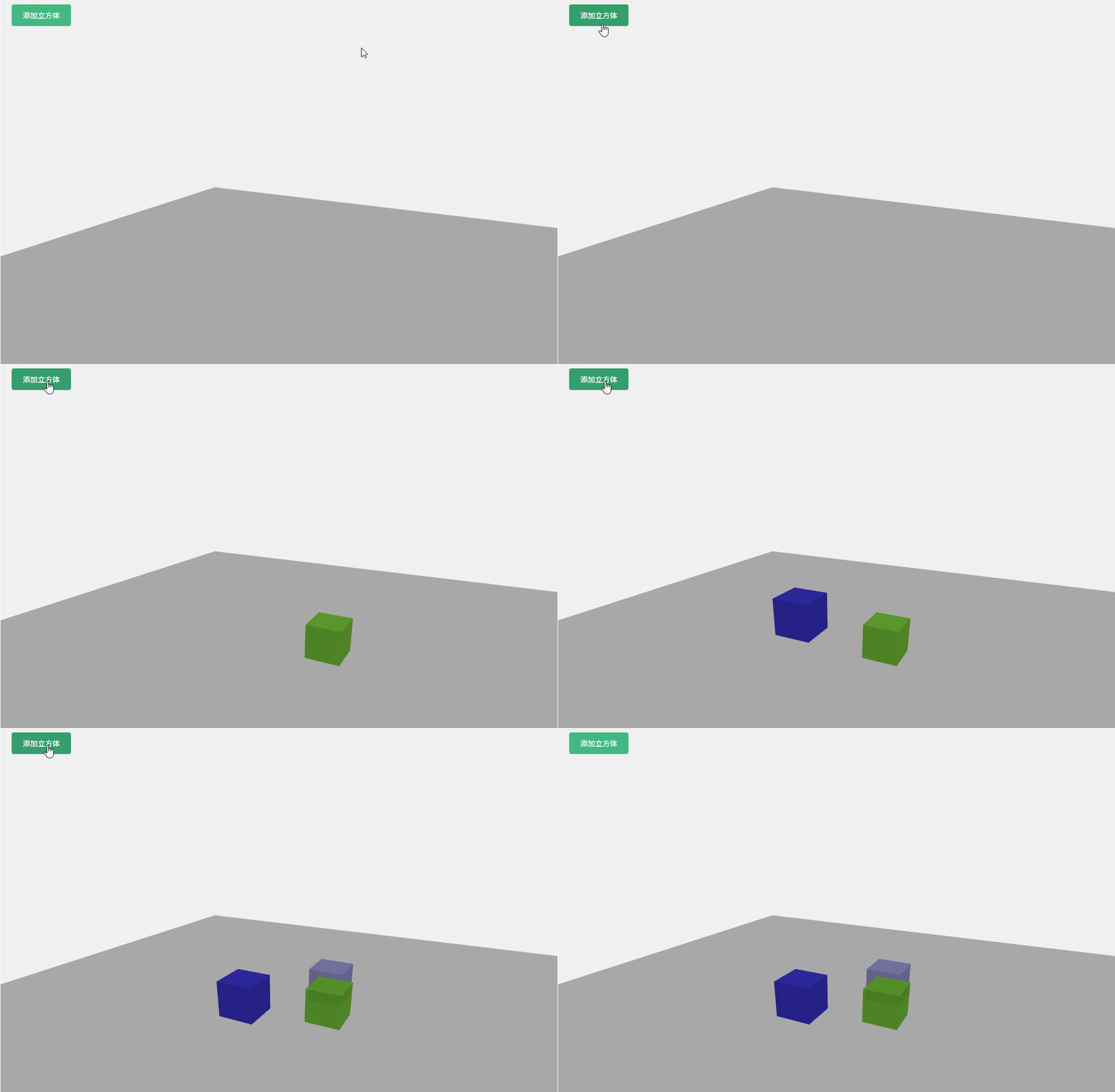
本示例是vue+threeJS计划,实现物体自由落体运动。
- 主要功能:
初始化 Three.js 场景、相机、渲染器和控制器
创建地面作为碰撞检测的基础
提供按钮可以动态添加随机大小和颜色的立方体
搭建了基础的重力模拟,使物体自由下落
实现了物体与地面的碰撞检测和反弹效果
实现了物体之间的容易碰撞检测和响应
三、配置说明
1)查看基础设置:https://dajianshi.blog.csdn.net/article/details/141936765
2)将示例源代码,粘贴到src/views/Home.vue中,npm run serve 运行即可。
四、示例源代码(共 250行)
/*
* @Author: 大剑师兰特(xiaozhuanlan),还是大剑师兰特(CSDN)
* @此源代码版权归大剑师兰特所有,可供学习或商业项目中借鉴,未经授权,不得重复地发表到博客、论坛,问答,git等公共空间或网站中。
* @Email: 2909222303@qq.com
* @First published in  CSDN
* @First published time: 2025-11-12
*/
<template>
  <div class="three-container">
    <div ref="canvasContainer" class="canvas-container"></div>
      <button @click="addBox" class="add-btn">添加立方体</button>
        </div>
          </template>
            <script>
              import * as THREE from 'three'
              import { OrbitControls } from 'three/examples/jsm//controls/OrbitControls.js'
              export default {
              data() {
              return {
              scene: null,
              camera: null,
              renderer: null,
              controls: null,
              boxes: [], // 存储所有下落的物体
              ground: null, // 地面
              gravity: 0.2, // 重力加速度
              animationId: null
              }
              },
              mounted() {
              this.initThree()
              this.createGround()
              this.animate()
              },
              beforeDestroy() {
              // 清理资源
              cancelAnimationFrame(this.animationId)
              this.renderer.dispose()
              this.scene.clear()
              },
              methods: {
              // 初始化Three.js基础组件
              initThree() {
              // 创建场景
              this.scene = new THREE.Scene()
              this.scene.background = new THREE.Color(0xf0f0f0)
              // 创建相机
              this.camera = new THREE.PerspectiveCamera(
              75,
              this.$refs.canvasContainer.clientWidth / this.$refs.canvasContainer.clientHeight,
              0.1,
              1000
              )
              this.camera.position.z = 20
              this.camera.position.y = 10
              this.camera.position.x = 10
              this.camera.lookAt(0, 0, 0)
              // 创建渲染器
              this.renderer = new THREE.WebGLRenderer({ antialias: true })
              this.renderer.setSize(
              this.$refs.canvasContainer.clientWidth,
              this.$refs.canvasContainer.clientHeight
              )
              this.$refs.canvasContainer.appendChild(this.renderer.domElement)
              // 添加轨道控制器
              this.controls = new OrbitControls(this.camera, this.renderer.domElement)
              this.controls.enableDamping = true
              // 添加环境光
              const ambientLight = new THREE.AmbientLight(0xffffff, 0.6)
              this.scene.add(ambientLight)
              // 添加平行光
              const directionalLight = new THREE.DirectionalLight(0xffffff, 1)
              directionalLight.position.set(10, 20, 10)
              this.scene.add(directionalLight)
              // 监听窗口大小变化
              window.addEventListener('resize', this.onWindowResize)
              },
              // 创建地面
              createGround() {
              const groundGeometry = new THREE.PlaneGeometry(50, 50)
              const groundMaterial = new THREE.MeshStandardMaterial({
              color: 0xeeeeee,
              side: THREE.DoubleSide
              })
              this.ground = new THREE.Mesh(groundGeometry, groundMaterial)
              this.ground.rotation.x = Math.PI / 2 // 旋转90度使其水平
              this.ground.position.y = -5 // 地面位置
              this.scene.add(this.ground)
              },
              // 添加立方体
              addBox() {
              const size = Math.random() * 1 + 2.5 // 随机大小
              const geometry = new THREE.BoxGeometry(size, size, size)
              const material = new THREE.MeshStandardMaterial({
              color: Math.random() * 0xffffff,
              transparent: true,
              opacity: 0.9
              })
              const box = new THREE.Mesh(geometry, material)
              // 随机位置
              box.position.x = (Math.random() - 0.5) * 10
              box.position.z = (Math.random() - 0.5) * 10
              box.position.y = 15 // 初始高度
              // 添加物理属性
              box.velocity = new THREE.Vector3(0, 0, 0) // 速度
              box.rotationSpeed = new THREE.Vector3(
              Math.random() * 0.05,
              Math.random() * 0.05,
              Math.random() * 0.05
              ) // 旋转速度
              this.scene.add(box)
              this.boxes.push(box)
              },
              // 窗口大小变化处理
              onWindowResize() {
              this.camera.aspect = this.$refs.canvasContainer.clientWidth / this.$refs.canvasContainer.clientHeight
              this.camera.updateProjectionMatrix()
              this.renderer.setSize(
              this.$refs.canvasContainer.clientWidth,
              this.$refs.canvasContainer.clientHeight
              )
              },
              // 动画循环
              animate() {
              this.animationId = requestAnimationFrame(() => this.animate())
              // 更新控制器
              this.controls.update()
              // 更新所有物体的物理状态
              this.updatePhysics()
              // 渲染场景
              this.renderer.render(this.scene, this.camera)
              },
              // 更新物理效果
              updatePhysics() {
              this.boxes.forEach(box => {
              // 应用重力
              box.velocity.y -= this.gravity
              // 更新位置
              box.position.add(box.velocity)
              // 检测与地面的碰撞
              const boxHalfHeight = box.geometry.parameters.height / 2
              const groundY = this.ground.position.y
              if (box.position.y - boxHalfHeight < groundY) {
              // 碰撞后反弹 (损失一些能量)
              box.velocity.y = -box.velocity.y * 0.8
              // 防止物体陷入地面
              box.position.y = groundY + boxHalfHeight
              // 能量损失到一定程度后停止反弹
              if (Math.abs(box.velocity.y) < 0.1) {
              box.velocity.y = 0
              }
              }
              // 检测物体之间的碰撞
              this.detectBoxCollisions(box)
              })
              },
              // 检测物体之间的碰撞
              detectBoxCollisions(box) {
              const boxHalfHeight = box.geometry.parameters.height / 2
              const boxHalfWidth = box.geometry.parameters.width / 2
              const boxHalfDepth = box.geometry.parameters.depth / 2
              this.boxes.forEach(otherBox => {
              if (box === otherBox) return
              const otherHalfHeight = otherBox.geometry.parameters.height / 2
              const otherHalfWidth = otherBox.geometry.parameters.width / 2
              const otherHalfDepth = otherBox.geometry.parameters.depth / 2
              // 简单的AABB碰撞检测
              const collisionX = Math.abs(box.position.x - otherBox.position.x) < (boxHalfWidth + otherHalfWidth)
              const collisionY = Math.abs(box.position.y - otherBox.position.y) < (boxHalfHeight + otherHalfHeight)
              const collisionZ = Math.abs(box.position.z - otherBox.position.z) < (boxHalfDepth + otherHalfDepth)
              if (collisionX && collisionY && collisionZ) {
              // 交换y方向的速度 (简单碰撞响应)
              const tempVelocity = box.velocity.y
              box.velocity.y = otherBox.velocity.y * 0.8
              otherBox.velocity.y = tempVelocity * 0.8
              // 分离物体防止重叠
              if (box.position.y < otherBox.position.y) {
              box.position.y = otherBox.position.y - (boxHalfHeight + otherHalfHeight)
              } else {
              otherBox.position.y = box.position.y - (boxHalfHeight + otherHalfHeight)
              }
              }
              })
              }
              }
              }
              </script>
                <style scoped>
                  .three-container {
                  width: 100%;
                  height: 100vh;
                  position: relative;
                  }
                  .canvas-container {
                  width: 100%;
                  height: 100%;
                  }
                  .add-btn {
                  position: absolute;
                  top: 20px;
                  left: 20px;
                  padding: 10px 20px;
                  background-color: #42b983;
                  color: white;
                  border: none;
                  border-radius: 4px;
                  cursor: pointer;
                  z-index: 100;
                  }
                  .add-btn:hover {
                  background-color: #359e6d;
                  }
                  </style>
五、相关文章参考
https://dajianshi.blog.csdn.net/article/details/142059217


 浙公网安备 33010602011771号