

1 项目背景与架构设计

图1-1:物联网监控系统整体架构与数据流

图1-2:技术选型对比分析与决策矩阵
假设你要为一个智能工厂搭建监控系统,需要实时采集温度、湿度、压力、振动等传感器数据,并提供实时监控和历史数据分析功能。这种场景下,InfluxDB是最佳选择。
我们的系统架构包含几个核心组件:传感器设备、数据采集网关、InfluxDB存储、Java后端服务、Web监控界面。整个数据流是这样的:传感器→网关→InfluxDB→后端API→前端展示。
1.1 系统需求分析
数据采集需求
- 支持多种传感器类型(温湿度、压力、振动、电流等)
- 数据采集频率:每秒到每分钟不等
- 设备数量:100-1000个传感器节点
- 数据保留:实时数据保留7天,聚合数据保留1年
监控功能需求
- 实时数据展示和告警
- 历史趋势分析
- 设备状态监控
- 数据导出和报表生成
1.2 技术架构选型
数据存储层
- InfluxDB 2.x:时序数据存储
- Redis:缓存和会话管理
应用服务层
- Spring Boot:Java后端框架
- InfluxDB Java Client:数据库连接
- WebSocket:实时数据推送
前端展示层
- Vue.js + ECharts:数据可视化
- Element UI:界面组件
2 InfluxDB数据模型设计
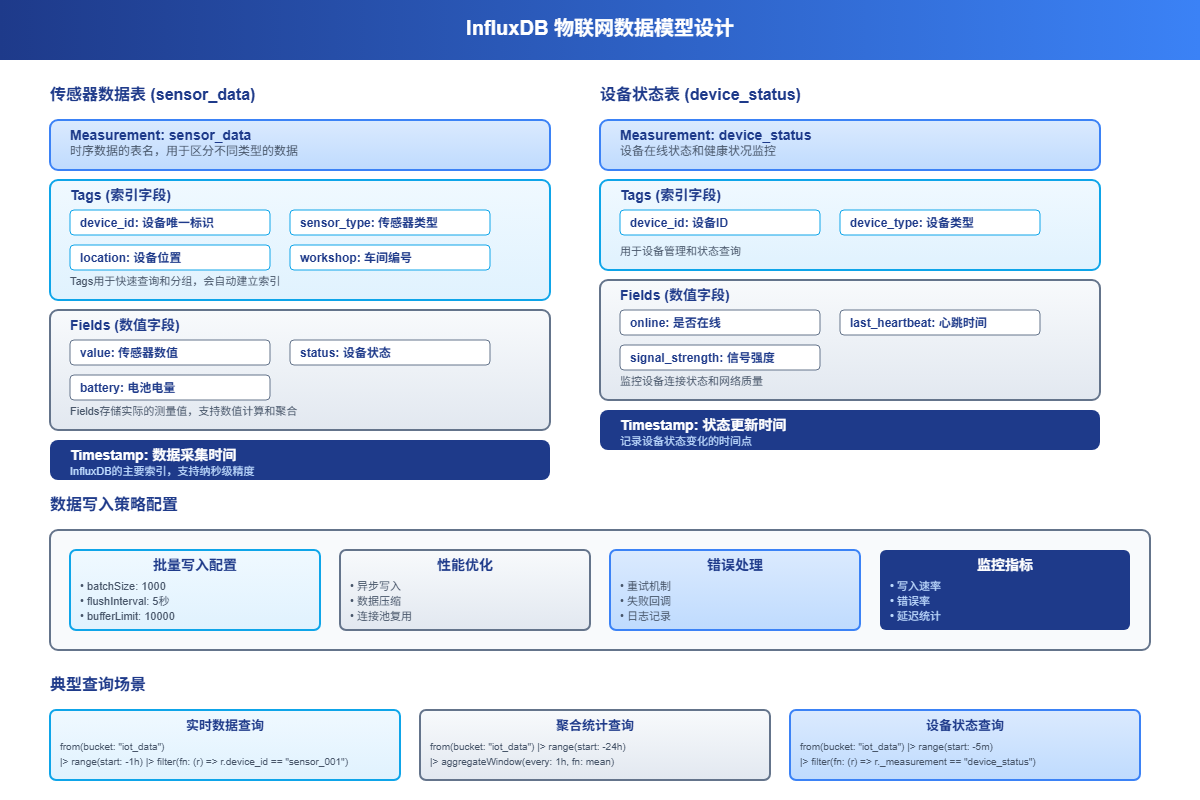
图2-1:InfluxDB数据模型结构与查询策略
2.1 数据结构规划
根据物联网场景的特点,我们设计如下的数据模型:
传感器数据表(sensor_data)
measurement: sensor_data
tags:
  - device_id: 设备ID
  - sensor_type: 传感器类型(temperature, humidity, pressure等)
  - location: 设备位置
  - workshop: 车间编号
fields:
  - value: 传感器数值
  - status: 设备状态(0正常,1异常)
  - battery: 电池电量(可选)
timestamp: 数据采集时间
设备状态表(device_status)
measurement: device_status
tags:
  - device_id: 设备ID
  - device_type: 设备类型
fields:
  - online: 是否在线
  - last_heartbeat: 最后心跳时间
  - signal_strength: 信号强度
timestamp: 状态更新时间
2.2 数据写入策略
考虑到物联网设备的特点,我们采用批量写入策略来提高性能:
// 批量数据写入配置
WriteOptions writeOptions = WriteOptions.builder()
.batchSize(1000)           // 批量大小
.flushInterval(5000)       // 5秒刷新一次
.bufferLimit(10000)        // 缓冲区大小
.retryInterval(1000)       // 重试间隔
.build();
3 Java后端服务实现

图3-1:Java后端服务架构与组件关系
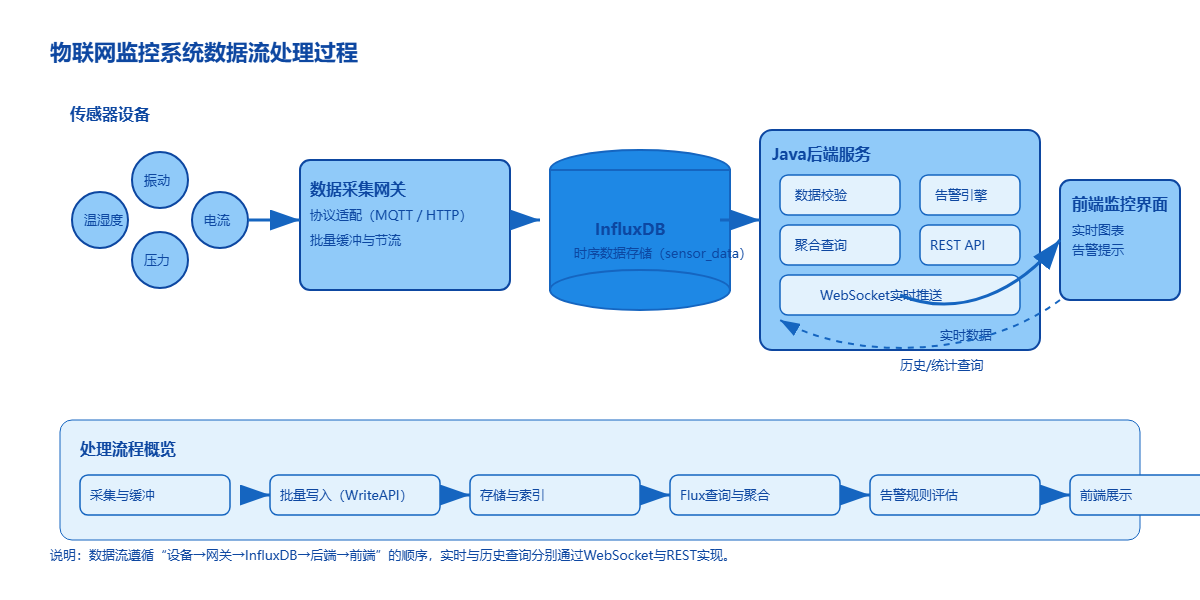
图3-2:物联网监控系统数据流处理过程
3.1 项目依赖配置
<dependencies>
  <dependency>
  <groupId>org.springframework.boot</groupId>
  <artifactId>spring-boot-starter-web</artifactId>
  </dependency>
  <dependency>
  <groupId>org.springframework.boot</groupId>
  <artifactId>spring-boot-starter-websocket</artifactId>
  </dependency>
  <dependency>
  <groupId>com.influxdb</groupId>
  <artifactId>influxdb-client-java</artifactId>
  <version>6.7.0</version>
  </dependency>
  <dependency>
  <groupId>org.springframework.boot</groupId>
  <artifactId>spring-boot-starter-data-redis</artifactId>
  </dependency>
  <dependency>
  <groupId>com.alibaba</groupId>
  <artifactId>fastjson</artifactId>
  <version>2.0.25</version>
  </dependency>
</dependencies>
3.2 InfluxDB配置类
import com.influxdb.client.InfluxDBClient;
import com.influxdb.client.InfluxDBClientFactory;
import com.influxdb.client.WriteApiBlocking;
import com.influxdb.client.domain.WritePrecision;
import org.springframework.beans.factory.annotation.Value;
import org.springframework.context.annotation.Bean;
import org.springframework.context.annotation.Configuration;
@Configuration
public class InfluxDBConfig {
@Value("${influxdb.url}")
private String influxUrl;
@Value("${influxdb.token}")
private String token;
@Value("${influxdb.org}")
private String org;
@Value("${influxdb.bucket}")
private String bucket;
@Bean
public InfluxDBClient influxDBClient() {
return InfluxDBClientFactory.create(influxUrl, token.toCharArray());
}
@Bean
public WriteApiBlocking writeApi(InfluxDBClient client) {
return client.getWriteApiBlocking();
}
}
3.3 数据模型定义
import com.influxdb.annotations.Column;
import com.influxdb.annotations.Measurement;
import java.time.Instant;
@Measurement(name = "sensor_data")
public class SensorData {
@Column(tag = true)
private String deviceId;
@Column(tag = true)
private String sensorType;
@Column(tag = true)
private String location;
@Column(tag = true)
private String workshop;
@Column
private Double value;
@Column
private Integer status;
@Column
private Double battery;
@Column(timestamp = true)
private Instant timestamp;
// 构造函数
public SensorData() {}
public SensorData(String deviceId, String sensorType, String location,
String workshop, Double value, Integer status) {
this.deviceId = deviceId;
this.sensorType = sensorType;
this.location = location;
this.workshop = workshop;
this.value = value;
this.status = status;
this.timestamp = Instant.now();
}
// getters and setters...
public String getDeviceId() { return deviceId; }
public void setDeviceId(String deviceId) { this.deviceId = deviceId; }
public String getSensorType() { return sensorType; }
public void setSensorType(String sensorType) { this.sensorType = sensorType; }
public String getLocation() { return location; }
public void setLocation(String location) { this.location = location; }
public String getWorkshop() { return workshop; }
public void setWorkshop(String workshop) { this.workshop = workshop; }
public Double getValue() { return value; }
public void setValue(Double value) { this.value = value; }
public Integer getStatus() { return status; }
public void setStatus(Integer status) { this.status = status; }
public Double getBattery() { return battery; }
public void setBattery(Double battery) { this.battery = battery; }
public Instant getTimestamp() { return timestamp; }
public void setTimestamp(Instant timestamp) { this.timestamp = timestamp; }
}
@Measurement(name = "device_status")
public class DeviceStatus {
@Column(tag = true)
private String deviceId;
@Column(tag = true)
private String deviceType;
@Column
private Boolean online;
@Column
private Long lastHeartbeat;
@Column
private Integer signalStrength;
@Column(timestamp = true)
private Instant timestamp;
// 构造函数和getter/setter方法...
public DeviceStatus() {}
public DeviceStatus(String deviceId, String deviceType, Boolean online,
Integer signalStrength) {
this.deviceId = deviceId;
this.deviceType = deviceType;
this.online = online;
this.signalStrength = signalStrength;
this.lastHeartbeat = System.currentTimeMillis();
this.timestamp = Instant.now();
}
// getters and setters...
}
3.4 数据访问层实现
import com.influxdb.client.InfluxDBClient;
import com.influxdb.client.QueryApi;
import com.influxdb.client.WriteApiBlocking;
import com.influxdb.query.FluxTable;
import com.influxdb.query.FluxRecord;
import org.springframework.beans.factory.annotation.Autowired;
import org.springframework.beans.factory.annotation.Value;
import org.springframework.stereotype.Repository;
import java.time.Instant;
import java.time.temporal.ChronoUnit;
import java.util.*;
@Repository
public class SensorDataRepository {
@Autowired
private InfluxDBClient influxDBClient;
@Autowired
private WriteApiBlocking writeApi;
@Value("${influxdb.bucket}")
private String bucket;
@Value("${influxdb.org}")
private String org;
// 写入单条传感器数据
public void writeSensorData(SensorData data) {
writeApi.writeMeasurement(WritePrecision.NS, data);
}
// 批量写入传感器数据
public void writeSensorDataBatch(List<SensorData> dataList) {
  writeApi.writeMeasurements(WritePrecision.NS, dataList);
  }
  // 查询最新的传感器数据
  public List<SensorData> getLatestSensorData(String deviceId, int limit) {
    String flux = String.format("""
    from(bucket: "%s")
    |> range(start: -1h)
    |> filter(fn: (r) => r["_measurement"] == "sensor_data")
    |> filter(fn: (r) => r["device_id"] == "%s")
    |> sort(columns: ["_time"], desc: true)
    |> limit(n: %d)
    """, bucket, deviceId, limit);
    return executeQueryForSensorData(flux);
    }
    // 查询指定时间范围的传感器数据
    public List<SensorData> getSensorDataByTimeRange(String deviceId, String sensorType,
      Instant start, Instant end) {
      String flux = String.format("""
      from(bucket: "%s")
      |> range(start: %s, stop: %s)
      |> filter(fn: (r) => r["_measurement"] == "sensor_data")
      |> filter(fn: (r) => r["device_id"] == "%s")
      |> filter(fn: (r) => r["sensor_type"] == "%s")
      |> sort(columns: ["_time"])
      """, bucket, start, end, deviceId, sensorType);
      return executeQueryForSensorData(flux);
      }
      // 获取聚合数据(按时间窗口)
      public List<Map<String, Object>> getAggregatedData(String deviceId, String sensorType,
        String timeWindow, int hours) {
        String flux = String.format("""
        from(bucket: "%s")
        |> range(start: -%dh)
        |> filter(fn: (r) => r["_measurement"] == "sensor_data")
        |> filter(fn: (r) => r["device_id"] == "%s")
        |> filter(fn: (r) => r["sensor_type"] == "%s")
        |> filter(fn: (r) => r["_field"] == "value")
        |> aggregateWindow(every: %s, fn: mean, createEmpty: false)
        |> yield(name: "mean")
        """, bucket, hours, deviceId, sensorType, timeWindow);
        return executeQueryForAggregatedData(flux);
        }
        // 获取设备状态统计
        public Map<String, Object> getDeviceStatusStats() {
          String flux = String.format("""
          from(bucket: "%s")
          |> range(start: -5m)
          |> filter(fn: (r) => r["_measurement"] == "device_status")
          |> filter(fn: (r) => r["_field"] == "online")
          |> group(columns: ["device_id"])
          |> last()
          |> group()
          |> sum(column: "_value")
          """, bucket);
          QueryApi queryApi = influxDBClient.getQueryApi();
          List<FluxTable> tables = queryApi.query(flux, org);
            Map<String, Object> stats = new HashMap<>();
              int onlineCount = 0;
              int totalCount = 0;
              for (FluxTable table : tables) {
              for (FluxRecord record : table.getRecords()) {
              if (record.getValue() != null) {
              onlineCount = ((Number) record.getValue()).intValue();
              }
              }
              }
              // 获取总设备数
              String totalFlux = String.format("""
              from(bucket: "%s")
              |> range(start: -1h)
              |> filter(fn: (r) => r["_measurement"] == "device_status")
              |> group(columns: ["device_id"])
              |> last()
              |> group()
              |> count()
              """, bucket);
              List<FluxTable> totalTables = queryApi.query(totalFlux, org);
                for (FluxTable table : totalTables) {
                for (FluxRecord record : table.getRecords()) {
                if (record.getValue() != null) {
                totalCount = ((Number) record.getValue()).intValue();
                }
                }
                }
                stats.put("onlineCount", onlineCount);
                stats.put("totalCount", totalCount);
                stats.put("offlineCount", totalCount - onlineCount);
                stats.put("onlineRate", totalCount > 0 ? (double) onlineCount / totalCount : 0.0);
                return stats;
                }
                private List<SensorData> executeQueryForSensorData(String flux) {
                  QueryApi queryApi = influxDBClient.getQueryApi();
                  List<FluxTable> tables = queryApi.query(flux, org);
                    List<SensorData> result = new ArrayList<>();
                      for (FluxTable table : tables) {
                      for (FluxRecord record : table.getRecords()) {
                      SensorData data = new SensorData();
                      data.setTimestamp(record.getTime());
                      data.setDeviceId((String) record.getValueByKey("device_id"));
                      data.setSensorType((String) record.getValueByKey("sensor_type"));
                      data.setLocation((String) record.getValueByKey("location"));
                      data.setWorkshop((String) record.getValueByKey("workshop"));
                      if ("value".equals(record.getField())) {
                      data.setValue((Double) record.getValue());
                      } else if ("status".equals(record.getField())) {
                      data.setStatus(((Number) record.getValue()).intValue());
                      } else if ("battery".equals(record.getField())) {
                      data.setBattery((Double) record.getValue());
                      }
                      result.add(data);
                      }
                      }
                      return result;
                      }
                      private List<Map<String, Object>> executeQueryForAggregatedData(String flux) {
                        QueryApi queryApi = influxDBClient.getQueryApi();
                        List<FluxTable> tables = queryApi.query(flux, org);
                          List<Map<String, Object>> result = new ArrayList<>();
                            for (FluxTable table : tables) {
                            for (FluxRecord record : table.getRecords()) {
                            Map<String, Object> dataPoint = new HashMap<>();
                              dataPoint.put("timestamp", record.getTime());
                              dataPoint.put("value", record.getValue());
                              result.add(dataPoint);
                              }
                              }
                              return result;
                              }
                              }
4 实时数据采集服务
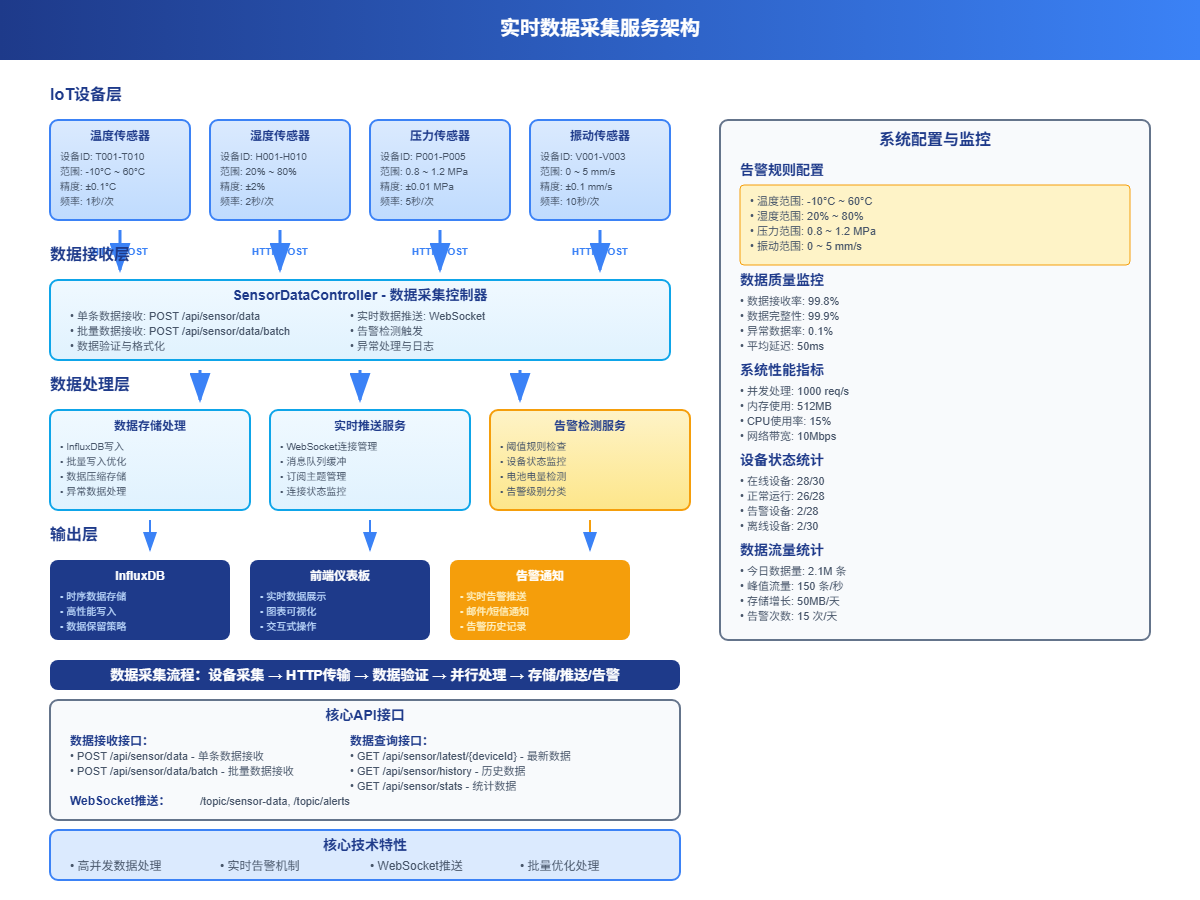
图4-1:实时数据采集服务架构与处理流程
4.1 数据接收控制器
import org.springframework.beans.factory.annotation.Autowired;
import org.springframework.web.bind.annotation.*;
import org.springframework.messaging.simp.SimpMessagingTemplate;
import java.util.List;
import java.util.Map;
@RestController
@RequestMapping("/api/sensor")
@CrossOrigin(origins = "*")
public class SensorDataController {
@Autowired
private SensorDataRepository sensorDataRepository;
@Autowired
private SimpMessagingTemplate messagingTemplate;
@Autowired
private AlertService alertService;
// 接收传感器数据
@PostMapping("/data")
public ResponseResult receiveSensorData(@RequestBody SensorDataRequest request) {
try {
// 数据验证
if (request.getDeviceId() == null || request.getValue() == null) {
return ResponseResult.error("设备ID和数值不能为空");
}
// 创建传感器数据对象
SensorData sensorData = new SensorData(
request.getDeviceId(),
request.getSensorType(),
request.getLocation(),
request.getWorkshop(),
request.getValue(),
request.getStatus()
);
if (request.getBattery() != null) {
sensorData.setBattery(request.getBattery());
}
// 写入数据库
sensorDataRepository.writeSensorData(sensorData);
// 实时推送到前端
messagingTemplate.convertAndSend("/topic/sensor-data", sensorData);
// 检查告警条件
alertService.checkAlerts(sensorData);
return ResponseResult.success("数据接收成功");
} catch (Exception e) {
return ResponseResult.error("数据处理失败: " + e.getMessage());
}
}
// 批量接收传感器数据
@PostMapping("/data/batch")
public ResponseResult receiveBatchSensorData(@RequestBody List<SensorDataRequest> requests) {
  try {
  List<SensorData> sensorDataList = requests.stream()
    .map(request -> new SensorData(
    request.getDeviceId(),
    request.getSensorType(),
    request.getLocation(),
    request.getWorkshop(),
    request.getValue(),
    request.getStatus()
    ))
    .toList();
    // 批量写入
    sensorDataRepository.writeSensorDataBatch(sensorDataList);
    // 批量推送
    messagingTemplate.convertAndSend("/topic/sensor-data-batch", sensorDataList);
    return ResponseResult.success("批量数据接收成功,共处理 " + requests.size() + " 条数据");
    } catch (Exception e) {
    return ResponseResult.error("批量数据处理失败: " + e.getMessage());
    }
    }
    // 获取最新传感器数据
    @GetMapping("/latest/{deviceId}")
    public ResponseResult getLatestData(@PathVariable String deviceId,
    @RequestParam(defaultValue = "10") int limit) {
    try {
    List<SensorData> data = sensorDataRepository.getLatestSensorData(deviceId, limit);
      return ResponseResult.success(data);
      } catch (Exception e) {
      return ResponseResult.error("查询失败: " + e.getMessage());
      }
      }
      // 获取历史数据
      @GetMapping("/history")
      public ResponseResult getHistoryData(@RequestParam String deviceId,
      @RequestParam String sensorType,
      @RequestParam String startTime,
      @RequestParam String endTime) {
      try {
      Instant start = Instant.parse(startTime);
      Instant end = Instant.parse(endTime);
      List<SensorData> data = sensorDataRepository.getSensorDataByTimeRange(
        deviceId, sensorType, start, end);
        return ResponseResult.success(data);
        } catch (Exception e) {
        return ResponseResult.error("查询历史数据失败: " + e.getMessage());
        }
        }
        // 获取聚合统计数据
        @GetMapping("/stats")
        public ResponseResult getAggregatedStats(@RequestParam String deviceId,
        @RequestParam String sensorType,
        @RequestParam(defaultValue = "5m") String timeWindow,
        @RequestParam(defaultValue = "24") int hours) {
        try {
        List<Map<String, Object>> data = sensorDataRepository.getAggregatedData(
          deviceId, sensorType, timeWindow, hours);
          return ResponseResult.success(data);
          } catch (Exception e) {
          return ResponseResult.error("查询统计数据失败: " + e.getMessage());
          }
          }
          }
          // 请求数据模型
          class SensorDataRequest {
          private String deviceId;
          private String sensorType;
          private String location;
          private String workshop;
          private Double value;
          private Integer status;
          private Double battery;
          // getters and setters...
          }
          // 响应结果模型
          class ResponseResult {
          private boolean success;
          private String message;
          private Object data;
          public static ResponseResult success(Object data) {
          ResponseResult result = new ResponseResult();
          result.success = true;
          result.data = data;
          return result;
          }
          public static ResponseResult error(String message) {
          ResponseResult result = new ResponseResult();
          result.success = false;
          result.message = message;
          return result;
          }
          // getters and setters...
          }
4.2 告警服务实现
import org.springframework.beans.factory.annotation.Autowired;
import org.springframework.messaging.simp.SimpMessagingTemplate;
import org.springframework.stereotype.Service;
import java.time.Instant;
import java.util.HashMap;
import java.util.Map;
@Service
public class AlertService {
@Autowired
private SimpMessagingTemplate messagingTemplate;
// 告警规则配置
private final Map<String, AlertRule> alertRules = new HashMap<>();
  public AlertService() {
  // 初始化告警规则
  alertRules.put("temperature", new AlertRule("温度", -10.0, 60.0));
  alertRules.put("humidity", new AlertRule("湿度", 20.0, 80.0));
  alertRules.put("pressure", new AlertRule("压力", 0.8, 1.2));
  alertRules.put("vibration", new AlertRule("振动", 0.0, 5.0));
  }
  public void checkAlerts(SensorData sensorData) {
  AlertRule rule = alertRules.get(sensorData.getSensorType());
  if (rule == null) return;
  Double value = sensorData.getValue();
  if (value == null) return;
  // 检查是否超出正常范围
  if (value < rule.getMinValue() || value > rule.getMaxValue()) {
    Alert alert = new Alert(
    sensorData.getDeviceId(),
    sensorData.getSensorType(),
    rule.getName(),
    value,
    rule.getMinValue(),
    rule.getMaxValue(),
    "数值超出正常范围",
    Instant.now()
    );
    // 发送告警
    sendAlert(alert);
    }
    // 检查设备状态
    if (sensorData.getStatus() != null && sensorData.getStatus() != 0) {
    Alert alert = new Alert(
    sensorData.getDeviceId(),
    sensorData.getSensorType(),
    rule.getName(),
    value,
    null,
    null,
    "设备状态异常",
    Instant.now()
    );
    sendAlert(alert);
    }
    // 检查电池电量
    if (sensorData.getBattery() != null && sensorData.getBattery() < 20.0) {
    Alert alert = new Alert(
    sensorData.getDeviceId(),
    "battery",
    "电池电量",
    sensorData.getBattery(),
    20.0,
    100.0,
    "电池电量过低",
    Instant.now()
    );
    sendAlert(alert);
    }
    }
    private void sendAlert(Alert alert) {
    // 推送到前端
    messagingTemplate.convertAndSend("/topic/alerts", alert);
    // 这里可以添加其他告警方式,如邮件、短信等
    System.out.println("告警: " + alert.getMessage() +
    " - 设备: " + alert.getDeviceId() +
    " - 当前值: " + alert.getCurrentValue());
    }
    }
    // 告警规则类
    class AlertRule {
    private String name;
    private Double minValue;
    private Double maxValue;
    public AlertRule(String name, Double minValue, Double maxValue) {
    this.name = name;
    this.minValue = minValue;
    this.maxValue = maxValue;
    }
    // getters and setters...
    }
    // 告警信息类
    class Alert {
    private String deviceId;
    private String sensorType;
    private String sensorName;
    private Double currentValue;
    private Double minValue;
    private Double maxValue;
    private String message;
    private Instant timestamp;
    public Alert(String deviceId, String sensorType, String sensorName,
    Double currentValue, Double minValue, Double maxValue,
    String message, Instant timestamp) {
    this.deviceId = deviceId;
    this.sensorType = sensorType;
    this.sensorName = sensorName;
    this.currentValue = currentValue;
    this.minValue = minValue;
    this.maxValue = maxValue;
    this.message = message;
    this.timestamp = timestamp;
    }
    // getters and setters...
    }
5 监控仪表板实现
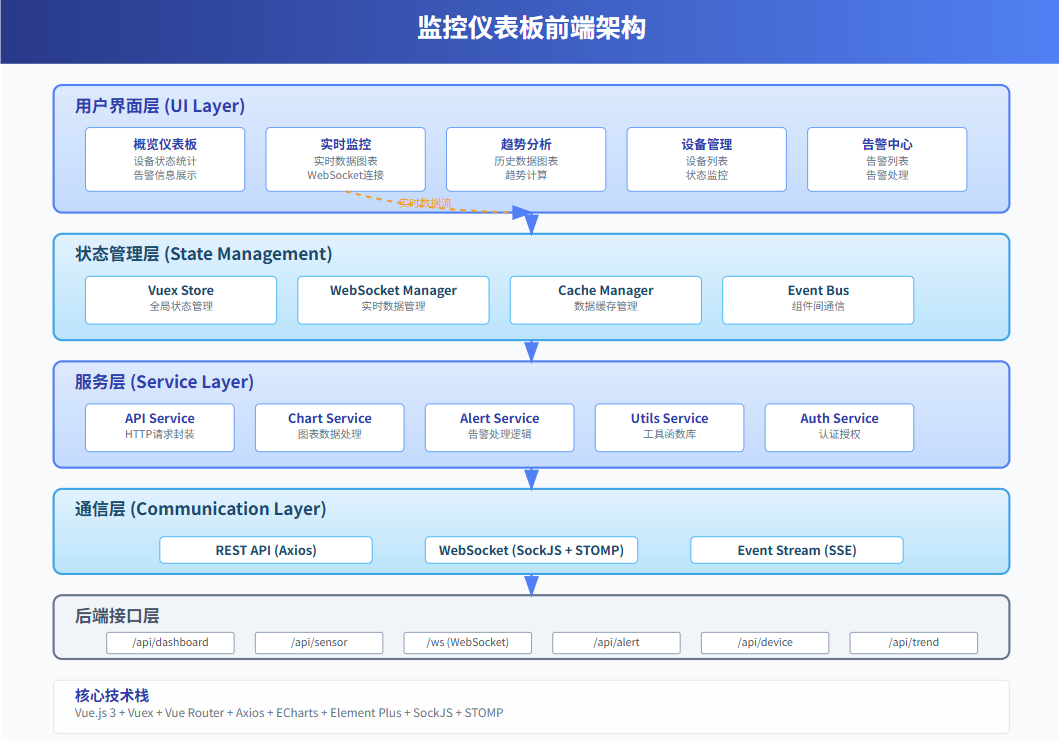
图5-1:监控仪表板前端架构与组件设计
5.1 设备监控控制器
@RestController
@RequestMapping("/api/dashboard")
@CrossOrigin(origins = "*")
public class DashboardController {
@Autowired
private SensorDataRepository sensorDataRepository;
// 获取仪表板概览数据
@GetMapping("/overview")
public ResponseResult getDashboardOverview() {
try {
Map<String, Object> overview = new HashMap<>();
  // 设备状态统计
  Map<String, Object> deviceStats = sensorDataRepository.getDeviceStatusStats();
    overview.put("deviceStats", deviceStats);
    // 最新数据统计
    overview.put("latestDataCount", getLatestDataCount());
    // 告警统计
    overview.put("alertStats", getAlertStats());
    return ResponseResult.success(overview);
    } catch (Exception e) {
    return ResponseResult.error("获取概览数据失败: " + e.getMessage());
    }
    }
    // 获取实时数据流
    @GetMapping("/realtime/{deviceId}")
    public ResponseResult getRealtimeData(@PathVariable String deviceId) {
    try {
    List<SensorData> data = sensorDataRepository.getLatestSensorData(deviceId, 50);
      return ResponseResult.success(data);
      } catch (Exception e) {
      return ResponseResult.error("获取实时数据失败: " + e.getMessage());
      }
      }
      // 获取趋势分析数据
      @GetMapping("/trend")
      public ResponseResult getTrendData(@RequestParam String deviceId,
      @RequestParam String sensorType,
      @RequestParam(defaultValue = "1h") String timeWindow,
      @RequestParam(defaultValue = "24") int hours) {
      try {
      List<Map<String, Object>> trendData = sensorDataRepository.getAggregatedData(
        deviceId, sensorType, timeWindow, hours);
        // 计算趋势指标
        Map<String, Object> result = new HashMap<>();
          result.put("data", trendData);
          result.put("trend", calculateTrend(trendData));
          return ResponseResult.success(result);
          } catch (Exception e) {
          return ResponseResult.error("获取趋势数据失败: " + e.getMessage());
          }
          }
          private int getLatestDataCount() {
          // 这里可以实现获取最近5分钟的数据量统计
          return 1250; // 示例数据
          }
          private Map<String, Object> getAlertStats() {
            Map<String, Object> alertStats = new HashMap<>();
              alertStats.put("totalAlerts", 15);
              alertStats.put("criticalAlerts", 3);
              alertStats.put("warningAlerts", 12);
              return alertStats;
              }
              private Map<String, Object> calculateTrend(List<Map<String, Object>> data) {
                if (data.size() < 2) {
                return Map.of("direction", "stable", "change", 0.0);
                }
                Double firstValue = (Double) data.get(0).get("value");
                Double lastValue = (Double) data.get(data.size() - 1).get("value");
                if (firstValue == null || lastValue == null) {
                return Map.of("direction", "stable", "change", 0.0);
                }
                double change = ((lastValue - firstValue) / firstValue) * 100;
                String direction = change > 5 ? "up" : change < -5 ? "down" : "stable";
                return Map.of("direction", direction, "change", Math.round(change * 100.0) / 100.0);
                }
                }
5.2 WebSocket配置
import org.springframework.context.annotation.Configuration;
import org.springframework.messaging.simp.config.MessageBrokerRegistry;
import org.springframework.web.socket.config.annotation.EnableWebSocketMessageBroker;
import org.springframework.web.socket.config.annotation.StompEndpointRegistry;
import org.springframework.web.socket.config.annotation.WebSocketMessageBrokerConfigurer;
@Configuration
@EnableWebSocketMessageBroker
public class WebSocketConfig implements WebSocketMessageBrokerConfigurer {
@Override
public void configureMessageBroker(MessageBrokerRegistry config) {
// 启用简单消息代理
config.enableSimpleBroker("/topic");
// 设置应用程序目标前缀
config.setApplicationDestinationPrefixes("/app");
}
@Override
public void registerStompEndpoints(StompEndpointRegistry registry) {
// 注册STOMP端点
registry.addEndpoint("/ws")
.setAllowedOriginPatterns("*")
.withSockJS();
}
}
6 数据模拟器

图6-1:数据模拟器生成流程与策略设计
为了测试系统,我们创建一个数据模拟器来生成传感器数据:
import org.springframework.beans.factory.annotation.Autowired;
import org.springframework.scheduling.annotation.Scheduled;
import org.springframework.stereotype.Component;
import java.util.ArrayList;
import java.util.List;
import java.util.Random;
@Component
public class SensorDataSimulator {
@Autowired
private SensorDataRepository sensorDataRepository;
private final Random random = new Random();
private final String[] deviceIds = {"TEMP_001", "TEMP_002", "HUM_001", "HUM_002", "PRESS_001"};
private final String[] locations = {"车间A", "车间B", "车间C", "仓库", "办公区"};
private final String[] workshops = {"WS001", "WS002", "WS003", "WS004", "WS005"};
// 每30秒生成一批模拟数据
@Scheduled(fixedRate = 30000)
public void generateSimulatedData() {
List<SensorData> dataList = new ArrayList<>();
  for (String deviceId : deviceIds) {
  String sensorType = getSensorType(deviceId);
  SensorData data = new SensorData(
  deviceId,
  sensorType,
  locations[random.nextInt(locations.length)],
  workshops[random.nextInt(workshops.length)],
  generateSensorValue(sensorType),
  random.nextInt(100) < 95 ? 0 : 1 // 95%概率正常状态
  );
  // 随机设置电池电量
  if (random.nextBoolean()) {
  data.setBattery(80.0 + random.nextDouble() * 20.0);
  }
  dataList.add(data);
  }
  // 批量写入
  sensorDataRepository.writeSensorDataBatch(dataList);
  System.out.println("生成了 " + dataList.size() + " 条模拟传感器数据");
  }
  private String getSensorType(String deviceId) {
  if (deviceId.startsWith("TEMP")) return "temperature";
  if (deviceId.startsWith("HUM")) return "humidity";
  if (deviceId.startsWith("PRESS")) return "pressure";
  return "unknown";
  }
  private Double generateSensorValue(String sensorType) {
  switch (sensorType) {
  case "temperature":
  return 20.0 + random.nextGaussian() * 5.0; // 平均20度,标准差5度
  case "humidity":
  return 50.0 + random.nextGaussian() * 10.0; // 平均50%,标准差10%
  case "pressure":
  return 1.0 + random.nextGaussian() * 0.1; // 平均1.0,标准差0.1
  default:
  return random.nextDouble() * 100;
  }
  }
  }
7 性能优化与最佳实践

图7-1:性能优化策略对比分析与效果评估
7.1 批量写入优化
@Service
public class OptimizedDataService {
@Autowired
private InfluxDBClient influxDBClient;
@Value("${influxdb.bucket}")
private String bucket;
@Value("${influxdb.org}")
private String org;
// 使用异步写入API提高性能
public void writeDataAsync(List<SensorData> dataList) {
  WriteApi writeApi = influxDBClient.getWriteApi(
  WriteOptions.builder()
  .batchSize(1000)
  .flushInterval(5000)
  .bufferLimit(10000)
  .build()
  );
  writeApi.writeMeasurements(WritePrecision.NS, dataList);
  writeApi.close(); // 确保数据被刷新
  }
  // 数据压缩和预处理
  public List<SensorData> preprocessData(List<SensorData> rawData) {
    return rawData.stream()
    .filter(data -> data.getValue() != null) // 过滤空值
    .filter(data -> isValidRange(data)) // 过滤异常值
    .map(this::normalizeData) // 数据标准化
    .collect(Collectors.toList());
    }
    private boolean isValidRange(SensorData data) {
    Double value = data.getValue();
    String type = data.getSensorType();
    switch (type) {
    case "temperature":
    return value >= -50 && value <= 100;
    case "humidity":
    return value >= 0 && value <= 100;
    case "pressure":
    return value >= 0 && value <= 10;
    default:
    return true;
    }
    }
    private SensorData normalizeData(SensorData data) {
    // 数据精度控制
    if (data.getValue() != null) {
    data.setValue(Math.round(data.getValue() * 100.0) / 100.0);
    }
    return data;
    }
    }
7.2 查询性能优化
@Service
public class OptimizedQueryService {
@Autowired
private InfluxDBClient influxDBClient;
@Value("${influxdb.bucket}")
private String bucket;
@Value("${influxdb.org}")
private String org;
// 使用连接池和缓存优化查询
@Cacheable(value = "sensorData", key = "#deviceId + '_' + #hours")
public List<Map<String, Object>> getCachedAggregatedData(String deviceId, int hours) {
  String flux = String.format("""
  from(bucket: "%s")
  |> range(start: -%dh)
  |> filter(fn: (r) => r["_measurement"] == "sensor_data")
  |> filter(fn: (r) => r["device_id"] == "%s")
  |> aggregateWindow(every: 5m, fn: mean, createEmpty: false)
  """, bucket, hours, deviceId);
  return executeOptimizedQuery(flux);
  }
  // 分页查询大数据集
  public List<SensorData> getPagedSensorData(String deviceId, int page, int size) {
    int offset = page * size;
    String flux = String.format("""
    from(bucket: "%s")
    |> range(start: -24h)
    |> filter(fn: (r) => r["_measurement"] == "sensor_data")
    |> filter(fn: (r) => r["device_id"] == "%s")
    |> sort(columns: ["_time"], desc: true)
    |> limit(n: %d, offset: %d)
    """, bucket, deviceId, size, offset);
    return executeQueryForSensorData(flux);
    }
    private List<Map<String, Object>> executeOptimizedQuery(String flux) {
      QueryApi queryApi = influxDBClient.getQueryApi();
      // 使用流式查询减少内存占用
      List<Map<String, Object>> result = new ArrayList<>();
        queryApi.query(flux, org, (cancellable, record) -> {
        Map<String, Object> dataPoint = new HashMap<>();
          dataPoint.put("timestamp", record.getTime());
          dataPoint.put("value", record.getValue());
          result.add(dataPoint);
          });
          return result;
          }
          }
这个物联网监控系统展示了InfluxDB在实际项目中的应用。通过合理的数据模型设计、高效的批量写入、实时数据推送和智能告警机制,我们构建了一个完整的时序数据处理平台。
系统的核心优势包括:高并发数据写入能力、灵活的查询和聚合功能、实时监控和告警、可扩展的架构设计。这些特性让它能够很好地适应各种物联网和监控场景的需求。


 浙公网安备 33010602011771号