

⚙️Spring Boot 启动流程源码解析
文章目录
一、Spring Boot 启动流程概览
启动流程全景图
Spring Boot 应用启动时序图:
⏱️ 启动阶段时间线
关键启动节点时间分布:
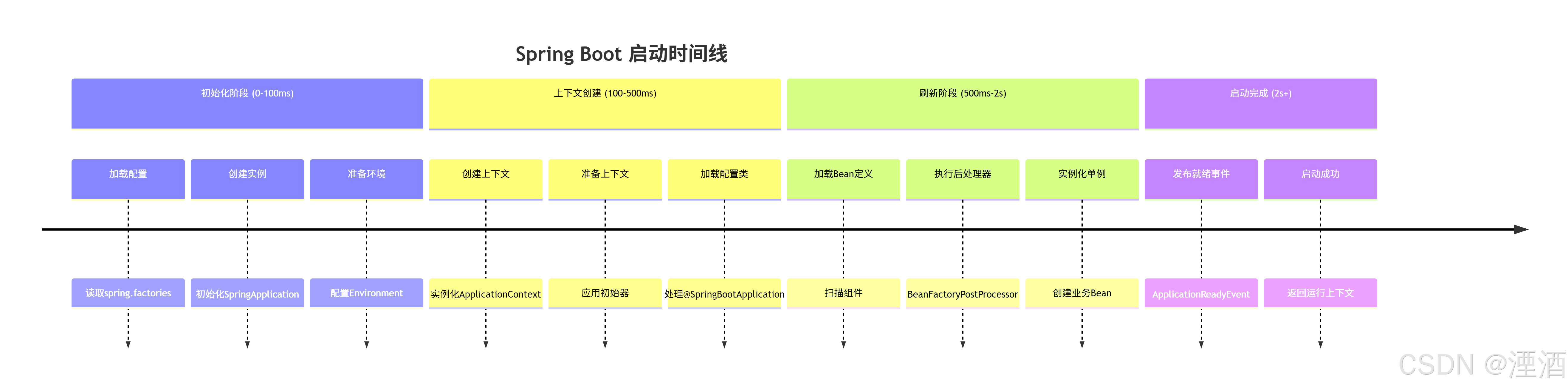
️ 二、SpringApplication 初始化阶段
SpringApplication.run() 入口分析
启动方法核心逻辑:
public static ConfigurableApplicationContext run(Class<?> primarySource, String... args) {
  return run(new Class<?>[]{primarySource}, args);
    }
    public static ConfigurableApplicationContext run(Class<?>[] primarySources, String[] args) {
      // 创建SpringApplication实例并执行run方法
      return new SpringApplication(primarySources).run(args);
}SpringApplication 构造函数源码:
public SpringApplication(ResourceLoader resourceLoader, Class<?>... primarySources) {
  this.resourceLoader = resourceLoader;
  // 1. 设置主配置类(不能为null)
  Assert.notNull(primarySources, "PrimarySources must not be null");
  this.primarySources = new LinkedHashSet<>(Arrays.asList(primarySources));
    // 2. 推断应用类型(Servlet、Reactive、None)
    this.webApplicationType = WebApplicationType.deduceFromClasspath();
    // 3. 加载应用上下文初始器(从spring.factories)
    setInitializers((Collection) getSpringFactoriesInstances(ApplicationContextInitializer.class));
    // 4. 加载应用事件监听器(从spring.factories)
    setListeners((Collection) getSpringFactoriesInstances(ApplicationListener.class));
    // 5. 推断主应用类(从堆栈跟踪)
    this.mainApplicationClass = deduceMainApplicationClass();
    }
应用类型推断机制
WebApplicationType.deduceFromClasspath() 源码:
static WebApplicationType deduceFromClasspath() {
// 检查类路径是否存在特定的类来判断应用类型
if (ClassUtils.isPresent(WEBFLUX_INDICATOR_CLASS, null)
&& !ClassUtils.isPresent(WEBMVC_INDICATOR_CLASS, null)
&& !ClassUtils.isPresent(JERSEY_INDICATOR_CLASS, null)) {
return WebApplicationType.REACTIVE;  // WebFlux应用
}
for (String className : SERVLET_INDICATOR_CLASSES) {
if (!ClassUtils.isPresent(className, null)) {
return WebApplicationType.NONE;  // 非Web应用
}
}
return WebApplicationType.SERVLET;  // Servlet Web应用
}应用类型推断的类路径检查:
// 关键类路径检查常量
private static final String WEBMVC_INDICATOR_CLASS = "org.springframework.web.servlet.DispatcherServlet";
private static final String WEBFLUX_INDICATOR_CLASS = "org.springframework.web.reactive.DispatcherHandler";
private static final String JERSEY_INDICATOR_CLASS = "org.glassfish.jersey.servlet.ServletContainer";
private static final String[] SERVLET_INDICATOR_CLASSES = {
"javax.servlet.Servlet",
"org.springframework.web.context.ConfigurableWebApplicationContext"
};
工厂加载机制
getSpringFactoriesInstances() 方法实现:
private <T> Collection<T> getSpringFactoriesInstances(Class<T> type) {
  return getSpringFactoriesInstances(type, new Class<?>[]{});
    }
    private <T> Collection<T> getSpringFactoriesInstances(Class<T> type, Class<?>[] parameterTypes, Object... args) {
      ClassLoader classLoader = getClassLoader();
      // 1. 使用SpringFactoriesLoader加载实现类名称
      Set<String> names = new LinkedHashSet<>(SpringFactoriesLoader.loadFactoryNames(type, classLoader));
        // 2. 创建实例
        List<T> instances = createSpringFactoriesInstances(type, parameterTypes, classLoader, args, names);
          // 3. 排序(支持@Order注解)
          AnnotationAwareOrderComparator.sort(instances);
          return instances;
          }
⚙️ 三、启动前准备:Banner、Environment、Listener
run() 方法执行流程
SpringApplication.run() 完整实现:
public ConfigurableApplicationContext run(String... args) {
// 1. 创建启动计时器
StopWatch stopWatch = new StopWatch();
stopWatch.start();
// 2. 初始化上下文和异常报告器
ConfigurableApplicationContext context = null;
Collection<SpringBootExceptionReporter> exceptionReporters = new ArrayList<>();
  // 3. 设置Headless模式
  configureHeadlessProperty();
  try {
  // 4. 获取运行监听器并发布启动事件
  SpringApplicationRunListeners listeners = getRunListeners(args);
  listeners.starting();
  try {
  // 5. 准备环境
  ApplicationArguments applicationArguments = new DefaultApplicationArguments(args);
  ConfigurableEnvironment environment = prepareEnvironment(listeners, applicationArguments);
  // 6. 打印Banner
  Banner printedBanner = printBanner(environment);
  // 7. 创建应用上下文
  context = createApplicationContext();
  // 8. 准备异常报告器
  exceptionReporters = getSpringFactoriesInstances(SpringBootExceptionReporter.class,
  new Class[] { ConfigurableApplicationContext.class }, context);
  // 9. 准备应用上下文
  prepareContext(context, environment, listeners, applicationArguments, printedBanner);
  // 10. 刷新上下文(核心阶段)
  refreshContext(context);
  // 11. 刷新后处理(空实现,子类可扩展)
  afterRefresh(context, applicationArguments);
  // 12. 停止计时器
  stopWatch.stop();
  // 13. 发布启动完成事件
  if (this.logStartupInfo) {
  new StartupInfoLogger(this.mainApplicationClass).logStarted(getApplicationLog(), stopWatch);
  }
  listeners.started(context);
  // 14. 执行Runner回调
  callRunners(context, applicationArguments);
  } catch (Throwable ex) {
  // 异常处理
  handleRunFailure(context, ex, exceptionReporters, listeners);
  throw new IllegalStateException(ex);
  }
  // 15. 发布应用就绪事件
  listeners.ready(context);
  return context;
  } catch (Throwable ex) {
  handleRunFailure(context, ex, exceptionReporters, null);
  throw new IllegalStateException(ex);
  }
  }
Banner 打印机制
Banner 打印实现细节:
private Banner printBanner(ConfigurableEnvironment environment) {
// 1. 检查是否禁用Banner
if (this.bannerMode == Banner.Mode.OFF) {
return null;
}
// 2. 获取Banner资源
ResourceLoader resourceLoader = (this.resourceLoader != null) ? this.resourceLoader
: new DefaultResourceLoader(getClassLoader());
// 3. 使用BannerPrinter打印
SpringApplicationBannerPrinter bannerPrinter = new SpringApplicationBannerPrinter(resourceLoader, this.banner);
// 4. 根据模式选择输出流
if (this.bannerMode == Mode.LOG) {
return bannerPrinter.print(environment, this.mainApplicationClass, logger);
}
return bannerPrinter.print(environment, this.mainApplicationClass, System.out);
}自定义 Banner 实现示例:
@Component
public class CustomBanner implements Banner {
private static final String[] BANNER = {
"  ___  ___         _     _      ",
"  |  \\/  |        | |   | |     ",
"  | .  . | ___  __| |___| |__   ",
"  | |\\/| |/ _ \\/ _` / __| '_ \\ ",
"  | |  | |  __/ (_| \\__ \\ | | |",
"  \\_|  |_/\\___|\\__,_|___/_| |_|",
"                                "
};
@Override
public void printBanner(Environment environment, Class<?> sourceClass, PrintStream printStream) {
  for (String line : BANNER) {
  printStream.println(line);
  }
  String version = getVersion();
  printStream.println(" :: Spring Boot :: " + version);
  printStream.println();
  }
  private String getVersion() {
  try {
  return SpringBootVersion.getVersion();
  } catch (Exception ex) {
  return "v2.7.0";
  }
  }
  }
Environment 准备过程
prepareEnvironment() 方法详解:
private ConfigurableEnvironment prepareEnvironment(SpringApplicationRunListeners listeners,
ApplicationArguments applicationArguments) {
// 1. 创建或获取Environment
ConfigurableEnvironment environment = getOrCreateEnvironment();
// 2. 配置Environment(处理命令行参数等)
configureEnvironment(environment, applicationArguments.getSourceArgs());
// 3. 发布Environment准备事件
listeners.environmentPrepared(environment);
// 4. 绑定Environment到SpringApplication
bindToSpringApplication(environment);
// 5. 检查是否自定义Environment
if (!this.isCustomEnvironment) {
environment = new EnvironmentConverter(getClassLoader()).convertEnvironmentIfNecessary(environment,
deduceEnvironmentClass());
}
// 6. 配置PropertySources
ConfigurationPropertySources.attach(environment);
return environment;
}Environment 创建逻辑:
private ConfigurableEnvironment getOrCreateEnvironment() {
// 根据应用类型创建相应的Environment
if (this.environment != null) {
return this.environment;
}
switch (this.webApplicationType) {
case SERVLET:
return new StandardServletEnvironment();
case REACTIVE:
return new StandardReactiveWebEnvironment();
default:
return new StandardEnvironment();
}
}
四、创建 ApplicationContext 与加载 BeanDefinition
️ 应用上下文创建机制
createApplicationContext() 方法实现:
protected ConfigurableApplicationContext createApplicationContext() {
// 1. 根据应用类型推断上下文类
Class<?> contextClass = this.applicationContextClass;
  if (contextClass == null) {
  try {
  switch (this.webApplicationType) {
  case SERVLET:
  contextClass = Class.forName(DEFAULT_SERVLET_WEB_CONTEXT_CLASS);
  break;
  case REACTIVE:
  contextClass = Class.forName(DEFAULT_REACTIVE_WEB_CONTEXT_CLASS);
  break;
  default:
  contextClass = Class.forName(DEFAULT_CONTEXT_CLASS);
  }
  } catch (ClassNotFoundException ex) {
  throw new IllegalStateException("Unable create a default ApplicationContext, " +
  "please specify an ApplicationContextClass", ex);
  }
  }
  // 2. 使用反射创建实例
  return (ConfigurableApplicationContext) BeanUtils.instantiateClass(contextClass);
}默认上下文类配置:
// 默认上下文类常量
public static final String DEFAULT_CONTEXT_CLASS = "org.springframework.context.annotation.AnnotationConfigApplicationContext";
public static final String DEFAULT_SERVLET_WEB_CONTEXT_CLASS = "org.springframework.boot.web.servlet.context.AnnotationConfigServletWebApplicationContext";
public static final String DEFAULT_REACTIVE_WEB_CONTEXT_CLASS = "org.springframework.boot.web.reactive.context.AnnotationConfigReactiveWebApplicationContext";
上下文准备阶段
prepareContext() 方法深度解析:
private void prepareContext(ConfigurableApplicationContext context, ConfigurableEnvironment environment,
SpringApplicationRunListeners listeners, ApplicationArguments applicationArguments, Banner printedBanner) {
// 1. 设置环境
context.setEnvironment(environment);
// 2. 后处理上下文(设置资源加载器、转换服务等)
postProcessApplicationContext(context);
// 3. 应用上下文初始器
applyInitializers(context);
// 4. 发布上下文准备事件
listeners.contextPrepared(context);
// 5. 打印启动信息
if (this.logStartupInfo) {
logStartupInfo(context.getParent() == null);
logStartupProfileInfo(context);
}
// 6. 注册特定的单例Bean
ConfigurableListableBeanFactory beanFactory = context.getBeanFactory();
beanFactory.registerSingleton("springApplicationArguments", applicationArguments);
if (printedBanner != null) {
beanFactory.registerSingleton("springBootBanner", printedBanner);
}
// 7. 设置允许Bean定义覆盖
if (this.allowBeanDefinitionOverriding != null) {
beanFactory.setAllowBeanDefinitionOverriding(this.allowBeanDefinitionOverriding);
}
// 8. 添加Bean后处理器(懒加载等)
if (this.lazyInitialization) {
context.addBeanFactoryPostProcessor(new LazyInitializationBeanFactoryPostProcessor());
}
// 9. 加载源(主配置类)
Set<Object> sources = getAllSources();
  Assert.notEmpty(sources, "Sources must not be empty");
  load(context, sources.toArray(new Object[0]));
  // 10. 发布上下文加载事件
  listeners.contextLoaded(context);
  }
上下文初始器应用
applyInitializers() 方法实现:
protected void applyInitializers(ConfigurableApplicationContext context) {
// 1. 遍历所有ApplicationContextInitializer
for (ApplicationContextInitializer initializer : getInitializers()) {
Class<?> requiredType = GenericTypeResolver.resolveTypeArgument(initializer.getClass(),
  ApplicationContextInitializer.class);
  // 2. 检查类型匹配
  if (requiredType != null && !requiredType.isInstance(context)) {
  throw new IllegalStateException("Initializer " + initializer.getClass().getName() +
  " requires context of type " + requiredType.getName() + ", but got " + context.getClass().getName());
  }
  // 3. 应用初始器
  initializer.initialize(context);
  }
}典型的 ApplicationContextInitializer 示例:
// Spring Boot 内置的初始器示例
public class MyContextInitializer implements ApplicationContextInitializer<ConfigurableApplicationContext> {
  @Override
  public void initialize(ConfigurableApplicationContext applicationContext) {
  // 1. 设置配置文件位置
  ConfigurableEnvironment environment = applicationContext.getEnvironment();
  environment.addActiveProfile("dev");
  // 2. 添加自定义属性源
  MapPropertySource customPropertySource = new MapPropertySource("custom",
  Collections.singletonMap("app.custom.property", "value"));
  environment.getPropertySources().addFirst(customPropertySource);
  // 3. 注册自定义Bean
  BeanDefinitionRegistry registry = (BeanDefinitionRegistry) applicationContext.getBeanFactory();
  registry.registerBeanDefinition("customBean",
  BeanDefinitionBuilder.genericBeanDefinition(CustomBean.class).getBeanDefinition());
  }
  }
⚡ 五、refresh 阶段与自动装配结合点
refreshContext() 核心流程
刷新上下文的关键调用:
private void refreshContext(ConfigurableApplicationContext context) {
// 1. 注册关闭钩子
if (this.registerShutdownHook) {
try {
context.registerShutdownHook();
} catch (AccessControlException ex) {
// 在安全管理器环境中可能不允许
}
}
// 2. 执行刷新(委托给AbstractApplicationContext)
refresh(context);
}
protected void refresh(ApplicationContext applicationContext) {
// 委托给ApplicationContext的refresh方法
if (applicationContext instanceof AbstractApplicationContext) {
((AbstractApplicationContext) applicationContext).refresh();
}
}
Spring Boot 特有的刷新扩展
SpringApplicationRefreshListener 的作用:
// Spring Boot 对标准refresh的扩展
@Component
public class SpringBootRefreshListener implements ApplicationListener<ContextRefreshedEvent> {
  private static final Logger logger = LoggerFactory.getLogger(SpringBootRefreshListener.class);
  @Override
  public void onApplicationEvent(ContextRefreshedEvent event) {
  ApplicationContext context = event.getApplicationContext();
  // 1. 记录刷新完成
  logger.info("Application context refreshed: {}", context.getDisplayName());
  // 2. 执行启动后检查
  performPostRefreshChecks(context);
  // 3. 发布自定义事件
  context.publishEvent(new ApplicationRefreshedEvent(context));
  }
  private void performPostRefreshChecks(ApplicationContext context) {
  // 检查关键Bean是否就绪
  checkRequiredBeans(context);
  // 验证配置属性
  validateConfigurationProperties(context);
  }
  }
自动装配与刷新的集成点
自动配置在刷新阶段的触发时机:
// 在refresh()方法中的关键调用点
@Override
public void refresh() throws BeansException, IllegalStateException {
synchronized (this.startupShutdownMonitor) {
// ... 标准refresh流程
// 关键点:调用BeanFactory后处理器(包括自动配置)
invokeBeanFactoryPostProcessors(beanFactory);
// ... 其他步骤
}
}自动配置的触发流程:
六、应用启动事件与回调机制
Spring Boot 启动事件体系
完整的启动事件序列:
public class SpringBootEventSequence {
/**
* 完整的启动事件发布顺序
*/
public void demonstrateEventSequence() {
// 1. ApplicationStartingEvent - 启动最开始
// 2. ApplicationEnvironmentPreparedEvent - 环境准备完成
// 3. ApplicationContextInitializedEvent - 上下文初始化
// 4. ApplicationPreparedEvent - 上下文准备完成
// 5. ContextRefreshedEvent - 上下文刷新完成(Spring标准事件)
// 6. ApplicationStartedEvent - 应用启动完成
// 7. ApplicationReadyEvent - 应用准备就绪(可以接收请求)
// 8. AvailabilityChangeEvent - 应用状态变更
}
}
事件监听器机制
SpringApplicationRunListeners 的实现:
class SpringApplicationRunListeners {
private final Log log;
private final List<SpringApplicationRunListener> listeners;
  // 启动事件发布方法
  void starting() {
  for (SpringApplicationRunListener listener : listeners) {
  listener.starting();
  }
  }
  void environmentPrepared(ConfigurableEnvironment environment) {
  for (SpringApplicationRunListener listener : listeners) {
  listener.environmentPrepared(environment);
  }
  }
  void contextPrepared(ConfigurableApplicationContext context) {
  for (SpringApplicationRunListener listener : listeners) {
  listener.contextPrepared(context);
  }
  }
  void contextLoaded(ConfigurableApplicationContext context) {
  for (SpringApplicationRunListener listener : listeners) {
  listener.contextLoaded(context);
  }
  }
  void started(ConfigurableApplicationContext context) {
  for (SpringApplicationRunListener listener : listeners) {
  listener.started(context);
  }
  }
  void ready(ConfigurableApplicationContext context) {
  for (SpringApplicationRunListener listener : listeners) {
  listener.ready(context);
  }
  }
  }
运行监听器获取机制
getRunListeners() 方法实现:
private SpringApplicationRunListeners getRunListeners(String[] args) {
Class<?>[] parameterTypes = new Class<?>[] { SpringApplication.class, String[].class };
  // 1. 从spring.factories加载SpringApplicationRunListener实现
  List<SpringApplicationRunListener> listeners = getSpringFactoriesInstances(
    SpringApplicationRunListener.class, parameterTypes, this, args);
    // 2. 创建运行监听器包装器
    return new SpringApplicationRunListeners(logger, listeners);
}典型的 SpringApplicationRunListener:
public class EventPublishingRunListener implements SpringApplicationRunListener, Ordered {
private final SpringApplication application;
private final String[] args;
private final SimpleApplicationEventMulticaster initialMulticaster;
public EventPublishingRunListener(SpringApplication application, String[] args) {
this.application = application;
this.args = args;
this.initialMulticaster = new SimpleApplicationEventMulticaster();
// 注册应用监听器
for (ApplicationListener<?> listener : application.getListeners()) {
  this.initialMulticaster.addApplicationListener(listener);
  }
  }
  @Override
  public void starting() {
  // 发布ApplicationStartingEvent
  this.initialMulticaster.multicastEvent(new ApplicationStartingEvent(this.application, this.args));
  }
  @Override
  public void environmentPrepared(ConfigurableEnvironment environment) {
  // 发布ApplicationEnvironmentPreparedEvent
  this.initialMulticaster.multicastEvent(new ApplicationEnvironmentPreparedEvent(
  this.application, this.args, environment));
  }
  // 其他事件发布方法...
  }
七、自定义监听器与启动钩子实践
️ 自定义启动监听器
完整的启动事件监听器示例:
@Component
@Slf4j
public class ComprehensiveStartupListener implements
ApplicationListener<ApplicationEvent>, Ordered {
  private long startupStartTime;
  private Map<String, Long> phaseTimestamps = new LinkedHashMap<>();
    @PostConstruct
    public void init() {
    this.startupStartTime = System.currentTimeMillis();
    log.info(" 应用启动监听器已初始化");
    }
    @Override
    public void onApplicationEvent(ApplicationEvent event) {
    recordPhaseTimestamp(event.getClass().getSimpleName());
    // 处理各种启动事件
    if (event instanceof ApplicationStartingEvent) {
    handleStartingEvent((ApplicationStartingEvent) event);
    } else if (event instanceof ApplicationEnvironmentPreparedEvent) {
    handleEnvironmentPreparedEvent((ApplicationEnvironmentPreparedEvent) event);
    } else if (event instanceof ApplicationContextInitializedEvent) {
    handleContextInitializedEvent((ApplicationContextInitializedEvent) event);
    } else if (event instanceof ApplicationPreparedEvent) {
    handlePreparedEvent((ApplicationPreparedEvent) event);
    } else if (event instanceof ContextRefreshedEvent) {
    handleContextRefreshedEvent((ContextRefreshedEvent) event);
    } else if (event instanceof ApplicationStartedEvent) {
    handleStartedEvent((ApplicationStartedEvent) event);
    } else if (event instanceof ApplicationReadyEvent) {
    handleReadyEvent((ApplicationReadyEvent) event);
    }
    }
    private void handleStartingEvent(ApplicationStartingEvent event) {
    log.info(" 1. 应用启动开始");
    logApplicationInfo(event.getSpringApplication());
    }
    private void handleEnvironmentPreparedEvent(ApplicationEnvironmentPreparedEvent event) {
    log.info(" 2. 环境准备完成");
    logEnvironmentInfo(event.getEnvironment());
    }
    private void handleContextInitializedEvent(ApplicationContextInitializedEvent event) {
    log.info("️ 3. 应用上下文初始化完成");
    }
    private void handlePreparedEvent(ApplicationPreparedEvent event) {
    log.info(" 4. 应用准备完成,Bean定义已加载");
    logBeanDefinitionCount(event.getApplicationContext());
    }
    private void handleContextRefreshedEvent(ContextRefreshedEvent event) {
    log.info(" 5. 应用上下文刷新完成");
    logBeanStatistics(event.getApplicationContext());
    }
    private void handleStartedEvent(ApplicationStartedEvent event) {
    log.info("✅ 6. 应用启动完成");
    }
    private void handleReadyEvent(ApplicationReadyEvent event) {
    log.info(" 7. 应用准备就绪,可以处理请求");
    generateStartupReport();
    }
    private void recordPhaseTimestamp(String phaseName) {
    phaseTimestamps.put(phaseName, System.currentTimeMillis() - startupStartTime);
    }
    private void generateStartupReport() {
    log.info("=== Spring Boot 启动性能报告 ===");
    phaseTimestamps.forEach((phase, timestamp) -> {
    log.info("   {}: {}ms", phase, timestamp);
    });
    long totalTime = System.currentTimeMillis() - startupStartTime;
    log.info("   总启动时间: {}ms", totalTime);
    log.info("=== 报告生成完成 ===");
    }
    @Override
    public int getOrder() {
    return Ordered.HIGHEST_PRECEDENCE; // 最高优先级,最先执行
    }
    }
启动性能监控工具
启动时间分析工具类:
@Component
@Slf4j
public class StartupPerformanceMonitor {
private final Map<String, BeanInitInfo> beanInitInfo = new ConcurrentHashMap<>();
  private long contextRefreshStartTime;
  @EventListener
  public void onContextRefreshed(ContextRefreshedEvent event) {
  this.contextRefreshStartTime = System.currentTimeMillis();
  log.info("开始监控Bean初始化性能...");
  }
  @EventListener
  public void onApplicationReady(ApplicationReadyEvent event) {
  long totalTime = System.currentTimeMillis() - contextRefreshStartTime;
  generatePerformanceReport(totalTime);
  }
  @Bean
  public static BeanPostProcessor startupMonitorBeanPostProcessor() {
  return new BeanPostProcessor() {
  @Override
  public Object postProcessBeforeInitialization(Object bean, String beanName) {
  // 记录Bean初始化开始时间
  BeanInitInfo info = new BeanInitInfo();
  info.setStartTime(System.currentTimeMillis());
  info.setBeanName(beanName);
  info.setBeanType(bean.getClass().getName());
  return bean;
  }
  @Override
  public Object postProcessAfterInitialization(Object bean, String beanName) {
  // 记录Bean初始化完成时间
  BeanInitInfo info = getBeanInitInfo(beanName);
  if (info != null) {
  info.setEndTime(System.currentTimeMillis());
  info.setDuration(info.getEndTime() - info.getStartTime());
  // 记录慢速Bean
  if (info.getDuration() > 100) { // 超过100ms
  log.warn(" 慢速Bean初始化: {} ({}ms)", beanName, info.getDuration());
  }
  }
  return bean;
  }
  };
  }
  private void generatePerformanceReport(long totalTime) {
  log.info("=== Bean初始化性能报告 ===");
  // 按初始化时间排序
  beanInitInfo.values().stream()
  .sorted(Comparator.comparingLong(BeanInitInfo::getDuration).reversed())
  .limit(10) // 显示最慢的10个Bean
  .forEach(info -> {
  String speed = info.getDuration() > 100 ? "" : "⚡";
  log.info("   {} {}: {}ms", speed, info.getBeanName(), info.getDuration());
  });
  log.info("Bean初始化总时间: {}ms", totalTime);
  log.info("监控的Bean数量: {}", beanInitInfo.size());
  }
  @Data
  private static class BeanInitInfo {
  private String beanName;
  private String beanType;
  private long startTime;
  private long endTime;
  private long duration;
  }
  }
自定义应用运行器
CommandLineRunner 和 ApplicationRunner 示例:
@Component
@Slf4j
public class StartupRunner implements CommandLineRunner, ApplicationRunner, Ordered {
private final ApplicationContext context;
public StartupRunner(ApplicationContext context) {
this.context = context;
}
@Override
public void run(ApplicationArguments args) throws Exception {
log.info(" ApplicationRunner执行开始");
performApplicationStartupTasks();
}
@Override
public void run(String... args) throws Exception {
log.info(" CommandLineRunner执行开始");
performCommandLineTasks(args);
}
private void performApplicationStartupTasks() {
// 1. 检查关键Bean是否就绪
checkCriticalBeans();
// 2. 验证配置属性
validateConfiguration();
// 3. 初始化应用数据
initializeApplicationData();
log.info("✅ 应用启动任务完成");
}
private void performCommandLineTasks(String[] args) {
if (args.length > 0) {
log.info("命令行参数: {}", Arrays.toString(args));
// 处理特定的命令行参数
if (Arrays.asList(args).contains("--init-db")) {
initializeDatabase();
}
}
}
private void checkCriticalBeans() {
String[] criticalBeans = {
"dataSource", "entityManagerFactory", "transactionManager"
};
for (String beanName : criticalBeans) {
if (context.containsBean(beanName)) {
log.info("✅ 关键Bean已就绪: {}", beanName);
} else {
log.warn("⚠️ 缺少关键Bean: {}", beanName);
}
}
}
@Override
public int getOrder() {
return 1; // 执行顺序
}
}
启动故障诊断工具
启动问题诊断器:
@Component
@ConditionalOnProperty(name = "app.startup.diagnostic", havingValue = "true")
@Slf4j
public class StartupDiagnosticTool {
@Autowired
private ApplicationContext context;
@EventListener
public void diagnoseOnReady(ApplicationReadyEvent event) {
log.info("=== 启动故障诊断开始 ===");
// 1. 检查Bean定义冲突
checkBeanDefinitionConflicts();
// 2. 检查循环依赖
checkCircularDependencies();
// 3. 检查配置属性
checkConfigurationProperties();
// 4. 检查数据库连接
checkDatabaseConnection();
log.info("=== 启动故障诊断完成 ===");
}
private void checkBeanDefinitionConflicts() {
try {
if (context instanceof ConfigurableApplicationContext) {
ConfigurableListableBeanFactory beanFactory =
((ConfigurableApplicationContext) context).getBeanFactory();
// 检查重复的Bean定义
String[] beanNames = beanFactory.getBeanDefinitionNames();
Map<String, List<String>> typeToBeanNames = new HashMap<>();
  for (String beanName : beanNames) {
  BeanDefinition bd = beanFactory.getBeanDefinition(beanName);
  String className = bd.getBeanClassName();
  if (className != null) {
  typeToBeanNames.computeIfAbsent(className, k -> new ArrayList<>())
    .add(beanName);
    }
    }
    // 报告冲突
    typeToBeanNames.entrySet().stream()
    .filter(entry -> entry.getValue().size() > 1)
    .forEach(entry -> log.warn(" Bean定义冲突: {} -> {}",
    entry.getKey(), entry.getValue()));
    }
    } catch (Exception e) {
    log.warn("Bean定义冲突检查失败: {}", e.getMessage());
    }
    }
    // 其他检查方法...
    }
八、总结:从 main() 到容器就绪的生命线
Spring Boot 启动流程核心总结
启动阶段关键节点回顾:
| 阶段 | 关键方法 | 主要工作 | 发布事件 |
|---|---|---|---|
| 初始化阶段 | SpringApplication 构造函数 | 推断 Web 应用类型(Servlet、Reactive)、加载 ApplicationContextInitializer 与 ApplicationListener | — |
| 环境准备阶段 | prepareEnvironment() | 构建 ConfigurableEnvironment,加载配置文件与系统属性,合并命令行参数 | ApplicationEnvironmentPreparedEvent |
| 创建上下文阶段 | createApplicationContext() | 实例化具体类型的 ApplicationContext(如 AnnotationConfigServletWebServerApplicationContext) | ApplicationContextInitializedEvent |
| 上下文准备阶段 | prepareContext() | 应用 ApplicationContextInitializer,注册核心单例 Bean(如 springApplicationArguments) | ApplicationPreparedEvent |
| 上下文刷新阶段 | refreshContext() | 加载 Bean 定义、创建单例 Bean、初始化容器生命周期 | ContextRefreshedEvent |
| 启动完成阶段 | afterRefresh() | 执行 ApplicationRunner 与 CommandLineRunner,发布应用就绪事件 | ApplicationReadyEvent |
启动流程完整时序图
Spring Boot 应用启动完整流程:
性能优化建议
启动性能优化策略:
@SpringBootApplication
public class OptimizedApplication {
public static void main(String[] args) {
SpringApplication app = new SpringApplication(OptimizedApplication.class);
// 1. 配置优化选项
app.setLazyInitialization(true); // 启用懒加载
app.setBannerMode(Banner.Mode.CONSOLE); // 控制Banner输出
// 2. 排除不必要的自动配置
app.setDefaultProperties(Collections.singletonMap(
"spring.autoconfigure.exclude",
"org.springframework.boot.autoconfigure.jdbc.DataSourceAutoConfiguration"
));
app.run(args);
}
@Configuration
@ConditionalOnProperty(name = "app.optimization.enabled", havingValue = "true")
public static class OptimizationConfig {
@Bean
public StartupOptimizer startupOptimizer() {
return new StartupOptimizer();
}
}
}
调试与监控最佳实践
生产环境启动监控配置:
# application-prod.properties
# 启动性能监控
management.endpoints.web.exposure.include=health,info,metrics,startup
management.endpoint.startup.enabled=true
# 详细的启动日志
logging.level.org.springframework.boot=INFO
logging.level.com.example=DEBUG
# 启动超时设置
spring.boot.startup.timeout=300s
# 懒加载配置
spring.main.lazy-initialization=true
# 排除不必要的自动配置
spring.autoconfigure.exclude=org.springframework.boot.autoconfigure.jdbc.DataSourceAutoConfiguration

 浙公网安备 33010602011771号