

一、MySQL Galera Cluster简介
MySQL Galera Cluster 是一个高可用、同步复制的数据库解决方案,基于 Galera Library 和 MySQL 数据库。它设计用于提供高可用性、负载均衡和数据一致性,特别适合需要高写入负载和多主节点支持的场景。
主要特点
同步复制:
所有的写操作(包括插入、更新、删除)在集群中的所有节点上都是同步的。这意味着每个节点上的数据是完全一致的。
多主节点(Multi-Master):
集群中的每个节点都是主节点。所有节点都可以处理读写请求,从而实现负载均衡和高可用性。
自动故障转移:
如果一个节点发生故障,其他节点会自动接管,确保系统持续可用。
自动节点加入:
新节点可以自动加入集群,并同步到当前集群状态。
数据一致性:
使用基于事务的复制保证数据一致性,所有事务在所有节点上以相同的顺序执行。
容错性:
集群能够处理网络分区和节点故障,确保集群的健壮性。
组件
Galera Library:
提供了同步复制功能和事务一致性。Galera Library 负责复制和应用事务。
MySQL 数据库:
提供数据库管理功能,包括 SQL 支持、查询优化等。
State Snapshot Transfer (SST) 和 Incremental State Transfer (IST):
SST 用于将新节点与集群中的现有数据进行同步,IST 用于在集群中节点之间进行增量数据传输。
工作流程
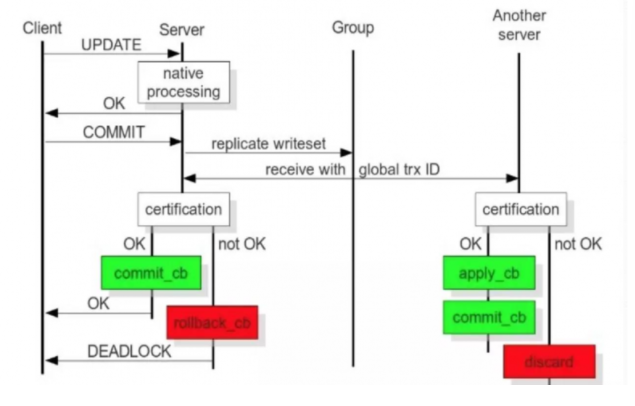
二、MySQL Galera Cluster部署
1、 环境准备
| 主机名 | IP | 系统 | 软件版本 | 配置信息 |
|---|---|---|---|---|
| galera1 | 192.168.158.6 | Rocky_linux9.4 | mysql-wsrep-8.0 galera-26.4.14-1 | 2核4G |
| galera2 | 192.168.158.7 | Rocky_linux9.4 | mysql-wsrep-8.0 galera-26.4.14-1 | 2核4G |
| galera3 | 192.168.158.31 | Rocky_linux9.4 | mysql-wsrep-8.0 galera-26.4.14-1 | 2核4G |
| galera4 | 192.168.158.9 | Rocky_linux9.4 | mysql-wsrep-8.0 galera-26.4.14-1 | 2核4G |
注意:关闭防火墙和selinux,进行时间同步。
sed -i 's/#PermitRootLogin prohibit-password/PermitRootLogin yes/' /etc/ssh/sshd_config
systemctl restart sshd
systemctl disable --now firewalld.service
setenforce 0
主机解析:
[root@galera1 ~]# cat <<e >/etc/hosts
127.0.0.1 localhost localhost.localdomain localhost4 localhost4.localdomain4
::1 localhost localhost.localdomain localhost6 localhost6.localdomain6
192.168.166.139 galera1
192.168.166.140 galera2
192.168.166.141 galera3
192.168.166.142 galera4
e
[root@galera2 ~]# cat /etc/hosts
127.0.0.1 localhost localhost.localdomain localhost4 localhost4.localdomain4
::1 localhost localhost.localdomain localhost6 localhost6.localdomain6
192.168.166.139 galera1
192.168.166.141 galera3
192.168.166.142 galera4
[root@galera3 ~]# cat /etc/hosts
127.0.0.1 localhost localhost.localdomain localhost4 localhost4.localdomain4
::1 localhost localhost.localdomain localhost6 localhost6.localdomain6
192.168.166.140 galera2
192.168.166.139 galera1
192.168.166.142 galera4
[root@galera4 ~]# cat /etc/hosts
127.0.0.1 localhost localhost.localdomain localhost4 localhost4.localdomain4
::1 localhost localhost.localdomain localhost6 localhost6.localdomain6
192.168.166.140 galera2
192.168.166.141 galera3
192.168.166.139 galera1
四台虚拟机都导入创建该服务的yum源
[root@galera1 ~]# cat <> /etc/yum.repos.d/mysql-wsrep.repo
[galera]
name=galera
baseurl=http://releases.galeracluster.com/mysql-wsrep-8.0/redhat/8/x86_64/
enabled=1
gpgcheck=0
e
####rocky8安装时
[galera]
name=galera
baseurl=http://releases.galeracluster.com/mysql-wsrep-5.7.44-25.36/redhat/7/x86_64/
enabled=1
gpgcheck=0
##需要禁用myql模块
dnf module disable -y mysql [root@galera1 ~]# yum clean all四台虚拟机都下载mysql-wsrep-8.0和galera
[root@galera1 ~]# yum install -y mysql-wsrep-8.0 galera
##Rocky8安装
yum install -y mysql-wsrep-5.7 galeramysql-wsrep-8.0:mysql-wsrep-8.0是 MySQL 8.0 版本的一个变体,集成了 WSREP(Write Set Replication)协议。这是一个用于数据库集群的复制协议,允许 MySQL 数据库节点之间的同步复制。这个版本的 MySQL 是通过 WSREP 协议来实现数据的一致性和高可用性。WSREP 协议确保了所有节点的数据库状态保持一致,支持事务的自动同步和冲突解决。
通常,这种版本的 MySQL 是在集群配置中使用的,旨在提高系统的容错能力和可扩展性。
Galera:
Galera 是一个用于 MySQL 数据库的同步复制插件,它实现了 WSREP 协议。Galera 提供了一个多主节点的数据库集群方案,允许所有节点同时进行读写操作,并且确保数据在所有节点之间保持一致。
它主要用于提高数据库的可用性、容错性和扩展性。Galera 使得所有节点都能够同时处理读写请求,这比传统的主从复制模式更具灵活性。
Galera 可以与 MySQL 以及 MariaDB 配合使用,它的主要特点包括全同步复制、自动节点加入、冲突检测和解决等。
2、配置
四台虚拟器都启动服务,并改个密码
[root@galera1 ~]# systemctl start mysqld# 获取数据库初始化密码的步骤
[root@galera1 ~]# password=$(cat /var/log/mysqld.log | awk '/[^_]password/{print $NF}' | tr -d ' ')
[root@galera1 ~]# echo $password
wIaPk8H8eo:I
#改密码
[root@galera1 ~]# mysqladmin -p password 'Q1w2e3@123!!!!!'
password=$(cat /var/log/mysqld.log | awk '/[^_]password/{print $NF}' | tr -d ' ')
mysqladmin -p"$password" password 'Q1w2e3@123!!!!!'
四台服务都配置一个远程用户并授权,采用脚本方式执行
[root@galera1 ~]# vim user.sh #每台都要执行一次,用来创建远程用户并授权
#!/bin/bash
# MySQL 连接参数
MYSQL_USER="root"
MYSQL_PASS='Q1w2e3@123!!!!!' # 替换为实际的 root 密码
MYSQL_HOST="localhost" # 或者使用 IP 地址
# 创建远程用户和授予权限的 SQL 命令
SQL_COMMANDS="
CREATE USER 'syncuser'@'%' IDENTIFIED BY 'Q1w2e3@123!!!!!';
GRANT ALL PRIVILEGES ON *.* TO 'syncuser'@'%';
FLUSH PRIVILEGES;
"
# 执行 SQL 命令
mysql -u "$MYSQL_USER" -p"$MYSQL_PASS" -h "$MYSQL_HOST" -e "$SQL_COMMANDS"[root@galera1 ~]# sh user.sh四台虚拟机服务都先停止
[root@galera1 ~]# systemctl stop mysqld2.1、配置 galera1 主机的my.cnf的文件
server-id=1 # 服务器 ID,用于唯一标识 MySQL 服务器
binlog_format=row # 二进制日志格式,行级别;statement:基于sql语句的复制;row:基于行的复制;mixed:混合复制
innodb_file_per_table=1 # 为每个 InnoDB 表使用一个独立的表空间文件
innodb_autoinc_lock_mode=2 # 自增锁模式,2表示更高效的锁模式
wsrep_on=ON # 启用 Galera 集群
wsrep_provider=/usr/lib64/galera/libgalera_smm.so # Galera 提供者库的路径
wsrep_cluster_name='galera' # Galera 集群的名称
wsrep_cluster_address='gcomm://' # Galera 集群的地址,通常为 `gcomm://` 表示集群初始节点
wsrep_node_name='galera1' # 当前节点的名称
wsrep_node_address='192.168.166.139' # 当前节点的 IP 地址
wsrep_sst_auth=syncuser:'Q1w2e3@123!!!!!' # SST(状态快照传输)认证信息
wsrep_sst_method=rsync # SST 方法,使用 rsync 进行状态快照传输启动galera1主机的mysql
[root@galera1 ~]# systemctl start mysqld[root@galera1 ~]# ss -tnlp
State Recv-Q Send-Q Local Address:Port Peer Address:Port Process
LISTEN 0 4096 0.0.0.0:4567 0.0.0.0:* users:(("mysqld",pid=5145,fd=9))
LISTEN 0 128 0.0.0.0:22 0.0.0.0:* users:(("sshd",pid=819,fd=3))
LISTEN 0 70 *:33060 *:* users:(("mysqld",pid=5145,fd=33))
LISTEN 0 128 [::]:22 [::]:* users:(("sshd",pid=819,fd=4))
LISTEN 0 151 *:3306 *:* users:(("mysqld",pid=5145,fd=35))
#4567: 用于 Galera 集群的内部通信。
#33060: 用于 MySQL X Protocol。这是 MySQL 的 X Plugin 端口,主要用于 MySQL 的 X Protocol (MySQL Shell、MySQL Router 和其他 MySQL X API 客户端) 的连接。
#3306: 用于 MySQL 数据库客户端连接。这是 MySQL 数据库的默认端口,用于客户端连接 MySQL 数据库。所有的 SQL 查询和数据库操作通过这个端口进行。2.2、配置 galera2 主机的my.cnf的文件
[root@galera2 ~]# systemctl start mysqld
server-id=2
binlog_format=row
innodb_file_per_table=1
innodb_autoinc_lock_mode=2
wsrep_on=ON
wsrep_provider=/usr/lib64/galera/libgalera_smm.so
wsrep_cluster_name='galera'
wsrep_cluster_address='gcomm://galera1,galera3'
wsrep_node_name='galera2'
wsrep_node_address='192.168.166.140'
wsrep_sst_auth=syncuser:'Q1w2e3@123!!!!!'
wsrep_sst_method=rsync启动galera2主机的mysql
[root@galera2 ~]# systemctl start mysqld2.3、配置 galera3 主机的my.cnf的文件
[root@galera3 ~]# vim /etc/my.cnf
server-id=3
binlog_format=row
innodb_file_per_table=1
innodb_autoinc_lock_mode=2
wsrep_on=ON
wsrep_provider=/usr/lib64/galera/libgalera_smm.so
wsrep_cluster_name='galera'
wsrep_cluster_address='gcomm://galera1,galera2,galera4'
wsrep_node_name='galera3'
wsrep_node_address='192.168.166.141'
wsrep_sst_auth=syncuser:'Q1w2e3@123!!!!!'
wsrep_sst_method=rsync启动galera3主机的mysql
[root@galera3 ~]# systemctl start mysqld2.4、配置 galera4 主机的my.cnf的文件
[root@galera3 ~]# vim /etc/my.cnf
server-id=4
binlog_format=row
innodb_file_per_table=1
innodb_autoinc_lock_mode=2
wsrep_on=ON
wsrep_provider=/usr/lib64/galera/libgalera_smm.so
wsrep_cluster_name='galera'
wsrep_cluster_address='gcomm://galera2,galera3,galera1'
wsrep_node_name='galera4'
wsrep_node_address='192.168.166.142'
wsrep_sst_auth=syncuser:'Q1w2e3@123!!!!!'
wsrep_sst_method=rsync启动galera4主机的mysql
[root@galera4 ~]# systemctl start mysqld2.4、在给galera1 主机的my.cnf的文件增加节点
[root@galera1 ~]# vim /etc/my.cnf #增加上节点,即修改这行内容如下,或见下图所示:
wsrep_cluster_address='gcomm://galera2,galera3,galera4' # Galera 集群的地址,通常为 `gcomm://` 表示集群初始节点重启动galera1主机的mysql
[root@galera1 ~]# systemctl restart mysqld2.5、写入数据验证同步
在 galera1主机写入数据,创建一个库
[root@galera1 ~]# mysql -uroot -p
mysql: [Warning] Using a password on the command line interface can be insecure.
Welcome to the MySQL monitor. Commands end with ; or \g.
Your MySQL connection id is 13
Server version: 8.0.37 Galera Cluster for MySQL
Copyright (c) 2000, 2024, Oracle and/or its affiliates.
Oracle is a registered trademark of Oracle Corporation and/or its
affiliates. Other names may be trademarks of their respective
owners.
Type 'help;' or '\h' for help. Type '\c' to clear the current input statement.
mysql> CREATE DATABASE database_name;
Query OK, 1 row affected (0.00 sec)在 galera2和galera3主机查看
[root@galera2 ~]# mysql -uroot -p
mysql: [Warning] Using a password on the command line interface can be insecure.
Welcome to the MySQL monitor. Commands end with ; or \g.
Your MySQL connection id is 14
Server version: 8.0.37 Galera Cluster for MySQL
Copyright (c) 2000, 2024, Oracle and/or its affiliates.
Oracle is a registered trademark of Oracle Corporation and/or its
affiliates. Other names may be trademarks of their respective
owners.
Type 'help;' or '\h' for help. Type '\c' to clear the current input statement.
mysql> show databases;
+--------------------+
| Database |
+--------------------+
| database_name |
| information_schema |
| mysql |
| performance_schema |
| sys |
+--------------------+
5 rows in set (0.00 sec)[root@galera3 ~]# mysql -uroot -p"Q1w2e3@123!!!!!"
mysql: [Warning] Using a password on the command line interface can be insecure.
Welcome to the MySQL monitor. Commands end with ; or \g.
Your MySQL connection id is 14
Server version: 8.0.37 Galera Cluster for MySQL
Copyright (c) 2000, 2024, Oracle and/or its affiliates.
Oracle is a registered trademark of Oracle Corporation and/or its
affiliates. Other names may be trademarks of their respective
owners.
Type 'help;' or '\h' for help. Type '\c' to clear the current input statement.
mysql> show databases;
+--------------------+
| Database |
+--------------------+
| database_name |
| information_schema |
| mysql |
| performance_schema |
| sys |
+--------------------+
5 rows in set (0.00 sec)可以看到在 galera1主机创建的库,同步写入到了其他节点的mysql中。
2.6、配置 galera4 主机的my.cnf的文件
[root@galera4 ~]# vim /etc/my.cnf
server-id=4
binlog_format=row
innodb_file_per_table=1
innodb_autoinc_lock_mode=2
wsrep_on=ON
wsrep_provider=/usr/lib64/galera/libgalera_smm.so
wsrep_cluster_name='galera'
wsrep_cluster_address='gcomm://galera1,galera2,galera3'
wsrep_node_name='galera1'
wsrep_node_address='192.168.166.142'
wsrep_sst_auth=syncuser:'Q1w2e3@123!!!!!'
wsrep_sst_method=rsync启动galera4主机的mysql
[root@galera4 ~]# systemctl start mysqld登录数据库查看数据
[root@galera4 ~]# mysql -uroot -p"Q1w2e3@123!!!!!"
mysql: [Warning] Using a password on the command line interface can be insecure.
Welcome to the MySQL monitor. Commands end with ; or \g.
Your MySQL connection id is 13
Server version: 8.0.37 Galera Cluster for MySQL
Copyright (c) 2000, 2024, Oracle and/or its affiliates.
Oracle is a registered trademark of Oracle Corporation and/or its
affiliates. Other names may be trademarks of their respective
owners.
Type 'help;' or '\h' for help. Type '\c' to clear the current input statement.
mysql> show databases;
+--------------------+
| Database |
+--------------------+
| database_name |
| information_schema |
| mysql |
| performance_schema |
| sys |
+--------------------+
5 rows in set (0.00 sec)如此验证成功,新启动的mysql即为新加入集群的msyql,启动即发现,并完成同步数据。
三、MySQL Galera Cluster 和传统My SQL的区别
1. 集群架构
传统 MySQL:
主从复制:传统的 MySQL 配置通常包括一个主服务器和多个从服务器。从服务器从主服务器接收数据更新。这是一种异步复制方式,意味着从服务器可能会滞后于主服务器。
主主复制:一些系统配置多个主节点进行主主复制,但仍存在潜在的数据一致性问题。
MySQL Galera Cluster:
多主复制:Galera Cluster 是一个同步复制系统,每个节点都可以充当主节点。所有节点都可以读写操作,确保数据在所有节点之间保持一致。
同步复制:数据更改会在所有节点之间同步,这意味着所有节点的数据是一致的,没有主从的延迟。
2. 一致性和容错
传统 MySQL:
最终一致性:在主从复制中,从节点的数据更新可能会有延迟,直到从节点追上主节点。数据一致性在主从复制中不是实时保证的。
容错性:单个主节点的故障可能会导致整个系统停机,尽管从节点可以作为备用,但恢复时间可能会较长。
MySQL Galera Cluster:
强一致性:Galera Cluster 提供强一致性,即所有节点都在数据更新时保持一致。每个事务都需要在集群中的所有节点上成功提交才能被认为是成功的。
高可用性:集群中的任何节点都可以提供服务,并且集群能够在节点失效时继续运行,只要集群中有足够的节点来维持“法定人数”(quorum)(半数+1)。
3. 复制机制
传统 MySQL:
异步复制:数据从主服务器复制到从服务器,可能存在延迟。
半同步复制:可以配置为在主服务器确认至少一个从服务器已收到数据之前才提交事务,但这并不保证所有从服务器都已更新。
MySQL Galera Cluster:
同步复制:所有节点在事务提交时需要在集群中多数节点上确认事务,从而确保数据一致性。
4. 配置和管理
传统 MySQL:
复杂性:主从复制的配置和管理可能较为复杂,尤其是在处理主节点故障、重新配置主从关系以及负载均衡时。
自动化工具:通常需要外部工具和脚本来处理故障转移和负载均衡。
MySQL Galera Cluster:
集群管理:配置集群较为复杂,但它提供了内置的节点加入和故障恢复机制。
故障转移:Galera Cluster 内置的机制使得节点故障转移和恢复更加自动化和高效。
5. 事务处理
传统 MySQL:
单节点事务:事务处理通常发生在单个主节点上,可能会受制于主节点的性能和负载。
MySQL Galera Cluster:
全局事务:事务需要在所有参与的节点上进行一致性检查和提交,可能会对事务性能产生影响,但保证了数据一致性。
6. 数据完整性
传统 MySQL:
数据一致性问题:在高负载和故障情况下,可能会出现数据一致性问题,尤其是在主从复制中。
MySQL Galera Cluster:
数据完整性:通过同步复制和全节点一致性检查,Galera Cluster 更好地保证了数据的完整性和一致性。
四、排障
如果节点全部关闭,重新都起来的解决办法
现在将四个节点全部停止,再起来mysql就都起不来了,这是因为集群的特点,并且已经有了集群的信息数据。只需要将一个节点的集群数据删除即可。
[root@galera1 ~]# rm -rf /var/lib/mysql/g*在删除这个节点配置文件中配置的其他的节点名
[root@galera1 ~]# vim /etc/my.cnf
将这个行修改wsrep_cluster_address='gcomm://galera2,galera3,galera4'
修改为此行wsrep_cluster_address='gcomm://'然后启动这个节点服务
[root@galera1 ~]# systemctl start mysqld但这个几点起来后,在将其余几个节点启动就可以了。
[root@galera2 ~]# systemctl start mysqld
[root@galera3 ~]# systemctl start mysqld
[root@galera4 ~]# systemctl start mysqld
然后在把刚删除galera1的配置文件中节点名再添加回去并重启服务即可。
[root@galera1 ~]# vim /etc/my.cnf
再将这个行修改wsrep_cluster_address='gcomm://'
修改为此行wsrep_cluster_address='gcomm://galera2,galera3,galera4'[root@galera1 ~]# systemctl restart mysqld查验数据数据是否还完整
[root@galera1 ~]# mysql -uroot -p"Qw2e3@123!!!!!"
mysql: [Warning] Using a password on the command line interface can be insecure.
Welcome to the MySQL monitor. Commands end with ; or \g.
Your MySQL connection id is 14
Server version: 8.0.37 Galera Cluster for MySQL
Copyright (c) 2000, 2024, Oracle and/or its affiliates.
Oracle is a registered trademark of Oracle Corporation and/or its
affiliates. Other names may be trademarks of their respective
owners.
Type 'help;' or '\h' for help. Type '\c' to clear the current input statement.
mysql> show databases;
+--------------------+
| Database |
+--------------------+
| database_name |
| information_schema |
| mysql |
| performance_schema |
| sys |
+--------------------+
5 rows in set (0.00 sec)

 浙公网安备 33010602011771号