分布式追踪集成:自动透传 TraceID 1. 使用 Micrometer Tracing(Spring Boot 3+ 推荐)
在 Spring Boot 3.x + Spring Cloud 2022+(如 2023.0.x)中,
Spring Cloud Sleuth 已被弃用,官方推荐使用 Micrometer Tracing(基于 Brave 或 OpenTelemetry)来实现分布式追踪,包括自动透传 traceId 和 spanId,并将其注入到日志的 MDC 中,供日志系统(如 ELK、Loki)使用。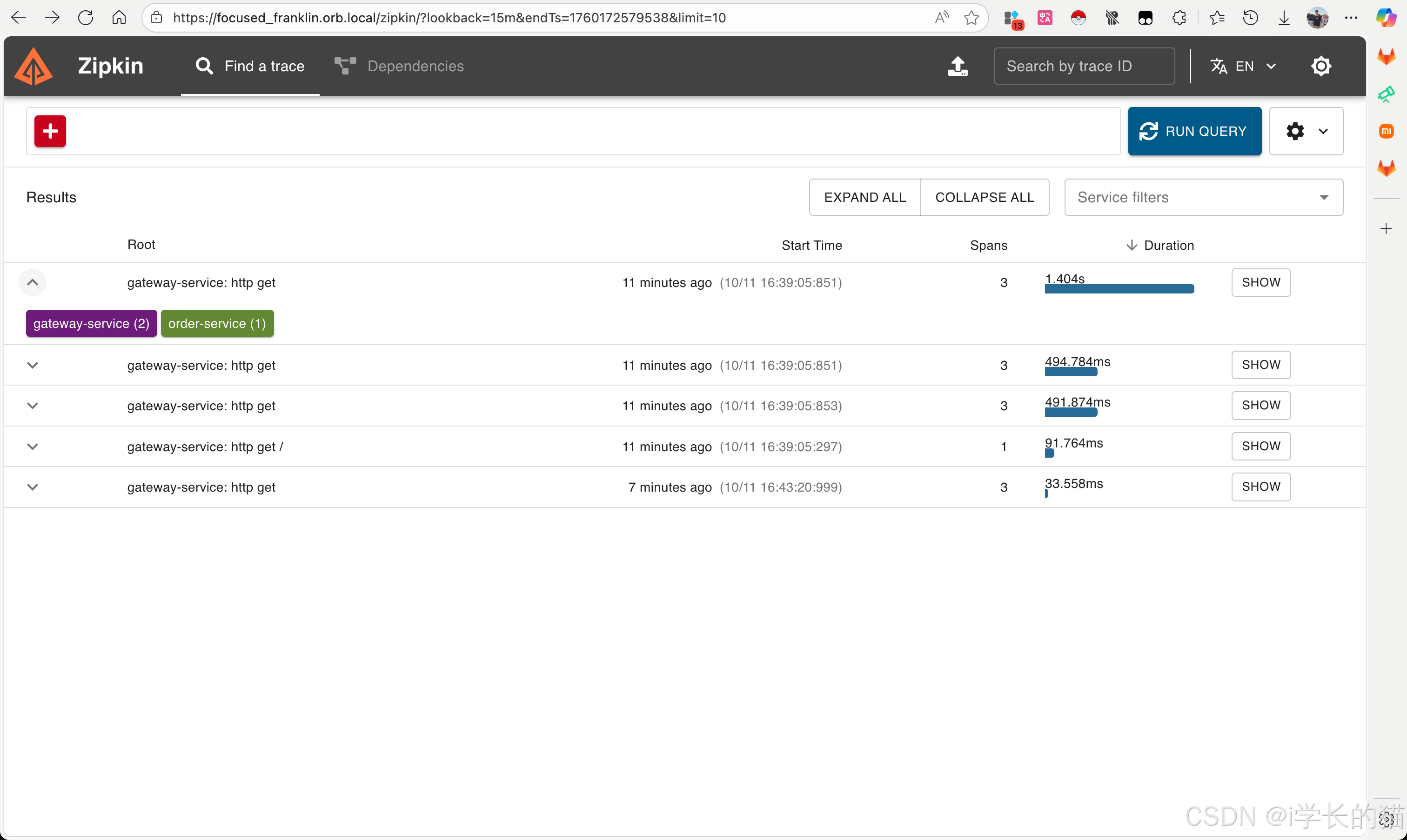
✅ 一、依赖管理(更完整的配置)
Maven (pom.xml)
xml
        1.2.0
        2.16.3


            io.micrometer
            micrometer-tracing-bridge-brave


            io.micrometer
            micrometer-tracing


            io.zipkin.reporter2
            zipkin-reporter-brave
            ${zipkin-reporter.version}


            io.zipkin.reporter2
            zipkin-sender-okhttp3
            ${zipkin-reporter.version}


            net.logstash.logback
            logstash-logback-encoder
            7.4


            org.springframework.boot
            spring-boot-starter-web


            org.springframework.boot
            spring-boot-starter-actuator


                io.micrometer
                micrometer-tracing-bom
                ${micrometer-tracing.version}
                pom
                import
Gradle (build.gradle)
gradle
ext {
    micrometerTracingVersion = '1.2.0'
    zipkinReporterVersion = '2.16.3'
}

dependencies {
    // Micrometer Tracing
    implementation 'io.micrometer:micrometer-tracing-bridge-brave'
    implementation 'io.micrometer:micrometer-tracing'

    // Zipkin
    implementation "io.zipkin.reporter2:zipkin-reporter-brave:${zipkinReporterVersion}"
    implementation "io.zipkin.reporter2:zipkin-sender-okhttp3:${zipkinReporterVersion}"

    // 日志
    implementation 'net.logstash.logback:logstash-logback-encoder:7.4'

    // Spring Boot
    implementation 'org.springframework.boot:spring-boot-starter-web'
    implementation 'org.springframework.boot:spring-boot-starter-actuator'
}

dependencyManagement {
    imports {
        mavenBom "io.micrometer:micrometer-tracing-bom:${micrometerTracingVersion}"
    }
}
✅ 二、详细配置(application.yml)
yaml
spring:
  application:
    name: order-service

  # Sleuth 兼容配置(可选)
  sleuth:
    enabled: false  # 明确禁用 Sleuth

# Micrometer Tracing 配置
management:
  tracing:
    enabled: true
    sampling:
      probability: 1.0  # 采样率:1.0=100%, 0.1=10%

    # 传播类型配置
    propagation:
      type: W3C  # 支持:W3C, B3, B3_MULTI

    # Brave 特定配置
    brave:
      sampler:
        rate: 10000  # 每秒最大采样数

  # Actuator 端点
  endpoints:
    web:
      exposure:
        include: health,metrics,info,tracecontext

# Zipkin 配置(可选)
zipkin:
  base-url: http://localhost:9411
  enabled: true
  sender:
    type: web  # 使用 HTTP 发送

# 日志配置
logging:
  pattern:
    level: "%5p [${spring.application.name:},%X{traceId:-},%X{spanId:-}]"
  level:
    io.micrometer.tracing: DEBUG  # 调试时可开启
✅ 三、增强的 Logback 配置
logback-spring.xml
xml
                    UTC


                        {
                            "service": "${spring.application.name:-unknown}"
                        }


                    traceId
                    spanId
                    parentId
                    service.name


                        30
                        2048
                        20
                        true


            %d{yyyy-MM-dd HH:mm:ss.SSS} [%thread] %-5level [%X{traceId:-},%X{spanId:-}] %logger{36} - %msg%n
✅ 四、验证和测试控制器
java
@RestController
@Slf4j
public class TraceDemoController {

    private final RestTemplate restTemplate;
    private final Tracer tracer;

    public TraceDemoController(RestTemplateBuilder restTemplateBuilder, Tracer tracer) {
        this.restTemplate = restTemplateBuilder.build();
        this.tracer = tracer;
    }

    @GetMapping("/demo")
    public String demoTrace() {
        log.info("收到请求 - 开始处理");

        // 当前追踪信息
        Span currentSpan = tracer.currentSpan();
        if (currentSpan != null) {
            log.info("TraceId: {}, SpanId: {}",
                currentSpan.context().traceId(),
                currentSpan.context().spanId());
        }

        // 模拟业务处理
        processBusiness();

        log.info("请求处理完成");
        return "Trace ID: " + (currentSpan != null ? currentSpan.context().traceId() : "null");
    }

    @GetMapping("/call-downstream")
    public String callDownstream() {
        log.info("调用下游服务开始");

        // 自动携带追踪头调用下游服务
        String result = restTemplate.getForObject(
            "http://localhost:8081/demo", String.class);

        log.info("下游服务调用完成: {}", result);
        return "Called downstream: " + result;
    }

    private void processBusiness() {
        log.debug("处理业务逻辑...");
        // 业务代码
    }
}
✅ 五、配置类(确保正确配置)
java
@Configuration
public class TracingConfig {

    @Bean
    public RestTemplate restTemplate(RestTemplateBuilder builder) {
        return builder.build();
    }

    @Bean
    public Sampler alwaysSampler() {
        return Sampler.ALWAYS_SAMPLE;
    }
}
✅ 六、异步任务中的追踪处理
java
@Service
@Slf4j
public class AsyncService {

    private final Tracer tracer;
    private final ObservationRegistry observationRegistry;

    public AsyncService(Tracer tracer, ObservationRegistry observationRegistry) {
        this.tracer = tracer;
        this.observationRegistry = observationRegistry;
    }

    // 方法1:使用 Observation(推荐)
    @Async
    public CompletableFuture processAsync(String data) {
        return Observation.createNotStarted("async-process", observationRegistry)
            .observe(() -> {
                log.info("异步处理数据: {}", data);
                // 模拟处理
                try {
                    Thread.sleep(100);
                } catch (InterruptedException e) {
                    Thread.currentThread().interrupt();
                }
                log.info("异步处理完成");
                return CompletableFuture.completedFuture("processed: " + data);
            });
    }

    // 方法2:手动传播上下文
    @Async
    public void manualAsyncProcess() {
        // 获取当前上下文
        Span currentSpan = tracer.currentSpan();
        if (currentSpan != null) {
            // 在新的线程中手动设置上下文
            try (Tracer.SpanInScope scope = tracer.withSpan(currentSpan)) {
                log.info("手动传播的异步任务");
                // 业务逻辑
            }
        } else {
            log.info("没有追踪上下文的异步任务");
        }
    }
}
✅ 七、Feign Client 集成
java
@FeignClient(name = "payment-service", url = "http://localhost:8082")
public interface PaymentClient {

    @GetMapping("/payment")
    String processPayment();
}

// 自动支持追踪,无需额外配置
✅ 八、常见问题解决方案
1. 自定义 HTTP 客户端追踪
java
@Bean
public RestTemplate tracedRestTemplate() {
    RestTemplate restTemplate = new RestTemplate();

    // 添加追踪拦截器
    List interceptors = new ArrayList<>();
    interceptors.add(new TracingClientHttpRequestInterceptor(tracer));
    restTemplate.setInterceptors(interceptors);

    return restTemplate;
}
2. 手动记录 Span
java
@Autowired
private Tracer tracer;

public void manualSpan() {
    Span span = tracer.nextSpan().name("custom-operation").start();
    try (Tracer.SpanInScope scope = tracer.withSpan(span)) {
        span.event("操作开始");
        log.info("执行自定义操作");
        // 业务逻辑
        span.tag("result", "success");
    } catch (Exception e) {
        span.tag("result", "error");
        span.error(e);
        throw e;
    } finally {
        span.end();
    }
}
✅ 九、健康检查端点
访问 http://localhost:8080/actuator/tracecontext 查看当前追踪上下文:
json
{
  "traceId": "a1b2c3d4e5f6a7b8",
  "spanId": "c9d0e1f2a3b4c5d6",
  "parentId": null,
  "sampled": true
}
✅ 十、完整的日志输出示例
json
{
  "@timestamp": "2024-01-15T10:30:00.123Z",
  "level": "INFO",
  "logger": "com.example.TraceDemoController",
  "message": "收到请求 - 开始处理",
  "service": "order-service",
  "traceId": "a1b2c3d4e5f6a7b8",
  "spanId": "c9d0e1f2a3b4c5d6",
  "thread": "http-nio-8080-exec-1"
}
这个方案提供了:
✅ 完整的依赖配置
✅ 详细的配置文件
✅ 多种日志格式支持
✅ 异步任务追踪
✅ 常见问题解决方案
✅ 验证和测试方法


 浙公网安备 33010602011771号