
ant design vue:Table的行合并
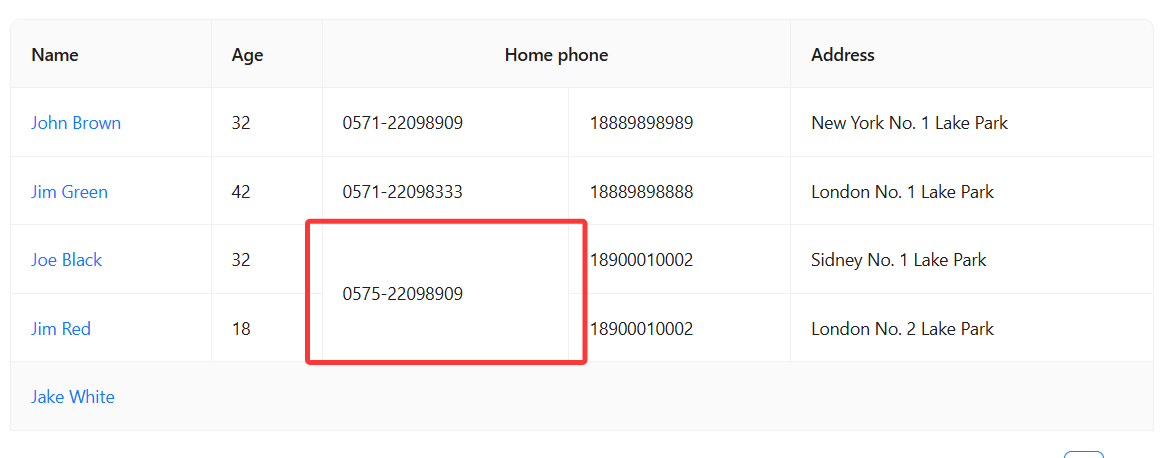
- 目标:能够方便的实现
![]()
图中的样式 - 想要的使用方式:
<div>
  <a-table
    :columns="mcolRight"
    :dataSource="dataRight"
    :striped="true"
    :bordered="true"
    :show-index-column="false"
    :pagination="pagination"
    @change="handlePaginationChange"
  />
</div>
const mcolRight = useTableMerge({
  mergeFields: ["name", "age", "salary"], //指定要合并的列,都一样的数据才合并
  columns: colRight, // 全部的列
  dataSource: dataRight, // 表格的数据
  mergeIndex: true, // 指定是否合并序号列,不填默认为false
  pagination, // 如果指定合并序号列,需要传递分页信息
});
- 主要方法:
// 表格数据分组函数:根据指定列的值相同进行分组
// 返回格式: { start: number, end: number, id: 0 }[]
// 数据经过合并后,start表示开始的索引,end表示结束的索引,id表示合并后的组号,在这里全部设置为0
export function groupTableData(
  dataSource: DataSource,
  groupFields: string[]
): Array<{ start: number, end: number, id: 0 }> {
  if (!dataSource.length || !groupFields.length) return [];

  const groups: Array<{ start: number, end: number, id: 0 }> = [];
  let currentGroupStart = 0;
  let currentGroupValues = getGroupValues(dataSource[0], groupFields);

  for (let i = 1; i < dataSource.length; i++) {
    const rowValues = getGroupValues(dataSource[i], groupFields);

    // 如果当前行与组内值不匹配,结束当前组并开始新组
    if (!isValuesEqual(rowValues, currentGroupValues)) {
      groups.push({
        start: currentGroupStart,
        end: i - 1,
        id: 0,
      });
      currentGroupStart = i;
      currentGroupValues = rowValues;
    }
  }
}
// 辅助函数:获取行中指定分组字段的值
function getGroupValues(
  row: TableRecord,
  fields: string[]
): (string | number)[] {
  return fields.map((field) => row[field]);
}
// 辅助函数:比较两组值是否相等
function isValuesEqual(
  a: (string | number)[],
  b: (string | number)[]
): boolean {
  if (a.length !== b.length) return false;
  return a.every((val, index) => val === b[index]);
}
如果不需要将序号列合并,用这几个方法,再加上一个最终合并的方法就够了。
行合并最主要的就是设置 rowSpan 的值,设置为 0 时就是不渲染,会和上一个合并,不为 0,设置成几就是合并下几行。
合并方法:
// 合并单元格的配置函数
function createMergeCell(
  fields: string[],
  data: DataSource
): (record: TableRecord, index: number) => { rowSpan: number } {
  // 仅计算一次分组信息
  const groups = groupTableData(data, fields);
  return (record, index) => {
    const group = groups.find((g) => g.start <= index && g.end >= index); //
    if (!group) return { rowSpan: 1 }; //默认返回{ rowSpan: 1 },表示单独一行
    return {
      // 如果当前行在分组中的第一项,那么rowSpan设置为当前分组数量大小(合并整个分组),
      // 其余项设置为0(合并到其中)。
      rowSpan: index === group.start ? group.end - group.start + 1 : 0,
    };
  };
}
如果需要将序号列合并,目前采用的方法是:
在配置表格的时候不配置序号列,生成一个序号列,然后返回。分组计算的时候需要根据分页信息来计算。
举例:一页 5 条数据,数据源一共 13 条数据,经过groupTableData方法处理后分成数量为 1,3,4,5 的四组数据,对应生成的序号列就是 1,2,3,4。
由于一页只展示 5 条数据,需要将这四组数据再次分组,确保每一组的序号在翻页后任然是连续正确的。
处理后的分组数量应该是:
1,
3,
1,(第一页数据结束)
3,
2,(第二页数据结束)
3
这样对应的序号就是正确的,1,2,3,4,5,6。
// 分割组函数:根据pageSize分割跨页的组
function splitGroups(
  groups: Array<{ start: number, end: number, id: number }>,
  pagination?: Ref<Pagination>
): Array<{ start: number, end: number, id: number }> {
  const { pageSize } = pagination?.value || { pageSize: 0 };
  if (!groups.length || !pageSize || pageSize <= 0) return groups;

  const splitResult: Array<{ start: number, end: number, id: number }> = [];
  let currentId = 1; // ID从1开始分配

  groups.forEach((group) => {
    const { start, end } = group;
    // 计算组的起始页和结束页
    const startPage = Math.floor(start / pageSize);
    const endPage = Math.floor(end / pageSize);

    // 如果组不跨页,直接添加
    if (startPage === endPage) {
      splitResult.push({
        start,
        end,
        id: currentId++,
      });
      return;
    }

    // 跨页情况,计算第一页的结束索引
    const firstPageEnd = (startPage + 1) * pageSize - 1;
    // 添加第一部分
    splitResult.push({
      start,
      end: firstPageEnd,
      id: currentId++,
    });

    // 添加中间页(如果有)
    const middlePages = endPage - startPage - 1;
    for (let i = 0; i < middlePages; i++) {
      const middleStart = (startPage + 1 + i) * pageSize;
      const middleEnd = (startPage + 2 + i) * pageSize - 1;
      splitResult.push({
        start: middleStart,
        end: middleEnd,
        id: currentId++,
      });
    }

    // 添加最后一部分
    const lastPageStart = endPage * pageSize;
    splitResult.push({
      start: lastPageStart,
      end,
      id: currentId++,
    });
  });

  return splitResult;
}
经过这样处理后,可以为每一组数据添加序号列,序号列里的序号就是 id,再创建合并单元格的配置函数给序号列的 customCell。
样例代码:
    const groups = groupTableData(data, fields);
    const aftersplit = splitGroups(groups, pagination);
    // 创建合并单元格的配置函数
    function createMergeCellWithIndex(
    groups: Array<{ start: number; end: number; id: number }>,
    pagination?: Ref<Pagination>,
    ): (record: TableRecord, index: number) => { rowSpan: number } {
    // 为确保返回值类型符合要求,添加默认返回值
    return (record, index) => {
        // 分组内的第一项rowSpan设置为要合并的数,其他项rowSpan设置为0
        // 默认设置成1,单行显示
        index =
        (pagination?.value.current - 1) * pagination?.value.pageSize + index;
        const temp = groups?.find(
        (item) => item.start <= index && item.end >= index,
        );
        if (temp) {
        if (index === temp.start) {
            return {
            rowSpan: temp.end - temp.start + 1,
            };
        } else {
            return {
                rowSpan: 0,
                };
        }
        } else {
            return {
                rowSpan: 1,
            };
        }
    };
    }

    // 创建序号列配置
    const indexColumn: BasicColumn = {
      title: '序号',
      dataIndex: 'index',
      width: 60,
      fixed: 'left',
      className: 'merge-table-background-color',
      customRender: ({ index }) => {
        const cur_i =
          index + (pagination.value.current - 1) * pagination.value.pageSize;
        const nowgroup = aftersplit.find(
          (item) => item.start <= cur_i && item.end >= cur_i,
        );
        return nowgroup?.id;
      },
    };
    // 添加合并单元格配置
    indexColumn.customCell = createMergeCellWithIndex(aftersplit, pagination);//

    // 将序号列添加到columns的最前面
    return [
      indexColumn,
      ...columns.map((col) => {
        if (!fields.includes(col.dataIndex as string)) { // 如果不是指定的要合并的列,正常返回
          return col;
        }

        return {
          ...col,
          customCell: createMergeCellWithIndex(aftersplit, pagination), // 需要合并的列
        };
      }),
    ];
综上,最后的逻辑代码类似:
export function useTableMerge(
  options: UseTableMergeOptions,
): ComputedRef<BasicColumn[]> {
  const {
    mergeFields,
    dataSource,
    columns,
    mergeIndex = false,
    pagination,
  } = options;

  // 使用computed确保响应式
  return computed(() => {
    // 确保dataSource是响应式的
    const data = unref(dataSource);
    // 确保columns是响应式的
    const currentColumns = unref(columns);

    return createMergeColumns(
      currentColumns,
      mergeFields,
      data,
      mergeIndex,
      pagination,
    );
  });
}
function createMergeColumns(
  columns: BasicColumn[],
  fields: string[],
  data: DataSource,
  mergeIndex = false,
  pagination?: Ref<Pagination>,
): BasicColumn[] {
  if (mergeIndex) {
    // 计算每行的实际序号
    const groups = groupTableData(data, fields);
    const aftersplit = splitGroups(groups, pagination);

    // 创建序号列配置
    const indexColumn: BasicColumn = {
      title: '序号',
      dataIndex: 'index',
      width: 60,
      fixed: 'left',
      className: 'merge-table-background-color',
      customRender: ({ index }) => {
        const cur_i =
          index + (pagination.value.current - 1) * pagination.value.pageSize;
        const nowgroup = aftersplit.find(
          (item) => item.start <= cur_i && item.end >= cur_i,
        );
        return nowgroup?.id;
      },
    };

    // 添加合并单元格配置
    indexColumn.customCell = createMergeCell(aftersplit, pagination);

    // 将序号列添加到columns的最前面
    return [
      indexColumn,
      ...columns.map((col) => {
        if (!fields.includes(col.dataIndex as string)) {
          return col;
        }

        return {
          ...col,
          customCell: createMergeCell(aftersplit, pagination),
        };
      }),
    ];
  } else {
    // 不添加序号列,直接处理columns
    return columns.map((col) => {
      if (!fields.includes(col.dataIndex as string)) {
        return col;
      }

      return {
        ...col,
        customCell: createMergeCellOLD(fields, data),
      };
    });
  }
}
在指定序号列也合并的时候,有没有更方便的方法呢?
学习新思想,争做新青年

 浙公网安备 33010602011771号