
简单聊天室
http://doc.workerman.net/getting-started/simple-example.html
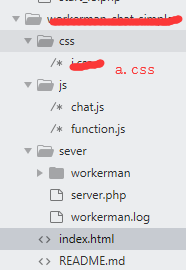
server.php
/<?php
use Workerman\Worker;
require_once __DIR__ . '/workerman/Autoloader.php';

// 注意:这里与上个例子不同,使用的是websocket协议
$worker = new Worker("websocket://0.0.0.0:23426");

// 启动4个进程对外提供服务
$worker->count = 1;

$user_count = 0;

//用户列表
$users = [];

// 当收到客户端发来的数据后返回hello $data给客户端
$worker->onMessage = function($connection, $data)
{

	global $worker,$user_count,$users;
	//转成数组
    $data_arr = json_decode($data,true);
    // 登录
    if ($data_arr['action_type'] == 'login') {
	    // 向客户端发送hello $data
	    $connection->uid = $data_arr['uid'];
	    $connection->photo = $data_arr['photo'];
	    $connection->username = $data_arr['username'];
	    //把当前用户添加进用户列表
		$users[] = [
			'uid' => $connection->uid,
			'username' => $connection->username
		];

	    // 给所用用户广播新用户加入
		$send_data = json_encode([
			'action_type' => 'new_user_login',
			'username' => $data_arr['username'],
			'photo' => $data_arr['photo'],
			'users' => $users,
		]);
	    // 遍历当前进程所有的客户端连接,发送当前服务器的时间
	    foreach($worker->connections as $con)
	    {
	    	$con->send($send_data);
	    }
    }
    // 发送消息
    if ($data_arr['action_type'] == 'send_msg') {
	    // 遍历当前进程所有的客户端连接,发送当前服务器的时间
	    foreach($worker->connections as $con)
	    {
		    // 给所用用户广播新用户加入
			$send_data = [
				'action_type' => 'new_msg',
				'my_msg' => 0,
				'uid' => $connection->uid,
				'photo' => $connection->photo,
				'username' => $connection->username,
				'content' => $data_arr['content'],
			];
           /*
                  我的显示红色
                  别人显示蓝色
                */
		//客户端发过来的uid == /遍历当前进程所有客户的uid
	    	if ($connection->uid == $con->uid) {
	    		$send_data['my_msg'] = 1;
	    	}
	    	$con->send(json_encode($send_data));
	    }
    }
};

//回调属性 当用户连接就触发这个
$worker->onConnect = function($connection)
{
	global $worker,$user_count;
	$user_count++;  //统计人数
    // 遍历当前进程所有的客户端连接,发送当前服务器的时间   connections这是属性
    foreach($worker->connections as $connection)
    {
	    // 给所用用户广播当前在线人数
		$send_data = json_encode([
			'action_type' => 'online_user_count',
			'online_user_count' => $user_count,
		]);
        $connection->send($send_data);
    }
};

// 用户断开链接
$worker->onClose = function($connection)
{
	global $worker,$user_count;
	$user_count = $user_count-1;  //断开连接就减一
    // 遍历当前进程所有的客户端连接,发送当前服务器的时间
    foreach($worker->connections as $con)
    {
	    // 给所用用户广播用户退出
		$send_data = json_encode([
			'action_type' => 'user_on_close',
			'username' => $connection->username,
		]);
		$con->send($send_data);

	    // 给所用用户广播当前在线人数
		$online_user_count_send_data = json_encode([
			'action_type' => 'online_user_count',
			'online_user_count' => $user_count,
		]);
        $con->send($online_user_count_send_data);
    }
};

// 运行worker
Worker::runAll();
chat.js
var interval;
//消息框获取焦点
$('#send-input').focus(function() {
    interval = setInterval(function() {
        scrollToEnd();
    }, 500)
})

//消息框失去焦点
$('#send-input').blur(function() {
    clearInterval(interval);
})

//滚动到底部
function scrollToEnd() {
    document.body.scrollTop = document.body.scrollHeight;
}

message_scrollTop();


//这是客户端转发到服务端的 从这开始
var ws = new WebSocket("ws://127.0.0.1:23426");
ws.onopen = function() {  //这部分是从数据库取出来的,以后发送个服务端    用户名、头像、id号  一上来就发送
    var msg_obj = { "action_type": "login", "uid": uid, "username": username, "photo": photo };
    var msg = JSON.stringify(msg_obj);
    console.log(msg);
    ws.send(msg);
};

//收到服务端的消息
ws.onmessage = function(e) {
    //json字符串转成对象
    var msg = JSON.parse(e.data);
    //console.log(msg);
    // 新用户登录
    if (msg.action_type == 'new_user_login') {
        var html = '<div class="remind-box"><span>' + msg.username + '</span>进入了聊天室</div>';
        $(".message-list-box").append(html);

        //显示用户列表
        //show_users(msg.users);
		message_scrollTop();
    }
    // 新消息
    if (msg.action_type == 'new_msg') {
        var my_html = '<div class="message message-right"><div class="img-box"></div><div class="message-text my-message">' + msg.content + '</div><div class="right-arrow-box"><div class="right-arrow"></div></div><div class="img-box"><img src="' + msg.photo + '" alt=""></div></div>';
        var others_html = '<div class="message message-left"><div class="img-box"><img src="' + msg.photo + '" alt=""></div><div class="left-arrow-box"><div class="left-arrow"></div></div><div class="message-text">' + msg.content + '</div><div class="img-box"></div></div>';
        if (msg.my_msg == 1) {
            $(".message-list-box").append(my_html);
        } else {
            $(".message-list-box").append(others_html);
        }
		message_scrollTop();
    }
    // 当前在线人数
    if (msg.action_type == 'online_user_count') {
        var html = msg.online_user_count + '人在线';
        $("#online_user_count").html(html);
    }
    // 用户断开链接
    if (msg.action_type == 'user_on_close') {
        var html = '<div class="remind-box"><span>' + msg.username + '</span>离开了聊天室</div>';
        $(".message-list-box").append(html);
        message_scrollTop();
    }
};

$(document).keyup(function(event){
  if(event.keyCode ==13){
    send();
  }
});

function send() {
    var content = $('#send-input').val();
    $('#send-input').val('');
    var msg_obj = { "action_type": "send_msg", "content": content };
    var msg = JSON.stringify(msg_obj);
    ws.send(msg);
}

function show_users($users) {

    $('users-box').html('');
    $.each(users,function(index,value){

            var html = '<a href="#" id="user_'+value.uid+'">'+value.username+'</a>';
            $('#users-box').append(html);
    });
}
function.js
//生成从minNum到maxNum的随机数
function randomNum(minNum,maxNum){
    switch(arguments.length){
        case 1:
            return parseInt(Math.random()*minNum+1,10);
        break;
        case 2:
            return parseInt(Math.random()*(maxNum-minNum+1)+minNum,10);
        break;
            default:
                return 0;
            break;
    }
}

function message_scrollTop(){
  $(".message-list-box").scrollTop($(".message-list-box")[0].scrollHeight);
}
index.html
<!DOCTYPE html>
<html lang="zh-CN">
  <head>
    <meta charset="utf-8">
    <meta http-equiv="X-UA-Compatible" content="IE=edge">
    <meta name="viewport" content="width=device-width, initial-scale=1, maximum-scale=1, user-scalable=no">
    <!-- 上述3个meta标签*必须*放在最前面,任何其他内容都*必须*跟随其后! -->
    <title>聊天室</title>

    <!-- Bootstrap -->
    <link href="https://cdn.jsdelivr.net/npm/bootstrap@3.3.7/dist/css/bootstrap.min.css" rel="stylesheet">

    <!-- HTML5 shim 和 Respond.js 是为了让 IE8 支持 HTML5 元素和媒体查询(media queries)功能 -->
    <!-- 警告:通过 file:// 协议(就是直接将 html 页面拖拽到浏览器中)访问页面时 Respond.js 不起作用 -->
    <!--[if lt IE 9]>
      <script src="https://cdn.jsdelivr.net/npm/html5shiv@3.7.3/dist/html5shiv.min.js"></script>
      <script src="https://cdn.jsdelivr.net/npm/respond.js@1.4.2/dest/respond.min.js"></script>
    <![endif]-->
    <link rel="stylesheet" href="./css/i.css">
  </head>
  <body>
    <header>
      <div class="row">
        <div class="col-xs-3 header-left"><i class="glyphicon glyphicon-chevron-left"></i></div>
        <div class="col-xs-6 header-center">聊天室案例</div>
        <div class="col-xs-3 header-right"><span style="color: #555;font-size: 12px;" id="online_user_count">0人在线</span> <i class="glyphicon glyphicon-record" style="color: #49d337;font-size: 12px;"></i></div>
      </div>
    </header>
    <div class="message-list-box">

    </div>

    <div class="send-box">
      <div class="send-left">
        <textarea id="send-input" rows="1"></textarea>
      </div>
      <div class="send-right">
        <a href="javascript:send();">发送</a>
      </div>
    </div>

    <!-- jQuery (Bootstrap 的所有 JavaScript 插件都依赖 jQuery,所以必须放在前边) -->
    <script src="https://cdn.jsdelivr.net/npm/jquery@1.12.4/dist/jquery.min.js"></script>
    <!-- 加载 Bootstrap 的所有 JavaScript 插件。你也可以根据需要只加载单个插件。 -->
    <script src="https://cdn.jsdelivr.net/npm/bootstrap@3.3.7/dist/js/bootstrap.min.js"></script>
    <!-- 这个函数库一点要先导入 -->
    <script src="./js/function.js"></script>
    <script>
      // 这里我只是临时准备了一组昵称和头像
      var photo_arr = ['http://qukufile2.qianqian.com/data2/pic/140d09665d1c204efe00973c3e16282c/579342600/579342600.jpg','http://qukufile2.qianqian.com/data2/pic/d06f59a51303f15f86a801b0e0c64f76/580384071/580384071.jpg@s_0,w_130','http://qukufile2.qianqian.com/data2/pic/26fd26d06eba326803126ac019fbe3c6/608321106/608321106.jpg@s_0,w_130','http://qukufile2.qianqian.com/data2/pic/246708025/246708025.jpg@s_0,w_130','http://qukufile2.qianqian.com/data2/pic/246709489/246709489.jpg@s_0,w_130'];
      var username_arr = ['薛','任','张','费','文','力','友','良','乐','健','声','志','郎'];
      // 每次刷新的时候随机取一个昵称和头像  uid 用户和图片   一进来随机取的值
      var uid = randomNum(1,999999);
      var username = username_arr[randomNum(0,12)];
      var photo = photo_arr[randomNum(0,4)];
    </script>
    <!-- 这个chat.js文件就是websocket相关的代码,必须后引入 -->
    <script src="./js/chat.js"></script>
  </body>
</html>
css
/*初始化*/
*{box-sizing: border-box;}
body{}
a,a:link,a:active,a:visited,a:hover{text-decoration:none;}
a{}

/*自定义样式*/
html{
	height: 100%;
}
body{
	display: -webkit-flex; /* Safari */
	display: flex;
	flex-direction: column;
	height: 100%;
}
header{
	height: 50px;
	line-height: 50px;
}
header .row{
	margin: 0;
}
.header-left{
	text-align: left;
	padding-left: 10px;
}
.header-center{
	text-align: center;
	font-weight: 700;
}
.header-right{
	text-align: right;
	padding-right: 10px;
}
.message-list-box{
	background: #f6f6f6;
	box-sizing: border-box;
	flex: 1;
	padding: 10px 5px;
	overflow-y: scroll;
	-webkit-overflow-scrolling : touch;
}
.message{
	display: flex;
	margin-bottom: 5px;
}
.message .img-box{
	width: 45px;
	text-align: center;
}
.message .message-text{
	/*flex: 1;*/
	background: #ddd;
	padding: 8px;
	border-radius: 4px;
	max-width: 75%;
}
.message .img-box img{
	width: 30px;
	height: 30px;
	border-radius: 4px;
}
.message .my-message{
	background: #9eea6a;
}
.message-left{
	text-align: left;
}
.message-right{
	text-align: right;
	justify-content: flex-end;
}
.right-arrow-box,.left-arrow-box{
	width: 0px;
	position: relative;
}
.right-arrow{
	width: 8px;
    height: 8px;
    position: absolute;
    background: #9eea6a;
    transform: rotate(42deg);
    right: -4px;
    top: 8px;
}
.left-arrow{
	width: 8px;
    height: 8px;
    position: absolute;
    background: #ddd;
    transform: rotate(42deg);
    right: -4px;
    top: 8px;
}
.message-list-box .remind-box{
	color: #aaa;
	text-align: center;
	font-size: 12px;
	padding: 5px 0 10px 0;
}
.message-list-box .remind-box span{
	color: #4f92ed;
	margin-right: 2px;
}

/*编辑区域*/
.send-box{
	width:100%;
	height: 50px;
}
.send-left{
	width: 80%;
	height: 50px;
	float: left;
}
.send-left textarea{
	display: block;
	width: 100%;
	height: 50px;
	border:0;
	padding: 5px;
	color: #777;
	resize:none;
	outline: none;
}
.send-right{
	width: 20%;
	height: 50px;
	float: left;
}
.send-right a{
	display: block;
	width: 100%;
	height: 50px;
	line-height: 50px;
	text-align: center;
	background-image: linear-gradient(to bottom,#5cb85c 0,#419641 100%);
	color: #fff;
}


 浙公网安备 33010602011771号