
Java学习——CSS详解
1、什么是CSS
-
CSS 指层叠样式表 (Cascading Style Sheets)
-
样式定义如何显示 HTML 元素
-
样式通常存储在样式表中
-
把样式添加到 HTML 4.0 中,是为了解决内容与表现分离的问题
-
外部样式表可以极大提高工作效率
-
外部样式表通常存储在 CSS 文件中
-
多个样式定义可层叠为一个
2、选择器
2.1、基本选择器
-
标签选择器
直接将元素标签放在style中,(少用)
h1{ } -
类选择器 class
class 选择器用于描述一组元素的样式,class 选择器有别于id选择器,class可以在多个元素中使用。
class 选择器在HTML中以class属性表示, 在 CSS 中,类选择器以一个点"."号显示:
.center {text-align:center;}
-
ID选择器
id 选择器可以为标有特定 id 的 HTML 元素指定特定的样式。
HTML元素以id属性来设置id选择器,CSS 中 id 选择器以 "#" 来定义。
 #para1 {
     text-align:center;
     color:red;
     }
2.2、层次选择器
-
后代选择器
在某个元素的后面,包含在上一级标签中的所有标签
 ul li{
     background:red
 }
ul中li标签的背景颜色都变为红色
-
子选择器
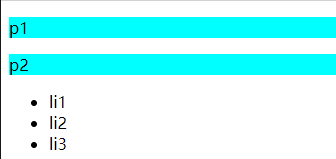
只有一代,指定子代同级标签中的一个
body>p{
     background:red
 }
且只有子代的p标签会变色,p标签后ul,li标签不会变色
body>p{ background: aqua; } </style> </head> <body> <p>p1</p> <p>p2</p> <p><ul> <li>li1</li> <li>li2</li> <li>li3</li> </ul> </p> </body>
2.3、结构伪类选择器
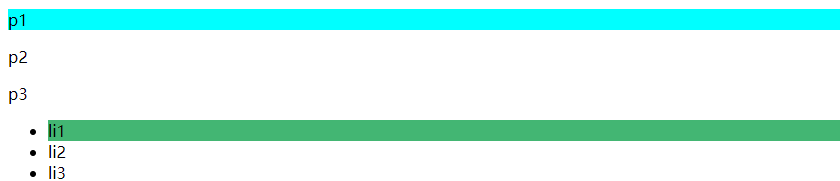
伪类:给标签加上条件,然后选中
<!DOCTYPE html> <html lang="en"> <head> <meta charset="UTF-8"> <title>Title</title> <style> /*选中ul的第一个子元素*/ ul li:first-child{ background: #43b673; } /*选中p的第一个元素 nth-child(1):选中当前标签父元素的第一个子元素, 并且是当前类型标签才生效! */ p:nth-child(1){ background: aqua; } </style> </head> <body> <p>p1</p> <p>p2</p> <p>p3</p> <ul> <li>li1</li> <li>li2</li> <li>li3</li> </ul> </body> </html>
2.4、属性选择器(重要)
基本类似于id+class
<!DOCTYPE html> <html lang="en"> <head> <meta charset="UTF-8"> <title>Title</title> <style> .demo a{ float: left; display: block; height: 50px; width: 50px; border-radius: 10px; background: #43b673; text-align: center; color: gainsboro; text-decoration: none; margin-right: 5px; font:bold 20px/50px Arial; } /*利用属性名选择标签,属性名 = 属性值(正则) *= 包含等号右边 ^= 以等号右边开头 $= 以等号右边结尾 */ /*存在id属性的元素 a[]{}*/ a[id]{ background: aqua; } /*也可以具体到某个id*/ a[id=qwe]{ background: blueviolet; } /*选中class是links的元素 */ a[class *= "links"]{ background: coral; } /*选中href中以http开头的元素 */ a[href^=http]{ background: crimson; } </style> </head> <body> <p class="demo"> <a href="/abc.pdf" class=" item first" id="first">1</a> <a href="" class="item active" target="_blank" title="test">2</a> <a href="image/123.html" class="links item">3</a> <a href="image/123.png" id="qwe">4</a> <a href="image/123.jpg" class="links item">5</a> <a href="abc" class="links item">6</a> <a href="/a.pdf" class="links item">7</a> <a href="http://www.baidu.com" class="links item">8</a> <a href="abc.word" class="links item">9</a> <a href="abc.doc" class="links item last">10</a> </p> </body> </html>

 *=  包含等号右边
 ^=  以等号右边开头
 $=  以等号右边结尾
3、美化网页元素
3.1、为什么要美化网页
-
有效的传递信息
-
吸引用户
-
凸显主题
-
提高用户体验
span标签:重点要突出的字
<!DOCTYPE html> <html lang="en"> <head> <meta charset="UTF-8"> <title>Title</title> <style> #ttd{ font-size: 50px; } </style> </head> <body> 欢迎学习<span id="ttd">Java</span> </body> </html>

3.2、字体样式
<!-- font-family: 字体 font-size: 字体大小 font-weight: 字体粗细 --> <style> body{ font-family: 幼圆 , "Bell MT"; } h1{ font-size: 50px; } .p1{ font-weight: bold; } p{ color: #43b673; } </style>
3.3、文本样式
-
颜色 color RGB RGB( , , )
-
文本对齐方式 text-align=center
-
首行缩进 text-indent: 2em
-
行高 line-height
-
装饰 链接去下划线: text-decoration
-
文本图片水平对齐:vertical-align: middle
<!DOCTYPE html> <html lang="en"> <head> <meta charset="UTF-8"> <title>Title</title> <!-- 设置颜色:单词 RGB 排版: text-align: 首行缩进: text-indent: 行高和块的高度一样可以段落居中:height: 30px; line-height: 30px; --> <style> h1{ color: rosybrown; text-align: center; } .p1{ text-indent: 2em; } .p3{ background: coral; height: 30px; line-height: 30px; } </style> </head> <body> <h1>人物介绍</h1> <P class="p1"> 2015年,李子柒开始自拍自导古风美食短视频。 早期,她的视频虽然创意有余,却质量一般,比如《樱桃酒》。 </P > <p> 而在拍摄内容的选择上,和奶奶生活在一起的李子柒选择了最熟悉的“农村生活”。其最初设定的话题取自俗语:“四季更替,适食而食”,后来在编辑的建议下改成了“古香古食”。期间,她曾用了一年多的时间还原“文房四宝”在古代的制作过程,也用古法制作过手工酱油,甚至以一人之力在院子里用木头和竹子搭了一座茅草棚和秋千架 [4] 。 </P> <p class="p3">You make me feel so happy;Whenever I'm with you.You make me feel so special--This love is too good to be true.</p> </body> </html>

3.4、文本阴影和超链接伪类
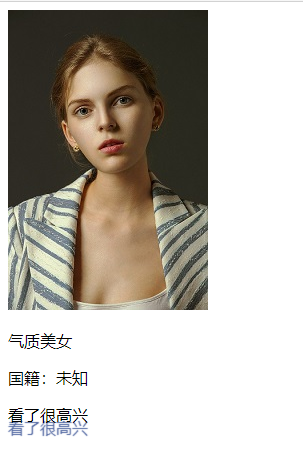
超链接伪类,正常情况下 a:hover
<!DOCTYPE html> <html lang="en"> <head> <meta charset="UTF-8"> <title>Title</title> <style> /*默认的颜色*/ a{ text-decoration: none; color: #000000; } /*鼠标悬浮状态(重要,只记hover)*/ a:hover{ color: coral; font-size: 50px; } /*鼠标选中激活状态*/ a:active{ color: #43b673; } /*阴影*/ #price{ text-shadow: 0px 13px 1px #4f65a0; } </style> </head> <body> <a href="#"> <img src="aaa.jpg" alt=""> </a> <p> <a href="#">气质美女</a> </p> <p> <a href="">国籍:未知</a> </p> <p id="price"> 看了很高兴 </p> </body> </html>
3.5、列表样式
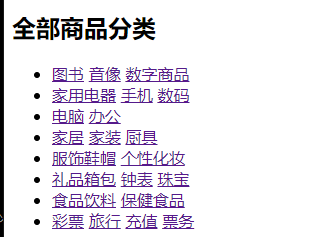
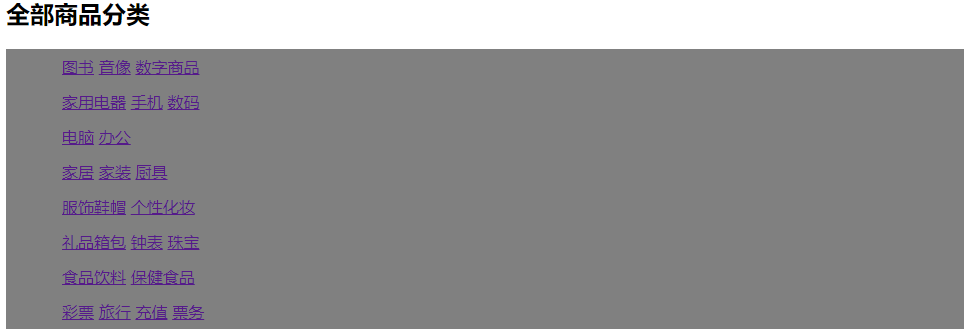
html页面原始样式:
列表美化样式:
/*ul li*/ ul{ background: gray; } /* list-style:none none去掉无需列表的圆点 circle空心圆 decimal有序列表 */ ul li{ line-height: 35px; list-style: none; text-indent: 1em; }
4、盒子模型
4.1、什么是盒子模型
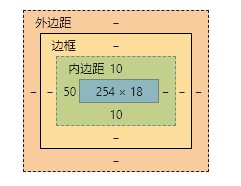
margin : 外边距 border :边框 padding :内边距
4.2、边框
-
边框的粗细
-
边框的样式
-
边框的颜色
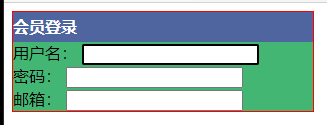
<style> /*body等总有一个默认的外边距 ,常进行初始化*/ /*h1,h2,ul,li,a,body{*/ /* margin: 0px;*/ /* padding: 0px;*/ /* text-decoration: none;*/ /*}*/ #box{ width: 300px; border:1px solid red; } h2{ font-size: 16px; background-color: #4f65a0; line-height: 30px; margin: 0px; color: white; } form{ background: #43b673; } div:nth-of-type(1) input[id="a"]{ border: 2px solid black; } </style>
4.3、外边距
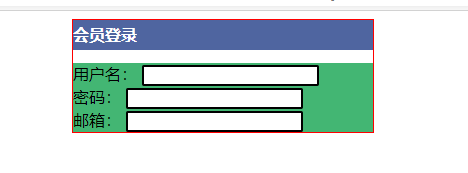
 /*外边距可以进行居中操作
  margin: 0 auto;
 */
         #box{
             width: 300px;
             border:1px solid red;
             margin: 0 auto;
         }
居中前:

居中后:
盒子的就算方式:margin+border+padding+内容宽度
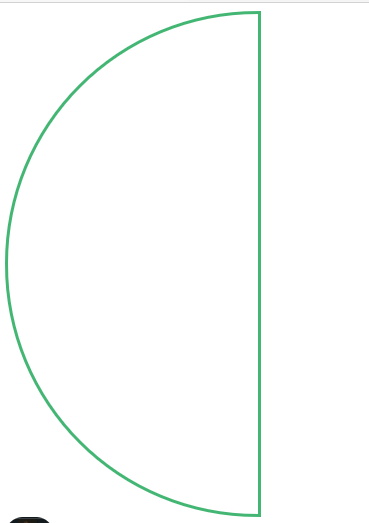
4.4、圆角边框
4个角
 <!--  border-radius:  角的圆的程度
       值的数量对应角的位置
       四个值:左上  右上   右下   左下 (顺时针)
       两个值:左上+右下    右上+左下
       圆:   圆角=宽度=高度
 -->
   <style>
       div{
           width: 250px;
           height: 500px;
           border: 3px #43b673 solid;
           border-radius: 500px 0  0 500px;
       }
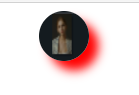
4.5、盒子阴影
img{
     width: 50px;
     height: 50px;
     border-radius: 25px;
     box-shadow: 10px 10px 10px red;
     }
5、浮动
5.1、标准文档流
块级元素:独占一行
h1~h6 p div 列表...
行内元素:不独占一行,可以被包含在块级元素中
span a img strong...
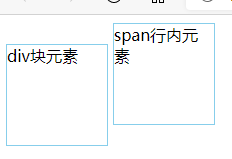
5.2、display
/*dispplay:block;
 block ,块元素
 inline , 行内元素
 inline-block , 块元素,但可以内联,在一行
 none , 元素不显示
 */
 span{
     width: 100px;
     height: 100px;
     border: 1px solid skyblue;
     display: inline-block;
 }
5.3、左右浮动
float:left right ;
元素浮动,类似于行内元素那样的样式在一行,可以控制方向
clear:both; //也可选择方向
清除浮动,恢复块元素的样式
5.4、父级边框塌陷
解决方法:
-
增加父级元素高度
 #father{
     border:1px blue solid;
     height:800px;
 }
-
增加一个空的的div标签,清除浮动
<div class="clear"></div> .clear{ clear:both; margin=0; padding:0; }
-
overflow
overflow:hidden; //在父级元素中增加一个这个属性定义溢出元素内容区的内容会如何处理。如果值为 scroll,不论是否需要,用户代理都会提供一种滚动机制。因此,有可能即使元素框中可以放下所有内容也会出现滚动条。
-
父类添加一个伪类(推荐)
#father:after{
     content:'';
     display:block;
     clear:both;
 }
6、定位
<!DOCTYPE html> <html lang="en"> <head> <meta charset="UTF-8"> <title>Title</title> <!-- 相对定位 相对于自己原来的位置进行偏移 --> <style> body{ padding: 20px; } div{ margin: 10px; padding: 5px; font-size: 12px; line-height: 25px; } #father{ border: solid 1px blue; padding: 0px; } #first{ background-color: #43b673; border: dashed 1px blue; position: relative; /*相对定位:向自己原来位置的上下左右移动*/ top:-30px; left: 30px; } #second{ background-color: #4f65a0; border: dashed 1px blue; } #third{ background-color: rosybrown; border: dashed 1px blue; position: relative; bottom: -30px; right: 30px; } </style> </head> <body> <div id="father"> <div id="first">第一个盒子</div> <div id="second">第二个盒子</div> <div id="third">第三个盒子</div> </div> </body> </html>
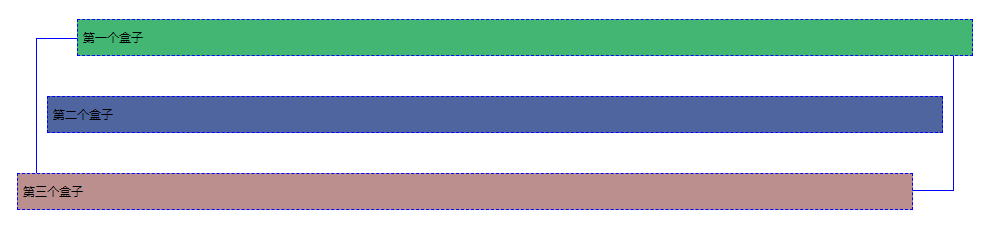
相对定位: position: relative;
/相对定位:向自己原来位置的上下左右移动/ ,
但元素原来盒子位置仍然保留,仍在标准文档流中
top right bottom left 顺时针
6.1、绝对定位
定位: 基于xxx定位,上下左右移动
position: absolute;
-
没有父级元素定位的情况下,相对于浏览器边框定位
-
假设父级元素存在定位,通常相对于父级元素进行偏移
-
在父级元素范围内移动
元素原来盒子位置不保留,不在标准文档流中
 #second{
             border: dashed 1px blue;
             position: absolute;
             right: 30px;
         }

6.3、固定定位fixed
<!DOCTYPE html> <html lang="en"> <head> <meta charset="UTF-8"> <title>Title</title> <style> body{ height: 1000px; } div:nth-of-type(1){ /*绝对定位:相对于浏览器*/ width: 100px; height: 100px; background: red; position: absolute; right: 0; bottom: 0; } div:nth-of-type(2){ /*fixed固定定位,固定在一个位置不变*/ width: 50px; height: 50px; background: yellow; position: fixed; right: 0; bottom: 0; } </style> </head> <body> <div>div1</div> <div>div2</div> </body> </html>


6.4、z-index
z-index简单类比千层饼,浏览器的页面就是盘子,页面上的盒子就是摞起来的饼层。
给不同的盒子赋予不同的层级,高层级显示在底层级之上。
z值就是层数值。
<!DOCTYPE html> <html lang="en"> <head> <meta charset="UTF-8"> <title>Title</title> <link rel="stylesheet" href="css/style.css"> </head> <body> <div id="content"> <ul> <li><img src="images/bg.png" alt=""></li> <li class="tipText">一些代码</li> <li class="tipBg"></li> <li>时间:2020-10-01</li> <li>地点:dasdlkjm</li> </ul> </div> </body> </html>
 #content{
     width: 300px;
     padding: 0px;
     margin: 0px;
     overflow: hidden;
     font-size: 21px;
     border: 1px #000 solid;
 }
 ul,li{
     padding: 0px;
     margin: 0px;
     list-style: none;
     color: orange;
 }
 /*父级元素相对定位,子级绝对定位*/
 #content ul{
     position: relative;
 }
 .tipText,.tipBg{
     position: absolute;
     width: 183px;
     height: 25px;
     top: 82px;
 }
 /*设置层级让字显示在绿色背景之上*/
 .tipText{
     z-index: 3;
 }
 /*opacity 调整背景透明度*/
 .tipBg{
     background: #43b673;
     opacity: 0.5;
 }
前: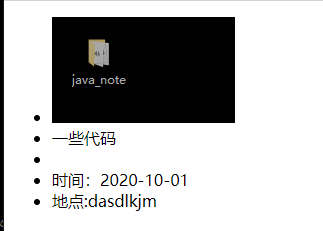
后: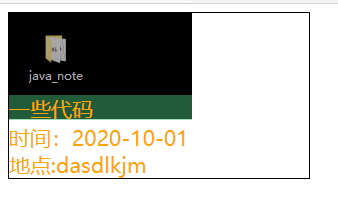

 浙公网安备 33010602011771号