


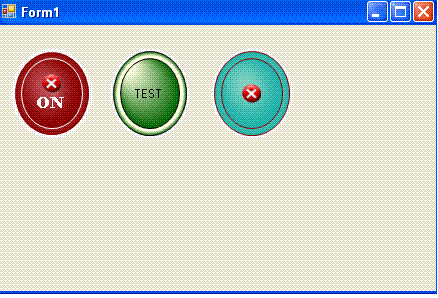
A shiny orb button in gdi+
Introduction
I was actually experimenting with different brush option to create a glassy orb but it does not work .. But i still like the effect even though it wasnt really what i want .. So i turn this into a button . Hope someone may found this useful . when the world is going to wpf ...
Using the code
There isn't much thing option to play around with except you can add image , text and the colors.. Do whatever you want with the code , and if you managed to create a shiny glass effect .. let me know . The code is short and most of the implementation is all in onpaint method
The following are used to create the animation effect for the glowing light
pgb1.FocusScales = new PointF(_focus, _focus);
where pgb1 is the pathgradientbrush .
Then as a mouse hover over , it kicks start a timer and increase the focus
{
if (_focus < 0.9f)
_focus = _focus + 0.1f;
}
else {
timer.Stop();
}
as focus reach 1 , the timer stop.
The reverse occurs when mouse left the control.
Points of Interest
History
Version 0.1

 浙公网安备 33010602011771号