
04.Python百行代码制作查询工具
3.1 功能分析
3.1.1 网址
# 1 网址的url:
https://ip138.com/
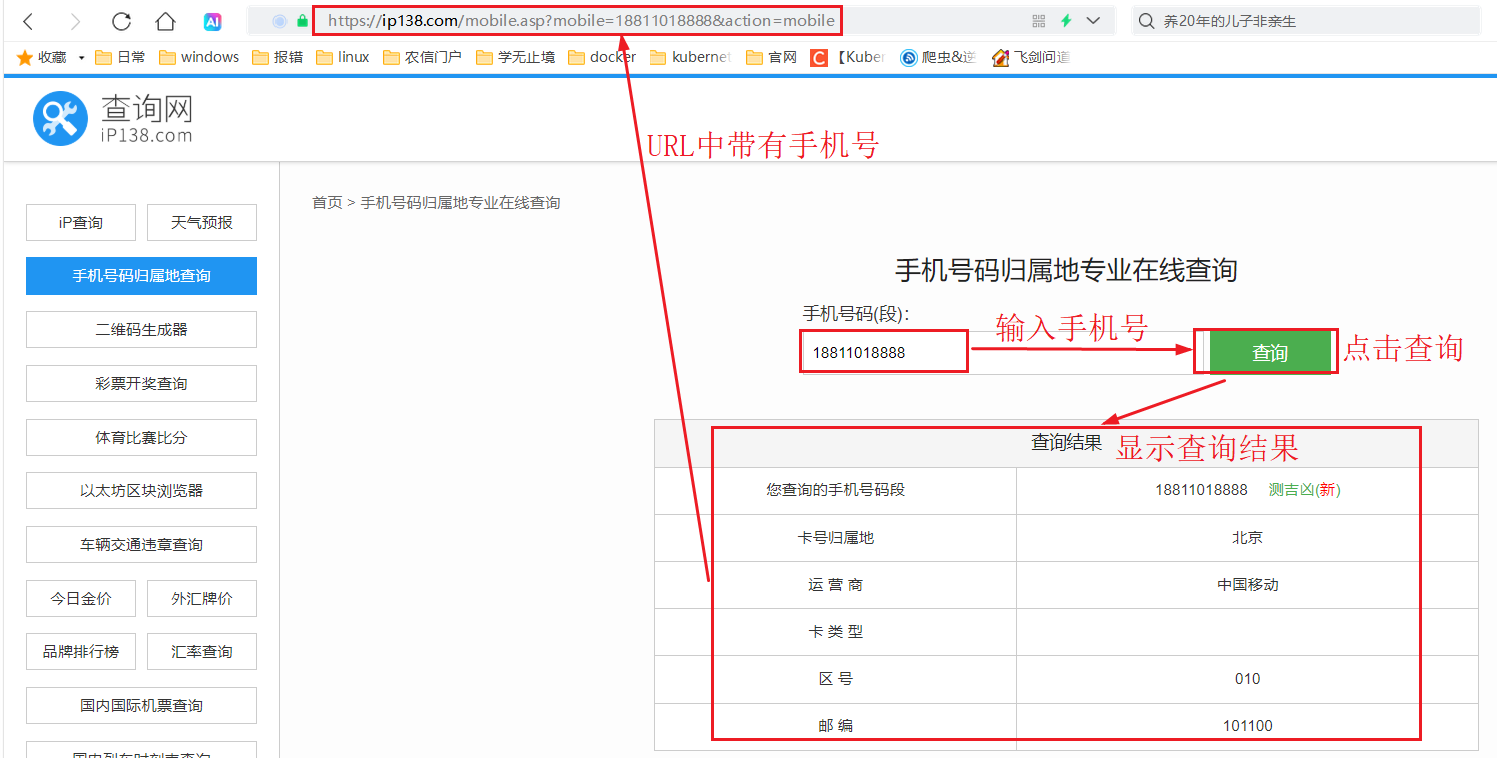
# 2 当进行查询时的url:输入的 18811018888 号码点击查询
https://ip138.com/mobile.asp?mobile=18811018888&action=mobile
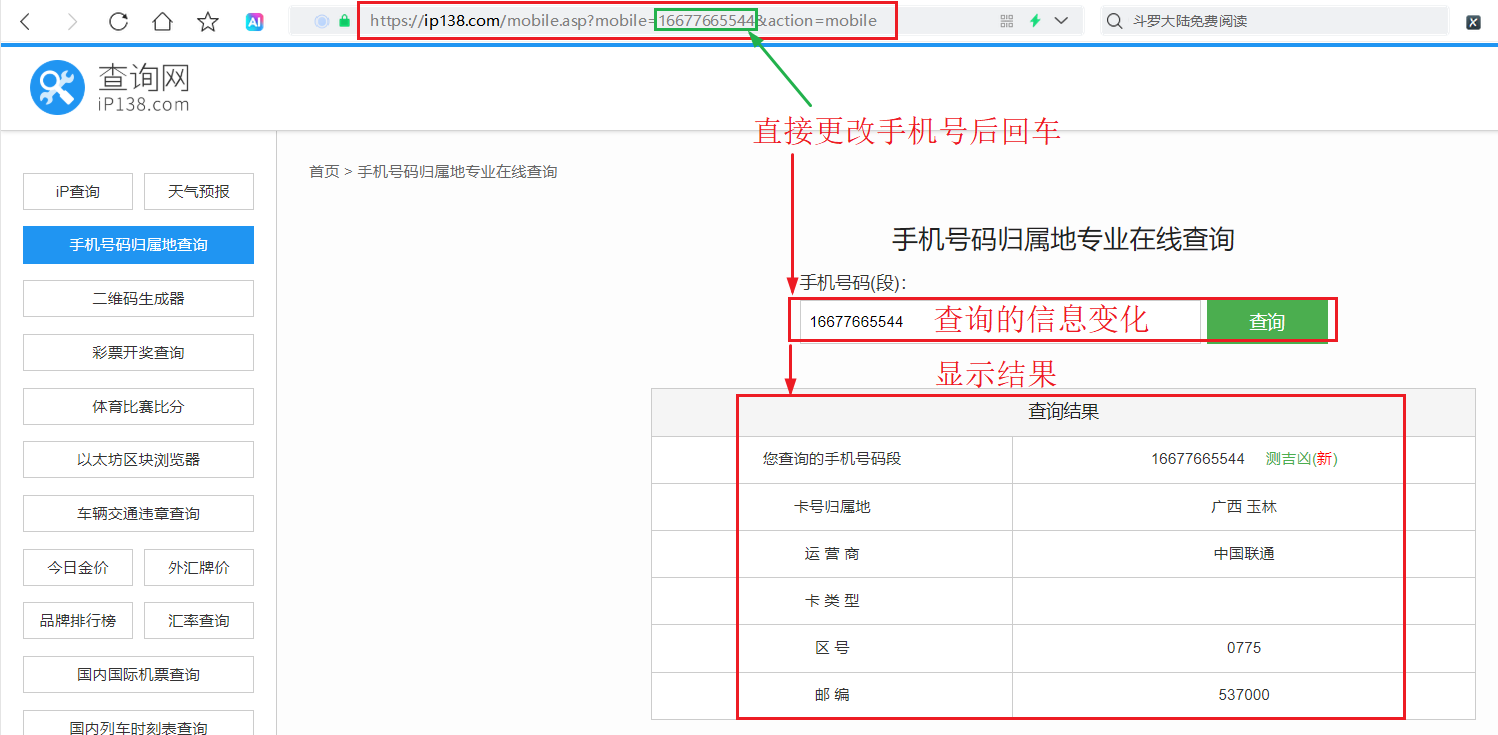
# 3 直接使用上面的 url:更换手机号 16677665544 直接显示查询信息
https://ip138.com/mobile.asp?mobile=16677665544&action=mobile
3.1.2 浏览器页面查询
3.1.3 URL查询
3.2 Python百行代码制作查询工具
# 导入发送请求的模块 pip install requests
import requests  # 对 URL 发送请求
from lxml import etree  # 转换 xml 格式
from flask import Flask,render_template,request  # 导入python web/html 模版/html 访问模块
app = Flask(__name__)  # 创建支持web应用的对象

# 8 将下面定义成函数 传参形式
def get_mobile(phone):  # 形参传入下面 url 中的手机号
    # 1 发送请求的地址 其中 16677665544 手机号需要动态
    url = f'https://ip138.com/mobile.asp?mobile={phone}&action=mobile'
    # 2 伪装成浏览器网页访问发送的信息
    headers = {'user-agent': 'Mozilla/5.0 (Linux; Android 6.0; Nexus 5 Build/MRA58N) AppleWebKit/537.36 (KHTML, like Gecko) Chrome/132.0.0.0 Mobile Safari/537.36'}
    # 3 发送请求
    resp = requests.get(url, headers = headers)
    # 4 设置中文显示
    resp.encoding ='utf-8'
    # 5 转换成 页面 F12 可见的 xml 格式
    e = etree.HTML(resp.text)
    # 6 编写 XPath 提取内容
    datas1 = e.xpath('//tr/td/a/text()')  # 取手机号等内容  ['16677665544', '测吉凶(', ')', '中国联通', '0775', '537000']
    datas2 = e.xpath('//tr/td/span/text()')  # 取归属地地址  ['广西 玉林']
    del datas1[1:3]  # 删除索引1和2(左闭右开) 删除不需要的其他, 留 ['16677665544', '中国联通', '0775', '537000']
    # result = str(datas2)[1:-1]  # 去掉 '[' 和 ']'
    location = datas2[0].strip() if datas2 else '未知'  # 取第一个结果,防止空列表
    datas1.insert(1, location)  # 转换成和原来差不多格式 ['16677665544', "'广西 玉林'", '中国联通', '0775', '537000']
    # 7 打印解构后的信息
    # print(datas1)  # 测试在控制台打印信息, 但是页面展示时需要返回
    return datas1  # 被调用时可以返回

# 11 主页
@app.route('/')  # 访问 http://127.0.0.1:5000 既可响应主页
def index():
    # return '主页'
    return render_template('index.html')  # 使用 html

# 10 建立路由信息
@app.route('/search_phone')
def search_phone():
    # return "Hello"
    phone = request.args.get('phone')  # 使用 flask request 方法获取页面输入请求参数的 phone
    data = get_mobile(phone)  # 调用查询函数
    return '<br/>'.join(data)  # .join是拼接

# 9 运行框架
app.run(debug=True)  # 跑 web 服务

# get_mobile(16677665544)  # 测试函数使用
3.3 index.html
创建 templates 目录,在此目录下创建 index.html 文件
<!DOCTYPE html>
<html lang="en">
<head>
    <meta charset="UTF-8">
    <title>Title</title>
</head>
<body>
    <form action="/search_phone" method="get">  <!-- from 表单 action 发送给谁 -->
        手机号: <input type="text" name="phone" id="">  <!-- 显示手机号, 传参类型是文本,参数名是 phone -->
        <input type="submit" value="查询">  <!-- 查询按钮 -->
    </form>
</body>
</html>
3.4 浏览器访问
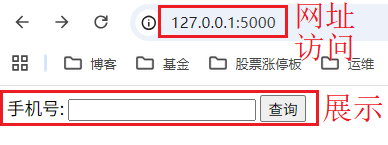
使用浏览器访问:http://127.0.0.1:5000
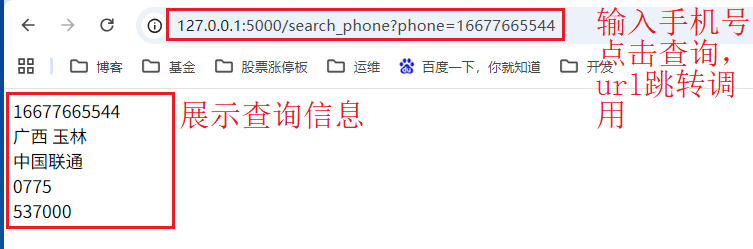
当输入手机号:16677665544 点击查询
———————————————————————————————————————————————————————————————————————————
无敌小马爱学习

 浙公网安备 33010602011771号