
12.Alertmanager告警配置文件和告警规则详解
1 什么是 Alertmanager?
1.1 Alertmanager作用
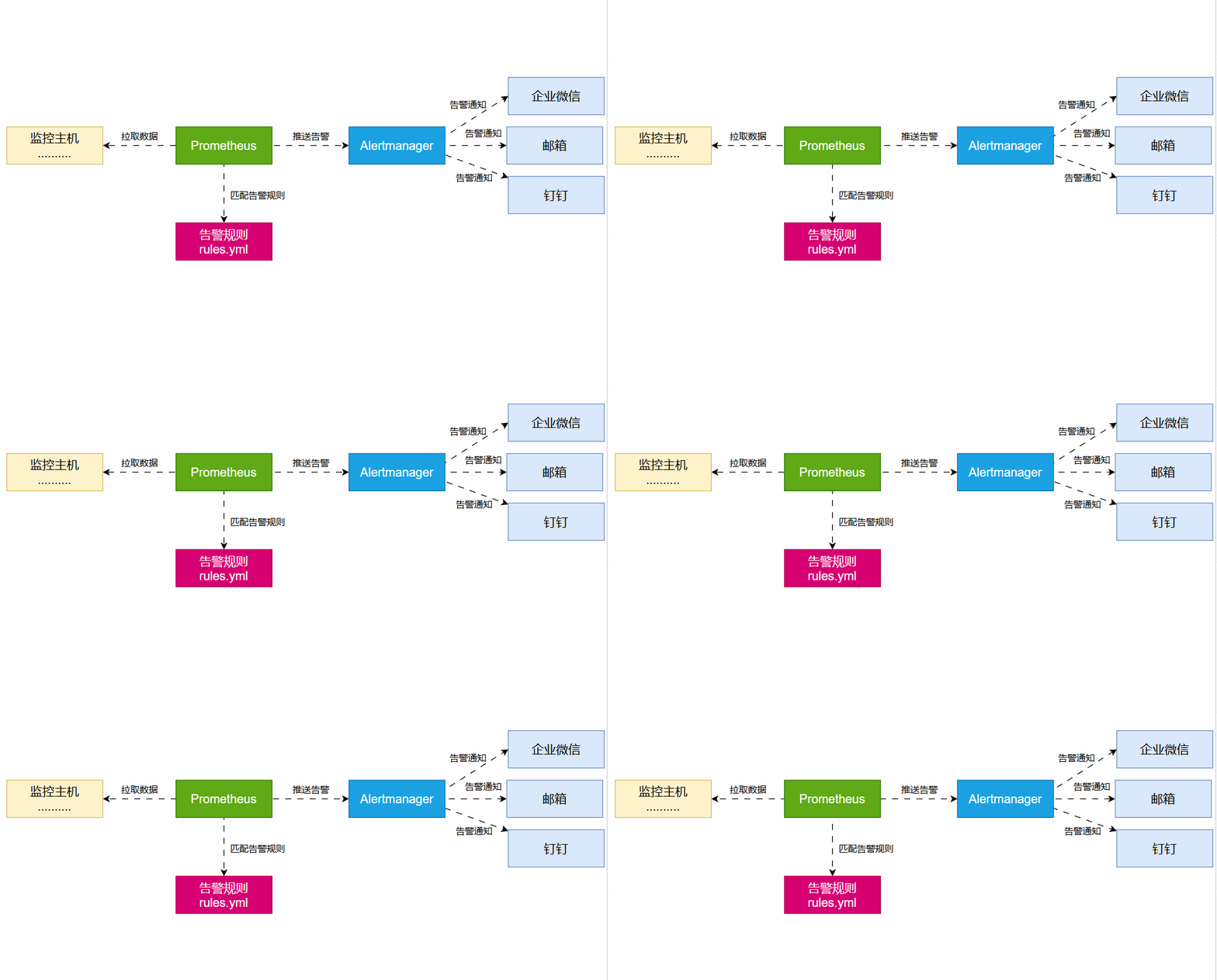
Alertmanager 是 Prometheus 生态中的一个重要组件,用于处理 Prometheus 发送的告警(Alerts)。
提供了告警分组、抑制、去重、路由以及告警通知等功能。可以在发现问题时立即通知相关负责人,使运维人员能快速响应并采取措施。
1.2 告警流程图
2 Prometheus 告警规则
2.1 告警规则文件
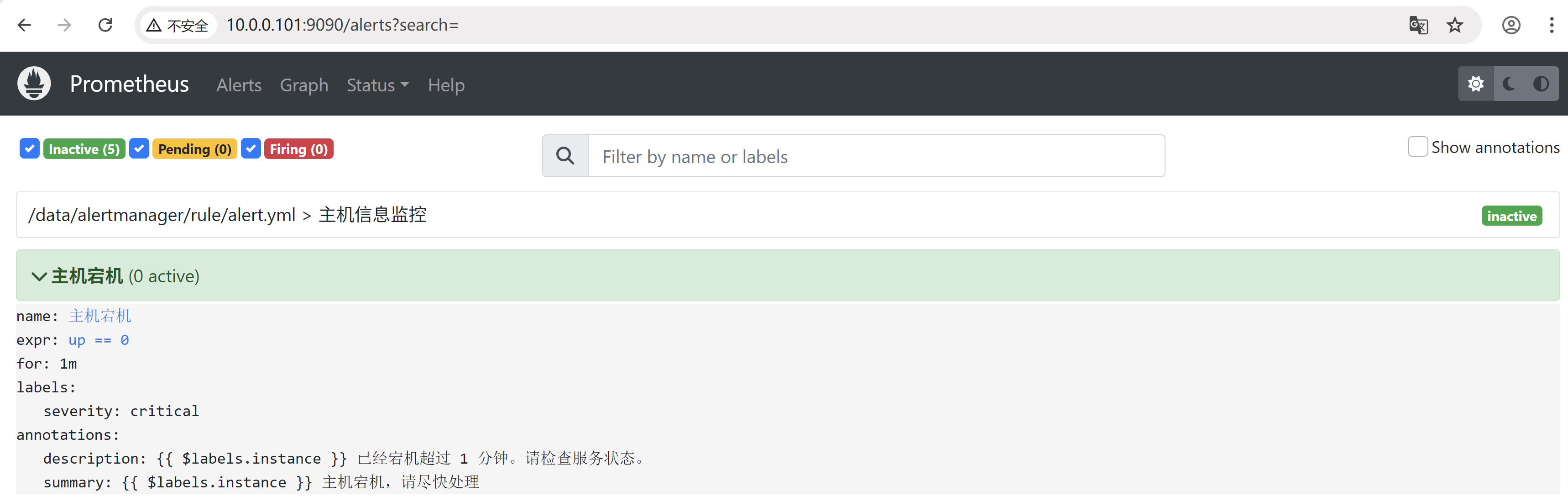
[root@docker01 rule]# cat /data/alertmanager/rule/alert.yml
groups:
  - name: 主机信息监控
    rules:
      - alert: 主机宕机
        expr: up == 0
        for: 1m
        labels:
          severity: critical
        annotations:
          summary: "{{ $labels.instance }} 主机宕机,请尽快处理"
          description: "{{ $labels.instance }} 已经宕机超过 1 分钟。请检查服务状态。"
groups:分组
  - name:文件中告警栏名称
    rules:告警规则
      - alert:告警栏下配置告警名称
        expr:告警触发条件
        for:持续多长时间才触发告警
        labels:告警标签,可用于匹配规则
        annotations:告警的详细描述
3 Alertmanager 配置文件 alertmanager.yml
3.1 Alertmanager 的主要功能
告警分组(Grouping):将相似的告警合并,减少告警数量。
去重(Deduplication):如果同一告警在短时间内重复触发,Alertmanager 只会发送一次。
抑制(Inhibition):当某个高优先级告警触发时,屏蔽低优先级的相关告警。
路由(Routing):将不同类型的告警发送到不同的接收者(如邮件、Slack、Webhook)。
通知(Notification):支持多种通知方式,如邮件、Slack、PagerDuty、Webhook 等。
3.2 Alertmanager 配置文件详解
global:
  resolve_timeout: 5m
  smtp_smarthost: 'smtp.example.com:587'
  smtp_from: 'alert@example.com'
  smtp_auth_username: 'user@example.com'
  smtp_auth_password: 'yourpassword'
  smtp_hello: "qq.com"
  smtp_require_tls: false

route:
  receiver: 'default'
  group_by: ['alertname', 'cluster', 'service']  # 分组依据
  group_wait: 30s  # 第一次分组告警发送前的等待时间
  group_interval: 5m  # 组内新告警的发送间隔
  repeat_interval: 3h  # 相同告警重复发送的间隔
  routes:
    - match:
        severity: critical
      receiver: 'email'
      continue: true# 继续匹配后续规则
    - match:
        severity: warning
      receiver: 'slack'
    - match:
        alertname: InstanceDown
      receiver: 'webhook'

receivers:
  - name: 'default'
    webhook_configs:
      - url: 'http://webhook.example.com/alert'# Webhook 地址

  - name: 'email'
    email_configs:
      - to: 'admin@example.com'
        from: 'alert@example.com'
        smarthost: 'smtp.example.com:587'
        auth_username: 'user@example.com'
        auth_password: 'yourpassword'
        send_resolved: true# 发送告警恢复通知

  - name: 'slack'
    slack_configs:
      - channel: '#alerts'
        send_resolved: true
        api_url: 'https://hooks.slack.com/services/XXX/YYY/ZZZ'
        title: '{{ .CommonAnnotations.summary }}'
        text: '{{ .CommonAnnotations.description }}'

  - name: 'webhook'
    webhook_configs:
      - url: 'http://alert-handler.local/notify'

inhibit_rules:
  - source_match:
      severity: 'critical'
    target_match:
      severity: 'warning'
    equal: ['instance']
3.3 global 配置
全局配置,Global块配置下的配置选项在本配置文件内的所有配置项下可见,但是文件内其他位置的子配置可以覆盖Global配置。
global:
  resolve_timeout: 5m  # 告警恢复后等待 5 分钟再标记为已解决
  smtp_smarthost: 'smtp.example.com:587'  # 邮件服务器地址
  smtp_from: 'xxx@example.com'  # 发送邮件的地址
  smtp_auth_username: 'xxx@example.com'  # 邮件服务器认证用户名
  smtp_auth_password: 'yourpassword'  # 邮件服务器认证密码
resolve_timeout:在告警恢复后,等待多长时间才将其标记为“已解决”。
smtp_smarthost:用于发送邮件告警的邮件服务器地址。
smtp_from:用于发送告警邮件的发件人地址。
smtp_auth_username 和 smtp_auth_password:用于认证 SMTP 服务器的用户名和授权码。
smtp_require_tls:是否开启tls认证
3.4 route 配置
告警路由配置,用于告警信息的分组路由,可以将不同分组的告警发送给不同的收件人。
route:
  receiver: 'default'
  group_by: ['alertname', 'cluster', 'service']
  group_wait: 30s
  group_interval: 5m
  repeat_interval: 3h
receiver:默认的接收器(如果没有匹配到具体的路由规则,则使用此接收器)。
group_by:定义告警分组的方式,确保相同服务的告警不会重复发送。
group_wait:在发送第一个告警前等待的时间,避免瞬时波动导致告警风暴。
group_interval:在同一分组内,新增告警的发送间隔。
repeat_interval:相同告警重复发送的时间间隔,防止过度通知。
3.5 routes 配置
路由子配置,优先级高于route,配置和route一样
  routes:
    - match:
        severity: critical
      receiver: 'email'
      continue: true
    - match:
        severity: warning
      receiver: 'slack'
    - match:
        alertname: InstanceDown
      receiver: 'webhook'
match:定义匹配规则,例如 severity: critical 表示匹配所有严重告警。
receiver:匹配该规则的告警将发送到指定接收器。
continue:如果为 true,则匹配该规则后仍会继续匹配其他规则,默认是找到符合的规则后就不在往下继续匹配。
3.6 receivers 配置
告警接收人配置,每个receiver都有一个名字,经过route分组并且路由后需要指定一个receiver,可以配置不同类型的接收者
receivers:
  - name: 'default'
    webhook_configs:
      - url: 'http://webhook.example.com/alert'
name:定义接收器的名称。
webhook_configs:使用 Webhook 发送告警。
  - name: 'email'
    email_configs:
      - to: 'admin@example.com'
        send_resolved: true
to:邮件接收者。
send_resolved:是否发送恢复通知。
  - name: 'slack'
    slack_configs:
      - channel: '#alerts'
        api_url: 'https://hooks.slack.com/services/XXX/YYY/ZZZ'
channel:告警发送的 Slack 频道。
api_url:Slack Webhook URL。
3.7 inhibit_rules 配置
告警抑制,主要用于减少告警的次数,防止“告警轰炸
inhibit_rules:
  - source_match:
      severity: 'critical'
    target_match:
      severity: 'warning'
    equal: ['instance']
source_match:定义高优先级的告警。
target_match:当 source_match 触发时,抑制 target_match。
equal:只有在相同 instance 触发时才应用抑制规则。当一个 severity 为 critical 的告警触发时,所有 severity 为 warning 且 alertname 和 instance 标签与 critical 告警相同的告警将被抑制,不会发送通知。
完整的配置文件应该还有个Templates配置:用于放置自定义模板的位置
———————————————————————————————————————————————————————————————————————————
无敌小马爱学习

 浙公网安备 33010602011771号