How to install skype in ubuntu 10.10 Maverick Meerkat
Skype is a simple software which enable you to make free calls(Audio,video and conference ) over the Internet by using VoIP protocol.It is available for all platform i.e you can use it from Ubuntu,windows or MacOS.It is very simple to use and graphical interface is also very user friendly with a lot of advanced features.
The Command Line Way
1. Add the partner repository to the sources.list.
sudo gedit /etc/apt/sources.listUncomment the following lines:
deb http://archive.canonical.com/ubuntu maverick partner deb-src http://archive.canonical.com/ubuntu maverick partnerIf you don’t see the above two lines, then you must add them.
Now save and close the file.
2. Now, retrieve the updated package lists from the newly added repositories by issuing the following command:
sudo apt-get update
3. Now install skpe
sudo apt-get install skype
The Graphical Way
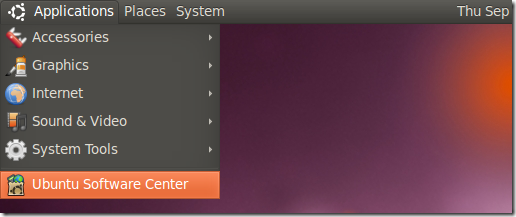
1. Go to Applications –> Ubuntu Software Center.
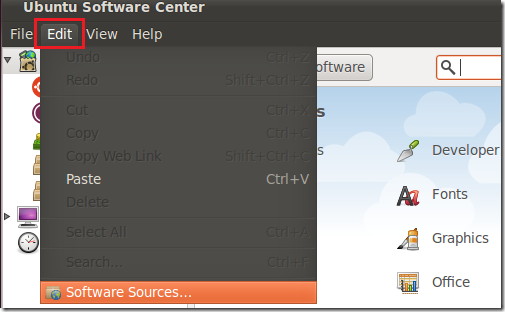
2. Then select Edit –> Software Sources…
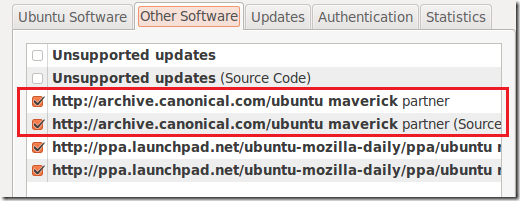
3. Select ‘Other Software’ tab and make sure the two lines below are checked.
If you don’t see the two lines above, then you must add them. To do that, click Add and copy and paste the line one-by-one below and click ‘Add Source’
deb http://archive.canonical.com/ubuntu maverick partner deb-src http://archive.canonical.com/ubuntu maverick partner
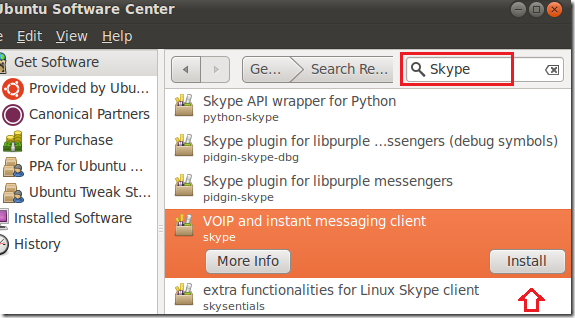
4. Back into Software Center, type ‘Skype’ in the search box, then select and install Skype.
5. After installing, you can find skype at Applications –> Internet –> Skype.

 浙公网安备 33010602011771号