
1 代码
<template>
  <div class="phone-input-container">
    <div class="phone-input-wrapper" :class="{ 'has-error': showError, 'disabled': disabled }">
      <!-- 国家/地区选择 -->
      <div v-if="showCountryCode" class="country-code-wrapper">
        <select
          v-model="selectedCountryCode"
          class="country-code-select"
          :disabled="disabled"
          @change="onCountryCodeChange"
        >
          <option v-for="country in countryCodes" :key="country.code" :value="country.code">
            {{ country.code }} ({{ country.name }})
          </option>
        </select>
        <span class="country-code-display" v-if="!showFullCountrySelect">
          {{ selectedCountryCode }}
        </span>
      </div>

      <!-- 输入框 -->
      <input
        ref="phoneInput"
        v-model="inputValue"
        :type="inputType"
        :placeholder="placeholder"
        :disabled="disabled"
        :readonly="readonly"
        :maxlength="maxLength"
        :required="required"
        class="phone-input"
        :style="inputStyles"
        @input="onInput"
        @blur="onBlur"
        @focus="onFocus"
      />

      <!-- 清空按钮 -->
      <button
        v-if="showClear && inputValue"
        type="button"
        class="clear-btn"
        @click="clearInput"
        :disabled="disabled"
      >
        <svg width="14" height="14" viewBox="0 0 14 14" fill="none" xmlns="http://www.w3.org/2000/svg">
          <path d="M14 1.41L12.59 0L7 5.59L1.41 0L0 1.41L5.59 7L0 12.59L1.41 14L7 8.41L12.59 14L14 12.59L8.41 7L14 1.41Z" fill="#999"/>
        </svg>
      </button>

      <!-- 显示/隐藏手机号按钮 -->
      <button
        v-if="showToggleMask && inputValue"
        type="button"
        class="toggle-mask-btn"
        @click="toggleMask"
        :disabled="disabled"
      >
        <svg v-if="masked" width="16" height="16" viewBox="0 0 24 24" fill="none" xmlns="http://www.w3.org/2000/svg">
          <path d="M12 4.5C7 4.5 2.73 7.61 1 12c1.73 4.39 6 7.5 11 7.5s9.27-3.11 11-7.5c-1.73-4.39-6-7.5-11-7.5zM12 17c-2.76 0-5-2.24-5-5s2.24-5 5-5 5 2.24 5 5-2.24 5-5 5zm0-8c-1.66 0-3 1.34-3 3s1.34 3 3 3 3-1.34 3-3-1.34-3-3-3z" fill="#666"/>
        </svg>
        <svg v-else width="16" height="16" viewBox="0 0 24 24" fill="none" xmlns="http://www.w3.org/2000/svg">
          <path d="M12 7c2.76 0 5 2.24 5 5 0 .65-.13 1.26-.36 1.83l2.92 2.92c1.51-1.26 2.7-2.89 3.43-4.75-1.73-4.39-6-7.5-11-7.5-1.4 0-2.74.25-3.98.7l2.16 2.16C10.74 7.13 11.35 7 12 7zM2 4.27l2.28 2.28.46.46C3.08 8.3 1.78 10.02 1 12c1.73 4.39 6 7.5 11 7.5 1.55 0 3.03-.3 4.38-.84l.42.42L19.73 22 21 20.73 3.27 3 2 4.27zM7.53 9.8l1.55 1.55c-.05.21-.08.43-.08.65 0 1.66 1.34 3 3 3 .22 0 .44-.03.65-.08l1.55 1.55c-.67.33-1.41.53-2.2.53-2.76 0-5-2.24-5-5 0-.79.2-1.53.53-2.2zm4.31-.78l3.15 3.15.02-.16c0-1.66-1.34-3-3-3l-.17.01z" fill="#666"/>
        </svg>
      </button>
    </div>

    <!-- 验证信息显示 -->
    <div v-if="showError || helpText" class="validation-info">
      <div v-if="showError" class="error-text" :style="{ color: errorColor, fontSize: errorFontSize }">
        {{ errorMessage }}
      </div>
      <div v-if="helpText && !showError" class="help-text" :style="{ color: helpTextColor, fontSize: helpTextFontSize }">
        {{ helpText }}
      </div>
    </div>
  </div>
</template>

<script>
export default {
  name: 'PhoneInput',

  props: {
    // 双向绑定值
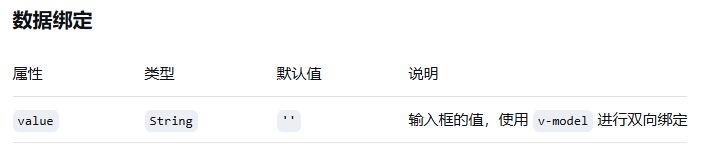
    value: {
      type: String,
      default: ''
    },

    // 样式相关属性
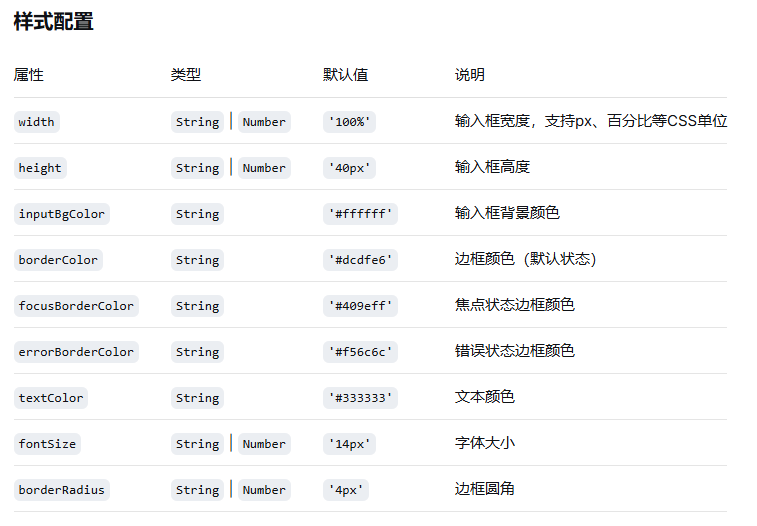
    width: {
      type: [String, Number],
      default: '100%'
    },
    height: {
      type: [String, Number],
      default: '40px'
    },
    inputBgColor: {
      type: String,
      default: '#ffffff'
    },
    borderColor: {
      type: String,
      default: '#dcdfe6'
    },
    focusBorderColor: {
      type: String,
      default: '#409eff'
    },
    errorBorderColor: {
      type: String,
      default: '#f56c6c'
    },
    textColor: {
      type: String,
      default: '#333333'
    },
    fontSize: {
      type: [String, Number],
      default: '14px'
    },
    borderRadius: {
      type: [String, Number],
      default: '4px'
    },

    // 功能属性
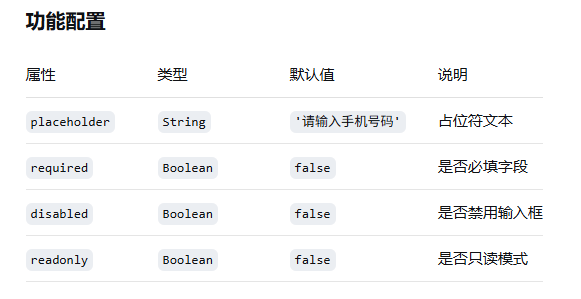
    placeholder: {
      type: String,
      default: '请输入手机号码'
    },
    required: {
      type: Boolean,
      default: false
    },
    disabled: {
      type: Boolean,
      default: false
    },
    readonly: {
      type: Boolean,
      default: false
    },

    // 验证相关
    validateOnBlur: {
      type: Boolean,
      default: true
    },
    validateOnChange: {
      type: Boolean,
      default: true
    },
    customValidator: {
      type: Function,
      default: null
    },

    // 显示选项
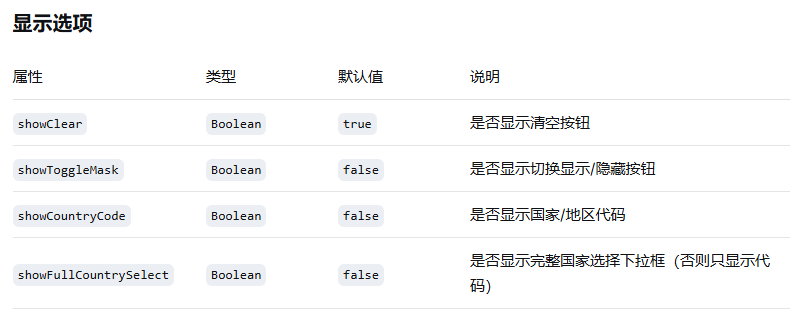
    showClear: {
      type: Boolean,
      default: true
    },
    showToggleMask: {
      type: Boolean,
      default: false
    },
    showCountryCode: {
      type: Boolean,
      default: false
    },
    showFullCountrySelect: {
      type: Boolean,
      default: false
    },

    // 辅助文本
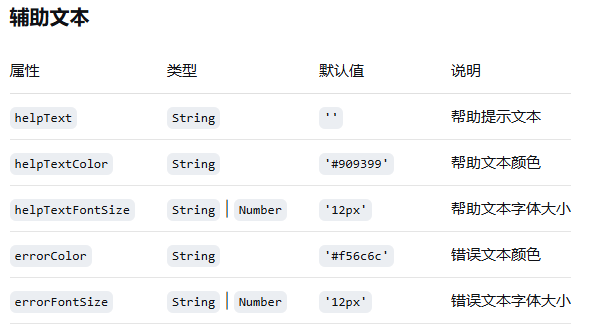
    helpText: {
      type: String,
      default: ''
    },
    helpTextColor: {
      type: String,
      default: '#909399'
    },
    helpTextFontSize: {
      type: [String, Number],
      default: '12px'
    },
    errorColor: {
      type: String,
      default: '#f56c6c'
    },
    errorFontSize: {
      type: [String, Number],
      default: '12px'
    },

    // 新增:是否允许非数字字符
    allowNonNumeric: {
      type: Boolean,
      default: false
    }
  },

  data() {
    return {
      inputValue: '',
      isFocused: false,
      showError: false,
      errorMessage: '',
      masked: false,
      inputType: 'tel',
      selectedCountryCode: '+86',
      countryCodes: [
        { code: '+86', name: '中国' },
        { code: '+1', name: '美国' },
        { code: '+44', name: '英国' },
        { code: '+81', name: '日本' },
        { code: '+82', name: '韩国' },
        { code: '+65', name: '新加坡' },
        { code: '+852', name: '香港' },
        { code: '+853', name: '澳门' },
        { code: '+886', name: '台湾' }
      ]
    };
  },

  computed: {
    // 计算输入框样式
    inputStyles() {
      let borderColor = this.borderColor;

      if (this.showError) {
        borderColor = this.errorBorderColor;
      } else if (this.isFocused) {
        borderColor = this.focusBorderColor;
      }

      return {
        width: this.width,
        height: this.height,
        backgroundColor: this.inputBgColor,
        borderColor: borderColor,
        color: this.textColor,
        fontSize: typeof this.fontSize === 'number' ? `${this.fontSize}px` : this.fontSize,
        borderRadius: typeof this.borderRadius === 'number' ? `${this.borderRadius}px` : this.borderRadius,
        paddingLeft: this.showCountryCode && !this.showFullCountrySelect ? '70px' : '12px'
      };
    },

    // 计算最大输入长度
    maxLength() {
      if (this.showCountryCode) {
        const countryCode = this.selectedCountryCode.replace('+', '');
        return 1 + countryCode.length + (countryCode === '86' ? 11 : 15);
      }
      return 11;
    }
  },

  watch: {
    value: {
      immediate: true,
      handler(newVal) {
        this.inputValue = newVal || '';
      }
    },

    inputValue(newVal) {
      // 格式化显示(无空格版本)
      const formattedValue = this.formatPhoneNumber(newVal);
      if (formattedValue !== newVal) {
        this.inputValue = formattedValue;
        return;
      }

      // 触发双向绑定
      this.$emit('input', newVal);

      // 验证输入
      if (this.validateOnChange && newVal) {
        this.validateInput(newVal);
      }
    }
  },

  methods: {
    // 格式化手机号显示(无空格版本)
    formatPhoneNumber(phone) {
      if (!phone) return '';

      // 如果允许非数字字符,直接返回
      if (this.allowNonNumeric) {
        return phone;
      }

      let cleaned = phone;

      // 如果是国际号码,保留+号
      if (this.showCountryCode && phone.startsWith('+')) {
        const plusSign = phone.charAt(0);
        const afterPlus = phone.substring(1).replace(/\D/g, '');
        cleaned = plusSign + afterPlus;
      } else {
        // 国内号码,只保留数字
        cleaned = phone.replace(/\D/g, '');
      }

      // 限制最大长度
      return cleaned.substring(0, this.maxLength);
    },

    // 输入事件处理
    onInput(event) {
      // 直接使用原始输入值,不添加空格
      this.inputValue = event.target.value;
    },

    // 焦点事件处理
    onFocus() {
      this.isFocused = true;
      this.$emit('focus');
    },

    // 失去焦点事件处理
    onBlur() {
      this.isFocused = false;

      if (this.validateOnBlur) {
        this.validateInput(this.inputValue);
      }

      this.$emit('blur');
    },

    // 验证输入
    validateInput(value) {
      // 重置错误状态
      this.showError = false;
      this.errorMessage = '';

      // 如果是必填且为空
      if (this.required && !value.trim()) {
        this.showError = true;
        this.errorMessage = '手机号码不能为空';
        this.$emit('validate', { isValid: false, message: this.errorMessage });
        return false;
      }

      // 如果值为空,直接通过验证
      if (!value.trim()) {
        this.$emit('validate', { isValid: true, message: '' });
        return true;
      }

      // 使用自定义验证器
      if (this.customValidator && typeof this.customValidator === 'function') {
        const result = this.customValidator(value, this.selectedCountryCode);
        if (result && result.isValid === false) {
          this.showError = true;
          this.errorMessage = result.message || '手机号码格式不正确';
          this.$emit('validate', { isValid: false, message: this.errorMessage });
          return false;
        }
      }

      // 默认手机号验证(无空格版本)
      let isValid = false;
      let cleanValue = value;

      if (this.showCountryCode) {
        // 国际手机号验证
        const countryCode = this.selectedCountryCode.replace('+', '');
        let numberPart;

        if (cleanValue.startsWith('+')) {
          // 移除+号和国码
          const withoutPlus = cleanValue.substring(1);
          if (withoutPlus.startsWith(countryCode)) {
            numberPart = withoutPlus.substring(countryCode.length);
          } else {
            numberPart = withoutPlus;
          }
        } else {
          // 没有+号,直接使用整个值
          numberPart = cleanValue;
        }

        // 不同国家/地区的手机号验证规则
        switch(this.selectedCountryCode) {
          case '+86': // 中国
            isValid = /^1[3-9]\d{9}$/.test(numberPart);
            this.errorMessage = isValid ? '' : '请输入正确的中国手机号码 (11位,以1开头)';
            break;
          case '+1': // 美国/加拿大
            isValid = /^\d{10}$/.test(numberPart);
            this.errorMessage = isValid ? '' : '请输入正确的北美电话号码 (10位)';
            break;
          case '+44': // 英国
            isValid = /^7[1-9]\d{8}$/.test(numberPart);
            this.errorMessage = isValid ? '' : '请输入正确的英国手机号码 (10位,以7开头)';
            break;
          default:
            // 通用国际号码验证(至少6位数字)
            isValid = /^\d{6,}$/.test(numberPart);
            this.errorMessage = isValid ? '' : '请输入正确的国际手机号码';
        }
      } else {
        // 中国手机号验证(无空格)
        cleanValue = cleanValue.replace(/\D/g, '');
        isValid = /^1[3-9]\d{9}$/.test(cleanValue);
        this.errorMessage = isValid ? '' : '请输入正确的手机号码 (11位,以1开头)';
      }

      if (!isValid && value.trim()) {
        this.showError = true;
      }

      this.$emit('validate', {
        isValid,
        message: this.errorMessage,
        value,
        rawValue: this.getRawValue(),
        countryCode: this.selectedCountryCode
      });

      return isValid;
    },

    // 清空输入
    clearInput() {
      this.inputValue = '';
      this.showError = false;
      this.errorMessage = '';
      this.$emit('clear');
      this.$nextTick(() => {
        this.$refs.phoneInput.focus();
      });
    },

    // 切换掩码显示
    toggleMask() {
      this.masked = !this.masked;
      this.inputType = this.masked ? 'text' : 'tel';
    },

    // 国家代码变化处理
    onCountryCodeChange() {
      this.$emit('country-code-change', this.selectedCountryCode);
      // 重新验证
      if (this.inputValue) {
        this.validateInput(this.inputValue);
      }
    },

    // 手动验证方法(可从外部调用)
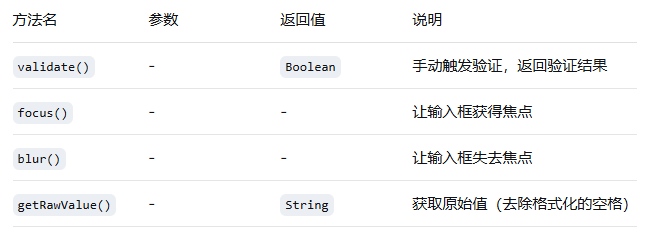
    validate() {
      return this.validateInput(this.inputValue);
    },

    // 手动聚焦方法
    focus() {
      this.$refs.phoneInput.focus();
    },

    // 手动失焦方法
    blur() {
      this.$refs.phoneInput.blur();
    },

    // 获取原始手机号(去除非数字字符,保留国际号码的+号)
    getRawValue() {
      if (!this.inputValue) return '';

      let rawValue = this.inputValue;

      // 如果允许非数字字符,直接返回
      if (this.allowNonNumeric) {
        return rawValue;
      }

      // 如果是国内号码,只保留数字
      if (!this.showCountryCode) {
        rawValue = rawValue.replace(/\D/g, '');
      } else if (rawValue.startsWith('+')) {
        // 国际号码,保留+号和数字
        const plusSign = rawValue.charAt(0);
        const afterPlus = rawValue.substring(1).replace(/\D/g, '');
        rawValue = plusSign + afterPlus;
      } else {
        // 没有+号的国际号码,只保留数字
        rawValue = rawValue.replace(/\D/g, '');
      }

      return rawValue;
    }
  }
};
</script>

<style scoped>
.phone-input-container {
  width: 100%;
  font-family: 'Helvetica Neue', Arial, sans-serif;
}

.phone-input-wrapper {
  position: relative;
  display: flex;
  align-items: center;
  width: 100%;
  border-radius: 4px;
  transition: all 0.3s ease;
}

.phone-input-wrapper.disabled {
  opacity: 0.6;
  cursor: not-allowed;
}

.phone-input-wrapper.has-error {
  animation: shake 0.5s;
}

@keyframes shake {
  0%, 100% { transform: translateX(0); }
  10%, 30%, 50%, 70%, 90% { transform: translateX(-5px); }
  20%, 40%, 60%, 80% { transform: translateX(5px); }
}

.country-code-wrapper {
  position: absolute;
  left: 1px;
  top: 1px;
  bottom: 1px;
  display: flex;
  align-items: center;
  z-index: 1;
}

.country-code-select {
  height: calc(100% - 2px);
  padding: 0 8px;
  border: none;
  background-color: #f5f7fa;
  border-right: 1px solid #dcdfe6;
  border-radius: 4px 0 0 4px;
  font-size: 14px;
  color: #333;
  outline: none;
  cursor: pointer;
}

.country-code-select:disabled {
  background-color: #f5f5f5;
  cursor: not-allowed;
}

.country-code-display {
  padding: 0 12px;
  height: 100%;
  display: flex;
  align-items: center;
  background-color: #f5f7fa;
  border-right: 1px solid #dcdfe6;
  border-radius: 4px 0 0 4px;
  font-size: 14px;
  font-weight: 500;
  color: #333;
}

.phone-input {
  flex: 1;
  padding: 0 12px;
  border: 1px solid #dcdfe6;
  outline: none;
  transition: border-color 0.3s, box-shadow 0.3s;
  box-sizing: border-box;
  font-family: inherit;
  /* 确保文本不会因为空格而产生奇怪的对齐 */
  letter-spacing: normal;
}

.phone-input:focus {
  box-shadow: 0 0 0 2px rgba(64, 158, 255, 0.1);
}

.phone-input:disabled {
  background-color: #f5f5f5;
  cursor: not-allowed;
}

.phone-input::placeholder {
  color: #c0c4cc;
}

.clear-btn, .toggle-mask-btn {
  position: absolute;
  right: 40px;
  top: 50%;
  transform: translateY(-50%);
  width: 20px;
  height: 20px;
  display: flex;
  align-items: center;
  justify-content: center;
  background: none;
  border: none;
  cursor: pointer;
  opacity: 0.7;
  transition: opacity 0.2s;
  padding: 0;
}

.clear-btn:hover, .toggle-mask-btn:hover {
  opacity: 1;
}

.clear-btn:disabled, .toggle-mask-btn:disabled {
  opacity: 0.4;
  cursor: not-allowed;
}

.toggle-mask-btn {
  right: 12px;
}

.validation-info {
  margin-top: 6px;
  min-height: 20px;
}

.error-text, .help-text {
  line-height: 1.5;
}

.error-text {
  animation: fadeIn 0.3s;
}

@keyframes fadeIn {
  from { opacity: 0; transform: translateY(-5px); }
  to { opacity: 1; transform: translateY(0); }
}
</style>
2 属性绑定
3 样式配置
4 功能配置
5 验证配置
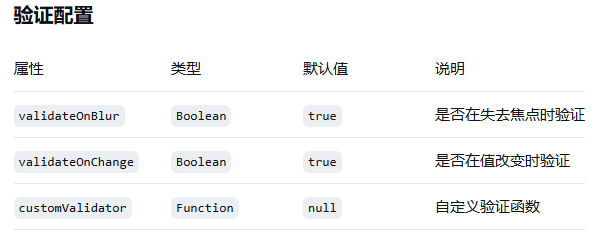
自定义验证函数格式
// 参数:value - 输入值, countryCode - 当前国家代码(如果有)
// 返回值:{ isValid: Boolean, message?: String } 或 undefined
customValidator(value, countryCode) {
  if (value && !value.startsWith('138')) {
    return {
      isValid: false,
      message: '只允许138开头的手机号码'
    };
  }
  return { isValid: true };
}
6 显示选项
7 辅助文本
8 事件
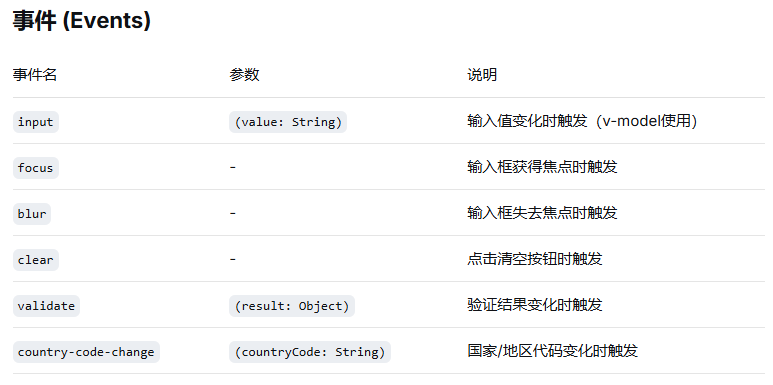
validate事件参数结构
{
  isValid: Boolean,      // 验证是否通过
  message: String,       // 验证消息(错误时显示)
  value: String,         // 当前输入值
  countryCode: String    // 当前国家代码(如果有)
}
9 方法
通过 ref 可以调用组件的方法
<template>
  <PhoneInput ref="phoneInput" v-model="phone" />
  <button @click="validatePhone">手动验证</button>
</template>

<script>
export default {
  methods: {
    validatePhone() {
      const isValid = this.$refs.phoneInput.validate();
      // 或者获取验证结果对象
      // const result = this.$refs.phoneInput.validate();
    }
  }
}
</script>
10 示例
10.1 基础示例
<template>
  <PhoneInput v-model="phone" />
</template>
10.2 样式自定义
<template>
  <PhoneInput
    v-model="phone"
    width="300px"
    height="50px"
    fontSize="16px"
    borderRadius="8px"
    inputBgColor="#f8f9fa"
    focusBorderColor="#007acc"
  />
</template>
10.3 验证配置
<template>
  <PhoneInput
    v-model="phone"
    :required="true"
    :customValidator="customValidator"
    placeholder="请输入11位手机号码"
    @validate="handleValidate"
  />
</template>

<script>
export default {
  methods: {
    customValidator(value) {
      if (value && !/^1[3-9]\d{9}$/.test(value.replace(/\s/g, ''))) {
        return {
          isValid: false,
          message: '请输入正确的手机号码格式'
        };
      }
      return { isValid: true };
    },

    handleValidate(result) {
      console.log('验证结果:', result);
      if (!result.isValid) {
        // 处理验证失败
      }
    }
  }
}
</script>
