
1 简介
采用的模式是把图片转换成base64,随其它数据一起提交到后台
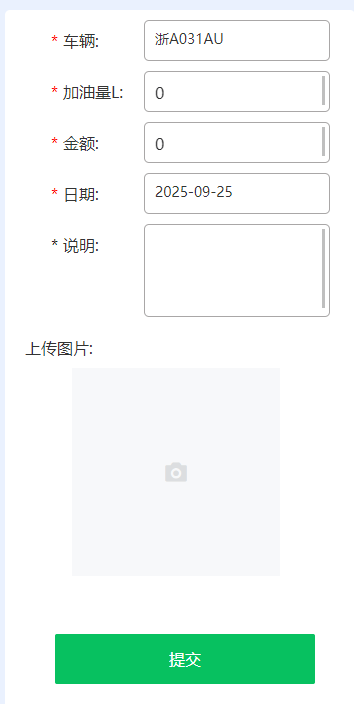
2 小程序端编码(新增)
2.1 json文件
引入组件
"van-uploader": "@vant/weapp/uploader/index",
完整的
{
  "navigationBarTitleText": "申请用车",
  "usingComponents": {
    "van-button": "@vant/weapp/button/index",
    "van-picker": "@vant/weapp/picker/index",
    "van-field": "@vant/weapp/field/index",
    "van-popup": "@vant/weapp/popup/index",
    "van-uploader": "@vant/weapp/uploader/index",
    "van-row": "@vant/weapp/row/index",
    "van-col": "@vant/weapp/col/index",
    "van-datetime-picker": "@vant/weapp/datetime-picker/index",
    "van-toast": "@vant/weapp/toast/index"
  }
}
2.2 wxml文件
添加图片组件
<view class="search-img">
      <view class="search-img-tt">上传图片:</view>
      <van-uploader
        file-list="{{ fileList }}"
        deletable="{{ true }}"
        max-count="1"
        accept="image"
        max-size="5242880"
        preview-image="{{true}}"
        bind:delete="deleteImg"
        bind:before-read="beforeRead"
        bind:after-read="afterRead" />
    </view>
完整
<!--index.wxml-->
<view class="box">
  <view class="search">
    <view class="search-tt ,require-label:before">车辆: </view>
    <view class="search-kk st" bindtap='bindCar' rules="{{[{ required: true, message: '请选择车辆' }]}}"
    error-message="{{error.carCode}}">{{formshowdata.carCode}}</view>
    <view class="search-tt st,require-label:before">加油量L: </view>
    <view class="search-kk st">
      <van-field
      value="{{ formdata.amount }}"
      bind:change="amountChange"
      type="number"
      placeholder=""
      border="{{ false }}"
      />
    </view>
    <view class="search-tt st,require-label:before">金额: </view>
    <view class="search-kk st">
      <van-field
      value="{{ formdata.money }}"
      bind:change="moneyChange"
      type="number"
      placeholder=""
      border="{{ false }}"
      />
    </view>

    <view class="search-tt st,require-label:before">日期: </view>
    <view class="search-kk st" bindtap='bindgasTime'>{{formdata.gasTime}}</view>


    <view class="search-tt st,notrequire-label:before">说明: </view>
    <view class="search-textarea st">
      <van-field
            maxlength="100"
            autosize="true"
            input-class="fieldarea"
            value="{{ formdata.remark }}"
            bind:change="remarkChange"
            type="textarea"
            placeholder=""
            border="{{ false }}"
        />
    </view>

    <view class="search-img">
      <view class="search-img-tt">上传图片:</view>
      <van-uploader
        file-list="{{ fileList }}"
        deletable="{{ true }}"
        max-count="1"
        accept="image"
        max-size="5242880"
        preview-image="{{true}}"
        bind:delete="deleteImg"
        bind:before-read="beforeRead"
        bind:after-read="afterRead" />
    </view>

  </view>

  <view class="search-btn">
    <van-button type="primary" disabled="{{disabled}}" loading="{{formshowdata.submitLoad}}" bind:click="submit" size="large">
      提交
    </van-button>
  </view>

  <van-popup show="{{ formshowdata.carShow }}" position="bottom" custom-style="height: 60%;" >
    <van-picker show-toolbar
    title="车辆"
    value-key="name"
    columns="{{ formshowdata.carList }}"
    bind:cancel="onCancel"
    bind:confirm="onCarConfirm" />
  </van-popup>


  <van-popup
  show="{{ formshowdata.gasTimeShow }}"
  position="bottom"
  custom-style="height: 60%;"
  bind:close="onClose">
    <van-datetime-picker
    type="date"
    value="{{currentDate}}"
    bind:confirm="ongasTimeConfirm"
    bind:cancel="onCancel"
    min-date="{{minDate}}"
    max-date="{{maxDate}}"/>
  </van-popup>

  <van-toast id="van-toast"  />
</view>
2.3 wxss文件
添加样式
.search-img {
  width: 100%;
  box-sizing: border-box;
  padding: 0 20rpx;
  margin: 20rpx 0;
  text-align: center;
}

.search-img-tt {
  width: 100%;
  height: 80rpx;
  line-height: 80rpx;
  font-size: 32rpx;
  color: #333;
  text-align: left;
}
完整
/**index.wxss**/
page {
  width: 100%;
  height: 100%;
  overflow-y: scroll;
  background-color: #EAF1FE;
  box-sizing: border-box;
  padding: 40rpx 40rpx;
}

.box {
  width: 100%;
  height: 100%;
  overflow-y: scroll;
  box-sizing: border-box;
  background-color: #fff;
  border-radius: 10rpx;
}

.search {
  width: 100%;
  box-sizing: border-box;
  padding: 0 20rpx;
  margin: 20rpx 0;
}

.search::after {
  content: " ";
  display: block;
  height: 0;
  clear: both;
  visibility: hidden;
}

.search-tt {
  float: left;
  width: 180rpx;
  height: 80rpx;
  line-height: 80rpx;
  font-size: 32rpx;
  color: #333;
  margin-left: 70rpx;
}

.search-kk {
  width: calc(80% - 150rpx);
  height: 80rpx;
  border: 1px solid rgb(169, 167, 167);
  box-sizing: border-box;
  padding: 0 20rpx;
  line-height: 70rpx;
  font-size: 28rpx;
  color: #333;
  overflow-x: hidden;
  border-radius: 10rpx;
}

.search-textarea {
  width: calc(80% - 150rpx);
  height: 180rpx;
  border: 1px solid rgb(169, 167, 167);
  box-sizing: border-box;
  padding: 0 20rpx;
  line-height: 50rpx;
  font-size: 28rpx;
  color: #333;
  overflow-x: hidden;
  border-radius: 10rpx;
  position: relative; /* 或者 absolute,取决于你的具体布局 */
}
.fieldarea {
  min-height: 170rpx !important; /* 使 van-field 组件撑满容器 */
}
.fieldarea2 {
  min-height: 100rpx !important; /* 使 van-field 组件撑满容器 */
}

input {
  height: 80rpx !important;
  line-height: 80rpx !important;
  font-size: 32rpx;
  color: #333;
  padding: 0 !important;
}


.van-cell {
  padding: 0 !important;

}

.st {
  margin-top: 20rpx;
}

.search-img {
  width: 100%;
  box-sizing: border-box;
  padding: 0 20rpx;
  margin: 20rpx 0;
  text-align: center;
}

.search-img-tt {
  width: 100%;
  height: 80rpx;
  line-height: 80rpx;
  font-size: 32rpx;
  color: #333;
  text-align: left;
}

.van-uploader__upload {
  width: 400rpx !important;
  height: 400rpx !important;
}

.van-uploader__preview-image{
  width: 400rpx !important;
  height: 400rpx !important;
}

.search-btn {
  width: 80%;
  box-sizing: border-box;
  padding: 20rpx;
  margin-left: 40px;
  margin-top: 30px;
}

/* 必填 */
.require-label:before {
  content: '* ';
  color: red;
}

/* 非必填 */
.notrequire-label:before {
  content: '* ';
  color: rgb(24, 23, 23);
}

.search-img {
  width: 100%;
  box-sizing: border-box;
  padding: 0 20rpx;
  margin: 20rpx 0;
  text-align: center;
}

.search-img-tt {
  width: 100%;
  height: 80rpx;
  line-height: 80rpx;
  font-size: 32rpx;
  color: #333;
  text-align: left;
}
2.4 js文件
图片相关data
data: {
    fileList:[],  存储组件的图片列表,对象格式{url:''},url是临时存储路径
    fileBase64List:[] 存储转换成base64的字符串图片列表
}
图片相关方法
beforeRead(event) {
    const { file, callback } = event.detail;
    callback(file.type === 'image');
  },

  // 选择图片后触发
  afterRead(event){
    var that = this
    var img = event.detail.file;
    // 读取图片,转换为base64
    wx.getFileSystemManager().readFile({
      filePath: event.detail.file.url,
      encoding: 'base64',
      success: (res) => {
        const base64Data = res.data;
        var base64Img = 'data:image/png;base64,' + base64Data
        var li = that.data.fileList
        li.push(img)
        var li2 = that.data.fileBase64List
        li2.push(base64Img)
        that.setData({
          fileList:li,
          fileBase64List:li2
        })
      },
      fail: (err) => {
        console.error(err);
      }
    });
    console.log('this.data.fileList',this.data.fileList)
    console.log('this.data.fileBase64List',this.data.fileBase64List)
  },

  // 点击删除图片
  deleteImg(event) {
    let id = event.detail.index //能获取到对应的下标
     //根据下标来删除对应的图片
    var li = this.data.fileList
    li.splice(id, 1)
    var li2 = this.data.fileBase64List
    li2.splice(id, 1)
    this.setData({
      fileList:li,
      fileBase64List:li2
    })
    console.log('this.data.fileList',this.data.fileList)
    console.log('this.data.fileBase64List',this.data.fileBase64List)
  },
提交到服务器
submit(){
    var that = this
    // 校验
    console.log(that.data.formdata)
    var flag = formUtils.validateForm(that.data.formdata,that.data.rules)
    console.log(flag)
    if(!flag){
      return
    }// 按钮禁用
    that.setData({
      'formshowdata.submitLoad': true
    })
    var openid = wx.getStorageSync("openid")
    console.log('发送请求',that.data.base64List)
    wx.request({
      url: app.globalData.url + 'publiccar/gasrecord/manager/add',
      method: 'POST',
      data: {
        publicCarId:that.data.formdata.publicCarId,
        operateOpenid:openid,
        amount:that.data.formdata.amount,
        money:that.data.formdata.money,
        gasTimeSt:that.data.formdata.gasTime,
        remark:that.data.formdata.remark,
        base64List:that.data.fileBase64List
      },
      header: {
        'content-type': 'application/json;charset=utf-8',
        'openid': openid // 默认值
      },
      success(res) {
        if(res.data.code ==200 ){
          wx.showToast({
            title: res.data.msg,
            icon: 'none',
            duration:500
           })
           setTimeout(function() {
            wx.navigateBack()
        }, 500);

        } else {
          Toast.fail(res.data.msg);
        }
      }
    })
完整
// index.js
// 获取应用实例
const app = getApp()
import Toast from '../../../../miniprogram_npm/@vant/weapp/toast/toast';
const dateutils = require('../../../../utils/dateUtil');
const formUtils = require('../../../../utils/formUtils');

Page({
  data: {
    formdata:{
      publicCarId:'',
      amount:0.0,
      money:0.0,
      gasTime:dateutils.formatTimeStamp(new Date())
    },
    formshowdata:{
      carShow:false,
      carList:[],
      carCode:'',
      gasTimeShow:false,
      submitLoad:false
    },
    fileList:[],
    fileBase64List:[],
    minDate:new Date((new Date().getFullYear() - 2), 10, 1).getTime() ,
    maxDate: new Date().getTime(),
    currentDate: new Date().getTime(),
    rules: {
      publicCarId: [{ required: true, message: '请选择车辆' }],
      amount: [{ required: true, message: '请选择地点' }],
      money: [{ required: true, message: '请选择距离' }],
      gasTime: [{ required: true, message: '请选择出发时间' }]
    },
  },


  onLoad() {
    var that = this
    that.getCarList() // 查询车辆下拉框
  },

   // 查询车辆下拉框
   getCarList(){
    var that = this
    var token = wx.getStorageSync("wxtoken")
    wx.request({
      url: app.globalData.url + 'publiccar/search/getNameAndValueList',
      method: 'POST',
      data: {
      },
      header: {
        'content-type': 'application/json;charset=utf-8',
        'authorization': token // 默认值
      },
      success(res) {
        if(res.data.code ==200 ){
          that.setData({
            'formshowdata.carList': res.data.data,
            'formshowdata.carCode':res.data.data[0].name,
            'formdata.publicCarId':res.data.data[0].value
          })
        } else {
          Toast.fail(res.data.msg);
        }
      }
    })
  },

  bindCar(){
    this.setData({
      'formshowdata.carShow': true
    })
  },

  onCancel(){
    this.setData({
      'formshowdata.carShow': false,
      'formshowdata.gasTimeShow': false,
    })
  },

  onCarConfirm(event){
    this.setData({
      'formshowdata.carShow': false,
      'formshowdata.carCode': event.detail.value.name,
      'formdata.publicCarId': event.detail.value.value
    })
  },

  amountChange(e){
    var that = this
    that.setData({
      'formdata.amount':e.detail
    })
  },

  moneyChange(e){
    var that = this
    that.setData({
      'formdata.money':e.detail
    })
  },

  bindgasTime(){
    this.setData({
      'formshowdata.gasTimeShow': true
    })
  },

  ongasTimeConfirm(event){
    this.setData({
      'formshowdata.gasTimeShow': false,
      'formdata.gasTime': dateutils.formatTimeStamp(event.detail),
    })
  },

  remarkChange(e){
    var that = this
    that.setData({
      'formdata.remark':e.detail
    })
  },

  beforeRead(event) {
    const { file, callback } = event.detail;
    callback(file.type === 'image');
  },

  // 选择图片后触发
  afterRead(event){
    var that = this
    var img = event.detail.file;
    // 读取图片,转换为base64
    wx.getFileSystemManager().readFile({
      filePath: event.detail.file.url,
      encoding: 'base64',
      success: (res) => {
        const base64Data = res.data;
        var base64Img = 'data:image/png;base64,' + base64Data
        var li = that.data.fileList
        li.push(img)
        var li2 = that.data.fileBase64List
        li2.push(base64Img)
        that.setData({
          fileList:li,
          fileBase64List:li2
        })
      },
      fail: (err) => {
        console.error(err);
      }
    });
    console.log('this.data.fileList',this.data.fileList)
    console.log('this.data.fileBase64List',this.data.fileBase64List)
  },

  // 点击删除图片
  deleteImg(event) {
    let id = event.detail.index //能获取到对应的下标
     //根据下标来删除对应的图片
    var li = this.data.fileList
    li.splice(id, 1)
    var li2 = this.data.fileBase64List
    li2.splice(id, 1)
    this.setData({
      fileList:li,
      fileBase64List:li2
    })
    console.log('this.data.fileList',this.data.fileList)
    console.log('this.data.fileBase64List',this.data.fileBase64List)
  },

  submit(){
    var that = this
    // 校验
    console.log(that.data.formdata)
    var flag = formUtils.validateForm(that.data.formdata,that.data.rules)
    console.log(flag)
    if(!flag){
      return
    }

    if(! /^(0*[1-9]\d*(\.\d+)?|0+\.\d*[1-9]\d*)$/.test(that.data.formdata.amount.toString())){
      wx.showToast({
        title: '加油量仅限大于0数字',
        icon: 'none',
        duration:1000
       })
       return
    }
    if(! /^(0*[1-9]\d*(\.\d+)?|0+\.\d*[1-9]\d*)$/.test(that.data.formdata.money.toString())){
      wx.showToast({
        title: '金额距离仅限大于0数字',
        icon: 'none',
        duration:1000
       })
       return
    }
    // 按钮禁用
    that.setData({
      'formshowdata.submitLoad': true
    })
    var openid = wx.getStorageSync("openid")
    console.log('发送请求',that.data.base64List)
    wx.request({
      url: app.globalData.url + 'publiccar/gasrecord/manager/add',
      method: 'POST',
      data: {
        publicCarId:that.data.formdata.publicCarId,
        operateOpenid:openid,
        amount:that.data.formdata.amount,
        money:that.data.formdata.money,
        gasTimeSt:that.data.formdata.gasTime,
        remark:that.data.formdata.remark,
        base64List:that.data.fileBase64List
      },
      header: {
        'content-type': 'application/json;charset=utf-8',
        'openid': openid // 默认值
      },
      success(res) {
        if(res.data.code ==200 ){
          wx.showToast({
            title: res.data.msg,
            icon: 'none',
            duration:500
           })
           setTimeout(function() {
            wx.navigateBack()
        }, 500);

        } else {
          Toast.fail(res.data.msg);
        }
      }
    })

    setTimeout(function () {
      // 1s后按钮取消禁用
      that.setData({
        'formshowdata.submitLoad':false
      })
    }, 1000);
  },

  resetForm(){
    var that = this
    that.setData({
      'formdata.publicCarId':'',
      'formdata.applyReasonType':'',
      'formdata.applyReasonDetail':'',
      'formdata.startTime':'',
      'formdata.placeOfDeparture':'',
      'formdata.distance':'',
      'formshowdata.carCode':'',
      'formshowdata.applyReasonTypeSt':'',
    })
  }


})
3 编码(编辑)
3.1 简介
编辑主要涉及回显,需要初始化fileBase64List和fileList
  that.data.applyDetail.billImageUrlList是后台返回的图片网络路径集合
 在onLoad中初始化fileBase64List和fileList
if(that.data.applyDetail.billImageUrlList){
      var li = []
      that.data.applyDetail.billImageUrlList.forEach(function (item){
          var vo = {'url':item}
          li.push(vo)
      })
      that.setData({
        fileBase64List:that.data.applyDetail.billImageUrlList,
        fileList:li
      });
    }
