
java IO流
IO流
File类
java.io.File类:代表文件和目录。 在开发中,读取文件、生成文件、删除文件、修改文件的属性时经常会用到本类。
	//创建文件对象
     File f = new File( "a.txt" );  //相对路径:默认放到user.dir目录下面
常用方法
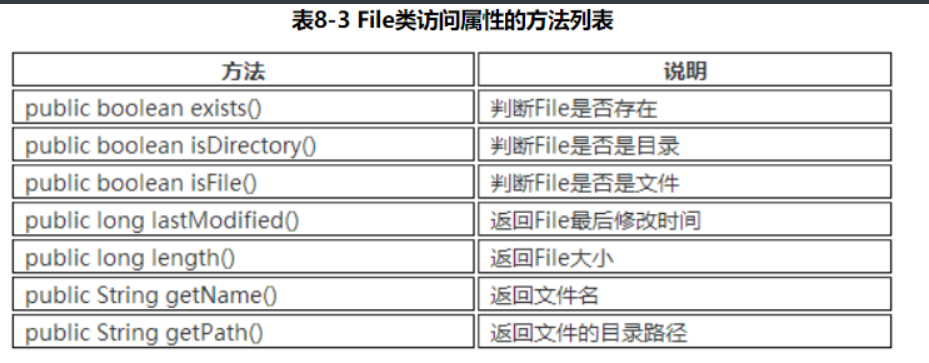
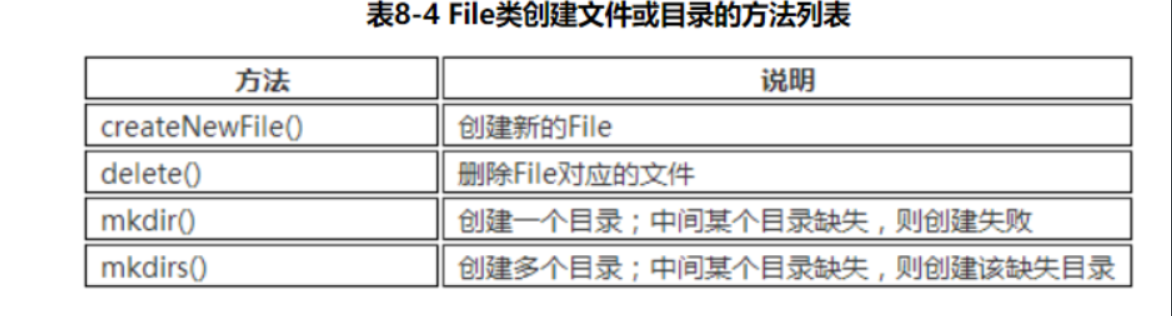
四大IO抽象类
InputStream
此抽象类是表示字节输入流的所有类的父类。InputSteam是一个抽象类,它不可以实例化。 数据的读取需要由它的子类来实现。根据节点的不同,它派生了不同的节点流子类 。
继承自InputSteam的流都是用于向程序中输入数据,且数据的单位为字节(8 bit)。
常用方法
int read():读取一个字节的数据,并将字节的值作为int类型返回(0-255之间的一个值)。如果未读出字节则返回-1(返回值为-1表示读取结束)。
void close():关闭输入流对象,释放相关系统资源。
OutputStream
此抽象类是表示字节输出流的所有类的父类。输出流接收输出字节并将这些字节发送到某个目的地。
常用方法:
void write(int n):向目的地中写入一个字节。
void close():关闭输出流对象,释放相关系统资源。
Reader
Reader用于读取的字符流抽象类,数据单位为字符。
int read(): 读取一个字符的数据,并将字符的值作为int类型返回(0-65535之间的一个值,即Unicode值)。如果未读出字符则返回-1(返回值为-1表示读取结束)。
void close() : 关闭流对象,释放相关系统资源。
Writer
Writer用于写入的字符流抽象类,数据单位为字符。
void write(int n): 向输出流中写入一个字符。
void close() : 关闭输出流对象,释放相关系统资源。
文件字节流
FileInputStream 通过字节的方式读取文件
适合读取所有类型的文件(图像、视频、文本文件等)。Java也提供了FileReader专门读取文本文件。
FileOutputStream 通过字节的方式写数据到文件中,适合所有类型的文件。Java也提供了FileWriter专门写入文本文件。
拷贝文件内容实例:
import java.io.FileInputStream;
import java.io.FileOutputStream;
import java.io.IOException;
public class TestFileCopy {
    public static void main(String[] args) {
        //将a.txt内容拷贝到b.txt
        copyFile("d:/a.txt", "d:/b.txt");
    }

    /**
     * 将src文件的内容拷贝到dec文件
     * @param src 源文件
     * @param dec 目标文件
     */
    static void copyFile(String src, String dec) {
        FileInputStream fis = null;
        FileOutputStream fos = null;
        //为了提高效率,设置缓存数组!(读取的字节数据会暂存放到该字节数组中)
        byte[] buffer = new byte[1024];
        int temp = 0;
        try {
            fis = new FileInputStream(src);
            fos = new FileOutputStream(dec);
            //边读边写
            //temp指的是本次读取的真实长度,temp等于-1时表示读取结束
            while ((temp = fis.read(buffer)) != -1) {
                /*将缓存数组中的数据写入文件中,注意:写入的是读取的真实长度;
                 *如果使用fos.write(buffer)方法,那么写入的长度将会是1024,即缓存
                 *数组的长度*/
                fos.write(buffer, 0, temp);
            }
        } catch (Exception e) {
            e.printStackTrace();
        } finally {
            //两个流需要分别关闭
            try {
                if (fos != null) {
                    fos.close();
                }
            } catch (IOException e) {
                e.printStackTrace();
            }
            try {
                if (fis != null) {
                    fis.close();
                }
            } catch (IOException e) {
                e.printStackTrace();
            }
        }
    }
}
注意:
-
为了减少对硬盘的读写次数,提高效率,通常设置缓存数组。相应地,读取时使用的方法为:read(byte[] b);写入时的方法为:write(byte[ ] b, int off, int length)。
-
程序中如果遇到多个流,每个流都要单独关闭,防止其中一个流出现异常后导致其他流无法关闭的情况。
文件字符流
前面介绍的文件字节流可以处理所有的文件,但是字节流不能很好的处理Unicode字符,经常会出现“乱码”现象。所以,我们处理文本文件,一般可以使用文件字符流,它以字符为单位进行操作。
文件复制
import java.io.FileNotFoundException;
import java.io.FileReader;
import java.io.FileWriter;
import java.io.IOException;
public class TestFileCopy2 {
    public static void main(String[] args) {
        // 写法和使用Stream基本一样。只不过,读取时是读取的字符。
        FileReader fr = null;
        FileWriter fw = null;
        int len = 0;
        try {
            fr = new FileReader("d:/a.txt");
            fw = new FileWriter("d:/d.txt");
            //为了提高效率,创建缓冲用的字符数组
            char[] buffer = new char[1024];
            //边读边写
            while ((len = fr.read(buffer)) != -1) {
                fw.write(buffer, 0, len);
            }

        } catch (FileNotFoundException e) {
            e.printStackTrace();
        } catch (IOException e) {
            e.printStackTrace();
        } finally {
            try {
                if (fw != null) {
                    fw.close();
                }
            } catch (IOException e) {
                e.printStackTrace();
            }
            try {
                if (fr != null) {
                    fr.close();
                }
            } catch (IOException e) {
                e.printStackTrace();
            }
        }
    }
}
缓冲字节流
-
Java缓冲流本身并不具有IO流的读取与写入功能,只是在别的流加上缓冲功能提高效率,就像是把别的流包装起来一样,因此缓冲流是一种处理流(包装流)。
-
当对文件或者其他数据源进行频繁的读写操作时,效率比较低,这时如果使用缓冲流就能够更高效的读写信息。因为缓冲流是先将数据缓存起来,然后当缓存区存满后或者手动刷新时再一次性的读取到程序或写入目的地。因此,缓冲流还是很重要的,我们在IO操作时记得加上缓冲流来提升性能。
-
BufferedInputStream 和 BufferedOutputStream 这两个流是缓冲字节流,通过内部缓存数组来提高操作流的效率。
高效率复制文件
public class TestBufferedFileCopy1 {

    public static void main(String[] args) {
        // 使用缓冲字节流实现复制
        copyFile("尚学堂传奇.mp4", "尚学堂越 "+"来越传奇.mp4");
    }

    /**缓冲字节流实现的文件复制的方法*/
    static void copyFile(String src, String dec) {
        FileInputStream fis = null;
        BufferedInputStream bis = null;
        FileOutputStream fos = null;
        BufferedOutputStream bos = null;
        int temp = 0;
        try {
            fis = new FileInputStream(src);
            fos = new FileOutputStream(dec);
            //使用缓冲字节流包装文件字节流,增加缓冲功能,提高效率
            //缓存区的大小(缓存数组的长度)默认是8192,也可以自己指定大小
            bis = new BufferedInputStream(fis);
            bos = new BufferedOutputStream(fos);

            while ((temp = bis.read()) != -1) {
                bos.write(temp);
            }
        } catch (Exception e) {
            e.printStackTrace();
        } finally {
            //注意:增加处理流后,注意流的关闭顺序!== 后开的先关闭!==
            try {
                if (bos != null) {
                    bos.close();
                }
            } catch (IOException e) {
                e.printStackTrace();
            }
            try {
                if (bis != null) {
                    bis.close();
                }
            } catch (IOException e) {
                e.printStackTrace();
            }
            try {
                if (fos != null) {
                    fos.close();
                }
            } catch (IOException e) {
                e.printStackTrace();
            }
            try {
                if (fis != null) {
                    fis.close();
                }
            } catch (IOException e) {
                e.printStackTrace();
            }
        }
    }
缓冲字符流
BufferedReader BufferedWriter 增加了缓存机制,大大提高了读写文本文件的效率,同时,提供了更方便的按行读取的方法:readLine(); 处理文本时,我们一般可以使用缓冲字符流。
文本文件的复制
public class TestBufferedFileCopy2 {
    public static void main(String[] args) {
        // 注:处理文本文件时,实际开发中可以用如下写法,简单高效!!
        FileReader fr = null;
        FileWriter fw = null;
        BufferedReader br = null;
        BufferedWriter bw = null;
        String tempString = "";
        try {
            fr = new FileReader("d:/a.txt");
            fw = new FileWriter("d:/d.txt");
            //使用缓冲字符流进行包装
            br = new BufferedReader(fr);
            bw = new BufferedWriter(fw);

            //BufferedReader提供了更方便的readLine()方法,直接按行读取文本
            //br.readLine()方法的返回值是一个字符串对象,即文本中的一行内容
            while ((tempString = br.readLine()) != null) {
                //将读取的一行字符串写入文件中
                bw.write(tempString);
                //下次写入之前先换行,否则会在上一行后边继续追加,而不是另起一行
                bw.newLine();
            }
        } catch (FileNotFoundException e) {
            e.printStackTrace();
        } catch (IOException e) {
            e.printStackTrace();
        } finally {
            try {
                if (bw != null) {
                    bw.close();
                }
            } catch (IOException e1) {
                e1.printStackTrace();
            }
            try {
                if (br != null) {
                    br.close();
                }
            } catch (IOException e1) {
                e1.printStackTrace();
            }
            try {
                if (fw != null) {
                    fw.close();
                }
            } catch (IOException e) {
                e.printStackTrace();
            }
            try {
                if (fr != null) {
                    fr.close();
                }
            } catch (IOException e) {
                e.printStackTrace();
            }
        }
    }
}
字节数组流
ByteArrayInputStream 和 ByteArrayOutputStream 经常用在需要流和数组之间转化的情况!
说白了,FileInputStream是把文件当做数据源。ByteArrayInputStream则是把内存中的”某个字节数组对象”当做数据源。
import java.io.ByteArrayInputStream;
import java.io.IOException;

public class TestByteArray {
    public static void main(String[] args) {
        //将字符串转变成字节数组
        byte[] b = "abcdefg".getBytes();

        test(b);
    }
    public static void test(byte[] b) {

        ByteArrayInputStream bais = null;
        StringBuilder sb = new StringBuilder();
        int temp = 0;
        //用于保存读取的字节数
        int num = 0;
        try {
            //该构造方法的参数是一个字节数组,这个字节数组就是数据源
            bais = new ByteArrayInputStream(b);
            while ((temp = bais.read()) != -1) {
                sb.append((char) temp);
                num++;
            }
            System.out.println(sb);
            System.out.println("读取的字节数:" + num);
        } finally {
            try {
                if (bais != null) {
                    bais.close();
                }
            } catch (IOException e) {
                e.printStackTrace();
            }
        }
    }
}
数据流
数据流将“基本数据类型与字符串类型”作为数据源,从而允许程序以与机器无关的方式从底层输入输出流中操作Java基本数据类型与字符串类型。
DataInputStream 和 DataOutputStream 提供了可以存取与机器无关的所有Java基础类型数据(如:int、double、String等)的方法。
DataInputStream 和 DataOutputStream 是处理流,可以对其他节点流或处理流进行包装,增加一些更灵活、更高效的功能。
public class TestDataStream {
    public static void main(String[] args) {
        DataOutputStream dos = null;
        DataInputStream dis = null;
        FileOutputStream fos = null;
        FileInputStream  fis = null;
        try {
            fos = new FileOutputStream("D:/data.txt");
            fis = new FileInputStream("D:/data.txt");

            //使用数据流对缓冲流进行包装,新增缓冲功能
            dos = new DataOutputStream(new BufferedOutputStream(fos));
            dis = new DataInputStream(new BufferedInputStream(fis));

            //将如下数据写入到文件中
            dos.writeChar('a');
            dos.writeInt(10);
            dos.writeDouble(Math.random());
            dos.writeBoolean(true);
            dos.writeUTF("北京尚学堂");
            //手动刷新缓冲区:将流中数据写入到文件中
            dos.flush();
            //直接读取数据:读取的顺序要与写入的顺序一致,否则不能正确读取数据。
            System.out.println("char: " + dis.readChar());
            System.out.println("int: " + dis.readInt());
            System.out.println("double: " + dis.readDouble());
            System.out.println("boolean: " + dis.readBoolean());
            System.out.println("String: " + dis.readUTF());
        } catch (IOException e) {
            e.printStackTrace();
        } finally {
            try {
                if(dos!=null){
                    dos.close();
                }
            } catch (IOException e) {
                e.printStackTrace();
            }
            try {
                if(dis!=null){
                    dis.close();
                }
            } catch (IOException e) {
                e.printStackTrace();
            }
            try {
                if(fos!=null){
                    fos.close();
                }
            } catch (IOException e) {
                e.printStackTrace();
            }
            try {
                if(fis!=null){
                    fis.close();
                }
            } catch (IOException e) {
                e.printStackTrace();
            }
        }
    }
}
对象流
我们前边学到的数据流只能实现对基本数据类型和字符串类型的读写,并不能读取对象(字符串除外),如果要对某个对象进行读写操作,我们需要学习一对新的处理流:ObjectInputStream ObjectOutputStream。
ObjectInputStream ObjectOutputStream 是以“对象”为数据源,但是必须将传输的对象进行序列化与反序列化操作。
public class TestObjectStream {
  public static void main(String[] args) throws IOException, ClassNotFoundException {
      write();
      read();
  }
  /**使用对象输出流将数据写入文件*/
  public static void write(){
      // 创建Object输出流,并包装缓冲流,增加缓冲功能
      OutputStream os = null;
      BufferedOutputStream bos = null;
      ObjectOutputStream oos = null;
      try {
          os = new FileOutputStream(new File("d:/bjsxt.txt"));
          bos = new BufferedOutputStream(os);
          oos = new ObjectOutputStream(bos);
          // 使用Object输出流
          //对象流也可以对基本数据类型进行读写操作
          oos.writeInt(12);
          oos.writeDouble(3.14);
          oos.writeChar('A');
          oos.writeBoolean(true);
          oos.writeUTF("北京尚学堂");
          //对象流能够对对象数据类型进行读写操作
          //Date是系统提供的类,已经实现了序列化接口
          //如果是自定义类,则需要自己实现序列化接口
          oos.writeObject(new Date());
      } catch (IOException e) {
          e.printStackTrace();
      } finally {
          //关闭输出流
          if(oos != null){
              try {
                  oos.close();
              } catch (IOException e) {
                  e.printStackTrace();
转换流
InputStreamReader OutputStreamWriter用来实现将字节流转化成字符流。比如,如下场景:
System.in是字节流对象,代表键盘的输入,如果我们想按行接收用户的输入时,就必须用到缓冲字符流BufferedReader特有的方法readLine(),但是经过观察会发现在创建BufferedReader的构造方法的参数必须是一个Reader对象,这时候我们的转换流InputStreamReader就派上用场了。
而System.out也是字节流对象,代表输出到显示器,按行读取用户的输入后,并且要将读取的一行字符串直接显示到控制台,就需要用到字符流的write(String str)方法,所以我们要使用 OutputStreamWriter 将字节流转化为字符流。
public class TestConvertStream { public static void main(String[] args) { // 创建字符输入和输出流:使用转换流将字节流转换成字符流 BufferedReader br = null; BufferedWriter bw = null; try { br = new BufferedReader(new InputStreamReader(System.in)); bw = new BufferedWriter(new OutputStreamWriter(System.out)); // 使用字符输入和输出流 String str = br.readLine(); // 一直读取,直到用户输入了exit为止 while (!"exit".equals(str)) { // 写到控制台 bw.write(str); bw.newLine();// 写一行后换行 bw.flush();// 手动刷新 // 再读一行 str = br.readLine(); } } catch (IOException e) { e.printStackTrace(); } finally { // 关闭字符输入和输出流 if (br != null) { try { br.close(); } catch (IOException e) { e.printStackTrace(); } } if (bw != null) { try { bw.close(); } catch (IOException e) { e.printStackTrace(); } } } }}

 浙公网安备 33010602011771号